
HomeTro HT1
Contents
HomeTro Exercise Bike User Manual
Model: HT1
1. Introduction
Thank you for choosing the HomeTro Exercise Bike. This manual provides essential information for the safe and effective use of your new fitness equipment. Please read it thoroughly before assembly and operation, and retain it for future reference.
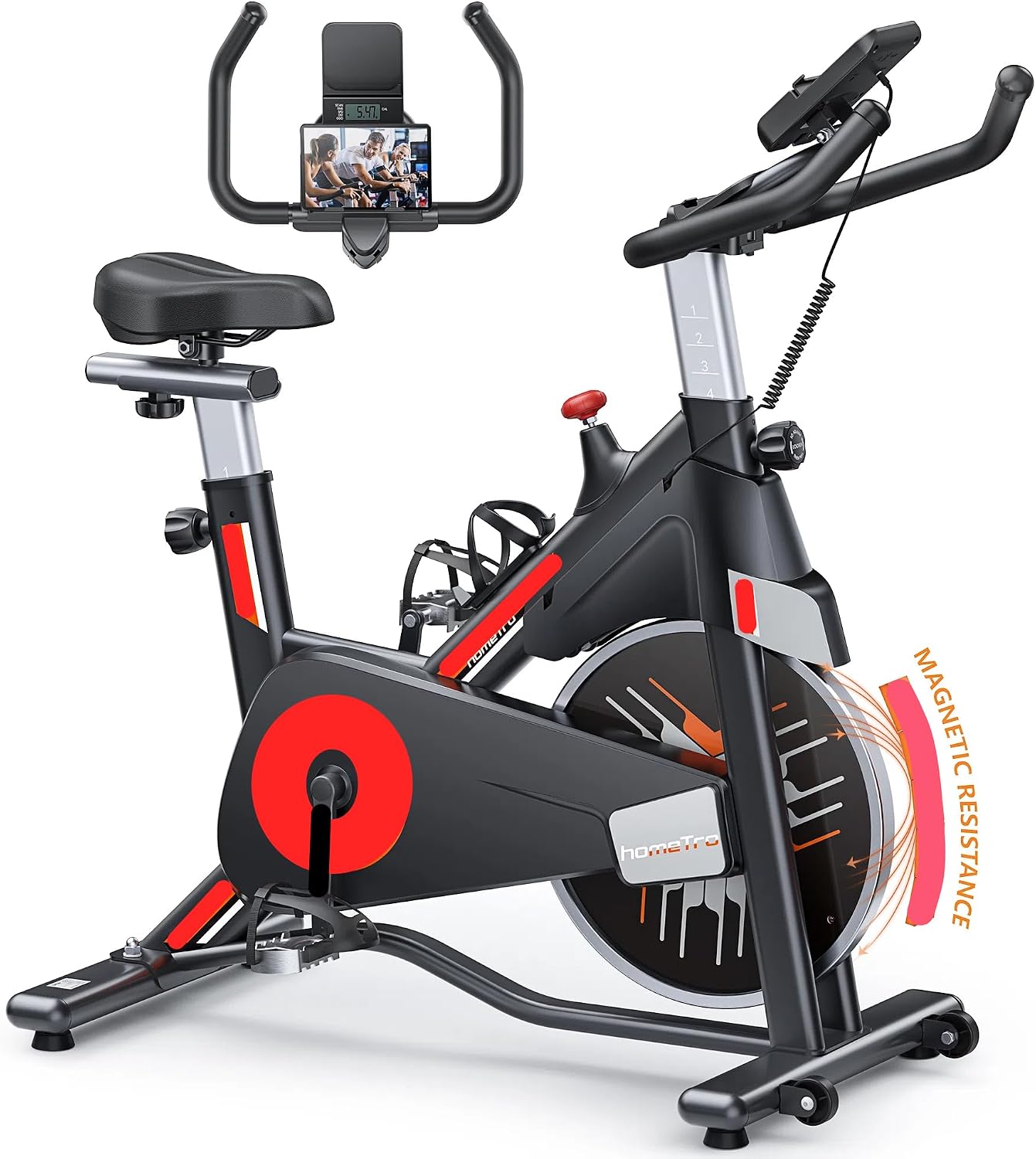
Image: The HomeTro Exercise Bike, showcasing its design with a tablet mount and an illustration of its magnetic resistance system.
2. Safety Information
Before beginning any exercise program, consult with your physician. It is important to ensure you are physically able to handle the demands of exercise. Failure to do so may result in serious injury.
- Always place the exercise bike on a flat, stable surface.
- Keep children and pets away from the equipment during use.
- Wear appropriate athletic footwear and clothing.
- Ensure all bolts and nuts are securely tightened before each use.
- Do not exceed the maximum weight capacity of 330 lbs (150 kg).
- Use the emergency brake knob to stop the flywheel quickly if needed.

Image: A user demonstrating the stable and safe design of the HomeTro Exercise Bike, emphasizing its 330 lbs capacity.
3. Package Contents
Please verify that all parts are present and undamaged before assembly. If any parts are missing or damaged, contact customer service immediately.
- Main Frame
- Handlebar Assembly
- Seat Post and Seat
- Pedals (Left and Right)
- Front and Rear Stabilizers
- Digital Monitor
- Tablet/Phone Bracket
- Hardware Kit (bolts, washers, nuts)
- Assembly Tools
- User Manual
4. Setup and Assembly
Assembly typically takes 20-25 minutes. Follow the included step-by-step instructions and diagrams. It is recommended to have a second person assist with certain steps.
- Attach the front and rear stabilizers to the main frame using the provided bolts and nuts.
- Install the pedals. Note that the left pedal (L) screws counter-clockwise and the right pedal (R) screws clockwise.
- Insert the seat post into the main frame and secure it at the desired height. Attach the seat to the seat post.
- Attach the handlebar assembly to the main frame.
- Connect the digital monitor to the handlebar assembly and plug in any necessary sensor cables. Insert AAA batteries (not included) into the digital monitor.
- Mount the tablet/phone bracket onto the handlebar.
- After completing assembly, check and tighten all parts to ensure optimal stability and safety.
For visual guidance, online assembly instruction videos are available. If you encounter difficulties, please contact HomeTro customer service.
5. Operating Instructions
5.1 Resistance Adjustment
The HomeTro Exercise Bike features an adjustable dual resistance system, combining magnetic and frictional (brake pad) resistance for precise control and a realistic riding experience.
- Adjusting Resistance: Rotate the red knob located on the main frame clockwise to increase resistance and counter-clockwise to decrease it. This allows for varied workout intensities, from warm-up to muscle training.
- Emergency Brake: Press the red knob down firmly to engage the emergency brake and quickly stop the flywheel.

Image: Illustration of the adjustable magnetic resistance knob, indicating various resistance levels for different exercise types.

Image: Detailed view of the hyper quiet magnetic and friction resistance mechanism within the bike.
5.2 Belt Drive System
The exercise bike features an ultra-quiet and smooth belt drive system, providing a silent and consistent workout experience without disturbing others.

Image: Visual representation of the smooth and quiet belt drive system, highlighting its internal components.
5.3 Adjusting Seat and Handlebars
The bike is designed for family use, with adjustable components to fit various user heights (4.92-6.23 feet or 150-190 cm).
- Seat Adjustment: The padded seat can be adjusted 4 ways (up/down, forward/backward) to find your optimal riding position.
- Handlebar Adjustment: The handlebars can be adjusted 2 ways (up/down) for comfortable grip and posture.
- Pedal Adjustment: Aluminum alloy pedals include adjustable shoelaces to secure your feet during exercise.

Image: A diagram showing the adjustable seat and handlebar, with measurements indicating the range of height adjustments for different users.
5.4 Digital Monitor and Tablet Mount
The rotatable digital monitor tracks key workout data, and the integrated tablet/phone bracket provides entertainment during your session.
- Monitor Functions: Tracks time, speed, distance, and calories burned, providing real-time feedback.
- Tablet/Phone Bracket: Securely holds your device. The display can rotate to protect your device during intense movements.

Image: A user interacting with the digital monitor and tablet mount, which displays real-time workout data.
5.5 Additional Features
- Water Bottle Holder: Conveniently located for hydration during workouts.
- Transport Wheels: Located on the front stabilizer for easy relocation of the bike. Tilt and roll to move.
6. Maintenance
Regular maintenance ensures the longevity and safe operation of your HomeTro Exercise Bike.
- Cleaning: Wipe down the bike with a damp cloth after each use to remove sweat and dust. Avoid abrasive cleaners.
- Inspecting Connections: Periodically check all bolts, nuts, and screws to ensure they are tight. Re-tighten if necessary.
- Belt Drive: The belt drive system is designed to be maintenance-free and does not require lubrication.
- Storage: Store the bike in a dry, cool place away from direct sunlight and extreme temperatures.
7. Troubleshooting
If you encounter any issues, refer to the following common problems and solutions. If the problem persists, contact customer service.
| Problem | Possible Cause | Solution |
|---|---|---|
| Bike is unstable/wobbles | Uneven floor; loose bolts | Adjust non-slip foot pads; tighten all assembly bolts. |
| Resistance not changing | Resistance knob not properly engaged or mechanism issue | Ensure knob is fully rotated; contact customer service if issue persists. |
| Digital monitor not working | Batteries dead or incorrectly installed; loose sensor cable | Replace AAA batteries; check sensor cable connection. |
| Noise during operation | Loose parts; foreign object | Check and tighten all bolts; inspect for any obstructions. |
8. Specifications
| Feature | Detail |
|---|---|
| Brand | HomeTro |
| Model Name | HT1 |
| Resistance Mechanism | Magnetic + Frictional (Brake Pad) |
| Drive System | Belt Drive |
| Maximum Weight Recommendation | 330 Pounds (150 kg) |
| Product Dimensions (L x W x H) | 43.03"D x 20.52"W x 48.4"H (109.3cm D x 52.1cm W x 122.9cm H) |
| Item Weight | 50 Pounds (22.7 kg) |
| Adjustable Height Range (User) | 4.92 - 6.23 feet (150 - 190 cm) |
| Material | Metal (Frame), Rubber (Handle) |
| Color | Red |
9. Warranty and Support
HomeTro is committed to providing high-quality products and outstanding customer service.
- Warranty: We provide customers with a 12-month warranty from the date of purchase.
- Customer Service: Our 24-hour customer service team is available to answer your questions and assist with any issues.
- Contact Us: To contact HomeTro customer service, please log in to your Amazon account, select "Your Orders", find the Order ID for your purchase, and click "Contact Seller". Please note this is for HomeTro customer service, not Amazon customer service.
Documents and downloads
Ask a question about this manual
Ask about setup, troubleshooting, compatibility, parts, safety, or missing instructions. Manuals+ will review the question and use this page’s manual context to help answer it.