1. Introduction
This manual provides detailed instructions for the installation, operation, and maintenance of your XIBANY KT-15A Brushless Motor Controller. Designed for 250W brushless motors, this controller is compatible with 36V and 48V systems, making it suitable for various electric bicycle and scooter applications. Please read this manual thoroughly before installation and use to ensure proper function and safety.
2. Safety Information
Always observe the following safety precautions to prevent injury or damage to the product:
- Electrical Safety: Ensure all power is disconnected before attempting any installation, wiring, or maintenance. Incorrect wiring can cause damage to the controller, motor, or battery, and poses a risk of electric shock.
- Voltage Compatibility: Verify that your battery voltage (36V or 48V) matches the controller's rated voltage. Using an incompatible voltage can lead to severe damage.
- Professional Installation: If you are unsure about any part of the installation process, seek assistance from a qualified technician.
- Environmental Conditions: Protect the controller from water, excessive moisture, and extreme temperatures. While the casing offers some protection, it is not fully waterproof.
- Secure Mounting: Mount the controller securely to prevent vibrations and physical damage during operation.
3. Product Overview
The XIBANY KT-15A controller is designed for efficient power management in electric drive systems. It features a robust aluminum casing for heat dissipation and various connectors for seamless integration with your e-bike or scooter components.
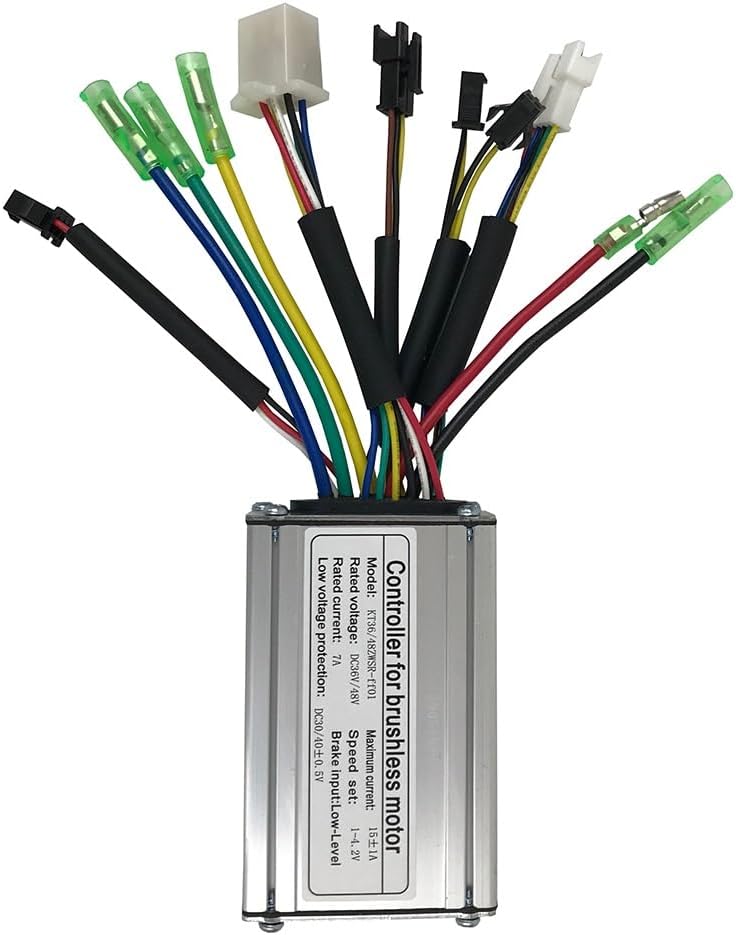
Figure 3.1: Top view of the XIBANY KT-15A Brushless Motor Controller, showing the main unit and its array of colored wires with various connectors.
Key Features:
- Applicable to KT series motors.
- Durable aluminum casing for effective heat dissipation.
- Supports DC36V/48V rated voltage.
- Maximum current: 15±1A.
- Low voltage protection: DC30/40±0.5V.
- SM interface connectors for easy installation.

Figure 3.2: Close-up view of the controller's label, detailing model number, rated voltage, maximum current, speed set, rated current, brake input, and low voltage protection.
The label on the controller (Figure 3.2) provides essential technical specifications for quick reference during installation and troubleshooting.
4. Setup and Installation
This section outlines the general steps for installing the XIBANY KT-15A controller. Specific wiring configurations may vary based on your e-bike or scooter model. Always refer to your motor and display unit manuals for detailed wiring diagrams.
4.1 Pre-Installation Checklist:
- Ensure the battery is fully charged and disconnected.
- Confirm compatibility with your 250W brushless motor and KT series components.
- Gather necessary tools (e.g., screwdrivers, wire cutters, electrical tape).
4.2 Wiring Connections:
The controller features multiple color-coded wires with SM interface connectors. Connect them according to the following general guidelines. Always match colors and connector types.

Figure 4.1: Angled view of the controller, highlighting the different wire bundles and their connectors, which include power, motor phase, Hall sensor, throttle, and brake connections.
- Motor Phase Wires: Connect the three thick wires (typically green, blue, yellow) from the controller to the corresponding phase wires of your brushless motor.
- Hall Sensor Wires: Connect the smaller five-wire connector (typically red, black, yellow, green, blue) to the motor's Hall sensor connector. Ensure correct polarity (red to positive, black to negative).
- Battery Power: Connect the thick red wire (positive) and thick black wire (negative) from the controller to your battery pack. Double-check polarity before connecting.
- Throttle/Accelerator: Connect the throttle unit to the designated connector (often a three-wire connector).
- Brake Levers: Connect the brake lever wires to the controller's brake input connectors. This controller uses a low-level brake input.
- Display/PAS (Pedal Assist Sensor): Connect any display unit or pedal assist sensor according to their respective manuals. The controller is designed to work with KT series displays and PAS sensors.
After making all connections, secure any loose wires and ensure they are protected from abrasion or pinching. Mount the controller in a location that allows for adequate airflow and protection from environmental elements.
5. Operating Instructions
Once the controller is correctly installed and all connections are secure, you can begin operating your e-bike or scooter.
- Power On: Turn on your e-bike's main power switch (usually on the battery or display unit). The display (if connected) should illuminate.
- Speed Control: Use the throttle or pedal assist system to control the motor's speed. The speed setting range is 1-4.2V, corresponding to the throttle input.
- Braking: Engaging the brake levers will cut power to the motor, providing a safety feature.
- Monitoring: If a display unit is connected, monitor battery level, speed, and other parameters as provided by your display.
Always start with low power settings or gentle throttle application to familiarize yourself with the system's response.
6. Maintenance
Proper maintenance ensures the longevity and reliable performance of your XIBANY KT-15A controller.
- Regular Inspection: Periodically check all wiring connections for looseness, corrosion, or damage. Ensure connectors are fully seated.
- Cleaning: Keep the controller casing clean and free from dust, dirt, and debris. Use a dry, soft cloth for cleaning. Avoid using water or chemical cleaners directly on the unit.
- Environmental Protection: While riding, avoid deep puddles or heavy rain if the controller is not fully waterproof. Store your e-bike/scooter in a dry environment.
- Heat Management: Ensure the controller's mounting location allows for adequate airflow to prevent overheating, especially during prolonged use or high power output.
7. Troubleshooting
This section addresses common issues you might encounter with your controller.
| Problem | Possible Cause | Solution |
|---|---|---|
| Motor does not respond / No power |
|
|
| Motor runs intermittently or with reduced power |
|
|
| Display not working (if applicable) |
|
|
If the problem persists after attempting these solutions, please contact customer support.
8. Specifications
Detailed technical specifications for the XIBANY KT-15A Brushless Motor Controller:
| Specification | Value |
|---|---|
| Model | KT-15A (XIBANY001) |
| Rated Voltage | DC36V / 48V |
| Maximum Current | 15 ± 1A |
| Rated Current | 7A |
| Power | 250W |
| Speed Setting | 1-4.2V |
| Brake Input | Low Level |
| Low Voltage Protection | DC30 / 40 ± 0.5V |
| Connector Type | SM Interface |
| Material | Aluminum + Plastic |
| Item Weight | 50 Grams (approx. 1.76 ounces) |
| Package Dimensions | 1.18 x 0.79 x 0.39 inches |
9. Warranty and Support
XIBANY products are manufactured to high-quality standards. For warranty information, please refer to the terms and conditions provided at the point of purchase or contact your retailer. Keep your proof of purchase for any warranty claims.
For technical support, troubleshooting assistance beyond this manual, or inquiries regarding parts, please contact XIBANY customer service through the retailer's platform or the official XIBANY website (if available).
Contact Information:
- Website: www.example.com/xibany-support (Placeholder - please refer to actual product packaging or retailer for official support channels)
- Email: support@xibany.com (Placeholder - please refer to actual product packaging or retailer for official support channels)