
UPBRIGHT Lenovo HA-200 12V Power Supply
UpBright 12V AC/DC Adapter User Manual
Model: Lenovo HA-200 12V Power Supply
1. Introduction
This user manual provides essential information for the safe and effective use of your UpBright 12V AC/DC Adapter. This adapter is designed to provide reliable power to various compatible Lenovo Smart Speaker Docks and other electronic devices requiring a 12V DC, 2A power supply.

Figure 1: UpBright 12V AC/DC Adapter with power cord and barrel connector.
2. Setup and Connection
Follow these steps to properly set up and connect your AC/DC adapter:
- Verify Compatibility: Ensure your device requires a 12V DC input with a current draw of 2A (2000mA) or less, and has a compatible barrel round connector. This adapter is compatible with various Lenovo Smart Speaker Docks including models HA-200, 07642C, 275A7B, 276F31, 27E40F, ADE1CF, SG38C43976, C55BA1, SG38C77660, 07BDD7, SG38D27355, SA18C59877, and CYSE20-120200U.
- Connect to Device: Insert the barrel connector end of the adapter firmly into the power input port of your electronic device.
- Connect to Power Outlet: Plug the AC prongs of the adapter into a standard 100-240VAC 50/60Hz wall power outlet.
- Power On: Once connected, your device should receive power.

Figure 2: UpBright products may include suitable outlet adapters for international orders. This image also shows a limited warranty certificate.
3. Operating Instructions
The UpBright 12V AC/DC Adapter is designed for simple plug-and-play operation. It automatically converts the incoming AC voltage to the required 12V DC output for your compatible device.
This adapter incorporates multiple safety features to protect your devices and the adapter itself:
- OVP (Over Voltage Output Protection): Prevents damage from excessive voltage output.
- OCP (Over Current Output Protection): Protects against damage from excessive current draw.
- SCP (Short Circuit Output Protection): Safeguards against short circuits.

Figure 3: Illustration of the adapter's multiple professional security protections, including good heat resistance, VO-grade fire-retardant material, overcharge, overvoltage, overheat, and overcurrent protection.
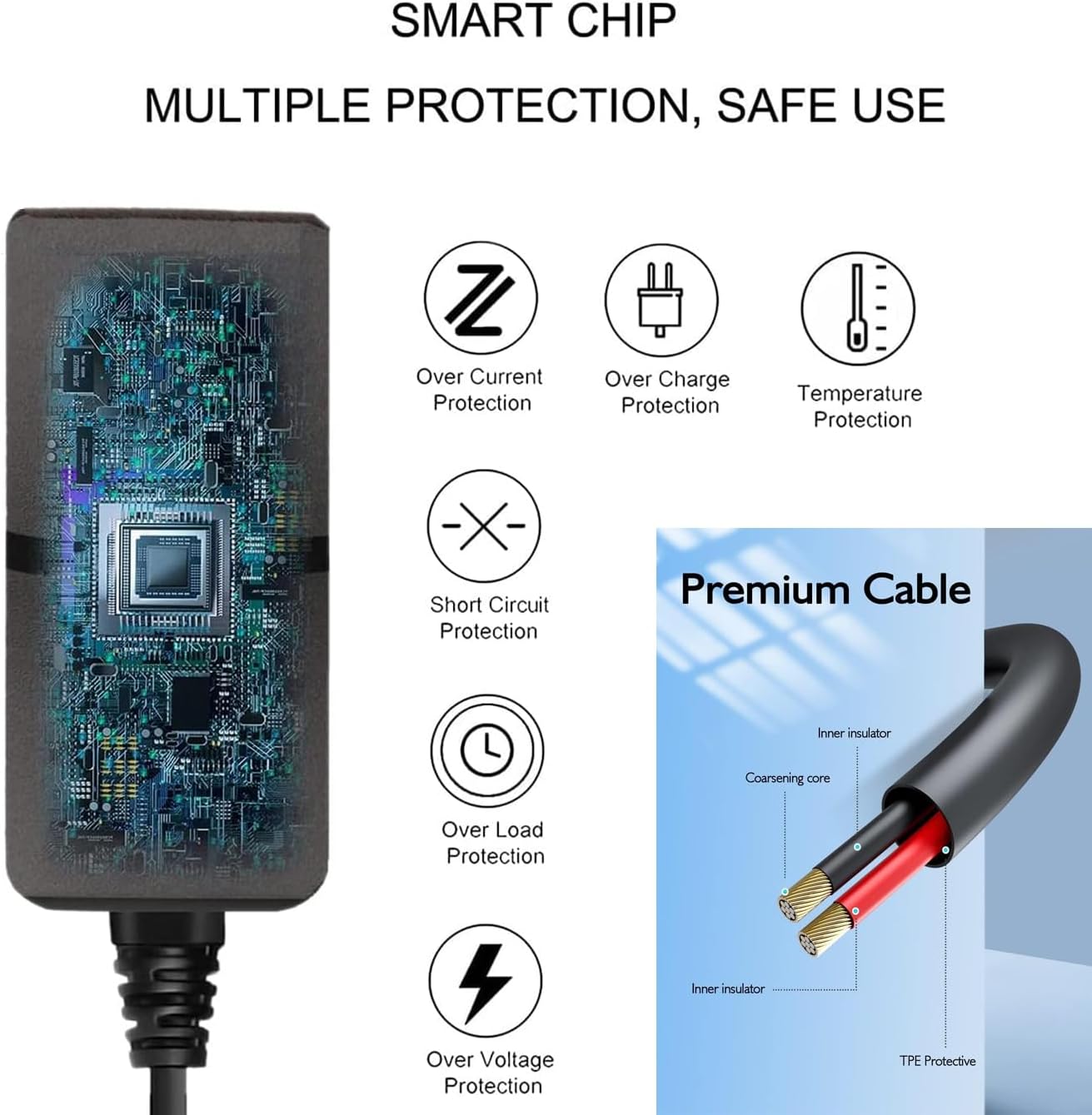
Figure 4: Details on the smart chip's multiple protections (over current, over charge, temperature, short circuit, over load, over voltage) and the premium cable's construction (inner insulator, coarsening core, TPE protective layer).
4. Maintenance
To ensure the longevity and optimal performance of your UpBright AC/DC Adapter, follow these maintenance guidelines:
- Storage: Store the adapter in a cool, dry place away from direct sunlight and extreme temperatures.
- Cleaning: Disconnect the adapter from the power outlet and your device before cleaning. Use a soft, dry cloth to wipe the exterior. Do not use liquid cleaners or abrasive materials.
- Handling: Avoid bending or crimping the power cord excessively. Do not pull the cord to disconnect the adapter from the outlet; always grasp the plug itself.
- Ventilation: Ensure the adapter has adequate ventilation during use. Do not cover it or place it in enclosed spaces that could trap heat.
5. Troubleshooting
If you encounter issues with your UpBright AC/DC Adapter, refer to the following common problems and solutions:
| Problem | Possible Cause | Solution |
|---|---|---|
| Device not receiving power. |
|
|
| Adapter feels hot during use. |
|
|
If the problem persists after trying these solutions, please contact UpBright customer support for further assistance.
6. Specifications
Below are the technical specifications for the UpBright 12V AC/DC Adapter:
- Model Number: Lenovo HA-200 12V Power Supply (Compatible with various Lenovo Smart Speaker Docks)
- Manufacturer: UpBright
- Input Voltage: 100-240VAC, 50/60Hz (World Wide Input Voltage)
- Output Voltage: 12V DC
- Output Current: 2A (2000mA)
- Connector Type: Barrel Round Connector
- Protection Features: OVP (Over Voltage Output Protection), OCP (Over Current Output Protection), SCP (Short Circuit Output Protection), Overcharge Protection, Overheat Protection, Good Heat Resistance, VO-Grade Fire-Retardant.
- Product Dimensions: Approximately 4 x 3 x 2 inches
- Item Weight: Approximately 4 ounces
- Included Components: 1 x AC/DC Adapter
7. Warranty and Support
UpBright stands behind the quality of its products. This adapter comes with:
- 30-Day Refund Policy: If you are not satisfied with your purchase, you may be eligible for a refund within 30 days.
- 24-Month Exchange Policy: The product is covered by a 24-month exchange policy for manufacturing defects.
For warranty claims, technical support, or any inquiries, please contact UpBright customer service through the retailer where the product was purchased or visit the official UpBright store online.
For more information, you can visit the UPBRIGHT Store on Amazon.
Related documentsLenovo HA-200 12V Power Supply

Ask a question about this manual
Ask about setup, troubleshooting, compatibility, parts, safety, or missing instructions. Manuals+ will review the question and use this page’s manual context to help answer it.