
OUKITEL WP23
Contents
OUKITEL WP23 Rugged Smartphone User Manual
Model: WP23 | Brand: OUKITEL
1. Introduction
This manual provides essential instructions for the safe and efficient use of your OUKITEL WP23 rugged smartphone. Please read this manual thoroughly before operating the device and retain it for future reference. The OUKITEL WP23 is designed for durability, featuring robust construction to withstand challenging environments.

Figure 1: OUKITEL WP23 Rugged Smartphone. This image displays the front and back of the OUKITEL WP23, highlighting its robust design and large display.
2. Product Overview
The OUKITEL WP23 is engineered for resilience and performance. Key components include:
- Display: 6.5-inch HD+ screen with Corning Gorilla Glass.
- Cameras: Triple AI rear camera system (13MP main, 2MP macro) and a 5MP front camera.
- Buttons: Power button, volume rocker, customizable side key.
- Ports: USB Type-C port for charging and data transfer.
- Sensors: Fingerprint sensor, face recognition, NFC.
3. Setup
3.1. Inserting SIM and MicroSD Cards
To insert your SIM card(s) and/or MicroSD card:
- Locate the SIM card tray on the side of the device.
- Use the provided SIM ejector tool to open the tray.
- Place your Nano-SIM card(s) and/or MicroSD card into the designated slots, ensuring correct orientation.
- Carefully reinsert the tray into the device.
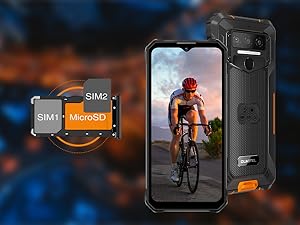
Figure 2: SIM and MicroSD Card Installation. This image illustrates the correct placement of SIM cards and a MicroSD card in the OUKITEL WP23's tray.
3.2. Initial Power On and Charging
Press and hold the Power button until the device vibrates and the OUKITEL logo appears. For optimal performance, fully charge the device before first use. Connect the provided USB Type-C cable to the phone and a compatible power adapter.
4. Operating System (Android 13)
The OUKITEL WP23 runs on Android 13.0, offering enhanced privacy controls and a user-friendly interface. Key features include:
- Privacy Information Center: Access a centralized hub to review and manage app permissions and data access for the past week.
- Personalization: Customize your device's appearance with new themes and dynamic colors.
- Enhanced Security: Improved security features to protect your data.

Figure 3: Android 13 Operating System. This image shows the OUKITEL WP23 display with various application icons, illustrating the Android 13 interface.
5. Battery Management
The OUKITEL WP23 is equipped with a large 10600mAh battery, designed for extended use. A single charge can provide up to 5 days of typical usage, reducing the need for frequent recharging.
5.1. Charging
Use the provided charger and USB Type-C cable for optimal charging. The device supports fast charging, allowing for quick power replenishment.
5.2. Reverse Charging (OTG)
The WP23 supports OTG (On-The-Go) functionality, enabling it to act as a power bank to charge other compatible devices. Connect the other device to your WP23 using an OTG cable.

Figure 4: Extended Battery Life. This infographic highlights the 10600mAh battery capacity of the OUKITEL WP23 and its long usage times for various activities like standby, music, calls, web browsing, gaming, and video playback.
6. Durability Features
The OUKITEL WP23 is built to withstand harsh conditions, making it suitable for outdoor activities and demanding work environments.
- IP68 Waterproof: Protected against continuous immersion in water.
- IP69K Dustproof: Offers complete protection against dust ingress and high-pressure, high-temperature water jets.
- MIL-STD-810H Shockproof: Certified to military standards for resistance against drops and impacts.
- Corning Gorilla Glass: The 6.5-inch display is protected by scratch-resistant and highly transparent Corning Gorilla Glass.
- Robust Construction: Features a sturdy rubber structure and metal frame for enhanced impact resistance.

Figure 5: Rugged Certifications. This image displays the OUKITEL WP23 submerged in water, covered in dust, and being dropped, illustrating its MIL-STD 810H, IP69K, and IP68 certifications for shock, dust, and water resistance.

Figure 6: Corning Gorilla Glass Display. This image highlights the 6.5-inch display of the OUKITEL WP23, emphasizing its scratch-resistant, high transparency, and fingerprint-resistant properties provided by Corning Gorilla Glass.
7. Performance and Storage
The WP23 offers efficient performance and ample storage capacity:
- RAM: 4GB physical RAM, expandable with up to 3GB virtual memory for a total of 7GB RAM, ensuring smooth multitasking and application performance.
- ROM: 64GB internal storage, expandable up to 1TB via a MicroSD (TF) card for extensive app and media storage.
8. Display
The device features a 6.5-inch HD+ display with a resolution of 720x1600 pixels and a 60Hz refresh rate. The in-cell process provides responsive touch input and smooth visuals, enhancing the viewing experience for videos and games.
9. Camera Usage
Capture moments with the OUKITEL WP23's triple AI camera system:
- Rear Cameras: 13MP main camera and a 2MP macro camera for detailed close-up shots.
- Front Camera: 5MP camera for selfies and video calls.
To take a photo or record a video, open the Camera application and select your desired mode. Tap the shutter button to capture.

Figure 7: Triple AI Camera. This image showcases the OUKITEL WP23's triple AI camera setup, including a 13MP main camera, a 5MP front camera, and a 2MP macro camera, demonstrating its photography capabilities.
10. Connectivity and Special Features
The OUKITEL WP23 includes several features for convenience and utility:
- NFC (Near Field Communication): Supports Google Pay for contactless payments.
- OTG (On-The-Go): Enables direct data transfer between devices and reverse charging.
- Glove Mode: Allows for touch screen operation even when wearing gloves.
- Flashlight: Equipped with four large flashlights for illumination in dark environments.

Figure 8: NFC Payment. This image shows the OUKITEL WP23 being used for a contactless payment via Google Pay, demonstrating its NFC capability.

Figure 9: OTG Functionality. This image illustrates the OUKITEL WP23's ability to charge another device, such as wireless earbuds, using its OTG port.
11. Troubleshooting
This section addresses common issues you might encounter with your OUKITEL WP23.
11.1. Network Connectivity Issues
- No Signal/Unstable Connection: Ensure your SIM card is correctly inserted and activated. Check network settings (APN) and confirm you are within network coverage. Some network bands may have limited coverage in certain areas.
- Data Not Working: Verify mobile data is enabled and your data plan is active. Check APN settings.
11.2. Touch Screen Unresponsive
- Intermittent Unresponsiveness: Ensure the screen is clean and dry. If using a screen protector, ensure it is properly applied and not interfering with touch sensitivity.
- Glove Mode: If experiencing issues with gloves, ensure Glove Mode is correctly enabled or disabled as needed.
11.3. Device Reboots Unexpectedly
- Frequent Restarts: This could indicate a software issue or an incompatible application. Try uninstalling recently installed apps. If the issue persists, consider performing a factory reset (back up your data first).
11.4. General Advice
- Restart: A simple restart can often resolve minor software glitches.
- Software Updates: Ensure your device's software is up to date. Updates often include bug fixes and performance improvements.
- Factory Reset: As a last resort, a factory reset can resolve persistent software issues. Remember to back up all important data before proceeding.
12. Specifications
| Feature | Specification |
|---|---|
| Brand | OUKITEL |
| Model Number | WP23 |
| Operating System | Android 13.0 |
| Screen Size | 6.52 inches |
| Display Type | LED, HD+ (720x1600) |
| Installed RAM Memory Size | 7 GB (4GB physical + 3GB virtual) |
| Memory Storage Capacity | 64 GB (expandable up to 1TB via MicroSD) |
| Battery Capacity | 10600 mAh |
| Connectivity | USB, NFC |
| Color | Green |
| Package Dimensions | 24.1 x 22.8 x 5.2 cm |
| Item Weight | 690 g |
13. Warranty and Support
OUKITEL provides a 2-year warranty for the WP23 smartphone, covering defects in materials and manufacturing. This warranty applies to all waterproof smartphones. In cases where necessary, OUKITEL may offer a free replacement with a new device.
For any questions or support needs, please contact OUKITEL customer service. We aim to respond to inquiries within 24 hours.
Please refer to your purchase documentation for specific warranty terms and contact details.
Documents and downloads
Ask a question about this manual
Ask about setup, troubleshooting, compatibility, parts, safety, or missing instructions. Manuals+ will review the question and use this page’s manual context to help answer it.