
Introduction
This manual provides comprehensive instructions for the installation, operation, and maintenance of your MekedeTech Android Car Stereo. Designed specifically for Mercedes Benz Smart 453 Fortwo models from 2015 to 2020, this head unit enhances your in-car entertainment and navigation experience.
Product Overview
The MekedeTech Android Car Stereo is an advanced in-dash navigation system featuring a 9-inch IPS touch screen with 1280x720 resolution. It operates on Android 12 OS, powered by an 8-Core A53 1.8GHz CPU, 2GB RAM, and 32GB ROM. Key functionalities include built-in 4G LTE, WiFi, wireless CarPlay, wired Android Auto, GPS navigation, and a DSP sound system.

Compatibility
This head unit is compatible with Mercedes Benz Smart 453 Fortwo vehicles manufactured between 2015 and 2020. It is designed for a plug-and-play installation, integrating seamlessly with your vehicle's existing systems.

Setup and Installation
The MekedeTech Android Car Stereo is designed for a direct plug-and-play installation. All necessary accessories are included.
Included Components:
- Dash kit
- Power cable
- RCA cable
- Reversing camera cable
- USB cables
Installation Steps:
- Preparation: Ensure the vehicle's ignition is off and the battery is disconnected before beginning installation.
- Remove Original Unit: Carefully remove the existing head unit and dashboard trim according to your vehicle's service manual.
- Connect Wiring: Connect the provided power cable, RCA cable, reversing camera cable, and USB cables to the corresponding ports on the new Android stereo and your vehicle's wiring harness. The system is designed to retain original wheel control functions.
- Install Dash Kit: Secure the new head unit within the provided dash kit.
- Mount Unit: Carefully mount the assembled unit into the dashboard opening.
- Reconnect Battery: Reconnect the vehicle's battery and test the unit's functionality.

Operating Instructions
Power On/Off
Press and hold the power button (usually located on the front panel) to turn the unit on or off. A short press typically mutes/unmutes audio.
Touch Screen Interface
Navigate the Android 12 OS using the 9-inch IPS touch screen. Swipe, tap, and pinch gestures are supported for various functions.
Wireless CarPlay and Wired Android Auto
The unit features built-in wireless CarPlay and wired Android Auto for seamless smartphone integration.
Wireless CarPlay (iOS System):
- Connect your iPhone via Bluetooth.
- Select "Car Link" on the stereo's interface.
- Wait for the connection to establish. (Can also be connected via USB cable for wired CarPlay).
Wireless Android Auto (Android System):
- Connect your Android phone via Bluetooth.
- Select "Car Link" on the stereo's interface.
- Wait for the connection to establish. (Can also be connected via USB cable for wired Android Auto).

4G LTE and WiFi Connectivity
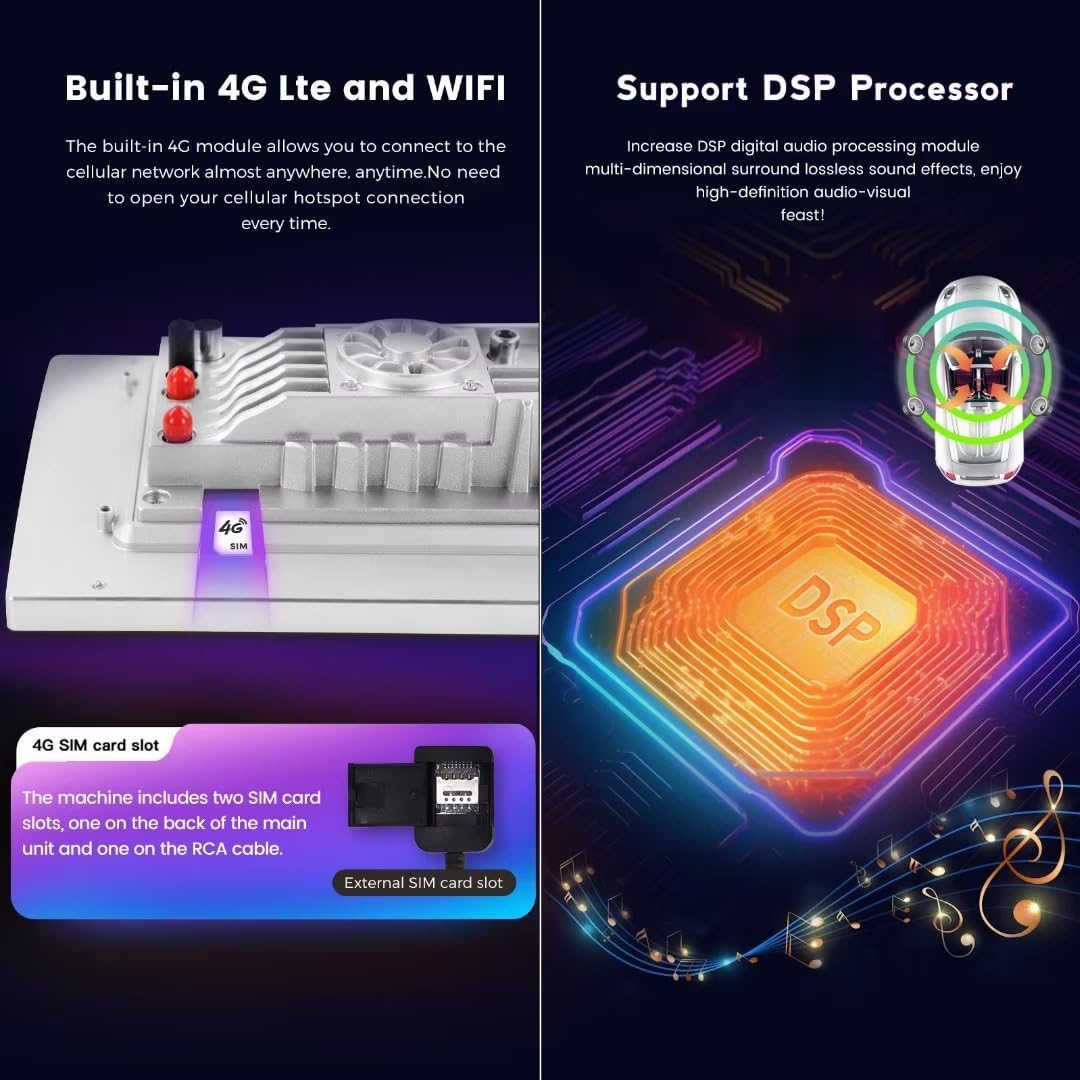
Insert a 4G SIM card into the designated slot to access the internet via cellular network. Alternatively, connect to a WiFi hotspot for internet access.
GPS Navigation
Utilize the built-in GPS navigation system with pre-installed maps. Update maps periodically for optimal performance.
Bluetooth 5.0
Connect your mobile device via Bluetooth 5.0 for hands-free calling and audio streaming. Ensure your device is discoverable and pair it through the stereo's Bluetooth settings.
Steering Wheel Controls
The unit retains original steering wheel control functionality, allowing easy adjustment of volume, track changes, and channel switching without removing hands from the steering wheel.
Maintenance
Screen Cleaning
Use a soft, lint-free cloth to gently wipe the touch screen. For stubborn smudges, slightly dampen the cloth with a screen cleaner solution designed for electronics. Avoid harsh chemicals or abrasive materials.
Software Updates
Periodically check for and install software updates to ensure optimal performance, security, and access to new features. Refer to the manufacturer's website or the unit's system settings for update procedures.
General Care
Avoid exposing the unit to extreme temperatures, direct sunlight for prolonged periods, or excessive moisture. Ensure proper ventilation around the unit to prevent overheating.
Troubleshooting
This section addresses common issues you might encounter with your MekedeTech Android Car Stereo.
- No Power: Check all power cable connections. Ensure the vehicle's battery is properly connected and charged. Verify fuses.
- No Sound: Check speaker connections. Ensure volume is not muted or set too low. Verify audio output settings.
- Touch Screen Unresponsive: Restart the unit. If the issue persists, a factory reset might be necessary (note: this will erase all user data).
- GPS Not Working: Ensure the GPS antenna is properly installed and has a clear view of the sky. Check GPS settings within the unit.
- CarPlay/Android Auto Connection Issues: Ensure Bluetooth is enabled on both the phone and the stereo. For wired connections, try a different USB cable. Restart both devices.
- Poor 4G/WiFi Signal: Ensure the 4G SIM card is correctly inserted and active. For WiFi, verify the hotspot is active and within range.
If you encounter issues not covered here, please contact customer support.
Specifications
| Feature | Detail |
|---|---|
| System | Android 12 OS |
| CPU | 8-Core A53 1.8GHz |
| Memory | 2GB RAM, 32GB ROM |
| Display Size | 9 Inches |
| Display Resolution | 1280 x 720 IPS Touch Screen |
| Power Output | 4*50W |
| Connectivity | 4G LTE, WiFi, Bluetooth 5.0 |
| Special Features | Wireless CarPlay, Wired Android Auto, Built-in DSP, GPS Navigation |
| Audio Format Support | APE/FLAC/WAV/MP3/WMA etc. |
| Video Format Support | MKV/RMVB/AVI/MP4/MDV etc. |
| Picture Format Support | PNG/JPEG/JPG/GIF/WBMP/BNP etc. |
| Mounting Type | Dashboard Mount |
Warranty and Support
Warranty Information
This MekedeTech Android Car Stereo comes with a 1-Year Warranty from the date of purchase. This warranty covers manufacturing defects and malfunctions under normal use. Please retain your proof of purchase for warranty claims.
Customer Support
For technical assistance, troubleshooting, or warranty inquiries, please contact MekedeTech customer support. Refer to the contact information provided with your product packaging or visit the official MekedeTech website.
Manufacturer: Shenzhen Mekede Technology Co.,Ltd