
1. Introduction
This manual provides instructions for the RemotesReplaced replacement remote control, designed for full compatibility with the SCHAUB LORENZ LT22-106 DBUP television model. This remote control offers all the functionalities of the original remote without requiring any complex setup.

Figure 1: Front view of the RemotesReplaced RRS41 Remote Control.
The remote control is a direct replacement, meaning it is pre-programmed to work with your specific television model upon battery insertion. It is not a universal remote that requires code entry.
2. Setup
2.1 Battery Installation
The remote control requires two (2) AAA batteries for operation. Follow these steps to install the batteries:
- Locate the battery compartment cover on the back of the remote control.
- Slide the cover downwards or press the latch (if present) to open the compartment.
- Insert two AAA batteries, ensuring the positive (+) and negative (-) terminals align correctly with the markings inside the compartment.
- Slide the battery compartment cover back into place until it clicks securely.


Figure 2: Back and bottom views of the remote control, illustrating the battery compartment.
Once batteries are installed, the remote control is ready for immediate use with your SCHAUB LORENZ LT22-106 DBUP television. No programming or setup codes are required.
3. Operating Instructions
This remote control provides full functionality for your SCHAUB LORENZ LT22-106 DBUP television. Point the remote control directly at the television's infrared receiver for optimal performance.

Figure 3: Detailed view of remote control buttons.
Key Functions Overview:
- POWER (●): Turns the television on or off.
- MUTE: Mutes or unmutes the television sound.
- TV/SAT/DVD/AUX: Selects input sources.
- MENU/EXIT: Accesses or exits the television's main menu.
- SHIFT: May provide access to secondary functions of certain buttons (refer to your TV's manual for specific uses).
- Number Buttons (0-9): Direct channel selection.
- SOURCE: Cycles through available input sources.
- -/--: For two-digit channel entry or other specific functions.
- GUIDE: Displays the electronic program guide (EPG).
- Volume Up/Down (V+/V-): Adjusts the volume level.
- Channel Up/Down (P+/P-): Changes the television channel.
- Navigation Pad (Up, Down, Left, Right, OK): Navigates through menus and confirms selections.
- BACK: Returns to the previous menu or screen.
- SLEEP: Sets the sleep timer.
- TV/DTV: Switches between analog and digital television modes.
- INFO: Displays information about the current program.
- EPG: Electronic Program Guide.
- FAV: Accesses favorite channels.
- NET TV/SMART: Accesses smart TV features or internet applications.
- Color Buttons (Red, Green, Yellow, Blue): Used for specific functions within menus or interactive services, as indicated on screen.
- Playback Controls (Play, Pause, Fast Forward, Rewind): Controls media playback if supported by the TV.
For detailed information on specific television functions, please refer to your SCHAUB LORENZ LT22-106 DBUP television's original user manual.
4. Maintenance
4.1 Cleaning
To clean the remote control, use a soft, dry cloth. For stubborn dirt, slightly dampen the cloth with water or a mild, non-abrasive cleaner. Avoid using harsh chemicals, solvents, or abrasive materials, as these can damage the remote's surface or internal components.
4.2 Battery Replacement
Replace batteries when the remote control's response becomes sluggish or stops functioning. Always replace both batteries at the same time with new AAA batteries. Do not mix old and new batteries, or different types of batteries, as this can lead to leakage or damage.
4.3 Storage
If the remote control will not be used for an extended period, remove the batteries to prevent potential leakage and damage to the device.
5. Troubleshooting
- Remote not responding:
- Ensure the remote is pointed directly at the television's IR receiver.
- Check if the batteries are correctly installed with the correct polarity (+/-).
- Replace the batteries with new ones.
- Ensure there are no obstructions between the remote and the TV.
- Some buttons not working:
- This remote is designed to replicate all original functions. If a specific button does not work, verify if that function is supported by your television model.
- Clean the remote control, especially around the unresponsive buttons, to ensure no debris is interfering.
- Interference:
- Bright light sources (e.g., direct sunlight, fluorescent lights) can sometimes interfere with infrared signals. Try operating the remote in different lighting conditions.
If troubleshooting steps do not resolve the issue, please refer to the Warranty and Support section.
6. Specifications
| Model | RRS41 (Compatible with SCHAUB LORENZ LT22-106 DBUP) |
| Brand | RemotesReplaced |
| Power Source | 2 x AAA Batteries (not included) |
| Item Weight | 120 grams |
| Manufacturer | Linkwebb |
| Country of Origin | China |
7. Warranty and Support
7.1 Warranty Information
This RemotesReplaced remote control is guaranteed for 1 year from the date of purchase against manufacturing defects. This warranty covers normal use and does not apply to damage resulting from misuse, accidents, unauthorized modifications, or battery leakage.
7.2 Customer Support
For technical assistance, warranty claims, or any questions regarding your remote control, please contact RemotesReplaced customer support through their official seller page on Amazon:
8. Safety and Recycling Information
8.1 Safety Precautions
This product is intended for use by adults. If used by children, adult supervision is recommended.

Figure 4: Multi-language safety warning regarding adult supervision.
8.2 Recycling Information
Please dispose of batteries and the remote control responsibly according to local regulations. Do not dispose of electronic waste or batteries with household waste.
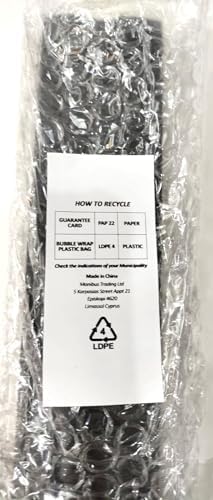
Figure 5: Recycling information for packaging materials.
Check the indications of your municipality for proper recycling of electronic products and batteries.