
1. Introduction
This manual provides instructions for the RemotesReplaced replacement remote control, designed to be fully compatible with the original TEKLIO TK32HSG7 remote. It offers all the same functionalities as the original remote, ensuring a seamless user experience.
This remote is not a universal remote; it is specifically engineered as a direct replacement for the TEKLIO TK32HSG7 model.
2. Setup
2.1 Battery Installation
The remote control requires two AAA batteries (not included). Follow these steps to install them:
- Locate the battery compartment cover on the back of the remote control.
- Slide the cover downwards or press the latch (if present) to open the compartment.
- Insert two AAA batteries, ensuring the positive (+) and negative (-) terminals align correctly with the markings inside the compartment.
- Replace the battery compartment cover, sliding it back into place until it clicks securely.
Once batteries are installed, the remote is ready for use. No programming or code entry is required.

Figure 1: Bottom view of the remote control, illustrating the location of the battery compartment cover.
3. Operating Instructions
This replacement remote control provides full functionality for your TEKLIO TK32HSG7 device. Below is a general overview of common buttons and their functions. Refer to your device's original manual for specific functions if needed.
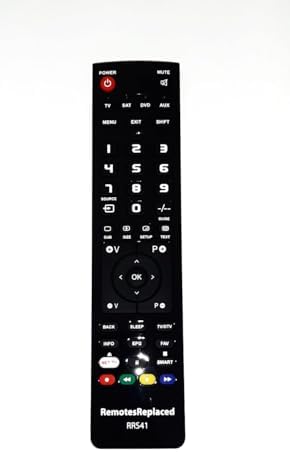
Figure 2: Front view of the remote control, displaying all buttons and their labels.
- POWER Button: Located at the top left, typically red. Turns the device on or off.
- MUTE Button: Located at the top right. Mutes or unmutes the audio.
- Number Buttons (0-9): Used for direct channel selection or inputting numbers.
- Volume Control (V+/V-): Increases or decreases the audio volume.
- Channel Control (P+/P-): Changes the channel up or down.
- Navigation Pad (Arrow buttons and OK): Used to navigate menus and confirm selections. The OK button is in the center.
- MENU/EXIT Buttons: Accesses or exits the device's main menu.
- Source/Input Button: Switches between different input sources (e.g., TV, HDMI, AV).
- Colored Buttons (Red, Green, Yellow, Blue): Often used for specific functions within smart TV applications or teletext.
- Smart/NET TV Button: Provides quick access to smart TV features or streaming services.

Figure 3: Top view of the remote control, highlighting the infrared (IR) emitter which sends signals to your device.
4. Maintenance
To ensure the longevity and optimal performance of your remote control, follow these maintenance guidelines:
- Cleaning: Wipe the remote with a soft, dry cloth. For stubborn dirt, slightly dampen the cloth with water or a mild, non-abrasive cleaner. Avoid excessive moisture.
- Battery Replacement: Replace batteries when the remote's response becomes sluggish or stops working. Always replace both batteries at the same time with new ones of the same type (AAA).
- Storage: Store the remote in a cool, dry place away from direct sunlight and extreme temperatures. If storing for an extended period, remove the batteries to prevent leakage.
- Avoid Drops: Protect the remote from physical impact, as drops can damage internal components.
5. Troubleshooting
If you encounter issues with your remote control, try the following troubleshooting steps:
- Remote Not Responding:
- Check if the batteries are inserted correctly with the correct polarity (+/-).
- Replace old batteries with new AAA batteries.
- Ensure there are no obstructions between the remote control and the device's infrared receiver.
- Make sure you are within the effective range and pointing the remote directly at the device.
- Some Buttons Not Working:
- This could indicate low battery power. Try replacing the batteries.
- Clean the remote control, especially around the unresponsive buttons, to remove any dirt or debris that might be interfering.
- Device Not Responding to Any Remote Command:
- Ensure the device itself is powered on and functioning correctly.
- If possible, test the remote with another compatible device to determine if the issue is with the remote or the device.
If these steps do not resolve the issue, please refer to the Warranty and Support section for further assistance.
6. Specifications
| Feature | Detail |
|---|---|
| Brand | RemotesReplaced |
| Model | TK32HSG7 |
| Compatible Devices | TEKLIO TK32HSG7 |
| Connectivity Technology | Infrared (IR) |
| Number of Buttons | 25 |
| Battery Type | 2 x AAA (not included) |
| Item Weight | 120 Grams |
| Special Feature | Ergonomic design |
7. Warranty and Support
This RemotesReplaced remote control is guaranteed for 1 year from the date of purchase.
RemotesReplaced specializes in remote controls and has nearly 20 years of experience in the field. For technical support or warranty claims, please contact your retailer or visit the official RemotesReplaced website for contact information.