1. Introduction
This manual provides comprehensive instructions for the operation and maintenance of your BAOFENG UV-9R Plus Two-Way Radio. Please read this manual thoroughly before using the radio to ensure proper function and safety.
The BAOFENG UV-9R Plus is an 8W Ham Radio designed for long-range communication. It features a handheld, waterproof design with VHF/UHF dual band capabilities and tri-power output. It includes a Type-C charger cable for convenient charging.
2. Safety Information
- Do not operate the radio in explosive atmospheres (e.g., flammable gases, dust particles, metallic powders).
- Do not transmit without an antenna attached.
- Keep the radio away from medical devices.
- Use only BAOFENG approved batteries and chargers.
- Do not expose the battery to fire or extreme heat.
- Ensure the Type-C charging port cover is securely closed when the radio is exposed to water to maintain its IP67 waterproof rating.
3. Package Contents
Upon opening the package, please verify that all items listed below are present and in good condition:
- 1 x Portable Radio (BAOFENG UV-9R Plus)
- 1 x 701 Antenna
- 1 x Li-ion Battery (2800mAh)
- 1 x US Charger (Desktop Charging Base)
- 1 x Belt Clip
- 1 x Hand Strap (Slingshot)
- 1 x Type-C Charger Cable
- 1 x User Manual
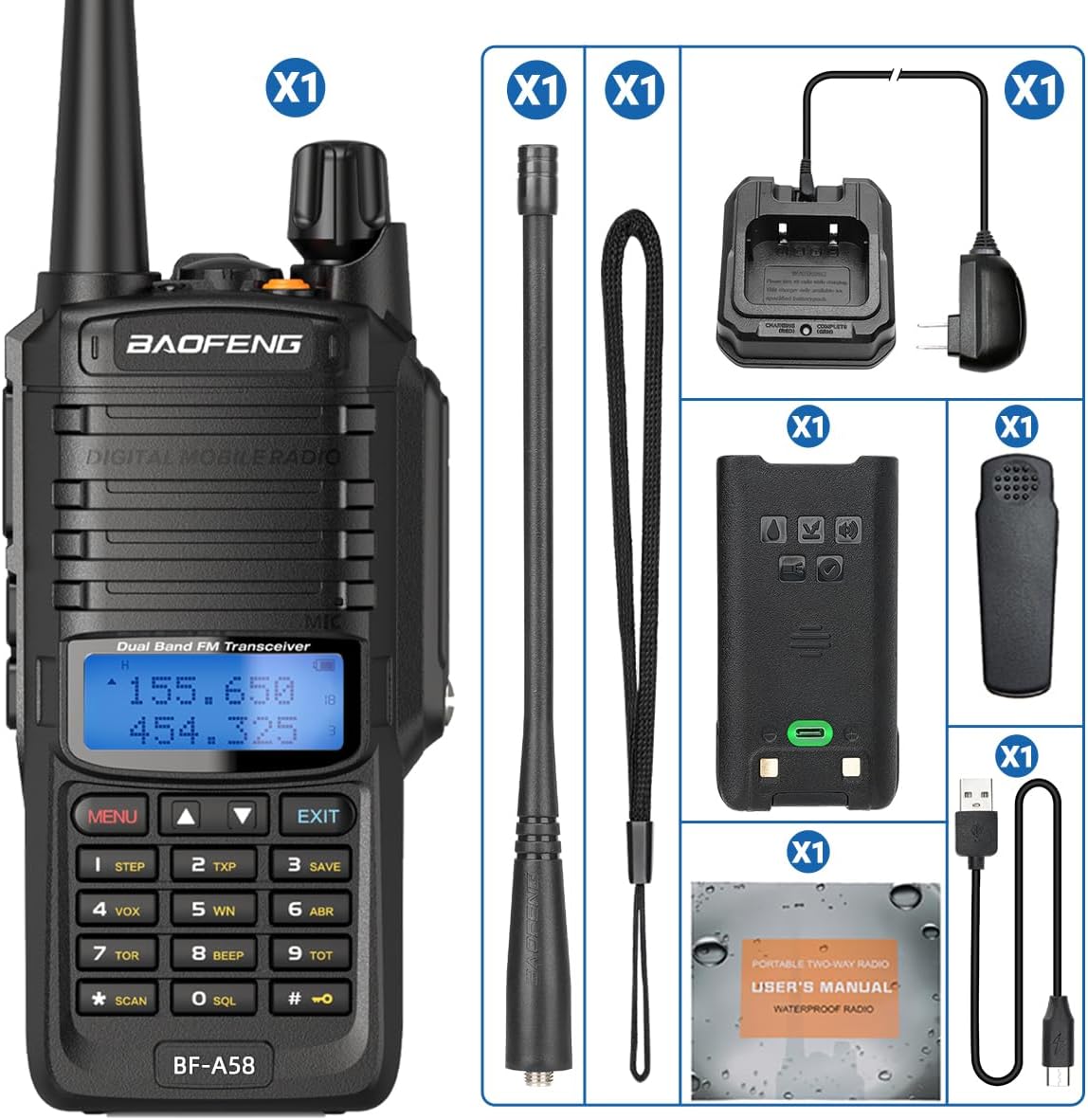
Figure 3.1: Complete package contents of the BAOFENG UV-9R Plus radio.
4. Product Features
The BAOFENG UV-9R Plus is equipped with a range of features designed for reliable and versatile communication:
- IP67 Waterproof Rating: Submersible in up to 1 meter of water for 30 minutes, suitable for outdoor use in various weather conditions.
- Tri-Power Output (High/Mid/Low): Allows users to select output power (8W max) to optimize battery life and range.
- Multiple Charging Methods: Supports both Type-C direct charging and traditional desktop base charging for convenience.
- 128 Memory Channels: Ample storage for frequently used frequencies.
- VOX Function: Voice-operated transmission for hands-free operation.
- FM Radio: Built-in FM radio receiver for entertainment.
- LED Flashlight: Integrated flashlight for illumination in low-light conditions.
- CTCSS & DCS: Tone squelch functions for private communication.
- Dual Display and Dual Standby: Monitor two different frequencies simultaneously.

Figure 4.1: Overview of BAOFENG UV-9R Plus key features.
5. Product Overview and Parts Identification
Familiarize yourself with the various parts of your BAOFENG UV-9R Plus radio:

Figure 5.1: Front and side view of the BAOFENG UV-9R Plus with labeled components.
- Antenna: For transmitting and receiving signals.
- Power/Volume Knob: Turns the radio on/off and adjusts volume.
- PTT (Push-to-Talk) Key: Press and hold to transmit, release to receive.
- FM Button: Activates the FM radio function.
- Flashlight Button: Turns the built-in LED flashlight on/off.
- Microphone/Speaker: For audio input and output.
- Display Screen: Shows frequency, channel, battery status, and other indicators.
- MENU Button: Enters the menu system.
- EXIT Button: Exits menu or cancels current operation.
- A/B Button: Switches between upper and lower frequency displays.
- Digital Keys (0-9, *, #): For frequency input and function selection.
- Type-C Charger Port: For direct charging of the battery.
6. Setup
6.1 Battery Installation
- Align the battery pack with the grooves on the back of the radio.
- Slide the battery upwards until it clicks into place.
- To remove, press the battery release latch (usually at the bottom of the battery) and slide the battery downwards.
6.2 Antenna Attachment
- Screw the antenna into the connector on the top of the radio clockwise until it is firmly seated.
- Do not overtighten.
6.3 Charging the Battery
The BAOFENG UV-9R Plus supports two charging methods:
- Desktop Charger: Place the radio with the battery attached into the desktop charging base. Ensure the charging contacts align. The indicator light on the charger will show charging status (e.g., red for charging, green for fully charged).
- Type-C Direct Charging: Connect the provided Type-C USB cable to the Type-C port on the battery pack (or radio, if integrated) and plug the other end into a compatible USB power source (e.g., wall adapter, power bank).
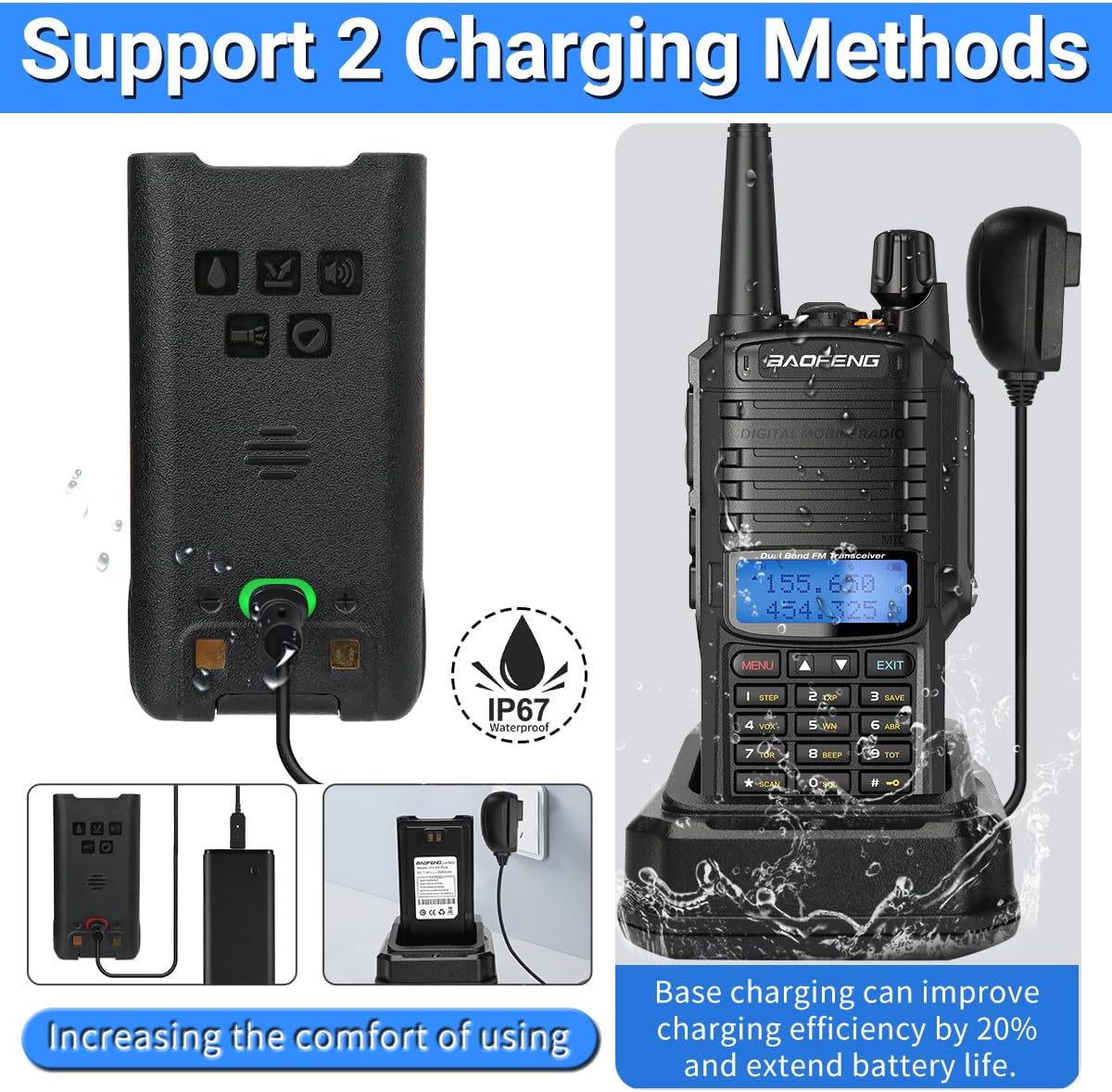
Figure 6.1: Charging methods for the BAOFENG UV-9R Plus.
7. Basic Operation
7.1 Power On/Off and Volume Adjustment
Rotate the Power/Volume knob clockwise to turn the radio on. Continue rotating clockwise to increase the volume. Rotate counter-clockwise to decrease volume and turn off the radio.
7.2 Channel/Frequency Selection
- VFO Mode (Frequency Mode): Directly input desired frequency using the numeric keypad.
- Channel Mode: Use the UP/DOWN arrow keys to scroll through programmed channels.
- Press the A/B button to switch between the upper and lower frequency displays for dual watch.
7.3 Transmitting and Receiving
- To transmit, press and hold the PTT (Push-to-Talk) key. Speak clearly into the microphone.
- Release the PTT key to stop transmitting and return to receive mode.
7.4 Adjusting Power Levels (Tri-Power)
The UV-9R Plus allows you to select between High, Mid, and Low power output to conserve battery or extend range.
- Press the MENU button.
- Navigate to the "TXP" (Transmit Power) setting using the UP/DOWN arrow keys.
- Press MENU again to enter the setting.
- Use UP/DOWN to select HIGH, MID, or LOW.
- Press MENU to confirm, then EXIT to return to standby.

Figure 7.1: Tri-power display on the radio screen.
8. Advanced Features
8.1 VOX Function (Voice Operated Transmit)
VOX allows you to transmit by speaking into the microphone without pressing the PTT key. This is useful for hands-free operation.
- Press MENU.
- Navigate to the "VOX" setting.
- Press MENU to enter.
- Select the desired VOX sensitivity level (1-10, 1 being most sensitive).
- Press MENU to confirm, then EXIT.
8.2 FM Radio
To activate the FM radio, press the dedicated FM button on the side of the radio. Use the UP/DOWN arrow keys to scan for stations or manually input frequencies.
8.3 LED Flashlight
Press the dedicated Flashlight button on the side of the radio to turn the LED flashlight on or off. This is useful for illumination in dark environments.

Figure 8.1: BAOFENG UV-9R Plus with LED flashlight active.
8.4 CTCSS & DCS (Tone Squelch)
CTCSS (Continuous Tone Coded Squelch System) and DCS (Digital Coded Squelch) are sub-audible tones used to filter out unwanted communications. When enabled, your radio will only open squelch and receive audio if the incoming signal carries the correct tone.
- Press MENU.
- Navigate to the "RX CTCSS" or "RX DCS" setting for receive tones, or "TX CTCSS" or "TX DCS" for transmit tones.
- Press MENU to enter.
- Use UP/DOWN to select the desired tone code.
- Press MENU to confirm, then EXIT.
9. Maintenance
9.1 Cleaning
- Clean the radio surface with a soft, damp cloth.
- Do not use harsh chemicals or abrasive cleaners.
- Ensure the Type-C port cover is closed before cleaning with a damp cloth.
9.2 Battery Care
- Charge the battery fully before first use.
- Avoid overcharging or completely draining the battery.
- Store the battery in a cool, dry place when not in use for extended periods.
9.3 Storage
When storing the radio for a long time, remove the battery and store it separately. Store the radio in a dry, dust-free environment away from direct sunlight and extreme temperatures.
10. Troubleshooting
| Problem | Possible Cause | Solution |
|---|---|---|
| Radio does not power on. | Battery is low or not installed correctly. | Charge the battery. Reinstall the battery securely. |
| Cannot transmit or receive. | Incorrect frequency/channel. Antenna not attached. Battery low. CTCSS/DCS mismatch. | Verify frequency/channel. Attach antenna. Charge battery. Check CTCSS/DCS settings. |
| Poor audio quality. | Low signal strength. Volume too low/high. Speaker/microphone obstructed. | Move closer to transmitting radio. Adjust volume. Clear obstructions. |
| Battery drains quickly. | High power setting. Frequent transmission. Old battery. | Use Mid/Low power when possible. Reduce transmission time. Consider replacing battery if old. |
| Radio not charging. | Charger not connected properly. Faulty charger/cable. Battery not seated correctly. | Check connections. Try a different charger/cable. Re-seat battery. |
11. Specifications
| Feature | Specification |
|---|---|
| Output Power | 8W (High/Mid/Low selectable) |
| Battery Type | Li-ion battery |
| Battery Capacity | 2800 mAh |
| Memory Channels | 128 Groups |
| Operation Voltage | DC 7.4 V |
| Antenna Impedance | 50 ohm |
| Frequency Range | VHF: 136-174 MHz, UHF: 400-470 MHz |
| Water Resistance | IP67 Waterproof |
| Item Weight | Approx. 1.3 pounds (0.59 kg) |
| Dimensions (Package) | 7.4 x 5.79 x 4.13 inches |
| FCC ID | 2AJGM-BFA58 |
12. Warranty and Support
The BAOFENG UV-9R Plus comes with a 3-month warranty from the date of purchase. This warranty covers manufacturing defects and malfunctions under normal use.
For technical support, warranty claims, or further assistance, please contact BAOFENG customer service through their official channels or the retailer from whom you purchased the product. Please have your product model number and purchase date available when contacting support.
For more information, you may visit the official BAOFENG store: BAOFENG Store on Amazon.