
Important Safety Information
Read this instruction manual carefully before use to ensure safe operation and prevent damage to the product or injury.
This product is not a toy and should be operated with caution. Keep out of reach of small children. Always ensure proper battery installation and disposal. Do not expose the device to moisture or extreme temperatures.
Product Overview
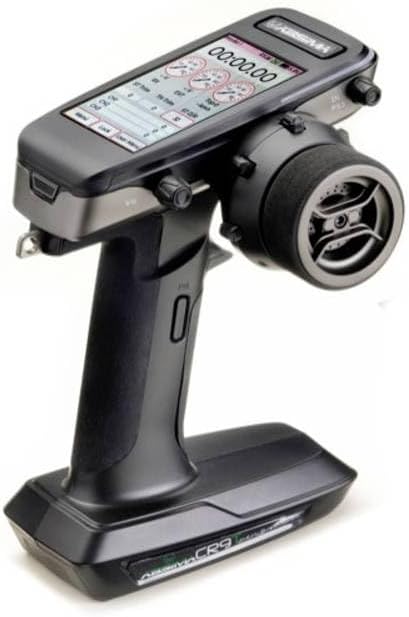
An image showing the Absima CR9T RC Pistol Transmitter, a black and grey device with a screen displaying numerical information and a large steering wheel on the right side. The handle is ergonomically designed for grip.
The Absima CR9T is a 2.4 GHz 9-channel RC pistol transmitter designed for precise control of remote-controlled vehicles. It features an ergonomic design, a clear display for settings, and intuitive controls for an enhanced user experience.
Setup
- Battery Installation: Open the battery compartment cover located at the bottom of the transmitter. Insert the required batteries (not included) according to the polarity indicators. Close the cover securely.
- Receiver Binding: Refer to your receiver's manual for specific binding instructions. Generally, power on the receiver in binding mode, then power on the transmitter while holding the bind button (if applicable).
- Initial Calibration: After binding, perform a basic calibration of the steering and throttle channels to ensure proper response.
Operating Instructions
- Power On/Off: Press and hold the power button until the display illuminates/shuts off.
- Steering Control: Use the steering wheel on the right side to control the vehicle's direction.
- Throttle Control: Use the trigger for forward and reverse movement. Pull for forward, push for reverse.
- Channel Assignment: Utilize the various switches and knobs on the transmitter to control auxiliary channels (e.g., lights, winches) as configured on your receiver.
- Display Navigation: Use the navigation buttons around the screen to access and adjust settings such as trim, EPA (End Point Adjustment), D/R (Dual Rate), and model memory.
Maintenance
- Cleaning: Use a soft, dry cloth to clean the transmitter. Do not use harsh chemicals or solvents.
- Storage: Store the transmitter in a cool, dry place away from direct sunlight and extreme temperatures. Remove batteries if storing for extended periods.
- Battery Care: Always use fresh batteries of the recommended type. Do not mix old and new batteries or different battery types.
Troubleshooting
| Problem | Possible Cause | Solution |
|---|---|---|
| Transmitter does not power on | Dead or incorrectly installed batteries | Replace batteries; check polarity |
| No control response from vehicle | Not bound to receiver; receiver not powered; out of range | Re-bind transmitter and receiver; check receiver power; move closer to vehicle |
| Erratic control | Interference; low battery on transmitter/receiver | Move to a different location; replace batteries |
Specifications
| Feature | Detail |
|---|---|
| Product Dimensions | 14 x 10 x 18.5 cm |
| Weight | 320 g |
| Item Model Number | 2000012 |
| Number of Items | 1 |
| Batteries Required? | No (for product, but required for operation) |
| Batteries Included? | No |
| ASIN | B0CP34F5K2 |
| First Available Date | April 24, 2024 |
Warranty and Support
We understand that it can be frustrating if a product does not work properly or becomes defective. Fortunately, we provide a warranty for a period of at least 2 years after purchase.
For technical support, warranty claims, or further assistance, please refer to the contact information provided with your purchase or visit the official Absima website. Please have your model number (2000012) and proof of purchase ready when contacting support.