
Introduction
Thank you for choosing the Lamomo Outdoor Motion Sensor Wall Lantern. This manual provides essential information for the safe installation, operation, and maintenance of your new outdoor lighting fixture. Designed for durability and functionality, this lantern features advanced PIR motion sensing and dusk-to-dawn technology to enhance security and convenience for your home's exterior.
Safety Information
- WARNING: Risk of electric shock. Disconnect power at the fuse or circuit breaker before installation or servicing.
- All electrical connections must be in accordance with local codes, ordinances, or the National Electric Code (NEC). Contact a qualified electrician if you are unfamiliar with proper electrical wiring connections.
- Ensure the fixture is securely mounted to a structural element.
- Do not exceed the recommended wattage for the bulb (100W max).
- Use only a DIMMABLE E26 bulb with this fixture to ensure proper functionality of the motion sensor and dusk-to-dawn features. Non-dimmable bulbs may cause malfunction.
- Keep the motion sensor clear of obstructions to ensure optimal performance.
Package Contents
Please check to ensure all parts are included in your package:
- Lamomo Outdoor Motion Sensor Wall Lantern (Model B06050PGUS-C)
- Mounting Hardware
- Instruction Manual
Note: Bulb is NOT included. A dimmable E26 bulb (100W max) is recommended.
Specifications
| Brand | Lamomo |
| Model Number | B06050PGUS-C |
| Color | Golden Strip (Black with Golden Accents) |
| Material | Aluminum, Seeded Glass |
| Product Dimensions | 13.8"L x 6.7"W x 4.7"H |
| Item Weight | 3.39 pounds |
| Power Source | Hard Wired |
| Bulb Base | E26 |
| Max Wattage | 100 watts |
| Special Features | Motion Sensor, Dusk to Dawn, Waterproof |
| Motion Sensor Range | Up to 40ft, 220° detection angle |
| Lighting Time Adjustment | 5 seconds to 3 minutes |
| Water Resistance Level | Waterproof |
The fixture is constructed from durable aluminum with a powder-coated finish and features rugged seeded glass, ensuring weather resistance against sun, snow, wind, and rain.
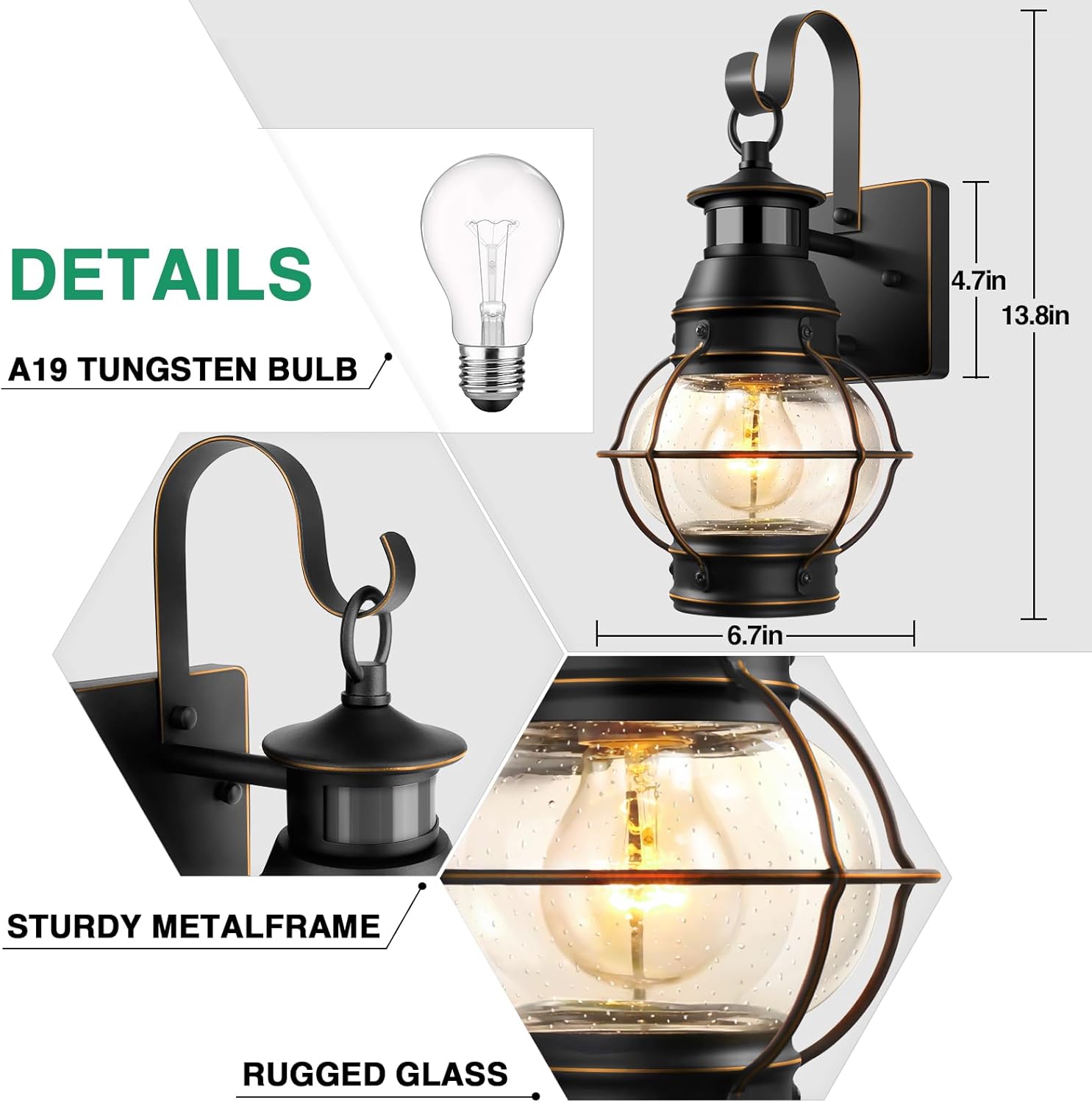
Detailed view of the Lamomo outdoor wall lantern showing dimensions and construction materials.

The lantern is designed to withstand various weather conditions, including rain, sun, snow, and wind.
Setup & Installation
Before beginning installation, ensure the power is turned off at the circuit breaker. This fixture is designed for hard-wired installation.
- Prepare the Mounting Surface: Remove any existing fixture and ensure the electrical box is clean and accessible.
- Attach Mounting Bracket: Secure the provided mounting bracket to the electrical box using the screws.
- Wire Connections: Connect the fixture's wires to your household wiring according to local electrical codes. Typically, black to black (live), white to white (neutral), and green/bare copper to green/bare copper (ground).
- Mount the Fixture: Carefully align the fixture with the mounting bracket and secure it with the provided screws.
- Install Bulb: Insert a dimmable E26 bulb (max 100W) into the socket.
- Restore Power: Turn the power back on at the circuit breaker.
For a visual guide on installation, please refer to the following videos:
Video: Installation overview of the Lamomo outdoor light fixture.
Video: Demonstration of the motion sensor functionality and installation.

Recommended E26 base bulbs for the fixture. Remember to use a dimmable bulb.
Operating Instructions
The Lamomo Outdoor Motion Sensor Wall Lantern offers three operating modes, easily switched using your existing wall switch.
Initial Self-Test Program
Upon first use or after a power cycle, the light will flash for approximately 20-120 seconds. This is a self-test program to ensure proper function. After this period, the light will automatically enter AUTO+ mode.
Switching Modes
To switch between modes, turn your wall switch OFF and then ON within 0.5-2 seconds. The sequence of modes is as follows:
- Auto Mode: (Switch OFF-ON once) The light remains off during the day. At night, it turns on to full brightness when motion is detected and turns off after a set delay (5s-3min) when no motion is detected.
- Auto+ Mode: (Switch OFF-ON once from Auto Mode) The light remains off during the day. At night, it stays at a low brightness (e.g., 30%) and brightens to full intensity when motion is detected. It returns to low brightness after a set delay when no motion is detected.
- Manual Override Mode: (Switch OFF-ON twice within 2 seconds from Auto+ Mode) The light stays on at full brightness continuously throughout the night, regardless of motion. It will automatically turn off during the daytime. This mode is ideal for extended illumination during outdoor gatherings.

Visual guide for switching between the three operating modes using the wall switch.
Dusk to Dawn Sensor
The integrated dusk-to-dawn sensor automatically detects ambient light levels. In Auto and Auto+ modes, the light will only operate during nighttime hours, conserving energy by remaining off during the day.
PIR Motion Sensor
The advanced PIR (Passive Infrared) motion sensor detects movement within a 40ft range and a 220° angle. The lighting duration after motion detection can be adjusted from 5 seconds to 3 minutes.

Illustration of the motion sensor's detection range and angle.
Maintenance
To ensure the longevity and optimal performance of your Lamomo Outdoor Motion Sensor Wall Lantern, follow these simple maintenance guidelines:
- Cleaning: Periodically clean the fixture with a soft, damp cloth. Avoid using abrasive cleaners or solvents, as they may damage the finish or glass.
- Bulb Replacement: Ensure power is disconnected before replacing the bulb. Allow the bulb to cool completely before handling. Use only dimmable E26 bulbs, up to 100W.
- Sensor Check: Keep the motion sensor lens clean and free from dust, dirt, or spiderwebs to maintain accurate detection.
- Inspection: Regularly inspect the wiring and mounting for any signs of wear, damage, or looseness. Address any issues promptly.
Troubleshooting
If you encounter issues with your Lamomo Outdoor Motion Sensor Wall Lantern, refer to the following common problems and solutions:
| Problem | Possible Cause | Solution |
| Light does not turn on at night. | 1. Power is off. 2. Bulb is faulty or not installed correctly. 3. Dusk-to-dawn sensor is obstructed or faulty. 4. Motion sensor not detecting. | 1. Check circuit breaker and wall switch. 2. Replace bulb and ensure it's screwed in tightly. 3. Clean sensor, ensure no light source is interfering. 4. Test motion sensor by walking in its detection zone. |
| Light stays on continuously. | 1. Manual Override Mode is active. 2. Constant motion in detection zone. 3. Sensor sensitivity too high or faulty. | 1. Cycle power via wall switch to return to Auto or Auto+ mode. 2. Clear obstructions from sensor's view. 3. Adjust sensor settings if possible (refer to operating instructions). |
| Light flashes or flickers. | 1. Non-dimmable bulb used. 2. Loose wiring connection. 3. Initial self-test program. | 1. Replace with a dimmable E26 bulb. 2. Disconnect power and check all wiring connections. 3. Wait 20-120 seconds for the self-test to complete. |
| Motion sensor is too sensitive or not sensitive enough. | Sensor settings need adjustment. | The motion sensor's detection range and lighting time are adjustable. Ensure the sensor is clean and not obstructed. Unfortunately, sensitivity adjustment beyond the default range is not specified for this model. |
Warranty and Support
For warranty information, product support, or to purchase additional protection plans, please refer to the product listing on Amazon or visit the official Lamomo store.
- Protection Plans: Optional 3-Year and 4-Year Protection Plans are available for purchase.
- Lamomo Store: Visit the Lamomo Store on Amazon