1. Introduction
This manual provides instructions for the safe and efficient operation, maintenance, and care of your TAGIC TG-SP01 Electric Spin Scrubber. Please read this manual thoroughly before first use and retain it for future reference.
The TAGIC TG-SP01 is a cordless electric cleaning brush designed to simplify various household cleaning tasks, reducing physical strain associated with traditional cleaning methods.
2. Product Overview and Components
Familiarize yourself with the components of your electric spin scrubber.
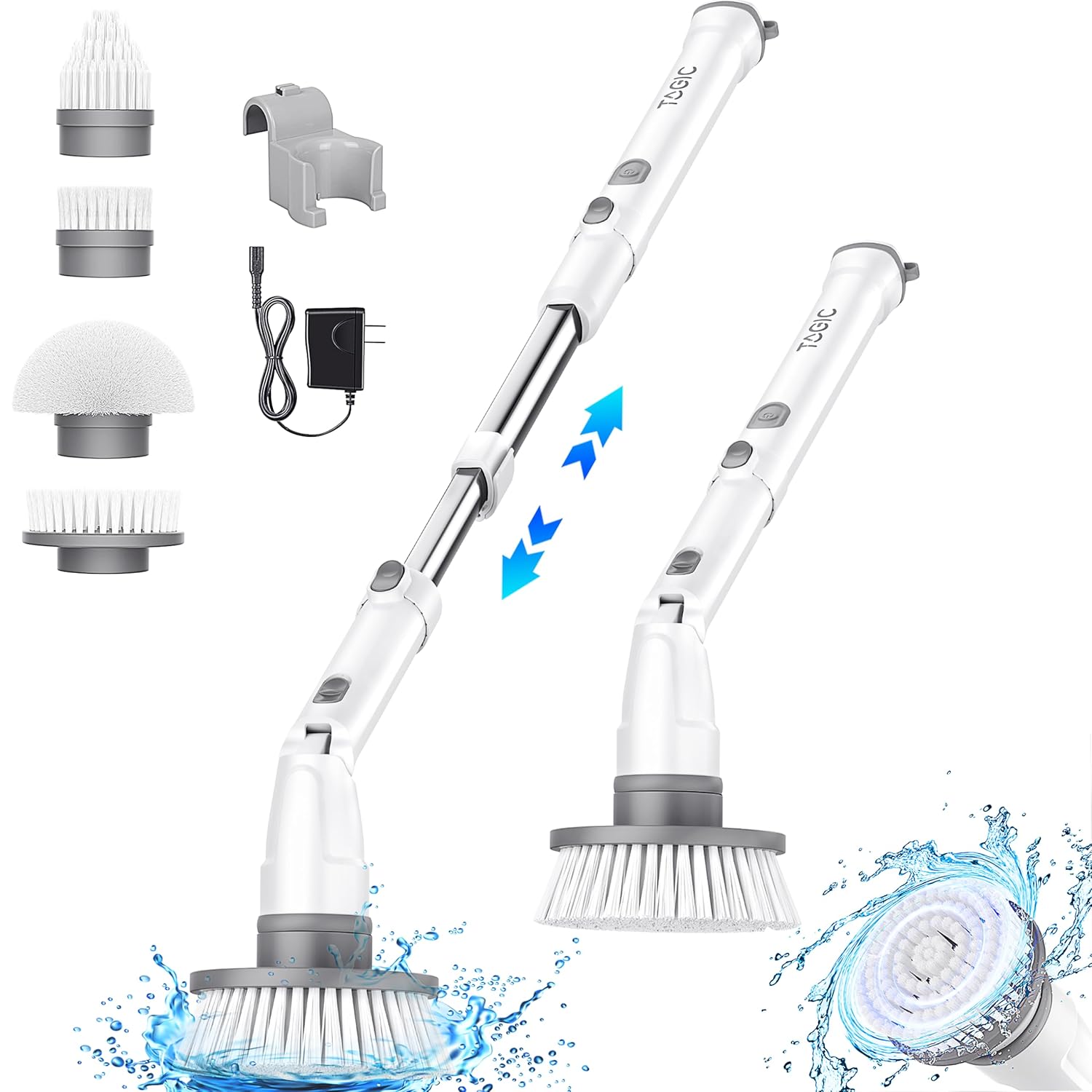
Figure 1: Main components of the TAGIC TG-SP01 Electric Spin Scrubber, including the main unit, extendable handle, charger, and four interchangeable brush heads.
2.1 Package Contents:
- Electric Spin Scrubber Main Unit
- Extendable Handle (Stainless Steel)
- Charging Adapter
- Hard Flat Brush
- Corner Brush
- Small Flat Brush
- Pointed Brush
- Wall Mount Hook (for storage)
- User Manual (this document)
2.2 Key Features:
- Cordless Operation: Provides freedom of movement during cleaning.
- 2 Speed Modes: Adjustable spin speeds for different cleaning tasks (Daily Cleaning and Stubborn Stains).
- Adjustable Angle: Brush head angle can be adjusted for optimal reach and cleaning efficiency.
- Extendable Handle: Handle extends from 27 inches to 43 inches for reaching high or low areas.
- Long-lasting Battery: Built-in 2500mAh battery provides up to 120 minutes of runtime.
- 4 Replaceable Brush Heads: Specialized brushes for various surfaces and cleaning needs.
3. Setup and Assembly
Follow these steps to assemble your electric spin scrubber before first use.
3.1 Assembling the Handle:
- Connect the main scrubber unit to the extendable handle. Ensure it clicks securely into place.
- To extend the handle, twist the locking mechanism on the handle, pull to the desired length (27 to 43 inches), and twist back to lock.

Figure 2: Illustration of the adjustable handle length and brush head angles.
3.2 Attaching Brush Heads:
- Select the appropriate brush head for your cleaning task.
- Align the brush head with the rotating shaft on the scrubber unit.
- Push the brush head firmly onto the shaft until it locks into place.
- To remove, pull the brush head off the shaft.

Figure 3: The four interchangeable brush heads and their typical applications.
4. Charging the Scrubber
Before first use, fully charge the scrubber. A full charge takes approximately 3-4 hours.
- Locate the charging port on the scrubber unit.
- Connect the charging adapter to the scrubber and plug it into a standard electrical outlet.
- The indicator light will show charging status (refer to device for specific light behavior, typically red for charging, green for full).
- Once fully charged, disconnect the adapter. The scrubber provides up to 120 minutes of continuous runtime on a full charge.

Figure 4: Battery specifications and charging features.
5. Operating Instructions
5.1 Power On/Off and Speed Modes:
- Press the power button once to turn on the scrubber at the low spin speed (e.g., 280 RPM for daily cleaning).
- Press the power button a second time to switch to the high spin speed (e.g., 380 RPM for stubborn stains).
- Press the power button a third time to turn off the scrubber.

Figure 5: Illustration of the two available speed modes and their recommended uses.
5.2 Using the Scrubber:
- Ensure the desired brush head is securely attached.
- Adjust the handle length and brush head angle as needed for the cleaning area.
- Apply a suitable cleaning solution or water to the surface to be cleaned.
- Turn on the scrubber and select the appropriate speed mode.
- Gently guide the rotating brush over the surface. Avoid applying excessive pressure, as the motor's power is sufficient for cleaning.
- For stubborn stains, allow the scrubber to work for a longer duration on the affected area, possibly with a stronger cleaning agent.
- After cleaning, rinse the surface and the brush head thoroughly.

Figure 6: Demonstrating the ease of use for floor cleaning compared to traditional methods.
6. Maintenance and Care
Proper maintenance ensures the longevity and performance of your scrubber.
6.1 Cleaning the Brush Heads:
- After each use, remove the brush head from the scrubber unit.
- Rinse the brush head thoroughly under running water to remove dirt and cleaning solution residue.
- Allow brush heads to air dry completely before storing.
6.2 Cleaning the Main Unit and Handle:
- Wipe the main unit and handle with a damp cloth. Do not submerge the main unit in water.
- Ensure the charging port cover is securely closed to prevent water ingress.
- Do not use abrasive cleaners or solvents.
6.3 Storage:
- Store the scrubber in a cool, dry place, away from direct sunlight and extreme temperatures.
- Use the provided wall mount hook for convenient storage.
- Ensure the scrubber is fully charged before long-term storage to maintain battery health.
7. Troubleshooting
If you encounter issues with your scrubber, refer to the following common problems and solutions.
| Problem | Possible Cause | Solution |
|---|---|---|
| Scrubber does not turn on. | Battery is depleted. | Charge the scrubber fully (refer to Section 4). |
| Brush head stops spinning or spins slowly. | Excessive pressure applied during cleaning. Battery is low. | Reduce pressure on the brush head. Charge the scrubber. |
| Brush head detaches during use. | Brush head not securely attached. | Ensure the brush head is pushed firmly onto the shaft until it clicks into place. |
| Reduced cleaning performance. | Brush head is worn or dirty. Incorrect brush head for the task. | Clean or replace the brush head. Select the appropriate brush head (refer to Section 3.2). |
If the problem persists after trying these solutions, please contact customer support.
8. Specifications
| Feature | Detail |
|---|---|
| Model Number | TG-SP01 |
| Brand | TAGIC |
| Battery Capacity | 2500mAh |
| Runtime | Up to 120 minutes (fully charged) |
| Charging Time | 3-4 hours |
| Speed Modes | 2 (e.g., 280 RPM, 380 RPM) |
| Handle Material | Stainless Steel |
| Adjustable Handle Length | 27 inches to 43 inches |
| Product Dimensions | 6.4L x 6.4W x 111.8H Centimeters (extended) |
| Item Weight | 1.68 kg (3.7 Pounds) |
9. Safety Information
Please observe the following safety precautions to prevent injury or damage to the product.
- Keep the scrubber away from children and pets.
- Do not immerse the main scrubber unit in water. It is water-resistant for cleaning, but not submersible.
- Use only the provided charging adapter.
- Do not operate the scrubber if it is damaged or malfunctioning.
- Avoid contact with moving brush heads during operation.
- Do not use the scrubber on delicate surfaces that may be scratched by abrasive brushes. Test on an inconspicuous area first.
- Always turn off the scrubber before changing brush heads or performing maintenance.
- Store the scrubber in a dry place when not in use.
10. Warranty and Support
Specific warranty details are not provided in the product information. For warranty claims or technical support, please contact TAGIC customer service through your purchase platform or the official TAGIC website.
Please have your model number (TG-SP01) and purchase details ready when contacting support.


