1. Introduction
Thank you for choosing the Real-Fit F2 NC Headphones. These wireless earbuds are designed to provide an immersive audio experience with active noise cancellation, premium deep bass, and seamless Bluetooth 5.3 connectivity. This manual will guide you through the setup, operation, and maintenance of your new headphones.

Image: The Real-Fit F2 NC Headphones in pink, resting in their open charging case. The earbuds are visible, showcasing their design and color.
2. What's in the Box
Please check the package contents to ensure all items are present:
- Realfit F2 Wireless Earbuds
- Charging Case
- USB Charging Cable
- Quick Guide & User Manual (this document)

Image: A flat lay of the Real-Fit F2 product box and its contents, including the black earbuds in their case, a USB charging cable, and the product packaging.
3. Setup
3.1 Charging the Earbuds and Case
- Place the earbuds into the charging case. Ensure they are correctly seated.
- Connect the USB charging cable to the charging port on the case and to a power source (e.g., computer USB port, wall adapter).
- The indicator light on the charging case will show charging status. A full charge typically takes approximately 1.5-2 hours.
- Once fully charged, the earbuds provide up to 25 hours of total playtime with the charging case.
3.2 Bluetooth Pairing
- Open the charging case. The earbuds will automatically enter pairing mode, indicated by a flashing LED light on the earbuds.
- On your device (smartphone, tablet, etc.), enable Bluetooth and search for available devices.
- Select "Real-Fit F2" from the list of found devices.
- Once connected, the LED indicator on the earbuds will stop flashing, and you will hear a confirmation tone.
- The earbuds will automatically reconnect to the last paired device when taken out of the case, if Bluetooth is enabled on the device.
3.3 Fitting the Earbuds
For optimal sound quality and comfort, ensure a proper fit:
- Gently insert each earbud into your ear canal.
- Rotate the earbud slightly until it feels secure and comfortable.
- The Real-Fit F2 comes with different sized ear caps. Experiment with the included ear caps to find the best fit for your ears. A good seal is crucial for effective noise cancellation and bass performance.
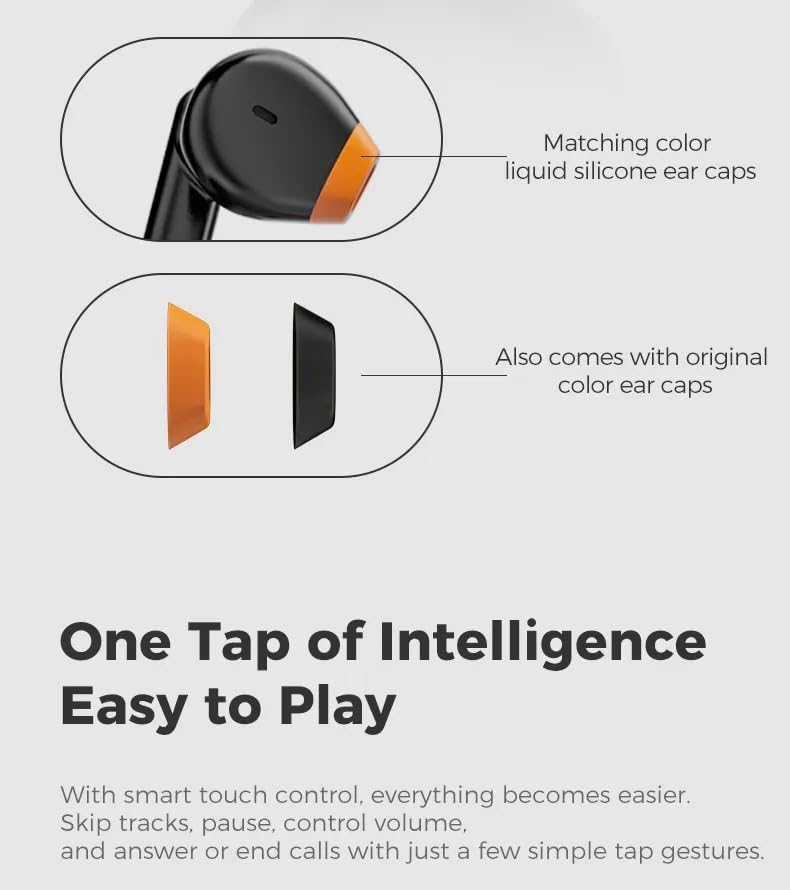
Image: A diagram illustrating the earbud design with matching color liquid silicone ear caps, and showing additional original color ear caps that come with the product.
4. Operating the Headphones
4.1 Smart Touch Controls
The Real-Fit F2 earbuds feature intuitive touch controls. Specific tap gestures allow you to manage playback, calls, and other functions:
- Play/Pause: Single tap on either earbud.
- Next Track: Double tap on the right earbud.
- Previous Track: Double tap on the left earbud.
- Answer/End Call: Single tap on either earbud.
- Reject Call: Press and hold either earbud for 2 seconds.
- Activate Voice Assistant: Triple tap on either earbud.
- Toggle ANC/Transparency Mode: Press and hold the right earbud for 2 seconds.
4.2 Active Noise Cancellation (ANC)
The Real-Fit F2 headphones feature Active Noise Cancellation technology to reduce ambient noise. To activate or deactivate ANC, or switch to Transparency Mode (if available), use the touch control gesture mentioned above. ANC is most effective for low-frequency sounds.
4.3 Call Management
With the built-in microphone, you can easily manage calls:
- To answer an incoming call, single tap either earbud.
- To end an active call, single tap either earbud.
- To reject an incoming call, press and hold either earbud for 2 seconds.

Image: Black Real-Fit F2 NC Headphones in their open charging case, positioned next to a smartphone screen showing an active call interface, highlighting the call management feature.
5. Maintenance
5.1 Cleaning
- Regularly clean the earbuds, especially the ear tips and charging contacts, with a soft, dry, lint-free cloth.
- Do not use abrasive cleaners, alcohol, or chemical solvents.
- Ensure no moisture enters any openings.
5.2 Storage
- When not in use, always store the earbuds in their charging case to protect them and keep them charged.
- Store the charging case and earbuds in a cool, dry place, away from extreme temperatures and direct sunlight.
6. Troubleshooting
If you encounter any issues with your Real-Fit F2 NC Headphones, please refer to the following common solutions:
- No Sound:
- Ensure the earbuds are charged.
- Check if the earbuds are properly paired with your device.
- Adjust the volume on both your device and the earbuds.
- Earbuds Not Pairing:
- Make sure Bluetooth is enabled on your device.
- Ensure the earbuds are in pairing mode (flashing LED).
- Turn off and on your device's Bluetooth.
- Try forgetting "Real-Fit F2" from your device's Bluetooth list and re-pairing.
- Charging Issues:
- Verify the charging cable is securely connected to both the case and the power source.
- Ensure the charging contacts on the earbuds and inside the case are clean and free of debris.
- Try a different USB cable or power adapter.
- ANC Not Working Effectively:
- Ensure the earbuds are properly seated in your ears, forming a good seal.
- Confirm ANC is activated via touch controls.
7. Specifications
| Feature | Description |
|---|---|
| Model Name | REALFITF2 (F2) |
| Connectivity Technology | Wireless (Bluetooth 5.3) |
| Bluetooth Range | 10 Meters |
| Noise Control | Active Noise Cancellation (ANC) |
| Total Playtime | Up to 25 Hours (with charging case) |
| Microphone | Built-in Mic |
| Control Type | Touch Control, Call Control, Voice Control |
| Ear Placement | In Ear |
| Material | Plastic |
| Frequency Response | 20 KHz |
| Compatible Devices | Bluetooth-enabled devices |

Image: An infographic highlighting key specifications and features of the Real-Fit F2, including 13mm titanium-plated composite dome diaphragms, 25 hours total playback, Bluetooth 5.3, and surround stereo sound effects.
8. Safety Information
- Do not expose the earbuds or charging case to extreme temperatures, humidity, or liquids.
- Avoid dropping, disassembling, or modifying the product.
- Keep out of reach of children and pets.
- Prolonged listening at high volumes may cause hearing damage. Adjust volume to a safe level.
- Do not use the earbuds in situations where inability to hear ambient sounds could be dangerous (e.g., driving, cycling, walking in traffic).


