
1. Introduction
The Mumusuki SM4-WLTE is a versatile 4G SMS Alarm Controller and Access Control System designed for various monitoring and control applications. It integrates 4G network connectivity, APP and WEB interfaces, and SMS capabilities for power outage alarms, temperature, and humidity monitoring. This device functions as a reliable relay switch for home automation and industrial equipment control.

Image 1.1: The SM4-WLTE controller integrated into an industrial environment, demonstrating its application versatility.
2. Product Features
- Multifunctional Design: Features 4G network connectivity, APP and WEB temperature/humidity linkage, and SMS power outage alarm functions to meet various needs.
- Durable and Reliable: Constructed from aluminum material for long-lasting performance.
- Wide Range of Applications: Can be used as a relay switch for various occasions and devices, from home automation systems to industrial equipment control.
- Flexible and Convenient: Equipped with a standard SIM card and antenna interface for easy operation, installation, and use.
- Accurate Monitoring: Enables precise and real-time monitoring with dedicated temperature and humidity sensor ports.
3. Package Contents
Please verify that all items listed below are included in your package:
- 1 x Mumusuki SM4-WLTE 4G SMS Alarm Controller Unit
- 1 x Power Adapter (EU Plug, 100-240V)
- 1 x User Manual (This document)
- 1 x 4G Antenna
- 1 x Temperature/Humidity Sensor Probe
- 1 x Wiring Harness Set

Image 3.1: Overview of the SM4-WLTE controller and its included accessories.
4. Specifications
| Parameter | Value |
|---|---|
| Product Model | SM4-WLTE |
| Material | Aluminum |
| Power Plug | EU Plug 100-240V |
| Main Function | Relay Switch, Alarm Controller |
| Power Consumption (Standby) | 12V 50mA |
| Power Consumption (Operation) | 12V 200mA |
| 4G Frequency (LTE FDD) | B1, B3, B5, B7, B8, B20 |
| GSM Frequency | 900, 1800 MHz |
| SIM Interface | Standard SIM Card |
| Antenna Interface | Standard SMA Interface |
| Temperature/Humidity Interface | 2 Sensor Connections |
| Temperature Detection Range | -40 to 125℃ |
| Humidity Detection Range | 0 to 100% |
| Relay Output | 4 Channels, 10A 250VAC, 15A 125VAC |
| Output Logic | Normally Open (NO) and Normally Closed (NC) |
5. Setup Guide
5.1 Initial Setup
- Insert SIM Card: Locate the SIM card slot on the device. Insert a standard 4G SIM card into the slot, ensuring it is correctly oriented.
- Attach Antenna: Connect the provided 4G antenna to the SMA interface on the controller. Ensure it is securely tightened for optimal signal reception.
- Connect Sensors: If using temperature and humidity monitoring, connect the sensor probe(s) to the designated sensor ports.
- Power Connection: Connect the power adapter to the device and then plug it into a suitable power outlet (100-240V). The device will power on automatically.
5.2 Wiring Diagrams
The SM4-WLTE controller offers flexible wiring options for various applications. Below are common wiring diagrams:

Image 5.1: Input Application Wiring Diagram. This diagram illustrates how to connect passive switches or micro switches to the controller's input terminals (Input 1-4) for various control scenarios, including level switches and wired door sensors for electric doors.

Image 5.2: Trigger to Control Electronic Lock. This diagram shows how to connect an electronic lock to one of the relay outputs (e.g., COM1, NO1) of the SM4-WLTE controller, allowing it to be controlled via a switch or remote command.
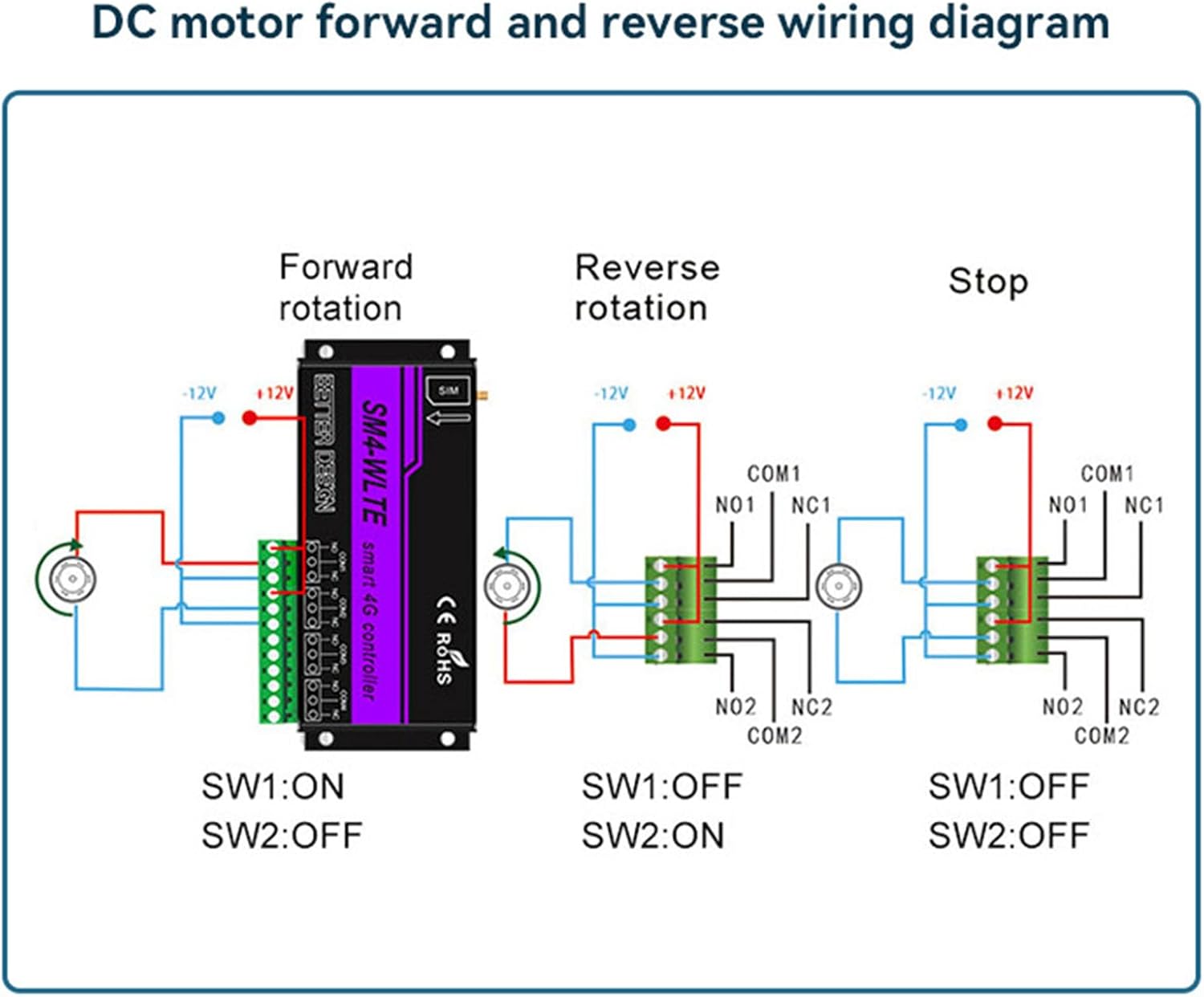
Image 5.3: DC Motor Forward and Reverse Wiring Diagram. This diagram details the connections for controlling a DC motor's direction (forward, reverse, stop) using two relay channels (e.g., COM1/NO1/NC1 and COM2/NO2/NC2) of the SM4-WLTE controller.

Image 5.4: Three-Phase Motor Forward and Reverse Control. This diagram illustrates how to interface the SM4-WLTE controller with AC contactors and an MCCB (Molded Case Circuit Breaker) to control the forward and reverse rotation of a 380V three-phase AC motor.
6. Operating Instructions
6.1 APP Control (Function 5)
The SM4-WLTE supports APP pushing notifications to keep you informed about device status and alarms. Ensure you have the dedicated application installed on your mobile phone and the device is properly configured for network access.
- Receive real-time alerts for security events, power status changes (on/off), and temperature/humidity thresholds.
- The APP provides a user-friendly interface for monitoring and managing your device remotely.

Image 6.1: APP Pushing Notifications. This image shows examples of notifications received on a mobile device, including security alerts, power status changes, and temperature threshold warnings.
6.2 Web Control (Function 6)
Centralized control of your equipment can be achieved via a web browser on a PC or other internet-enabled device. This allows for remote management and monitoring.
- Access the device's web interface by entering its IP address or domain into your browser.
- The web interface provides controls for each channel (e.g., ON/OFF/JOG) and displays device status.

Image 6.2: Web Control Interface. This screenshot displays the web-based control panel, allowing users to manage individual channels (e.g., channel1, channel2) with ON, OFF, and JOG functions.
6.3 Humidity Control (Function 8)
The SM4-WLTE can monitor humidity levels and trigger actions or alarms when predefined thresholds are met.
- Configure humidity thresholds through the APP or web interface.
- When detected humidity reaches a set value, the device can send alarm information (e.g., via SMS) and/or trigger a relay to activate connected equipment.

Image 6.3: Humidity Control Function. This image illustrates the humidity monitoring capability, showing a wine cellar environment and mobile phone screens with SMS alerts indicating humidity levels (e.g., 38% and 82%) relative to set thresholds.
6.4 SMS Commands and Power Outage Alarm
The device supports SMS commands for remote control and configuration. It also features an SMS power outage alarm.
- Specific SMS commands can be sent to the device's SIM card number to control relays or query status. Refer to the detailed command list in the full user manual (if provided separately).
- In case of a power outage, the device can send an SMS alert to pre-configured phone numbers, ensuring you are immediately notified of power interruptions.
7. Maintenance
To ensure the longevity and optimal performance of your Mumusuki SM4-WLTE controller, follow these general maintenance guidelines:
- Keep Clean: Regularly clean the device's exterior with a soft, dry cloth. Avoid using harsh chemicals or abrasive materials.
- Environmental Conditions: Operate the device within its specified temperature and humidity ranges. Avoid exposure to extreme temperatures, direct sunlight, or high moisture.
- Firmware Updates: Check the manufacturer's website or APP for any available firmware updates to ensure the device has the latest features and security patches.
- Connection Integrity: Periodically check all wiring and antenna connections to ensure they are secure and free from corrosion or damage.
- SIM Card: Ensure the SIM card remains active and has sufficient credit/data plan for SMS and 4G communication.
8. Troubleshooting
If you encounter issues with your SM4-WLTE controller, refer to the following common troubleshooting steps:
- No Power:
- Check if the power adapter is securely connected to both the device and the power outlet.
- Verify that the power outlet is functional.
- No 4G/GSM Signal:
- Ensure the SIM card is correctly inserted and active.
- Check if the 4G antenna is securely attached.
- Relocate the device to an area with better cellular reception.
- Confirm the SIM card has an active data plan and supports the device's frequencies.
- Relay Not Responding:
- Verify the wiring connections to the relay outputs are correct according to the diagrams.
- Check the control commands (APP, Web, SMS) for accuracy.
- Ensure the device has power and network connectivity.
- Incorrect Sensor Readings:
- Ensure the sensor probe is correctly connected to the designated port.
- Check for any physical damage to the sensor or its cable.
- Verify sensor calibration settings in the APP or web interface.
For further assistance, please contact Mumusuki customer support.
9. Warranty and Support
The Mumusuki SM4-WLTE controller comes with a standard manufacturer's warranty. Please refer to the warranty card included in your package or visit the official Mumusuki website for detailed warranty terms and conditions.
For technical support, product inquiries, or warranty claims, please contact Mumusuki customer service through their official channels. Contact information can typically be found on the product packaging, the official website, or through your point of purchase.
Manufacturer: Mumusuki
Model Number: Mumusuki8g5bd174yg