
Introduction
Thank you for purchasing the Paladone PlayStation LED Neon Light. This manual provides essential information for the safe and optimal use of your new gaming accessory. Please read these instructions carefully before setup and operation, and retain them for future reference.
Product Overview
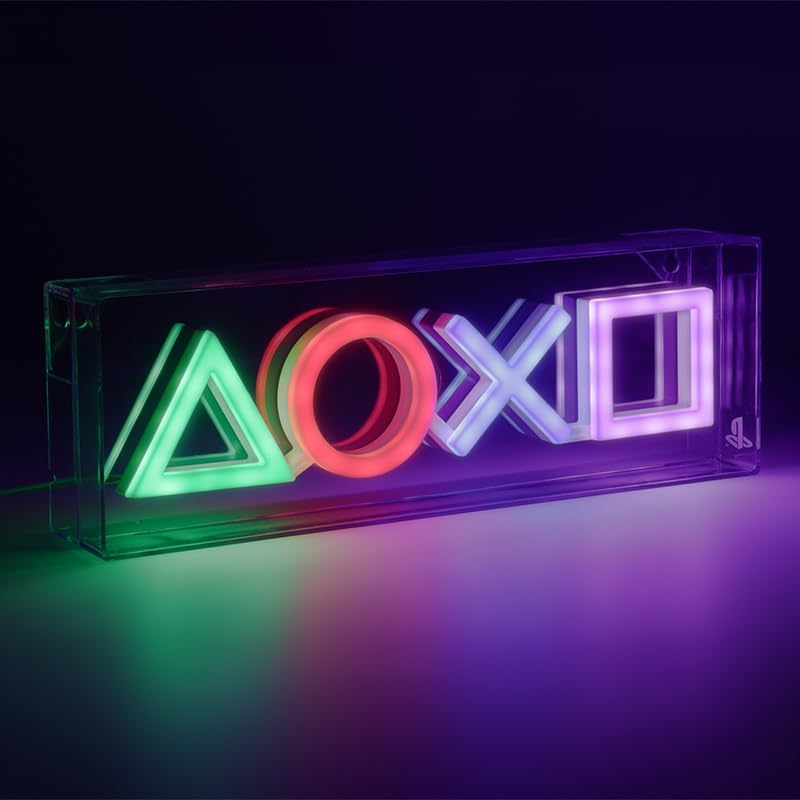
The Paladone PlayStation LED Neon Light is designed to add a vibrant, gaming-themed ambiance to any space. Featuring the iconic PlayStation controller symbols (triangle, circle, cross, square) in a four-color LED glow, this light is suitable for both free-standing display and wall mounting.
Key Features:
- Iconic Design: Displays the PlayStation controller symbols in vibrant LED colors.
- Versatile Placement: Can be used as a free-standing desk light or mounted on a wall.
- USB Powered: Conveniently powered via a USB cable (included).
- Officially Licensed: An authentic PlayStation product.
What's Included
- Paladone PlayStation LED Neon Light
- USB Power Cable
Note: A USB wall adapter (power brick) is not included and must be supplied by the user.
Setup
1. Power Connection:
- Locate the USB power cable.
- Insert the small end of the USB cable into the power port on the back or side of the LED Neon Light.
- Insert the larger end of the USB cable into a compatible USB power source (e.g., a USB wall adapter, computer USB port, or power bank).
2. Placement Options:
The PlayStation LED Neon Light offers two primary placement methods:
- Free-Standing: Place the light on any flat, stable surface such as a desk, shelf, or bedside table. Ensure it is positioned securely to prevent accidental falls.
- Wall Mounting: The light features keyholes on the back for wall mounting. Use appropriate wall fasteners (not included) suitable for your wall type and the weight of the light. Ensure the fasteners are securely installed before hanging the light.

Operating Instructions
To operate the Paladone PlayStation LED Neon Light:
- Ensure the light is properly connected to a USB power source as described in the Setup section.
- Locate the on/off switch on the power cable.
- Press the switch to turn the light ON. The PlayStation symbols will illuminate in their respective colors.
- Press the switch again to turn the light OFF.

Care and Maintenance
- Keep the light dry and away from moisture or liquids.
- Clean the surface with a soft, dry cloth. Do not use abrasive cleaners or solvents.
- Avoid dropping the light or subjecting it to strong impacts.
- Do not attempt to disassemble or modify the light, as this will void the warranty and may cause damage or injury.
Troubleshooting
Light Does Not Turn On:
- Ensure the USB cable is securely connected to both the light and the power source.
- Verify that the USB power source (e.g., wall adapter, computer port) is functioning correctly. Try a different USB port or adapter if available.
- Check the on/off switch on the cable to ensure it is in the 'ON' position.
Light Flickers or is Dim:
- Ensure the power source provides sufficient power (typically 5V USB).
- Check for any damage to the USB cable or connections.
Specifications
| Brand | Paladone |
| Model Number | PP12716PS |
| Product Dimensions | 11.81"L x 1.97"W (approx. 29.8cm wide) |
| Item Weight | 8.8 Ounces |
| Light Type | Neon (LED) |
| Style | Playstation |
| Material | Plastic |
| Color | Multicolor |
| Power Source | USB (5V) |

Warranty and Support
Specific warranty details are not provided within this manual. For information regarding warranty, returns, or technical support, please refer to the official Paladone website or contact their customer service directly. Keep your proof of purchase for any warranty claims.