
Introduction
Welcome to the user manual for the Diadens PCM Pro Biofeedback Therapy Device. This device is designed to provide biofeedback therapy and is the successor to the DENAS PCM 6 model. It incorporates advanced features to enhance your therapy experience.
Please read this manual thoroughly before using the device to ensure safe and effective operation.
Key Features
- Successor to DENAS PCM 6.
- FAVORITES Function: Allows users to save frequently used programs or frequencies for quick access.
- DESIGNER Function: Enables the creation and storage of individual treatment schemes directly on the device.
The Diadens PCM Pro is equipped with an English menu for ease of use.
Safety Information
Always consult with a healthcare professional before starting any new therapy, especially if you have pre-existing medical conditions.
- Do not use the device on open wounds, inflamed skin, or mucous membranes.
- Keep the device away from water and extreme temperatures.
- Use only original accessories and power adapters.
- Store out of reach of children.
- If you experience any discomfort or adverse reactions, discontinue use immediately and consult a medical professional.
This device is intended for personal use and should not replace professional medical advice or treatment.
Setup
Unpacking the Device
Carefully remove the Diadens PCM Pro device and all accessories from the packaging. Verify that all components are present: the device, charging cable, and this user manual.
Charging the Device
Before first use, fully charge the device. Connect the charging cable to the port at the bottom of the device and plug the other end into a suitable USB power source. The charging indicator on the screen will show the charging status.

Image: The Diadens PCM Pro device, showing its ergonomic design, control buttons, and a clear display screen with an English menu. The charging port is visible at the bottom.
Operating Instructions
Powering On/Off
To power on the device, press and hold the power button (usually marked with a circle and a vertical line) until the screen illuminates. To power off, press and hold the power button again until the device shuts down.
Navigating the Menu
Use the arrow buttons to navigate through the menu options. The 'OK' or 'Enter' button (often a central button) is used to select an option. The 'Back' button (often an arrow pointing left) allows you to return to the previous screen.
Using the FAVORITES Function
The FAVORITES function allows you to quickly access frequently used programs or frequencies. To add a program to FAVORITES, navigate to the desired program, then select the 'Add to Favorites' option (refer to on-screen prompts). To access, select 'FAVORITES' from the main menu.
Using the DESIGNER Function
The DESIGNER function enables you to create and save personalized treatment schemes. Navigate to the 'DESIGNER' option in the menu. Follow the on-screen instructions to select frequencies, durations, and sequences, then save your custom scheme.
Applying the Device
The device is designed for direct skin contact. Ensure the contact electrodes are clean before application. Apply the device firmly to the desired area of the body.

Image: A close-up view of the two metallic contact electrodes located on the top surface of the Diadens PCM Pro device, which make direct contact with the skin during therapy.
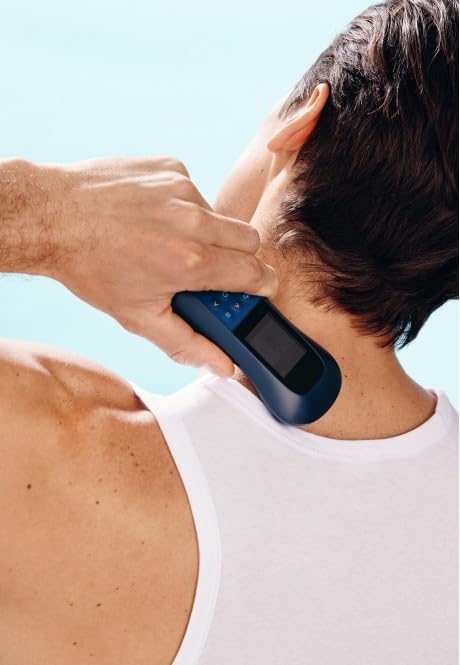
Image: A person holding the Diadens PCM Pro device against the back of their neck, demonstrating a common application area for the therapy.

Image: A person applying the Diadens PCM Pro device to their lower back, illustrating another typical area for therapeutic application.

Image: A person holding the Diadens PCM Pro device against their arm, showing the versatility of the device for different body parts.
Maintenance
Cleaning the Device
After each use, wipe the device, especially the electrodes, with a soft, damp cloth. Do not use abrasive cleaners or immerse the device in water. Ensure the device is completely dry before storage.
Storage
Store the device in a cool, dry place, away from direct sunlight and extreme temperatures. Keep it in its original packaging or a protective case to prevent damage.
Battery Care
To prolong battery life, avoid fully discharging the device frequently. If storing for an extended period, charge the battery to approximately 50% and recharge every few months.
Troubleshooting
| Problem | Possible Cause | Solution |
|---|---|---|
| Device does not turn on | Low battery; Device malfunction | Charge the device fully. If problem persists, contact customer support. |
| No sensation during therapy | Poor skin contact; Intensity too low; Program not active | Ensure firm contact with skin. Increase intensity gradually. Verify program is running. |
| Screen is unresponsive | Software glitch; Low battery | Recharge the device. Try restarting the device by holding the power button. |
If you encounter issues not listed here, or if the suggested solutions do not resolve the problem, please contact customer support.
Specifications
- Model: PCM Pro (N-128)
- Brand: Generisch
- ASIN: B0CNZKV5JB
- Power Source: Internal rechargeable battery
- Display: Digital screen with English menu
- Functions: FAVORITES, DESIGNER, various therapy programs
- Dimensions: Ergonomic handheld design (approximate)
- Weight: Lightweight (approximate)
Warranty and Support
For warranty information and technical support, please refer to the documentation provided with your purchase or contact the manufacturer directly.
Manufacturer: Vitalik Kohut
Manufacturer Reference: N-128
First Available on Amazon.de: 25. November 2023