1. Important Safety Instructions
Before operating the GYMAX Walking Pad, please read and understand all safety instructions. Failure to follow these instructions may result in injury or damage to the product.
- Always place the walking pad on a flat, stable surface.
- Ensure adequate clear space around the walking pad (at least 2 feet on all sides and 6 feet behind).
- Keep children and pets away from the walking pad during operation.
- Do not operate the walking pad if it has a damaged cord or plug, or if it is not working correctly.
- Wear appropriate athletic footwear when using the walking pad.
- Do not exceed the maximum weight capacity of 265 lbs (120 kg).
- Unplug the walking pad from the power outlet when not in use or before cleaning and maintenance.
- This appliance requires a three-prong grounded outlet.
2. Product Overview
The GYMAX Walking Pad is a compact and portable under-desk treadmill designed for home and office use. It features a 2.25HP motor, LED display, remote control, and a 7-layer running belt for a comfortable exercise experience.

Figure 1: The GYMAX Walking Pad features built-in wheels for easy movement and storage. The image shows a woman effortlessly moving the walking pad across a room.
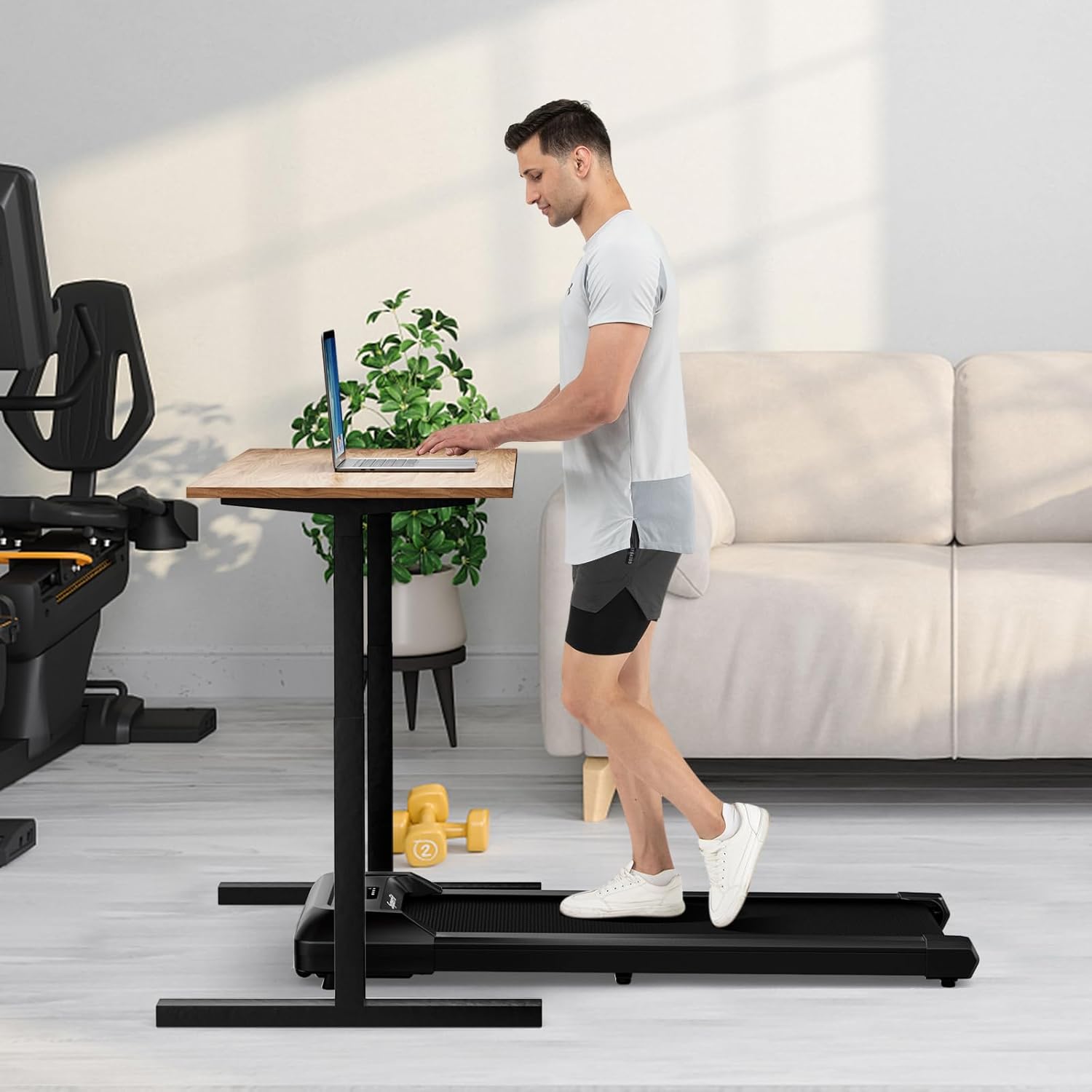
Figure 2: The compact design allows for use under a standing desk, integrating exercise into your workday.
3. Setup and Assembly
The GYMAX Walking Pad comes 100% pre-assembled, requiring minimal setup before first use.
3.1 Unpacking
- Carefully remove the walking pad from its packaging.
- Inspect the unit for any signs of damage during transit. If damaged, contact customer support immediately.
- Ensure all included components are present: Walking Pad unit, Power Cord, User Manual, and Maintenance Kit (including lubrication oil).
3.2 Placement
- Place the walking pad on a firm, level surface. Avoid placing it on thick carpets, which may obstruct ventilation.
- Ensure the walking pad is near a three-prong grounded electrical outlet.
- The compact 6-inch thickness allows for convenient storage under a bed or sofa when not in use.
3.3 Power Connection
- Connect the power cord to the walking pad's power input.
- Plug the power cord into a standard 110V, 60Hz three-prong grounded electrical outlet.
3.4 Remote Control Battery
- The remote control may not include a battery. Insert the required battery type (typically a CR2032 coin cell battery) into the remote control before use.
4. Operating Instructions
The GYMAX Walking Pad is operated using the included remote control and features an integrated LED display.
4.1 Power On/Off
- To power on, ensure the walking pad is plugged in and press the power button on the remote control. The LED display will illuminate.
- To power off, press the power button on the remote control again.
4.2 Adjusting Speed
- The walking pad offers a speed range of 0.6 to 3.8 MPH.
- Use the '+' button on the remote control to increase speed.
- Use the '-' button on the remote control to decrease speed.

Figure 3: The LED display provides real-time tracking of speed, time, distance, and calories. The remote control allows for easy adjustment of settings.
4.3 Incline Adjustment
- The walking pad includes detachable foot mats designed for incline adjustment and damping.
- To create a slight incline (approximately 2%), place the foot mats under the rear of the walking pad as indicated in the product diagrams.
- Ensure the foot mats are securely positioned before use.

Figure 4: Detachable foot mats can be used to adjust the incline and provide additional damping for varied workout intensities.
4.4 Monitoring Exercise Data
- The integrated LED display shows real-time data including speed, time, distance, and calories burned.
- This allows you to monitor your progress and adjust your workout as needed.
5. Maintenance
Regular maintenance ensures the longevity and optimal performance of your GYMAX Walking Pad.
5.1 Cleaning
- Always unplug the walking pad before cleaning.
- Wipe down the surface of the walking pad and the display with a damp cloth. Avoid using abrasive cleaners or solvents.
- Keep the area around the running belt clean and free of dust and debris.
5.2 Running Belt Lubrication
- The walking pad includes a maintenance kit with lubrication oil.
- Regular lubrication of the running belt is crucial for smooth operation and to prevent wear. Refer to the specific instructions in the included maintenance guide for frequency and application method.
- Typically, lubrication is recommended every few months depending on usage.
5.3 Running Belt Adjustment
- If the running belt becomes misaligned or feels loose, it may require adjustment.
- Consult the detailed instructions in the included user manual for proper belt tensioning and centering procedures.
6. Troubleshooting
If you encounter issues with your GYMAX Walking Pad, refer to the following common troubleshooting steps.
- Walking Pad Does Not Power On:
Ensure the power cord is securely plugged into both the walking pad and a working three-prong grounded electrical outlet. Check if the main power switch on the unit (if present) is in the 'ON' position. - Remote Control Not Responding:
Verify that the remote control has a working battery installed. Replace the battery if necessary. Ensure there are no obstructions between the remote control and the walking pad's receiver. - Running Belt Stops or Slips:
This may indicate the belt needs lubrication or adjustment. Refer to the 'Maintenance' section for instructions on lubrication and belt tensioning. Ensure you are within the maximum weight capacity. - Unusual Noise During Operation:
Check for any foreign objects caught in the running belt or motor area. Ensure the walking pad is on a level surface. If the noise persists, contact customer support. - Display Not Showing Correct Data:
Try powering off and restarting the walking pad. If the issue continues, contact customer support.
For issues not covered here, or if troubleshooting steps do not resolve the problem, please contact GYMAX customer support.
7. Specifications
Detailed technical specifications for the GYMAX Walking Pad.
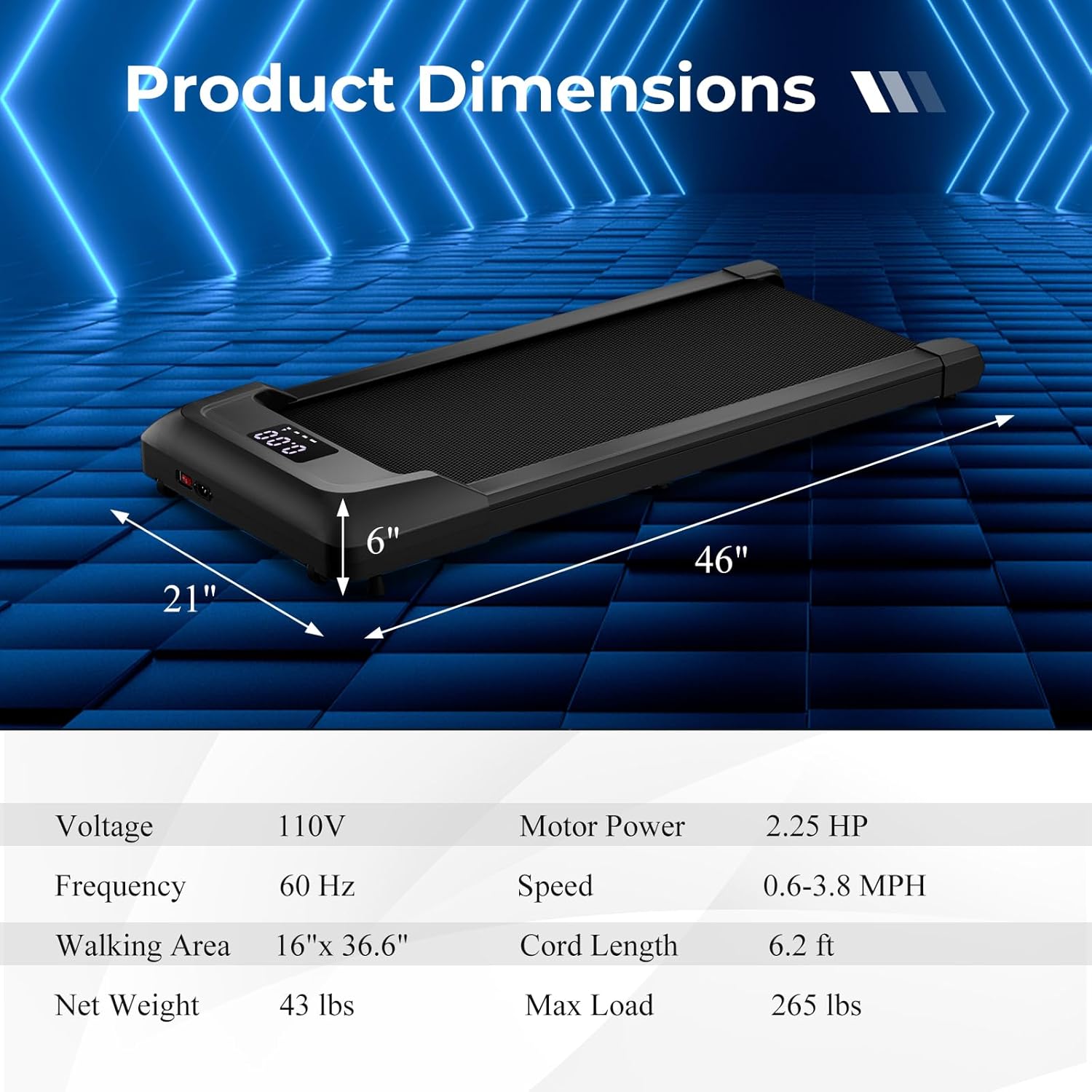
Figure 5: Visual representation of the walking pad's dimensions and key specifications.
| Feature | Specification |
|---|---|
| Motor Horsepower | 2.25 HP |
| Speed Range | 0.6 - 3.8 MPH |
| Maximum Weight Capacity | 265 lbs (120 kg) |
| Running Belt Dimensions | 36.6" L x 16" W |
| Product Dimensions (Overall) | 46" L x 21" W x 6" H (116.84 x 53.34 x 15.24 cm) |
| Item Weight | 43 lbs (19.5 kg) |
| Display Type | LED (Speed, Time, Distance, Calories) |
| Power Source | Corded Electric |
| Voltage / Frequency | 110V / 60Hz |
| Cord Length | 6.2 ft |
| Frame Material | Alloy Steel |
| Main Materials | Acrylonitrile Butadiene Styrene (ABS), Metal, PC |
| Noise Level | < 45 dB |
8. Warranty and Support
For warranty information, please refer to the documentation included with your purchase or contact the seller directly. GYMAX is committed to providing quality products and customer satisfaction.
If you require technical assistance, have questions about operation, or need to report a defect, please contact GYMAX customer support through the retailer where the product was purchased or visit the official GYMAX website for contact details.


