
1. Introduction
Thank you for purchasing the JOC H011UR Portable FM Radio. This device is designed to provide high-quality stereo sound with strong signal reception, offering both FM radio functionality and media playback from USB flash drives and TF memory cards. Please read this manual carefully to ensure proper use and maintenance of your radio.
2. Safety Information
- Do not expose the device to water, moisture, or extreme temperatures.
- Avoid dropping or subjecting the radio to strong impacts.
- Do not attempt to disassemble or repair the unit yourself. Refer all servicing to qualified personnel.
- Keep the device away from direct sunlight and heat sources.
- Use only the specified charging cable and power adapter (if included) to prevent damage.
- Dispose of batteries according to local regulations.
3. Package Contents
Please check the package for the following items:
- JOC H011UR Portable FM Radio
- Quick Start Guide
- Charging Cable (USB)
- Rechargeable Battery (may be pre-installed)
Note: Contents may vary slightly depending on the region or specific package.
4. Product Overview
Familiarize yourself with the various parts of your JOC H011UR radio.

Figure 4.1: JOC H011UR Portable FM Radio Packaging. The retail box displaying the model number and key features.

Figure 4.2: Top view of the JOC H011UR Portable FM Radio, showing the extendable antenna and power switch. The antenna can be extended for better FM reception.

Figure 4.3: Side view of the JOC H011UR Portable FM Radio, highlighting the DC 5V charging port, headphone jack, TF card slot, and USB port. These ports allow for charging, private listening, and media playback.
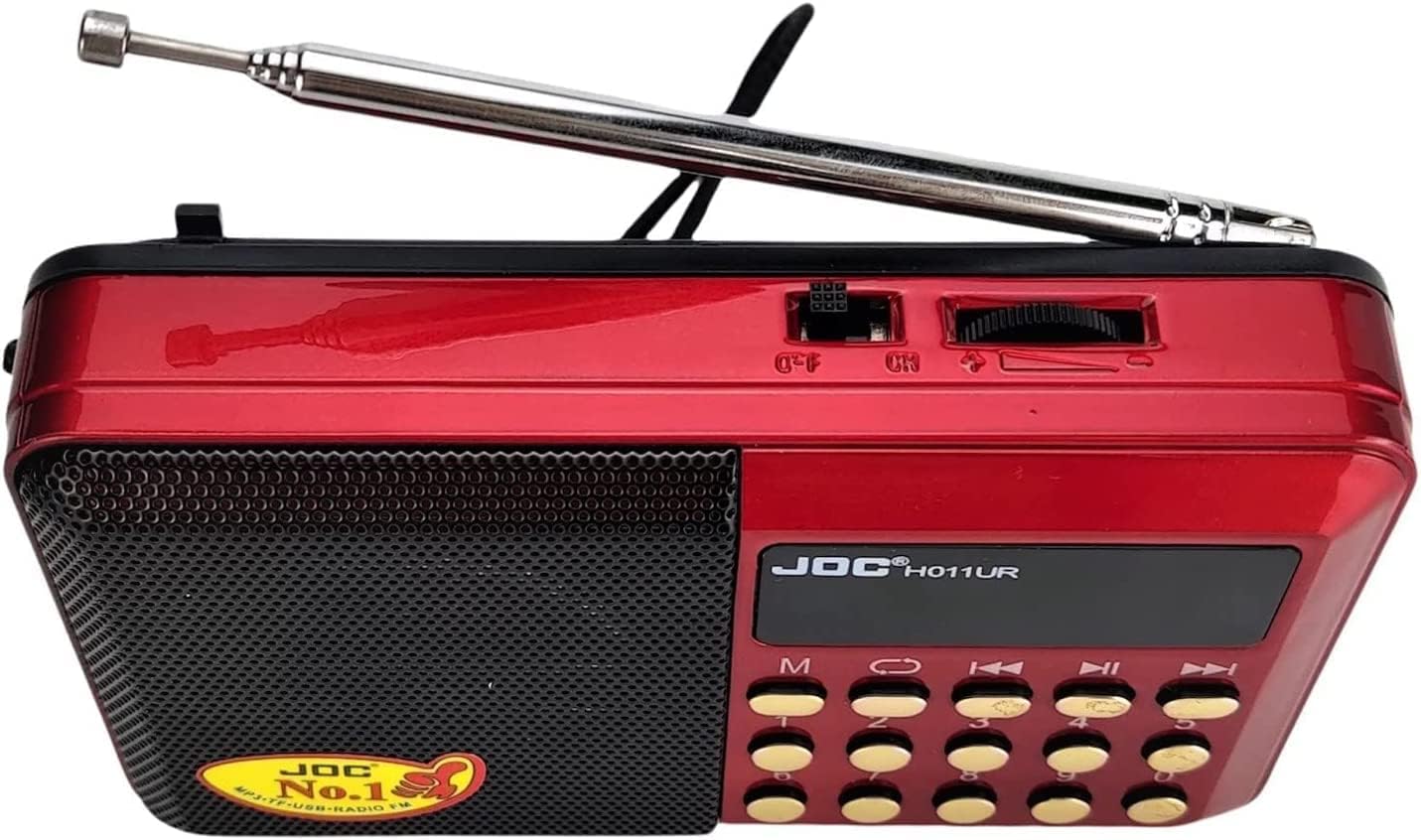
Figure 4.4: Rear view of the JOC H011UR Portable FM Radio, displaying the battery compartment and authenticity marks. Ensure the battery is correctly inserted for operation.
5. Setup
5.1. Battery Installation
- Locate the battery compartment on the back of the radio (refer to Figure 4.4).
- Open the battery compartment cover.
- Insert the rechargeable battery, ensuring the polarity (+/-) matches the indicators inside the compartment.
- Close the battery compartment cover securely.
5.2. Charging the Battery
- Connect the small end of the USB charging cable to the DC 5V port on the side of the radio (refer to Figure 4.3).
- Connect the larger end of the USB cable to a compatible USB power adapter (not included) or a computer's USB port.
- The charging indicator light (if present) will illuminate, indicating that the battery is charging.
- Once fully charged, the indicator light may change color or turn off. Disconnect the charging cable.
6. Operating Instructions
6.1. Power On/Off
To turn the radio on or off, slide the power switch located on the top of the device (refer to Figure 4.2) to the 'ON' or 'OFF' position.
6.2. FM Radio Operation
- Extend the telescopic antenna for optimal reception (refer to Figure 4.2).
- Press the 'M' (Mode) button to select FM radio mode. The LCD display will show the current frequency.
- Use the tuning buttons (often labeled with arrows or 'PREV/NEXT') to scan for radio stations. A long press may initiate an automatic scan.
- Adjust the volume using the dedicated volume control knob or buttons.
6.3. USB/TF Card Playback
- Insert a USB flash drive into the USB port or a TF (MicroSD) card into the TF card slot (refer to Figure 4.3).
- The radio should automatically switch to USB or TF card playback mode. If not, press the 'M' (Mode) button to cycle through modes until the correct mode is selected.
- Use the playback control buttons (Play/Pause, Previous, Next) to manage your audio files.
6.4. Using Headphones
To listen privately, plug standard 3.5mm headphones (not included) into the headphone jack on the side of the radio (refer to Figure 4.3). The internal speaker will automatically mute.
7. Maintenance
7.1. Cleaning
Wipe the radio with a soft, dry cloth. Do not use liquid cleaners or abrasive materials, as they may damage the surface.
7.2. Storage
When not in use for extended periods, store the radio in a cool, dry place, away from direct sunlight and extreme temperatures. It is advisable to fully charge the battery before long-term storage and recharge it every few months to maintain battery health.
7.3. Battery Care
To prolong battery life, avoid fully discharging the battery frequently. Charge the battery regularly, even if the radio is not in constant use.
8. Troubleshooting
| Problem | Possible Cause | Solution |
|---|---|---|
| No power/Radio does not turn on | Battery is low or not installed correctly. | Charge the battery. Ensure the battery is inserted with correct polarity. |
| Poor FM reception | Antenna not extended or weak signal area. | Fully extend the telescopic antenna. Try repositioning the radio or moving to an area with better signal. |
| No sound from speaker | Volume too low or headphones connected. | Increase the volume. Disconnect headphones if not intended for private listening. |
| USB/TF card not playing | Card/drive not inserted correctly or unsupported file format. | Ensure the USB drive or TF card is fully inserted. Check if audio files are in a supported format (e.g., MP3). |
9. Specifications
| Feature | Detail |
|---|---|
| Brand Name | JOC |
| Model | H011UR |
| Tuner Technology | FM Waves |
| Supported Radio Bands | FM |
| Display Type | LCD |
| Connectivity Technology | Wireless |
| Special Features | Portable |
| Power Source | Battery Powered |
| Color | Red |
| Product Dimensions (L x W x H) | 6 x 17 x 3 cm |
| Package Dimensions | 14.1 x 8.1 x 4.4 cm; 200 grams |
| Country of Origin | China |
| Included Components | Quick Start Guide |
10. Warranty Information
The JOC H011UR Portable FM Radio comes with a standard manufacturer's warranty. Please refer to the warranty card included in your package for specific terms, conditions, and duration. Keep your purchase receipt as proof of purchase for any warranty claims.
11. Support
For technical assistance, troubleshooting beyond this manual, or inquiries regarding your JOC H011UR Portable FM Radio, please contact the retailer or the manufacturer's customer support. Contact details can typically be found on the product packaging or the manufacturer's official website.