
1. Product Overview
The Frigidaire Gallery Countertop Nugget Ice Maker is designed to produce chewable, crunchy nugget ice, similar to what is found in restaurants. This contemporary countertop unit can produce up to 44 pounds of ice per day and features a large-capacity bin that holds up to 3 pounds of ice. The first batch of ice is typically ready within 10 minutes of operation. It includes a built-in water reservoir, reducing the need for frequent refills, and features a touch screen control panel for intuitive operation. A self-cleaning mode is integrated to help maintain hygiene and ensure fresh-tasting ice.

Image: Front view of the Frigidaire Gallery Nugget Ice Maker, showcasing its sleek design and the ice bin filled with nugget ice.
2. Important Safety Information
Please read all instructions thoroughly before operating this appliance to ensure safe and efficient use. Retain this manual for future reference.
- Ensure the ice maker is placed on a stable, level surface away from direct sunlight or heat sources.
- Do not immerse the appliance, power cord, or plug in water or other liquids.
- Unplug the ice maker from the electrical outlet before cleaning, performing maintenance, or when not in use.
- Use only potable water in the reservoir.
- This appliance is for household use only. Do not use outdoors.
- Keep children away from the appliance during operation and cleaning.
- Do not operate any appliance with a damaged cord or plug, or after the appliance malfunctions or has been damaged in any manner.
3. Product Components
The Frigidaire Gallery Nugget Ice Maker package includes the following components:
- Icemaker Unit
- Ice Bin
- Ice Scoop
- Drip Tray

Image: Visual representation of the ice maker highlighting key features and included accessories like the ice scoop and large ice basket.
4. Setup and Installation
- Unpacking: Carefully remove all packaging materials and inspect the ice maker for any damage. Ensure all components listed in Section 3 are present.
- Placement: Position the ice maker on a flat, stable countertop. The compact design allows it to fit under most kitchen cabinets. Ensure adequate ventilation around the unit.
- Initial Cleaning: Before first use, clean the ice bin and water reservoir. It is recommended to run the self-cleaning cycle (refer to Section 6) with clean water before making ice for consumption.
- Power Connection: Plug the ice maker into a grounded electrical outlet.

Image: The ice maker positioned on a kitchen countertop, demonstrating its suitable size for fitting beneath standard kitchen cabinets.
5. Operating Instructions
- Filling the Water Reservoir: Open the top lid and pour potable water into the reservoir. The "Add Water" indicator light on the control panel will illuminate when the water level is low.
- Starting Ice Production: Press the "Ice" button on the touch screen control panel. The "Power" indicator light will illuminate, and the unit will begin the ice-making process.
- Ice Size Selection: If available on your model, use the "S/L" button to select between small or large nugget ice sizes.
- Monitoring Ice Production: The ice maker will produce its first batch of ice within approximately 10-15 minutes. The "Ice Full" indicator light will illuminate when the ice bin is full, and the unit will pause production.
- Dispensing Ice: Pull out the ice bin to access the nugget ice. Use the provided ice scoop to retrieve ice.
- Important Note on Ice Storage: This ice maker is designed for ice production, not long-term storage. The unit does not keep ice frozen once it's made. To prevent melting, transfer the ice to your freezer promptly after it is produced.
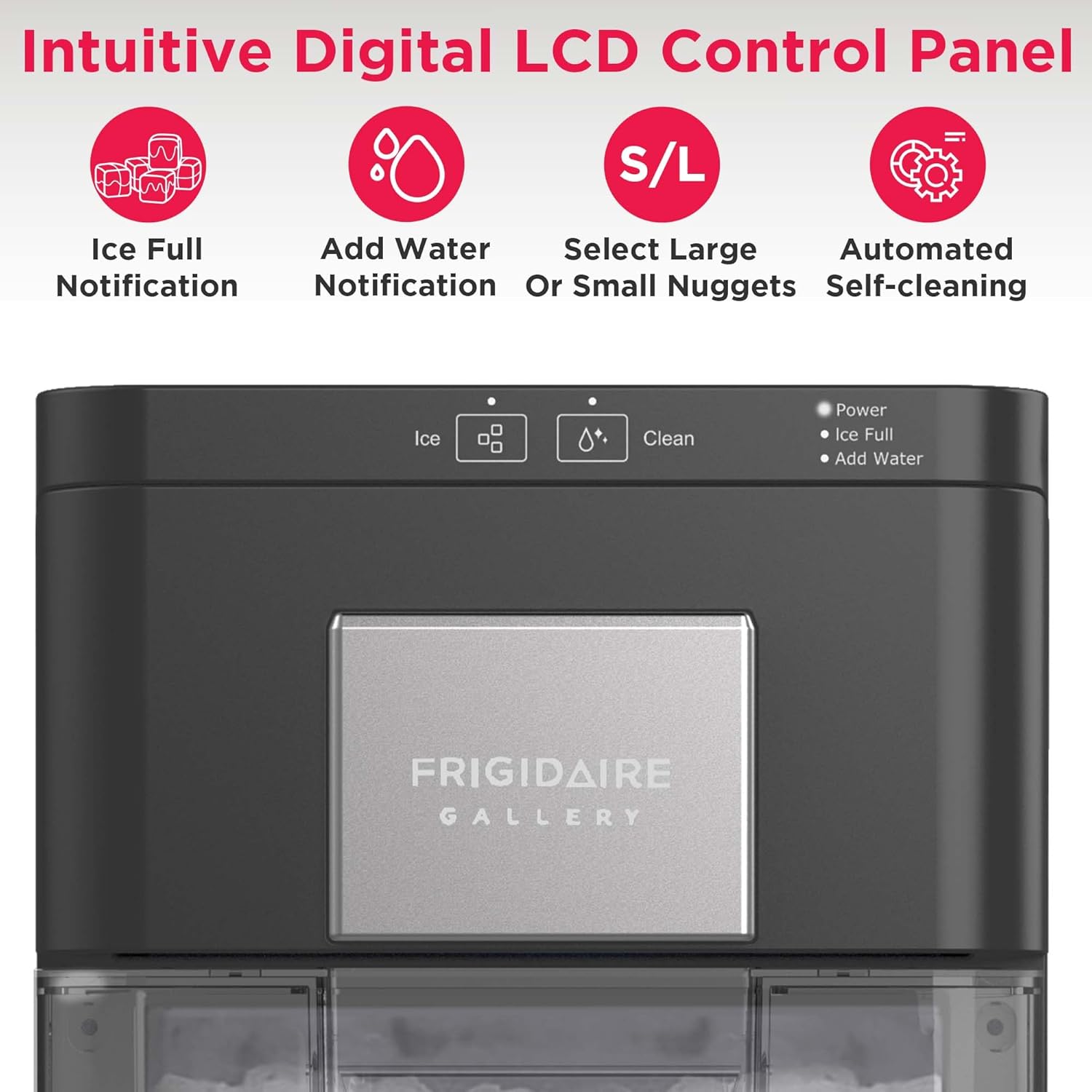
Image: Detailed view of the intuitive digital LCD control panel, showing indicators for ice status and function buttons.

Image: Demonstrates the effortless process of scooping ice from the unit's accessible ice bin.
6. Maintenance and Cleaning
Regular cleaning and maintenance will ensure the longevity and optimal performance of your ice maker.
- Self-Cleaning Mode: The ice maker features a built-in self-cleaning mode. To activate, ensure the unit is empty of ice and water, then fill the reservoir with clean water and press the "Clean" button on the control panel. Follow the instructions in your full product manual for specific steps and recommended cleaning solutions (e.g., vinegar solution).
- Draining Water: Periodically drain the water from the reservoir, especially if the unit will not be used for an extended period. This typically involves turning the unit around to access a drain plug or hose.
- Exterior Cleaning: Wipe the exterior of the ice maker with a soft, damp cloth. Do not use abrasive cleaners or solvents.
- Ice Bin and Scoop: Wash the ice bin and scoop with warm, soapy water, rinse thoroughly, and dry before returning them to the unit.
7. Troubleshooting
If you encounter issues with your ice maker, refer to the following common problems and solutions:
| Problem | Possible Cause | Solution |
|---|---|---|
| Ice maker not producing ice. | No water in reservoir; power issue; ice bin full. | Fill water reservoir; check power connection; empty ice bin. |
| Ice melts quickly in the bin. | Unit is not a freezer; ambient temperature too high. | Transfer ice to a freezer immediately after production. |
| Loud noise during operation. | Normal operational sounds; internal component issue. | Some noise is normal. If excessive or unusual, contact customer support. |
| Water drains into overflow basin. | Valve stuck open; unit not drained properly. | Perform a thorough cleaning and draining cycle. If issue persists, contact support. |
For issues not covered here, or if troubleshooting steps do not resolve the problem, please contact Frigidaire customer support.
8. Specifications
| Feature | Detail |
|---|---|
| Brand | Frigidaire |
| Model Name | EFIC165 |
| Product Dimensions (D x W x H) | 16.75"D x 11.75"W x 20.25"H |
| Ice Production Capacity | Up to 44 lbs per day |
| Ice Bin Capacity | 3 lbs |
| Wattage | 500 watts |
| Voltage | 120 Volts |
| Material | Stainless Steel, Plastic |
| Installation Type | Countertop |
9. Warranty and Support
Warranty information for your Frigidaire Gallery Countertop Nugget Ice Maker is typically included with your purchase documentation. Please refer to the warranty card or leaflet provided in the product packaging for details regarding coverage, terms, and conditions.
For technical assistance, service, or to inquire about replacement parts, please contact Frigidaire customer support through their official website or the contact information provided in your product documentation. When contacting support, please have your model number (EFIC165) and purchase date available.
Note: Official product videos from the manufacturer, if available, can often be found on the Frigidaire official website or their authorized retail channels.