1. Introduction
This manual provides instructions for the AULCMEET Replacement Remote Control, model CXW-55UA10V3. This remote is designed to replace original remote controls for various GRUNKEL SMART-TECH and LED TV models. It requires no programming or setup, offering a straightforward replacement solution.

Image 1.1: Front view of the AULCMEET Replacement Remote Control.
2. Compatible TV Models
This remote control is compatible with a wide range of GRUNKEL SMART-TECH and LED TV models. Below is a list of some compatible models:
- GRUNKEL SMART-TECH: 40FA20T1, 50UA10V3, 65UA20V3, 32HA10T3, 55UA10V3, 24HA20T3, 32HA10V3, 75UA10T1, 43UA10V3, 50UA10T3, 43FA10V3, 40FA10V3, 55UA20V3, 50UA20V3, 65UA10V3
- LED TV Models: LED-322G0Q, LED-5022G0Q, LED-3211G00, LED-240GOO, LED-4322G0Q, LED-3221GOQ, LED-4021GQQ, LED-402GOO, LED-5021KG0Q, LED-2411GQQ, LED-3221GOIN, LED-5521KG0Q
3. Setup and Battery Installation
The AULCMEET replacement remote control does not require any programming. Simply insert batteries to begin operation.
3.1. Battery Installation
- Locate the battery compartment on the back of the remote control.
- Slide open the battery compartment cover.
- Insert two AAA batteries (not included), ensuring correct polarity (+ and -) as indicated inside the compartment.
- Close the battery compartment cover securely.
Note: Always replace both batteries at the same time with new ones. Do not mix old and new batteries or different types of batteries.
4. Operating Instructions
The remote control features an ergonomic design with soft rubber buttons for comfortable and responsive use. Its infrared connectivity ensures a maximum range of 10 meters.
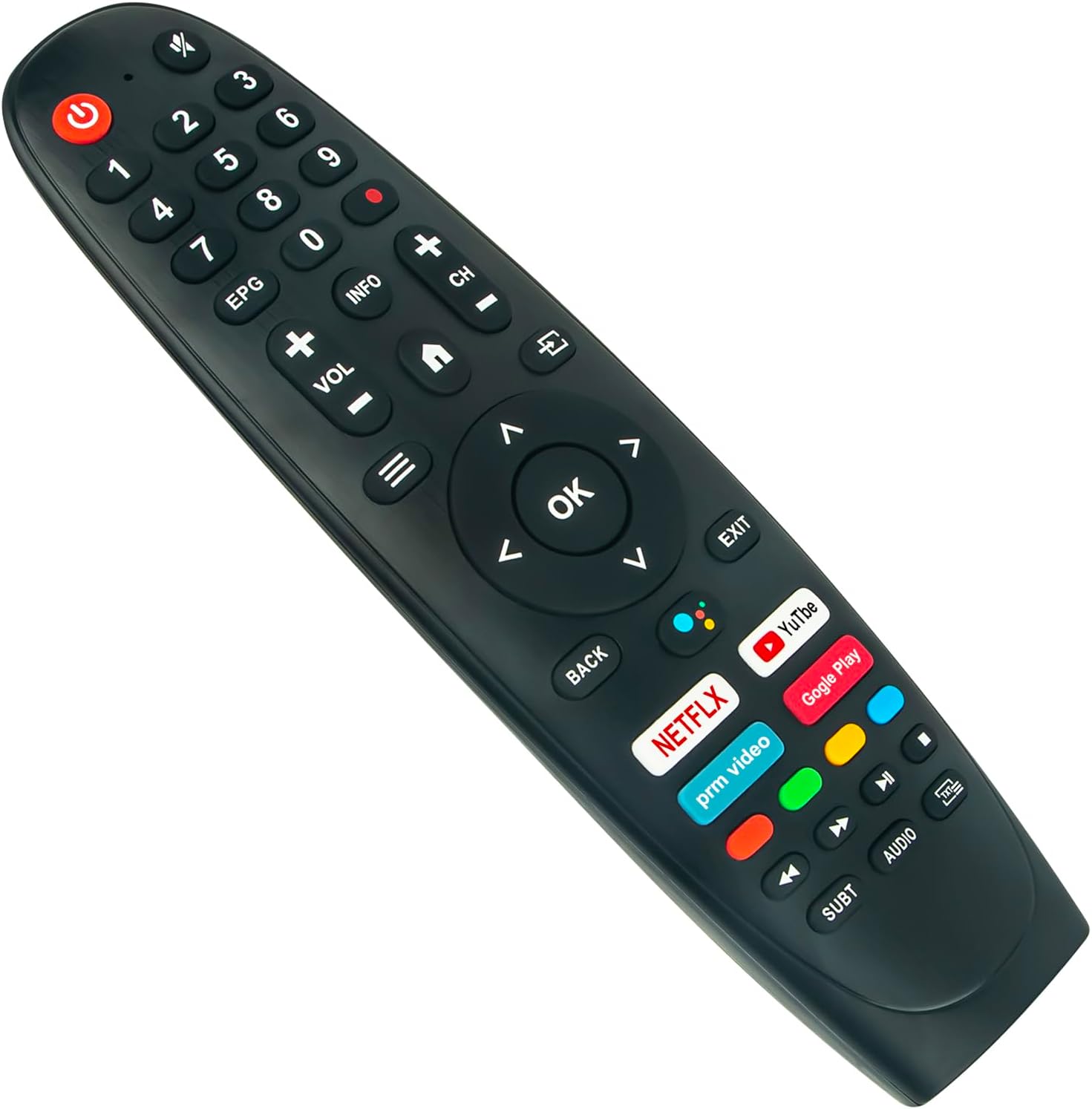
Image 4.1: Angled view of the AULCMEET Replacement Remote Control, showing button layout.
4.1. Button Functions
| Button | Function |
|---|---|
| Power | Turns the TV on or off. |
| Mute | Mutes or unmutes the TV sound. |
| 0-9 | Direct channel selection. |
| EPG | Accesses the Electronic Program Guide. |
| INFO | Displays program information. |
| Color Buttons (Red, Green, Yellow, Blue) | Specific functions within menus or applications. |
| VOL +/- | Adjusts the volume level. |
| CH +/- | Changes the TV channel. |
| Home (House icon) | Returns to the main home screen. |
| Menu (Three lines icon) | Opens the TV's main menu. |
| Input (Square with arrow icon) | Selects the input source (HDMI, AV, etc.). |
| Navigation (Up, Down, Left, Right, OK) | Navigates through menus and confirms selections. |
| BACK | Returns to the previous screen or menu. |
| EXIT | Exits the current menu or application. |
| Netflix, YouTube, Prime Video, Google Play | Direct access buttons for streaming services. |
| Media Control (Rewind, Play/Pause, Fast Forward, Stop) | Controls media playback. |
| SUBT | Activates or deactivates subtitles. |
| AUDIO | Selects audio tracks or modes. |
| TV/Input (Icon) | Switches between TV and external input sources. |
5. Maintenance
Proper maintenance ensures the longevity and optimal performance of your remote control.
- Cleaning: Use a soft, dry cloth to clean the remote control. Avoid using liquid cleaners, solvents, or abrasive materials, as these can damage the surface or internal components.
- Battery Replacement: Replace batteries when the remote's response becomes sluggish or stops working. Always dispose of used batteries responsibly according to local regulations.
- Storage: Store the remote control in a cool, dry place away from direct sunlight, extreme temperatures, and high humidity.
6. Troubleshooting
If you encounter issues with your remote control, refer to the following troubleshooting tips:
- Remote not responding:
- Check battery polarity to ensure batteries are inserted correctly.
- Replace batteries with new ones. Weak batteries are a common cause of unresponsiveness.
- Ensure there are no physical obstructions between the remote control and the TV's infrared receiver.
- Confirm that the remote control is compatible with your specific TV model. Refer to the 'Compatible TV Models' section.
- Buttons are not working:
- Clean the remote surface, especially around the unresponsive buttons, to remove any dirt or debris.
- Ensure batteries are properly installed and have sufficient charge.
- Short transmission range:
- Replace batteries, as low battery power can reduce the effective range.
- Ensure no strong light sources (such as direct sunlight or bright fluorescent lights) are interfering with the infrared signal.
7. Specifications
- Brand: AULCMEET
- Model Name: CXW-55UA10V3
- Color: Black
- Connectivity Technology: Infrared
- Special Features: Ergonomic design
- Compatible Devices: GRUNKEL SMART-TECH and LED TVs (various models listed in Section 2)
- Maximum Range: 10 Meters
- Number of Buttons: 35
- Controller Type: Button control
- Maximum Number of Supported Devices: 1
8. Warranty and Support
This product comes with a standard manufacturer's warranty. For warranty claims or technical support, please contact your retailer or the manufacturer directly. Keep your purchase receipt as proof of purchase. Information regarding spare parts availability and software updates is not available at this time.


