
Introduction
Thank you for choosing the Havit Gamenote MS1033 RGB Gaming Mouse. This manual provides essential information for setting up, operating, maintaining, and troubleshooting your new gaming mouse. Please read these instructions carefully to ensure optimal performance and longevity of your device.
Product Overview
The Havit Gamenote MS1033 is a high-performance gaming mouse designed for precision and customization. It features adjustable macros, vibrant RGB lighting, and a comfortable, non-slip design.

Image: The Havit Gamenote MS1033 RGB Gaming Mouse, showcasing its overall design and illuminated RGB elements.
Key Features:
- RGB 16 Million Colors: Customizable lighting options to match your setup.
- Adjustable Macro: Program complex commands for enhanced gameplay.
- High Sensitivity: Up to 8000 DPI for precise tracking.
- Non-slip Surface Design: Ensures a secure grip during intense gaming sessions.
- Button Life: Durable switches rated for 3 Million clicks.
- Number of Buttons: 9 programmable buttons for versatile control.

Image: A side view of the mouse, showing the strategically placed G1 and G2 buttons, along with a profile switch for quick adjustments.
Setup Instructions
Setting up your Havit Gamenote MS1033 mouse is a straightforward process.
- Connect the Mouse: Plug the USB connector of the mouse into an available USB port on your computer or gaming console.
- Driver Installation: For most operating systems (Windows, macOS, Linux), the mouse will be recognized automatically as a plug-and-play device, and standard drivers will be installed. No additional software is typically required for basic functionality.
- Software Installation (Optional): To access advanced features such as macro programming and detailed RGB customization, you may need to download the official Havit Gamenote software from the manufacturer's website. Refer to the software's instructions for installation and usage.
Operating Instructions
The MS1033 mouse offers various functions for an enhanced user experience.
Basic Functions:
- Left Click: Primary action.
- Right Click: Secondary action, often for context menus.
- Scroll Wheel: Scroll up/down, and click for middle-button functionality.
DPI Adjustment:
The mouse features adjustable DPI (Dots Per Inch) settings, allowing you to change cursor sensitivity on the fly. Use the dedicated DPI button (often located behind the scroll wheel) to cycle through preset DPI levels. The current DPI level may be indicated by a change in the mouse's LED color or pattern.
Programmable Buttons:
The MS1033 has 9 buttons, many of which are programmable. These can be customized using the Havit Gamenote software to perform specific actions, launch applications, or execute macros.
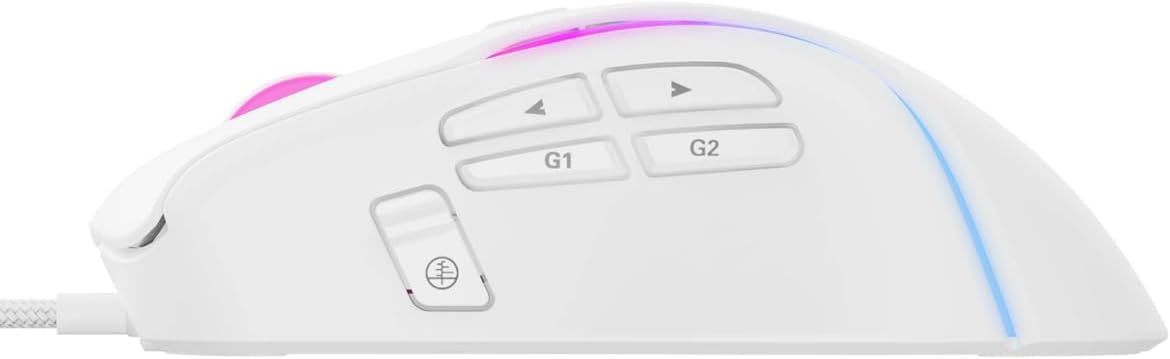
Image: A detailed view of the side buttons, including G1, G2, and standard navigation buttons, which can be programmed for various functions.
Macro Programming
The adjustable macro feature allows you to record a sequence of keystrokes and mouse clicks, then assign them to a single button. This is particularly useful for complex actions in games or repetitive tasks in productivity software.
- Install Software: Ensure the Havit Gamenote software is installed on your computer.
- Open Macro Editor: Launch the software and navigate to the macro editor section.
- Record Macro: Start recording and perform the desired sequence of actions.
- Save and Assign: Save the recorded macro and assign it to one of the programmable buttons on your MS1033 mouse.
Refer to the software's help documentation for detailed instructions on macro creation and management.

Image: The mouse illuminated with RGB lighting, demonstrating its aesthetic appeal and highlighting its gaming-oriented design.
RGB Lighting Customization
The MS1033 features dynamic RGB lighting with 16 million color options. You can customize the lighting effects, colors, and patterns to personalize your gaming setup.
- Software Control: Use the Havit Gamenote software to access the full range of RGB customization options. This includes static colors, breathing effects, color cycles, and more.
- On-the-fly Switching: Some lighting modes may be switchable directly from the mouse using a dedicated button or a combination of buttons. Consult the software or manufacturer's website for specific key combinations.

Image: A top-down view of the mouse, highlighting the scroll wheel and the vibrant RGB lighting emanating from its body.
Maintenance
Proper maintenance ensures the longevity and performance of your gaming mouse.
- Cleaning: Regularly clean the mouse with a soft, dry cloth. For stubborn dirt, slightly dampen the cloth with water or a mild cleaning solution. Avoid harsh chemicals or abrasive materials.
- Sensor Maintenance: Keep the optical sensor on the underside of the mouse clean and free from dust or debris to ensure accurate tracking.
- Cable Care: Avoid sharp bends or excessive pulling on the USB cable to prevent damage.
Troubleshooting
If you encounter issues with your Havit Gamenote MS1033 mouse, try the following troubleshooting steps:
- Mouse Not Responding:
- Ensure the USB cable is securely plugged into a working USB port.
- Try plugging the mouse into a different USB port or another computer to rule out port or system issues.
- Restart your computer or console.
- Inaccurate Tracking:
- Clean the optical sensor on the bottom of the mouse.
- Ensure you are using the mouse on a suitable surface (e.g., a mouse pad). Avoid highly reflective or uneven surfaces.
- Adjust the DPI settings to a comfortable level.
- RGB Lighting Not Working:
- Check the Havit Gamenote software settings to ensure lighting is enabled and configured correctly.
- Ensure the mouse is receiving sufficient power from the USB port.
- Buttons Not Functioning:
- Verify button assignments in the Havit Gamenote software.
- Ensure no physical obstructions are preventing button presses.
If these steps do not resolve the issue, please contact Havit customer support.
Specifications
Detailed technical specifications for the Havit Gamenote MS1033 RGB Gaming Mouse:
| Brand | Havit |
| Model | MS1033 |
| Connectivity Type | Wired USB |
| Movement Detection Technology | Optical |
| Number of Buttons | 9 |
| Button Life | 3 Million Clicks |
| DPI (Max) | 8000 DPI |
| RGB Lighting | 16 Million Colors (LED Lights) |
| Material Type | Plastic |
| Product Dimensions | 10 x 5 x 0.1 cm |
| Item Weight | 1 Kilogram |
| Compatible Devices | Gaming Consoles, PCs |
| Operating System | Console-specific OS (PlayStation, Xbox), PC compatible |
Warranty and Support
Havit products are designed for reliability and performance. For information regarding warranty coverage, please refer to the warranty card included with your product or visit the official Havit website.
For technical support, driver downloads, or further assistance, please visit the Havit official support page or contact their customer service directly. Keep your purchase receipt and product model number (MS1033) handy when seeking support.


