
1. Product Overview
This document provides essential information regarding the XGEDA Replacement Power Board, designed for specific Samsung LCD televisions. This component is a critical part of the television's power supply system, responsible for converting incoming AC power into the various DC voltages required for the TV's operation.
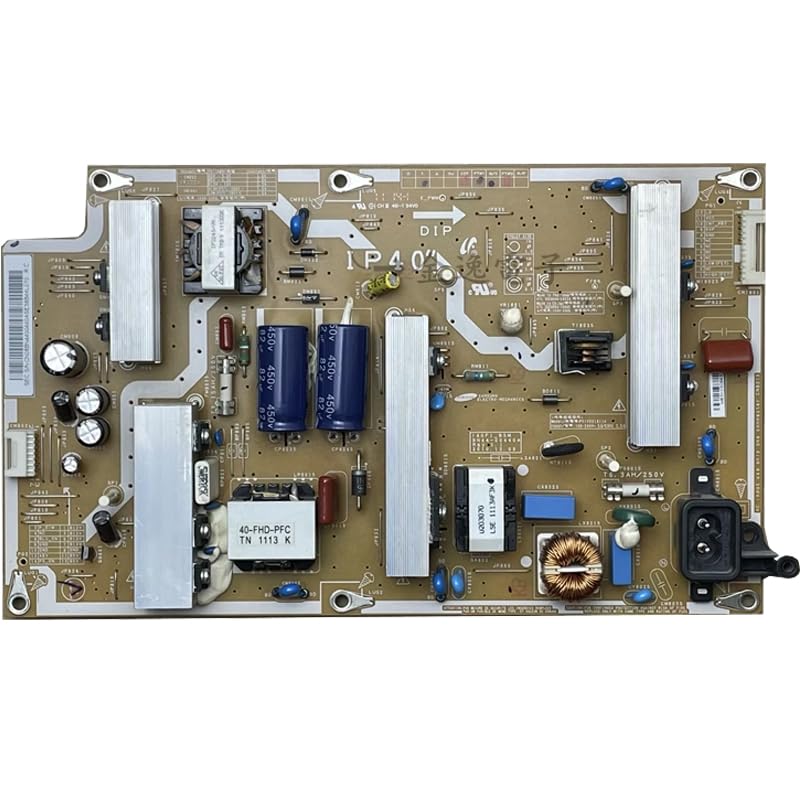
Image 1.1: Front view of the XGEDA Replacement Power Board. This image displays the various components, including capacitors, transformers, and heat sinks, arranged on the circuit board. The board is brown with silver and blue components.
2. Important Notes and Disclaimer
Please read this section carefully before proceeding with purchase or installation.
- Due to the specialized nature of LCD TV components, this product is intended for users with a certain level of LCD TV repair knowledge and experience.
- Improper installation or handling can lead to damage to the product, the television, or personal injury.
- It is highly recommended that installation be performed by a qualified and experienced technician.
- This product does not support 7-day no-reason returns or exchanges due to its specialized nature and the potential for damage during improper handling or installation.
- In some cases, specific product parameters (e.g., photos of the original board or TV model details) may be required by the seller to ensure compatibility before shipment. Please be prepared to provide such information if requested.
3. Compatibility
This replacement power board is suitable for the following Samsung TV models and original power board part numbers:
- Samsung TV Models: LA40D503F7R, LA40D550K1R
- Compatible Power Board Part Numbers: BN44-00440A, BN44-00469B
Always verify the part number on your existing power board against the compatible numbers listed above to ensure correct fit and function. Discrepancies can lead to incompatibility or damage.
4. Safety Information
Working with electronic components, especially power supply units, carries inherent risks. Adhere to the following safety guidelines:
- Disconnect Power: Always unplug the television from the main power outlet before opening the TV casing or attempting any repair.
- Discharge Capacitors: Power boards contain large capacitors that can store high voltage even after the TV is unplugged. These must be safely discharged by a qualified technician before handling the board.
- Static Electricity: Use anti-static precautions (e.g., anti-static wrist strap, mat) to prevent damage to sensitive electronic components from electrostatic discharge (ESD).
- Insulated Tools: Use appropriate insulated tools for any work involving electrical components.
- Ventilation: Ensure adequate ventilation if soldering or using chemicals.
- Professional Assistance: If you are unsure about any step or lack the necessary tools/experience, seek assistance from a professional electronics repair technician.
5. Installation Guide
This section provides a general outline for the replacement process. Detailed, model-specific instructions are beyond the scope of this general manual. Refer to the service manual for your specific Samsung TV model for precise steps.
- Preparation:
- Ensure the TV is unplugged from all power sources.
- Place the TV face down on a soft, clean surface to protect the screen.
- Gather necessary tools: screwdrivers, anti-static wrist strap, plastic pry tools (if needed).
- Accessing the Power Board:
- Remove the back cover of the television. This usually involves unscrewing multiple screws around the perimeter and sometimes in the center.
- Carefully detach any cables or connectors that might be attached to the back cover.
- Removing the Old Power Board:
- Locate the existing power board. It is typically a large circuit board with prominent capacitors and transformers, often connected directly to the AC inlet.
- Carefully disconnect all cables and connectors attached to the power board. Note their positions for reassembly, or take photos.
- Unscrew the mounting screws that secure the power board to the TV chassis.
- Gently lift and remove the old power board.
- Installing the New Power Board:
- Align the new XGEDA power board with the mounting holes in the TV chassis.
- Secure the board with the screws removed earlier. Do not overtighten.
- Reconnect all cables and connectors to their correct positions on the new power board. Ensure all connections are firm and secure.
- Reassembly and Testing:
- Before replacing the back cover, perform a preliminary test. Plug in the TV and observe if it powers on correctly.
- If the TV functions as expected, unplug it again and reattach the back cover, securing all screws.
- Perform a final functional test.
If the TV does not power on or exhibits unusual behavior after installation, refer to the Troubleshooting section or consult a professional.
6. Troubleshooting
This section addresses common issues that may arise after replacing the power board. Note that complex issues require professional diagnosis.
| Problem | Possible Cause | Suggested Action |
|---|---|---|
| TV does not power on (no lights, no sound). | Loose cable connections, incorrect board installation, faulty replacement board, or other TV component failure. |
|
| TV powers on but has no picture or sound. | Power board may be partially functional, or issues with other TV components (e.g., backlight, main board, T-con board). |
|
| Intermittent power or flickering. | Unstable power supply, loose connections, or component degradation. |
|
Note: Attempting repairs without proper knowledge and tools can cause further damage. Always prioritize safety and consult a professional when in doubt.
7. Specifications
- Product Type: Replacement Power Board for LCD TV
- Brand: XGEDA
- Compatible Samsung TV Models: LA40D503F7R, LA40D550K1R
- Compatible Power Board Part Numbers: BN44-00440A, BN44-00469B
- ASIN: B0CNVWSX9H
- Date First Available: November 23, 2023
8. Support and Warranty Information
For technical support or inquiries regarding this product, please contact the seller directly through the platform where the purchase was made. Provide your order details and any relevant information about your TV model and the issue encountered.
As stated in the Important Notes section, due to the specialized nature of this product, it does not support 7-day no-reason returns or exchanges. Specific warranty terms, if any, should be clarified with the seller at the time of purchase.