
1. Introduction
This manual provides comprehensive instructions for the installation, operation, and maintenance of your NUASI RBX-S60 4G LTE Solar Security Camera. Please read this manual thoroughly before using the product to ensure proper functionality and safety. Keep this manual for future reference.

Image 1.1: NUASI RBX-S60 4G LTE Solar Security Camera. This image displays the camera unit, its integrated solar panel, and icons representing a 128GB Micro SD card and a 4G SIM card, highlighting its key features.
2. Product Overview
Key Features:
- 2K Super HD Resolution: Captures clear video footage day and night.
- 4G LTE Connectivity: Operates independently without Wi-Fi, ideal for remote locations.
- Solar Powered: Integrated solar panel for continuous charging and extended battery life.
- PTZ Functionality: 355° horizontal pan and 100° vertical tilt for comprehensive area coverage.
- Color Night Vision: Provides full-color video in low-light conditions when spotlights are active.
- PIR Motion Detection: Advanced passive infrared sensor for accurate human and animal detection, reducing false alarms.
- Two-Way Audio: Built-in microphone and speaker for real-time communication.
- Local & Cloud Storage: Supports Micro SD card up to 128GB and offers cloud storage options.
- Weatherproof Design: IP66 rated for outdoor use in various weather conditions.
3. Setup
3.1 SIM Card Installation
The camera supports 4G LTE cellular networks, eliminating the need for Wi-Fi. Ensure your SIM card is compatible with major carriers such as Vodafone, Wind Tre, Telekom, Orange, SFR, Bouygues, or O2. Deactivate the PIN code on the SIM card using a mobile phone before inserting it into the camera.

Image 3.1: 4G LTE Connectivity. This image illustrates the camera's reliance on 4G LTE signal, showing a SIM card icon and logos of compatible mobile network operators (T-Mobile, Vodafone, Orange, SFR).
3.2 Micro SD Card Installation
The camera supports local storage via a Micro SD card (up to 128GB). Insert the Micro SD card into the designated slot on the camera. Ensure it is inserted correctly to enable local video recording.
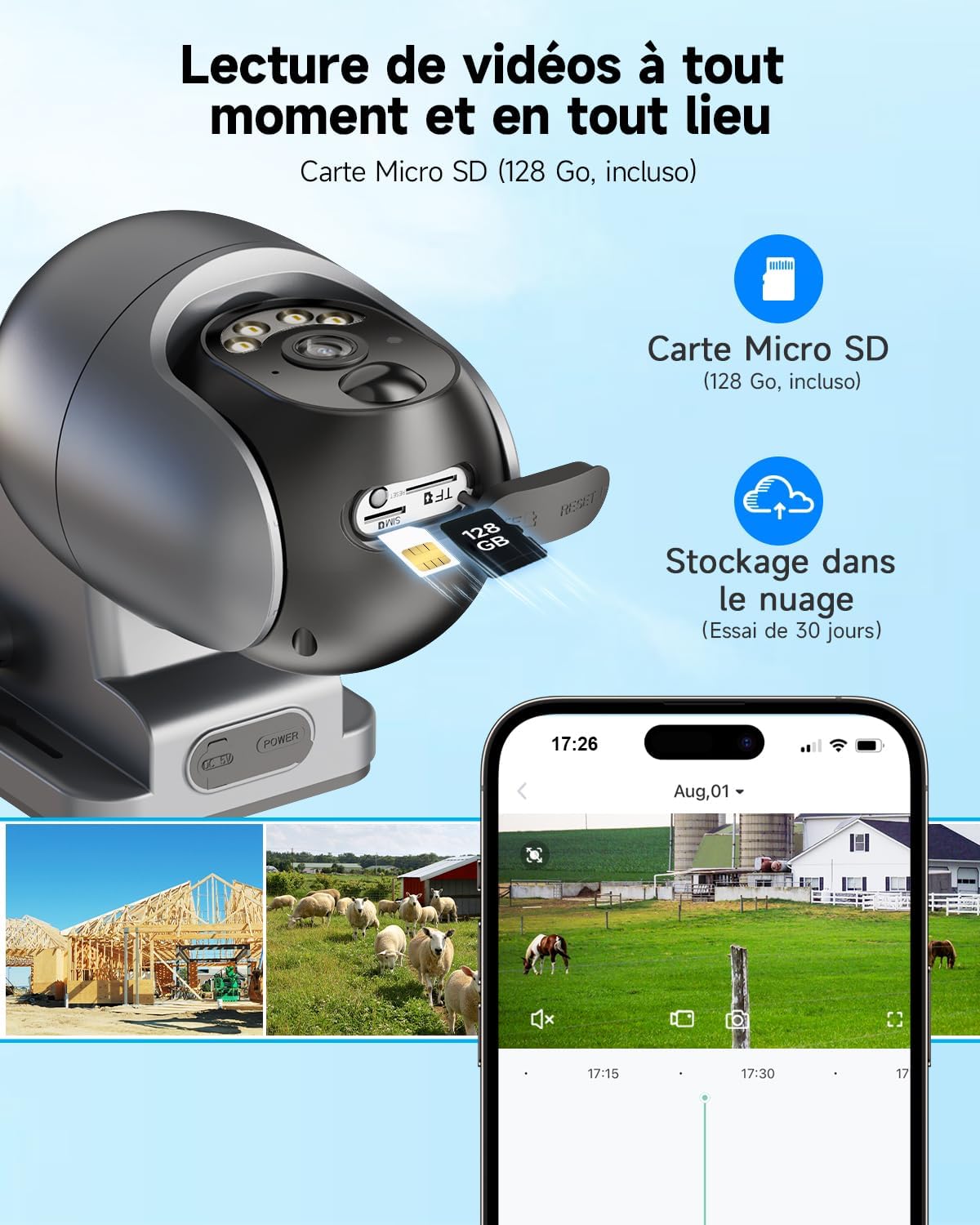
Image 3.2: Storage Options. This image highlights the camera's Micro SD card slot (with a 128GB card inserted) and the availability of cloud storage, indicating flexible recording solutions.
3.3 App Installation (UBox)
Download the UBox application from the App Store (for iOS devices) or Google Play Store (for Android devices). The UBox app is essential for controlling the camera, viewing live feeds, and managing settings.

Image 3.3: UBox App Download. This image shows a smartphone displaying the UBox app logo and icons for downloading from the Apple App Store and Google Play Store, indicating where to get the control application.
3.4 Mounting
The camera offers flexible mounting options. Choose a location that receives ample sunlight for the solar panel and provides the desired surveillance coverage. The camera can be mounted directly to a wall or other suitable surface. Ensure the solar panel is positioned to maximize sun exposure.

Image 3.4: Mounting and Coverage. This image illustrates two different mounting methods for the camera and solar panel, along with graphics indicating 360-degree panoramic coverage, 355° pan, and 100° tilt capabilities.
4. Operation
4.1 Powering On/Off
After installing the SIM and SD cards, press the power button to turn on the camera. The solar panel will begin charging the internal battery when exposed to sunlight.
4.2 App Control (PTZ, Zoom, Two-Way Audio)
Use the UBox app to remotely control the camera's functions:
- Pan/Tilt: Swipe on the live view screen to rotate the camera horizontally (355°) and vertically (100°).
- Digital Zoom: Pinch-to-zoom on the live view to digitally magnify the image up to 4X.
- Two-Way Audio: Tap the microphone icon in the app to speak through the camera's speaker and listen through its microphone.
4.3 Motion Detection Settings
The camera features PIR motion detection. Configure sensitivity levels and notification preferences within the UBox app. When motion is detected, the camera will send real-time alerts to your phone.

Image 4.1: PIR Motion Detection. This image depicts the camera detecting a person at night, triggering an alarm, spotlight, and sending a motion alert notification to a smartphone via the UBox app.
4.4 Night Vision Modes
The camera supports two night vision modes:
- Color Night Vision: Activates when the integrated spotlights are turned on, providing full-color images in dark environments.
- Infrared Night Vision: Provides black and white images using infrared LEDs when spotlights are off.
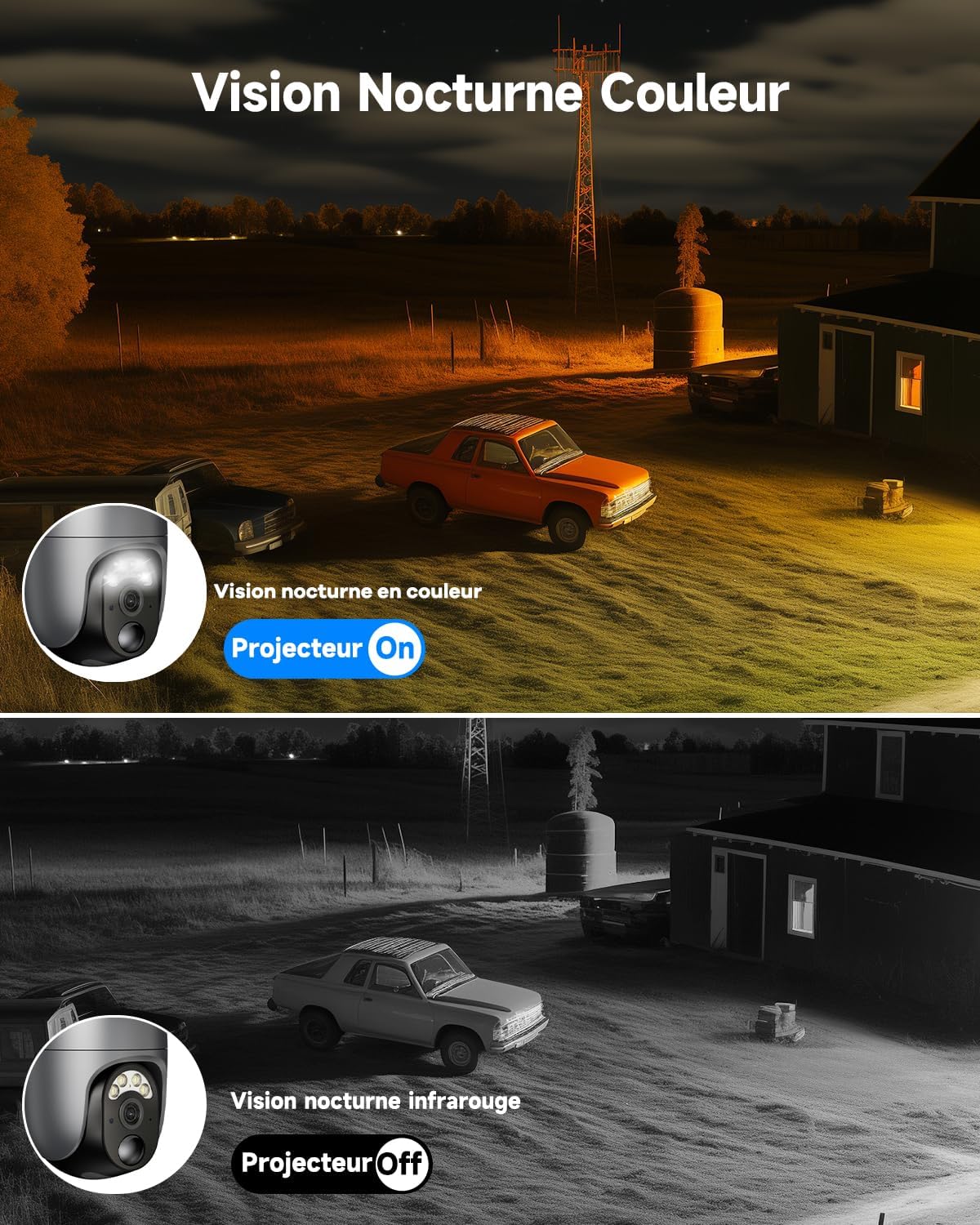
Image 4.2: Night Vision Modes. This image compares the camera's color night vision (with spotlight on) and infrared night vision (with spotlight off), demonstrating the visual difference in dark conditions.
4.5 Storage Management
Recorded footage can be stored on the Micro SD card or in the cloud. The UBox app allows you to review, download, and manage recordings. A 7-day free trial for cloud storage may be available.
5. Maintenance
5.1 Cleaning
Regularly clean the camera lens and solar panel with a soft, damp cloth to ensure optimal performance. Avoid using abrasive cleaners that could scratch the surfaces.
5.2 Battery and Solar Panel Care
Ensure the solar panel is free from obstructions (e.g., leaves, dirt) to maximize charging efficiency. The camera's internal lithium-polymer battery is designed for long-term use and is recharged by the solar panel.
6. Troubleshooting
- Camera Offline: Check SIM card installation and ensure the SIM card has an active data plan. If 80% of data is consumed, purchase more data via the UBox app. Ensure the camera is powered on and the battery is charged.
- No Video Recording: Verify that a Micro SD card is properly inserted and formatted, or that cloud storage is active.
- False Motion Alerts: Adjust PIR motion detection sensitivity settings in the UBox app to reduce unwanted notifications.
- Poor Night Vision: Ensure the camera lens is clean. If using color night vision, verify that the spotlights are enabled.
7. Specifications
| Feature | Detail |
|---|---|
| Video Recording Resolution | 2K |
| Color | Grey |
| Number of Items | 1 |
| Wireless Communication Technology | 4G Cellular |
| Form Factor | Bullet |
| Night Vision Range | 30 Meters |
| Material | Plastic |
| Voltage | 5 Volts |
| Power | 6 Watts |
| Item Dimensions (L x W x H) | 19.5 x 16.5 x 13.7 cm |
| Weight | 1.19 kilograms |
| Battery Type | Lithium-polymer (4 required) |
| Special Features | Two-way audio, Motion detector, HD resolution, PTZ technology, Night vision |
| Usage | Surveillance |
| Recommended Uses | Outdoor security |
| Connectivity Protocol | 4G Cellular |
| Controller Type | UBox App |
| Mounting Type | Wall Mount |
8. Warranty and Support
Information regarding specific warranty terms and customer support contact details is not available in the provided product data. Please refer to the product packaging or the manufacturer's official website for warranty information and support contacts.