1. Introduction
This manual provides detailed instructions for the installation, operation, and maintenance of your Podofo Portable Motorcycle Carplay/Android Auto System. Please read this manual thoroughly before using the device to ensure proper functionality and safety. This device is designed to enhance your motorcycle riding experience by integrating smartphone features directly onto a dedicated display.
2. Safety Information
- Always prioritize road safety. Do not operate the device in a way that distracts you from driving.
- Ensure the device is securely mounted to prevent detachment during riding.
- The device is IP65 waterproof, meaning it is protected against dust and low-pressure water jets. While it can withstand rain, avoid submerging it in water.
- Do not attempt to disassemble or modify the device. This may void the warranty and pose safety risks.
- Keep the device away from extreme temperatures and direct sunlight for prolonged periods to prevent damage.
3. Package Contents
Verify that all items listed below are included in your package:
- 1 x 5-inch Motorcycle Carplay/Android Auto System
- 1 x Power Cable
- 1 x Universal Mount
- 1 x Mini-USB to USB2.0 Cable
- 1 x User Manual (English Version)
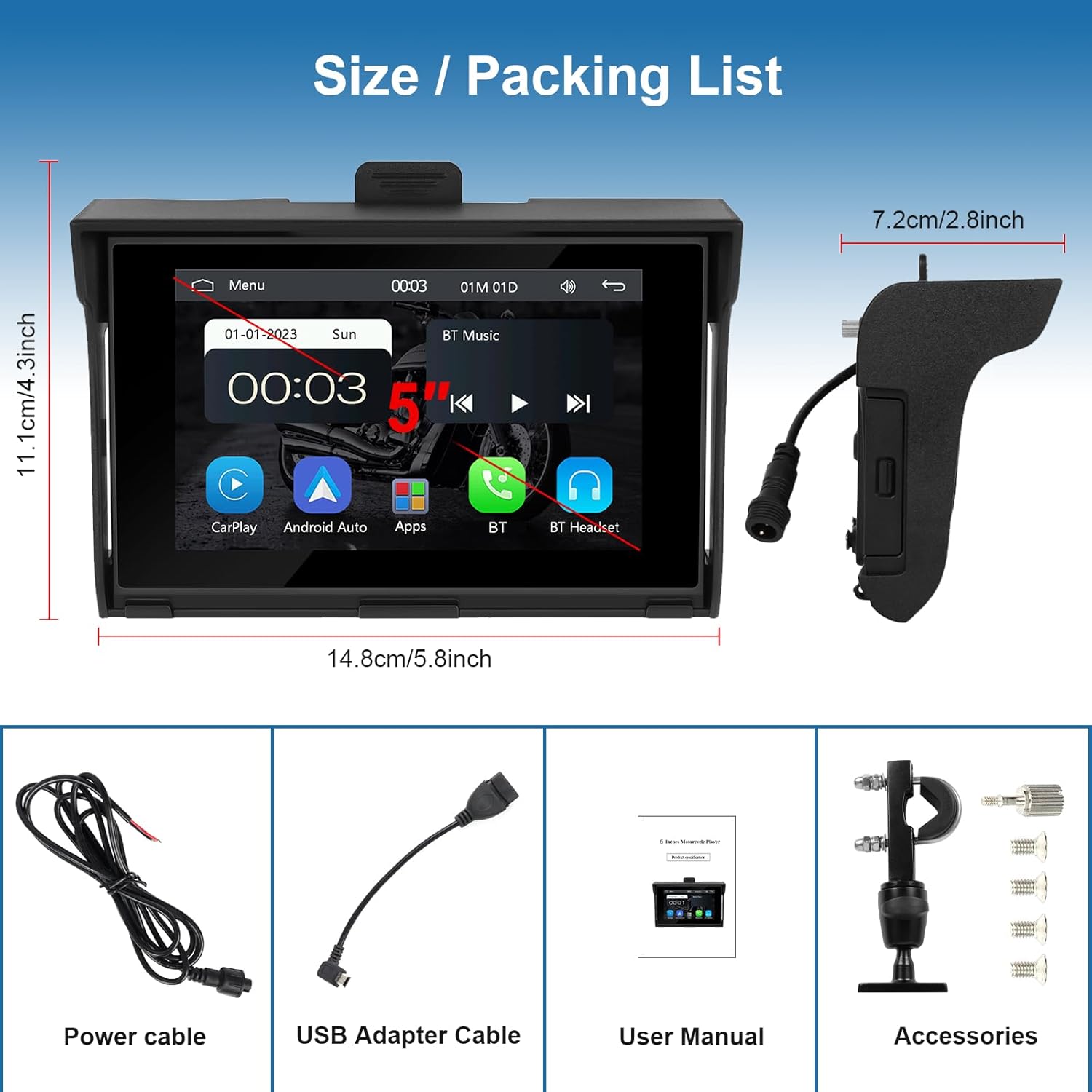
4. Setup and Installation
The Podofo Portable Motorcycle Carplay/Android Auto System is designed for easy installation. Follow these steps to set up your device:
- Mounting: Securely attach the universal mount to your motorcycle's handlebar or a suitable location on the head of the motorcycle. Ensure the mount is stable and provides a clear view of the screen without obstructing your vision or controls.
- Device Attachment: Slide the main unit onto the universal mount until it clicks into place. Verify that it is firmly attached.
- Power Connection: Connect the provided power cable to the device and to your motorcycle's power source. This is a plug-and-play setup. Ensure the connection is secure and protected from the elements.
- Initial Power On: Once connected, power on the device. The system should boot up automatically.

5. Operating Instructions
5.1. Wireless Apple Carplay and Android Auto
Connect your smartphone wirelessly to the device via Bluetooth to access Apple Carplay or Android Auto. This allows you to use various phone applications directly on the motorcycle display, including navigation (Google Maps, Waze), music streaming (Spotify, Apple Music), and more. A wired connection is also supported for these features.

Video: A demonstration of the Podofo Portable Motorcycle Carplay/Android Auto System, showcasing its features and user interface.
5.2. Bluetooth Music and Phone Calls
The integrated Bluetooth allows for quick connection to your smartphone. You can stream your favorite music and make or receive hands-free calls, ensuring your focus remains on the road.

5.3. Mirror Link for iOS/Android
Utilize the wired Mirror Link function to project your smartphone's screen onto the device. This feature allows you to view videos or images from your phone in real-time on the larger display.

5.4. EQ Sound Settings
Customize your audio experience using the built-in EQ sound settings. Adjust various frequency bands to achieve your preferred sound profile (e.g., Jazz, Classic, Rock, Pop, Flat, User-defined).

5.5. USB/TF Card Input
The device supports media playback via USB and TF Card inputs. Insert a USB disk or TF card into the designated slots to access your stored audio or video files.

6. Features Overview
- 5-inch Touchscreen: Intuitive and responsive display for easy interaction.
- Wireless Carplay & Android Auto: Seamless smartphone integration for navigation, music, and communication.
- Built-in Bluetooth: For hands-free calls and audio streaming.
- Mirror Link: Wired connection to mirror iOS and Android smartphone screens.
- IP65 Waterproof Design: Ensures durability and functionality in various weather conditions.
- EQ Sound Settings: Customizable audio equalization for personalized sound.
- USB/TF Card Input: Supports external media playback.
7. Maintenance
- Cleaning: Use a soft, damp cloth to clean the screen and exterior. Avoid abrasive cleaners or solvents.
- Waterproof Care: While IP65 rated, ensure all ports are properly sealed when not in use to maintain water resistance.
- Storage: If storing the device for an extended period, disconnect it from the power source and store it in a dry, cool place.
8. Troubleshooting
8.1. Device Does Not Power On
- Check the power cable connection to ensure it is securely plugged into both the device and the motorcycle's power source.
- Verify that the motorcycle's power source is active.
8.2. No Carplay/Android Auto Connection
- Ensure your phone's Bluetooth is enabled and discoverable.
- On the device, navigate to the Carplay/Android Auto menu and initiate the connection process.
- For wired connections, ensure the USB cable is functioning correctly and securely connected.
- Restart both the device and your smartphone.
8.3. Screen Visibility Issues
- Adjust the screen brightness settings on the device.
- Ensure the screen is clean and free from smudges or dirt.
- The device includes a small sunshade to help reduce glare. Position it correctly.
8.4. Audio Issues
- Check the volume levels on both the device and your connected smartphone.
- Ensure Bluetooth audio output is correctly selected on your phone if using wireless headphones or helmet speakers.
- Verify EQ settings are not set to an extreme that distorts sound.
9. Specifications
| Feature | Specification |
|---|---|
| Manufacturer | Podofo |
| Model Number | c267d41c-0b7a-45f4-900b-b8a4435282f0 |
| Product Dimensions | 14.8 x 7.2 x 11.1 cm |
| Weight | 790 grams |
| Connectivity Technology | Carplay & Android Auto, Mirror Link, Bluetooth |
| Controller Type | Touchscreen |
| Special Features | Built-in Bluetooth, Touchscreen, IP65 Waterproof |
| Compatible Devices | iPhone and Android smartphones |
| Audio Output Mode | Stereo |
| Surround Sound Channel Configuration | 2.0 |
| Video Encoding | H.264, MPEG-4, WMV |
| Color | Black |
| Output Power | 45 Watts |
10. Warranty and Support
Podofo offers the following support for your product:
- 30-Day Return and Replacement: If you encounter any issues within 30 days of purchase, you are eligible for a return or replacement.
- One-Year Warranty: The device is covered by a one-year warranty from the date of purchase.
- Lifetime After-Sales Service: Podofo provides lifetime after-sales support for this product.
For any pre-sales or after-sales inquiries, please contact customer support at podofodirect@163.com.


