
1. Introduction
This manual provides essential information for the safe and efficient operation of your Datakom SBC-10A-M 12/24V Auto Select Battery Charger. Please read this manual thoroughly before installation and use to ensure proper function and to prevent damage to the unit or connected equipment.
1.1. Product Overview
The Datakom SBC-10A-M is an advanced battery charger designed for high efficiency and reliability in demanding environments, such as automotive applications. It features automatic voltage detection for 12V or 24V batteries, a wide input voltage range (90-305VAC), and robust protection mechanisms against overload, short circuit, high temperature, and reverse battery connection.
1.2. Safety Instructions
- Always disconnect the AC power supply before making or breaking battery connections.
- Ensure adequate ventilation around the charger during operation.
- Do not expose the charger to rain, moisture, or excessive dust.
- Avoid operating the charger near flammable materials or gases.
- Do not attempt to open or repair the charger. Refer all servicing to qualified personnel.
- Verify battery voltage and polarity before connecting the charger.
2. Product Features
- Automatic Voltage Selection: Automatically detects and adapts to 12V or 24V battery systems.
- Wide Input Voltage Range: Operates reliably with AC input from 90VAC to 305VAC.
- Advanced Protection: Includes overload, short circuit, high temperature, and reverse battery connection protection.
- Current Limiting Overload Protection: Maintains rated current output during overload, allowing continuous charging of empty batteries.
- Temperature Management: Automatically reduces output current in case of overheating to ensure continuous operation.
- LED Status Indicator: Provides visual feedback on charger status.
- High Efficiency: Designed for optimal power conversion and minimal energy loss.
- Compact Metallic Casing: Durable and suitable for harsh environments.
3. Specifications
| Parameter | Value |
|---|---|
| Model | SBC-10A-M |
| Input Voltage Range | 90 - 305 VAC |
| Output Voltage (Auto Select) | 12V / 24V DC |
| Output Current | 10A |
| Charging Stages | 4 Stages |
| Weight | 0.58 kg (1.28 lbs) |
| Protections | Overload, Short Circuit, High Temperature, Reverse Battery |
4. Setup and Installation
Proper installation is crucial for the safe and effective operation of the SBC-10A-M charger.
4.1. Mounting
Mount the charger in a location that is dry, well-ventilated, and protected from direct sunlight, excessive heat, and moisture. Ensure there is sufficient space around the unit for air circulation. Use appropriate fasteners to secure the charger to a stable surface.
4.2. Electrical Connections
- AC Input Connection: Connect the AC input cable to a grounded power outlet within the specified voltage range (90-305VAC). Ensure the connection is secure.
- DC Output Connection:
- Connect the positive (+) output terminal of the charger to the positive (+) terminal of the battery.
- Connect the negative (-) output terminal of the charger to the negative (-) terminal of the battery.
- Important: Double-check polarity before making connections. Reverse polarity protection is built-in, but incorrect connection should still be avoided.
- Ensure all connections are tight and secure to prevent loose contacts and potential arcing.
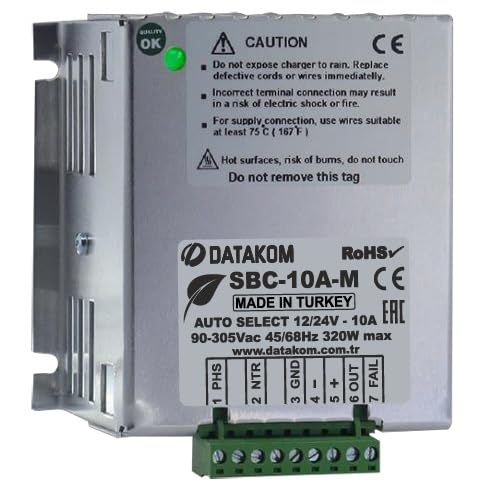
Figure 1: Datakom SBC-10A-M Battery Charger showing input and output terminals. The charger features a compact metallic casing with clearly marked connection points for AC input and DC battery output.
5. Operating Instructions
Once the charger is properly installed and connected, follow these steps for operation:
- Power On: Connect the AC power supply to the charger. The charger will automatically detect the battery voltage (12V or 24V).
- Charging Process: The LED status indicator will illuminate, indicating that charging has commenced. The charger employs a 4-stage charging process to optimize battery health and longevity.
- Monitoring: Observe the LED indicator for status. Refer to the troubleshooting section for interpretation of LED signals if issues arise.
- Charging Completion: The charger will automatically switch to a maintenance (float) charge mode once the battery is fully charged, preventing overcharging.
- Power Off: To disconnect, first remove the AC power supply, then disconnect the battery terminals.
6. Maintenance
The SBC-10A-M charger is designed for minimal maintenance. However, periodic checks can ensure optimal performance and longevity.
- Cleaning: Keep the charger clean and free from dust and debris. Use a dry, soft cloth for cleaning. Do not use liquid cleaners.
- Connections: Periodically check all electrical connections to ensure they are tight and free from corrosion.
- Ventilation: Ensure that the ventilation openings are not obstructed.
- Storage: If storing the charger for an extended period, disconnect it from both AC power and the battery, and store it in a dry, cool place.
7. Troubleshooting
This section provides solutions to common issues you might encounter with your SBC-10A-M charger.
| Problem | Possible Cause | Solution |
|---|---|---|
| Charger not operating (LED off) | No AC input power; Loose connections. | Check AC power supply and ensure all connections are secure. |
| Charging LED not illuminating | Battery not connected; Reverse polarity; Battery voltage too low. | Verify battery connections and polarity. Ensure battery voltage is within operational range. |
| Charger output current is low | Overheating; Battery is nearly full. | Ensure adequate ventilation. This is normal if the battery is nearing full charge or if the charger is managing its temperature. |
| Charger shuts down | Severe fault (e.g., internal component failure). | Disconnect power and battery. Do not attempt to repair. Contact customer support. |
If the problem persists after attempting the above solutions, please contact Datakom customer support.
8. Warranty and Support
Datakom products are manufactured to high quality standards. For information regarding warranty terms and conditions, please refer to the warranty card included with your product or visit the official Datakom website.
For technical support, service, or spare parts, please contact your authorized Datakom dealer or Datakom customer service directly. When contacting support, please have your product model (SBC-10A-M) and purchase details ready.
Datakom Official Website: www.datakom.com.tr


