
1. Introduction
1.1 Product Overview
The Datakom D-500-LITE-MK2 is a multifunctional generator controller designed for advanced genset management. It integrates synchronization, load sharing, Automatic Mains Failure (AMF), Automatic Transfer Switch (ATS), Remote Start, Engine Control, and Remote Display Panel functionalities into a single, reliable unit. This controller offers extensive communication capabilities, including remote monitoring via GSM or Ethernet through optional plug-in modules, and supports easy firmware upgrades via its USB port. It is engineered to meet stringent industrial safety, vibration, and environmental standards.
1.2 Key Features
- AMF (Automatic Mains Failure) unit functionality
- ATS (Automatic Transfer Switch) unit functionality
- Remote start controller capabilities
- Manual start controller capabilities
- Remote display panel functionality
- MPU (Magnetic Pickup Unit) and J1939 engine communication support
- Expandable with plug-in communication modules for GSM/Ethernet
- USB port for firmware upgrades and PC software connection
- Windows-based PC software for monitoring and programming
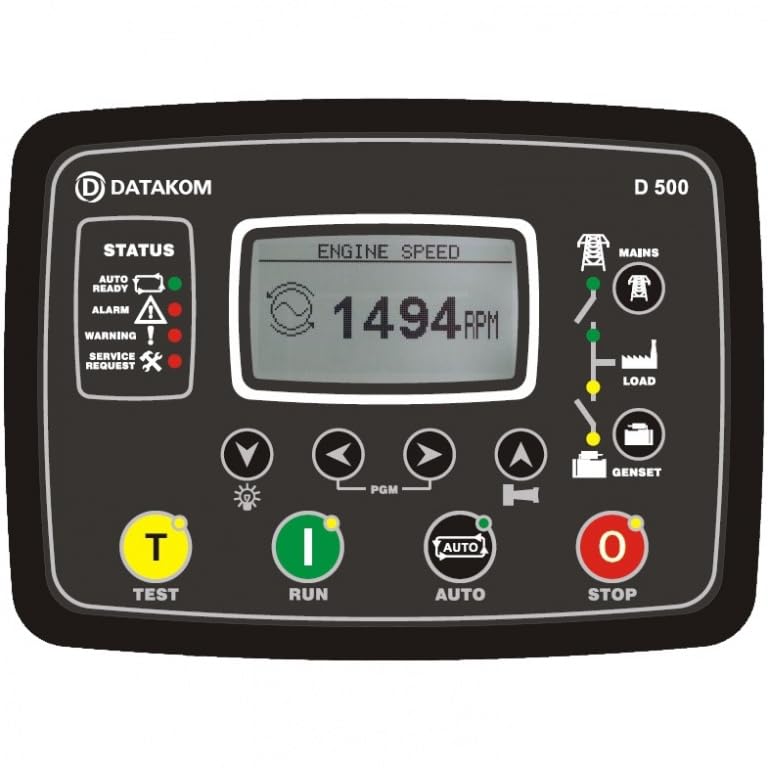
Figure 1: Front view of the Datakom D-500-LITE-MK2 Generator Controller, showcasing its display and control buttons.
2. Safety Information
Please read all safety instructions carefully before installing, operating, or performing maintenance on the D-500-LITE-MK2 controller. Failure to comply with these instructions may result in personal injury, equipment damage, or property damage.
- Qualified Personnel: Installation and servicing must be performed by qualified and authorized personnel only.
- Electrical Hazards: This device operates with electrical power. Ensure all power sources are disconnected before installation or maintenance to prevent electric shock.
- Proper Grounding: Always ensure the generator and controller system are properly grounded according to local electrical codes.
- Environmental Conditions: Do not expose the controller to extreme temperatures, moisture, or corrosive environments beyond its specified operating conditions.
- Emergency Stop: Familiarize yourself with the generator's emergency stop procedure before operating the controller.
3. Package Contents
Upon opening the package, verify that all components are present and undamaged. The standard package for the D-500-LITE-MK2 includes:
- Datakom D-500-LITE-MK2 Generator Controller Unit
- Mounting hardware (if applicable)
- Quick Start Guide (refer to the full manual for detailed instructions)
4. Setup
4.1 Installation Guidelines
The D-500-LITE-MK2 controller is designed for panel mounting. Ensure the mounting location is free from excessive vibration, dust, and moisture. Allow adequate space for wiring and ventilation around the unit.
- Cut a panel opening of the specified dimensions (refer to the product datasheet for exact measurements).
- Insert the controller into the opening from the front.
- Secure the controller using the provided mounting clamps from the rear of the panel.
4.2 Wiring Connections
All wiring connections should be made with the power supply disconnected. Refer to the detailed wiring diagrams in the complete technical manual for specific terminal assignments. Key connections include:
- Power Supply: Connect the controller to a stable 12V DC power source.
- Engine Inputs: Connect to engine sensors (oil pressure, water temperature, fuel level, etc.) and the Magnetic Pickup Unit (MPU) for engine speed sensing.
- J1939 Communication: Connect to compatible engines for CAN bus communication.
- Generator Inputs: Connect voltage and current transformers for generator monitoring.
- Mains Inputs: Connect for mains voltage monitoring in AMF/ATS applications.
- Control Outputs: Connect to engine start/stop solenoids, fuel solenoids, circuit breakers, and other control devices.
- Communication Ports: USB for PC connection, RS-485, Ethernet, and GPRS via optional plug-in modules.
5. Operating Instructions
5.1 Basic Operation
Once properly installed and powered, the D-500-LITE-MK2 will display its operational status on its LCD or LED screen. Navigation through menus and settings is typically done using the front panel buttons.
- Power On: The controller will perform a self-test and display the main screen.
- Menu Navigation: Use the UP/DOWN arrow buttons to scroll through parameters and menus.
- Selection/Confirmation: Use the ENTER button to select an option or confirm a setting.
- Exit/Back: Use the ESCAPE button to go back to the previous menu or exit a setting.
5.2 Operating Modes
The D-500-LITE-MK2 supports various operating modes, configurable through the controller's menu or PC software:
- Manual Mode: Allows direct manual control of the generator start/stop sequence.
- Automatic Mode (AMF/ATS): The controller continuously monitors the mains power supply. In case of a mains failure, it automatically starts the generator, transfers the load, and reverses the process upon mains return.
- Remote Start Mode: The generator can be started and stopped via a remote signal, often used in conjunction with building management systems or external timers.
- Test Mode: Allows for testing the generator's operation without transferring the load or under load conditions.
6. Maintenance
Regular maintenance ensures the longevity and reliable operation of your D-500-LITE-MK2 controller and the associated generator system.
- Periodic Inspection: Visually inspect the controller and its wiring for any signs of damage, loose connections, or corrosion.
- Cleaning: Keep the controller's display and buttons clean using a soft, dry cloth. Do not use abrasive cleaners or solvents.
- Firmware Updates: Periodically check the Datakom website for available firmware updates. Updates can be performed via the USB port using the provided PC software.
- Battery Check: Ensure the generator's starting battery is in good condition, as it powers the controller during startup.
7. Troubleshooting
This section provides basic troubleshooting steps for common issues. For complex problems, consult the full technical manual or contact Datakom support.
| Problem | Possible Cause | Solution |
|---|---|---|
| Controller does not power on | No power supply; Blown fuse; Loose wiring | Check DC power input; Inspect fuses; Verify all power connections. |
| Generator fails to start | Low fuel; Low battery; Engine fault; Incorrect settings | Check fuel level and battery voltage; Inspect engine for faults; Verify controller start parameters. |
| Display shows error message | Sensor fault; Communication error; System alarm | Note the error code and consult the full manual for specific meanings and remedies. Check sensor connections. |
| Remote monitoring not working | Communication module not installed; Network issue; Incorrect configuration | Ensure communication module is correctly installed; Check network connectivity; Verify remote monitoring settings in PC software. |
8. Specifications
Technical specifications for the Datakom D-500-LITE-MK2 Generator Controller:
- Brand: Datakom
- Model: D-500-LITE-MK2
- Display Type: LCD or LED
- Voltage: 12 Volts (DC)
- Material: Iron
- Color: Black
- Item Weight: 1.28 pounds (0.58 Kilograms)
- Included Components: Generator Controller
- Manufacturer: DATAKOM
- ASIN: B0CNTN7MXN
9. Warranty and Support
Datakom products are manufactured to high standards and are typically covered by a limited warranty against defects in materials and workmanship. For specific warranty terms and conditions, please refer to the warranty card included with your product or visit the official Datakom website.
For technical assistance, troubleshooting beyond this manual, or to inquire about spare parts, please contact Datakom customer support. Have your product model number (D-500-LITE-MK2) and any relevant error messages ready when contacting support.
Datakom Official Website: www.datakom.com.tr