1. Introduction
Thank you for choosing the Claiks Dual Motor 63" L Shaped Standing Desk. This electric height-adjustable desk is designed to provide a versatile and ergonomic workspace, allowing seamless transitions between sitting and standing positions. This manual provides essential information for assembly, operation, maintenance, and troubleshooting to ensure optimal performance and longevity of your desk.
2. Important Safety Information
- Always use the lockable casters to move the desk.
- Be cautious when adjusting the desk's orientation, as it can be heavy.
- Never attempt to move or adjust the desk when it is fully extended or loaded with heavy items.
- Always ensure the desk is properly anchored to the floor to prevent tipping.
- Keep children and pets away from the desk during operation.
- Ensure no obstacles are in the desk's path during height adjustment.
3. Package Contents
Before assembly, verify that all components are present and undamaged. Refer to the image below for a visual representation of the parts included.

Figure 3.1: Claiks Standing Desk Parts List. This image displays all the individual components of the desk, including the main desktop panels, L-shaped frame sections, dual motors, various hardware pieces, storage drawers, monitor stand components, and optional casters or adjustable feet.
- Desktop Panels (L-shaped configuration)
- Dual Motor Lifting Columns
- Desk Frame Components
- Control Box and Keypad
- Power Adapter and Cables
- Monitor Stand/Splice Board Components
- Fabric Drawers (x3)
- Storage Hooks (x2)
- Lockable Swivel Casters (x6, optional installation)
- Adjustable Feet (x6, alternative to casters)
- Assembly Hardware (screws, bolts, tools)
4. Setup and Assembly
Assembly of the Claiks L-shaped standing desk requires careful attention to detail. It is recommended to have ample space and a second person for assistance, especially when handling larger components and flipping the desk upright. A power drill can expedite the process.
4.1 Desk Dimensions and Configuration
The desk offers a flexible L-shaped design that can be configured for either left-sided or right-sided orientation to best suit your workspace. The overall dimensions are 55"D x 63"W x 28.5"H. The height is adjustable from 28.3" to 46.5". Note that installing the optional wheels will add approximately 1.3 inches to the minimum height.

Figure 4.1: Desk Dimensions. This diagram illustrates the various measurements of the L-shaped desk, including the overall length (63 inches), depth (55 inches), and height range (28.3 to 46.5 inches), along with specific dimensions for the monitor stand and storage areas.

Figure 4.2: Right/Left Orientation. This image shows how the L-shaped desk can be assembled with either a left-sided or right-sided return, providing adaptability to different room layouts and user preferences.
4.2 Assembly Steps (General Guidelines)
- Unpack and Organize: Lay out all parts and hardware. Group similar components to simplify the process.
- Assemble the Frame: Follow the detailed instructions provided in your physical manual to connect the motor lifting columns and crossbars.
- Attach Desktop Panels: Secure the L-shaped desktop panels to the assembled frame. Ensure proper alignment for your desired left or right orientation.
- Install Monitor Stand and Drawers: Attach the monitor stand and integrate the fabric drawers into their designated slots.
- Install Feet or Casters: Choose between the adjustable feet for stationary stability or the lockable swivel casters for mobility.
- Connect Electronics: Connect the control box, keypad, and power adapter according to the wiring diagram in your manual.
- Cable Management: Utilize the included cable clips to organize power and control cables for a tidy setup.
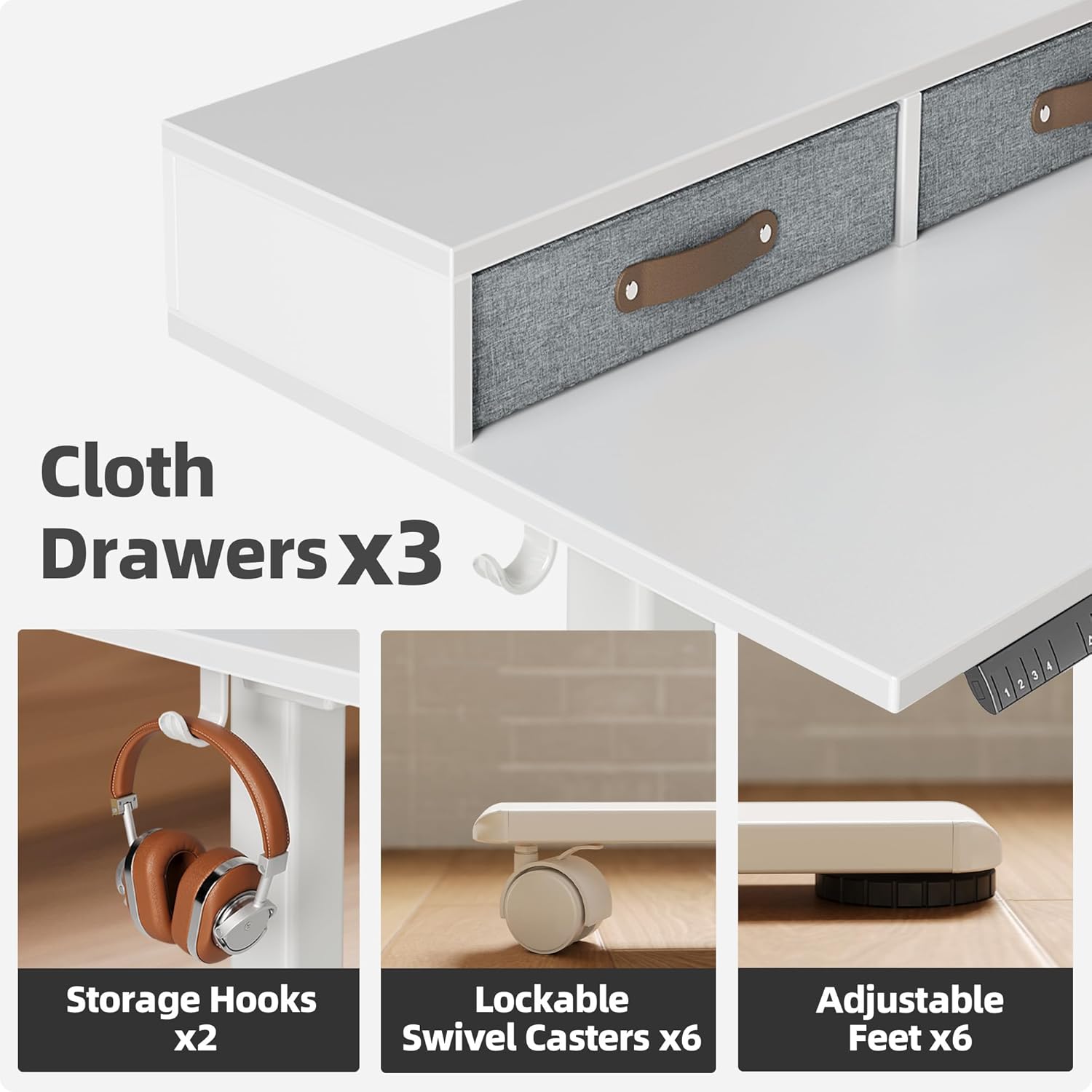
Figure 4.3: Key Features. This image highlights the practical features of the desk, including the three integrated cloth drawers for storage, two convenient storage hooks for headphones or bags, and the option to install either six lockable swivel casters for mobility or six adjustable feet for static stability.
5. Operating Instructions
Your Claiks standing desk features an intelligent keypad for easy height adjustment and memory presets.
5.1 Multi-Function Intelligent Keypad
The keypad allows you to precisely control the desk's height and save preferred positions.

Figure 5.1: Multi-Function Intelligent Keypad. This image provides a detailed view of the desk's control panel, showing the numbered buttons (1, 2, 3, 4) for saving and recalling height presets, a 'Setting Adjustment' button, and 'Up' and 'Down' arrow buttons for manual height adjustments.
- Up/Down Arrows: Press and hold the up or down arrow to manually adjust the desk to your desired height. Release the button to stop.
- Memory Presets (1-4): To save a height, adjust the desk to the desired position, then press the 'Setting Adjustment' button followed by one of the numbered preset buttons (1, 2, 3, or 4). To recall a saved height, simply press the corresponding numbered button.
5.2 Smooth and Quiet Operation
The desk is equipped with an advanced silent lift system, ensuring smooth and quiet transitions between sitting and standing heights. The noise level during operation is approximately 45dB, comparable to a quiet office environment.

Figure 5.2: Smooth Moves. This image visually represents the stability and smooth operation of the desk's lifting mechanism, symbolized by a house of cards remaining intact during height adjustments.

Figure 5.3: Ultra Quiet Design. This infographic highlights the low noise output of the desk's motor, indicating it operates at approximately 45 decibels, which is significantly quieter than a normal conversation or an engine sound, ensuring a peaceful work environment.
6. Maintenance
Regular maintenance helps preserve the desk's appearance and functionality.
- Cleaning: Wipe the desk surfaces with a soft, damp cloth. Avoid abrasive cleaners or harsh chemicals that could damage the finish.
- Check Connections: Periodically inspect all screws and bolts to ensure they are tight. Re-tighten if necessary.
- Cable Management: Ensure cables are neatly organized and not pinched or tangled, which could affect desk operation or cause damage.
7. Troubleshooting
If you encounter issues with your Claiks standing desk, refer to the following common problems and solutions:
| Problem | Possible Cause | Solution |
|---|---|---|
| Desk does not move or moves unevenly. | Power supply issue, loose connections, motor imbalance, or obstruction. | Check if the power cord is securely plugged in. Inspect all cable connections to the control box and motors. Ensure no objects are obstructing the desk's movement. If one side moves, check the motor connection for that side. Consult the full manual for reset procedures. |
| Desk is wobbly at higher heights. | Loose assembly, uneven floor, or heavy load. | Ensure all assembly screws are tightened. If using adjustable feet, ensure they are properly leveled. If using casters, ensure they are locked. Reduce the load on the desk if it exceeds the maximum weight recommendation. |
| Keypad is unresponsive. | Power issue, loose keypad connection, or control box malfunction. | Verify power supply. Check the cable connecting the keypad to the control box. Try unplugging the desk from the power outlet for 30 seconds and plugging it back in to reset the system. |
If the problem persists after attempting these solutions, please contact Claiks customer support.
8. Specifications
| Feature | Detail |
|---|---|
| Brand | Claiks |
| Model Number | CL-SD-SZZW-63WT-W |
| Product Dimensions (D x W x H) | 55"D x 63"W x 28.5"H |
| Adjustable Height Range | 28.3" - 46.5" |
| Color | White Frame/White Top |
| Desk Design | L-Shape Computer Desk |
| Lifting Mechanism | Electric Dual Motor |
| Maximum Weight Recommendation | 220 Pounds |
| Base Material | Metal (Iron) |
| Top Material Type | Engineered Wood |
| Number of Drawers | 3 (Fabric) |
| Special Features | Cord Rewind, Monitor Stand, Splice Board, Headphone Hook, Optional Casters |
| Assembly Required | Yes |
9. Warranty and Support
9.1 Warranty Information
The Claiks Dual Motor 63" L Shaped Standing Desk comes with a Lifetime Warranty. Please retain your proof of purchase for warranty claims.
9.2 Customer Support
For any questions, technical assistance, or warranty claims, please contact Claiks customer support through the retailer's platform or the official Claiks website. Provide your model number (CL-SD-SZZW-63WT-W) and a detailed description of your issue for prompt service.


