
BRPOM BM502
BRPOM BM502 6000A Portable Car Jump Starter User Manual
Model: BM502
Introduction
The BRPOM BM502 is a powerful and versatile portable jump starter designed to provide emergency starting power for a wide range of 12V vehicles, including cars, trucks, motorcycles, and more. With a peak current of 6000A and a 26800mAh battery capacity, it can jump-start vehicles with up to 8.5L diesel or any gas engine. Beyond its primary function, it also serves as a portable power bank and features multiple LED light modes for various situations.
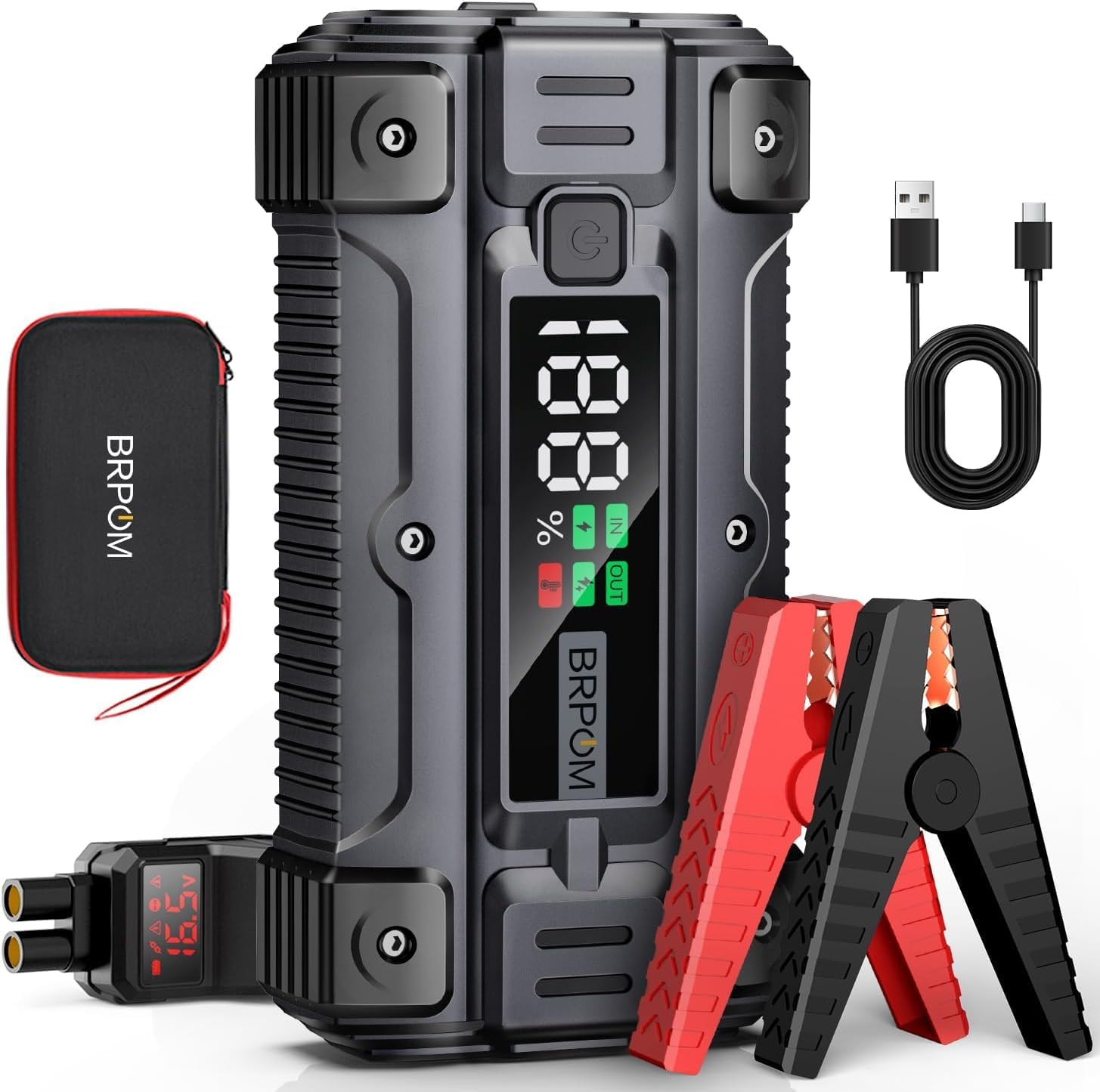
Image: The BRPOM BM502 jump starter unit, smart battery clamps (red and black), and a USB-C charging cable, all neatly arranged with a carrying case.
Safety Information
Please read all safety warnings and instructions before using this product to avoid electric shock, explosion, fire, or injury. Keep this manual for future reference.
- Do not expose the product to rain or wet conditions.
- Do not disassemble the unit. Refer to qualified service personnel for servicing.
- Do not operate the unit if it has received a sharp blow, been dropped, or otherwise damaged.
- Keep out of reach of children.
- Ensure proper polarity connection when jump-starting. Connect the red clamp to the positive (+) terminal and the black clamp to the negative (-) terminal.
- Remove the smart clamps from the vehicle battery immediately after the vehicle starts.
- Store the jump starter in a cool, dry place away from direct sunlight and high temperatures.
- Charge the unit every three months, even when not in use, to prolong battery life.
Package Contents
Verify that all items are present in the package:
- BRPOM BM502 Jump Starter Unit
- Smart Battery Clamps
- USB-C Charging Cable
- User Manual
- Storage Case

Image: A visual representation of the items included in the box: the BRPOM BM502 jump starter, smart clamps, USB-C cable, user manual, and a zippered carrying case.
Product Overview
Familiarize yourself with the components of your BRPOM BM502 jump starter:
- Main Unit: Houses the battery, control circuitry, and display.
- LCD Display: Shows battery percentage, input/output status, and temperature warnings.
- Power Button: Used to turn the unit on/off and cycle through LED modes.
- USB Output Ports: For charging mobile devices and other electronics.
- Jump Start Port: Connects to the smart battery clamps.
- LED Light: Integrated flashlight with multiple modes.
- Smart Battery Clamps: Equipped with 8 intelligent protection systems for safe operation.

Image: Close-up of the BRPOM BM502's LCD display, highlighting features such as precise battery level indication, USB activation, and temperature protection warnings. The smart clamp's integrated display showing voltage is also visible.

Image: Illustrates the 6000A peak current capability and the types of vehicles the BRPOM BM502 can jump-start, including cars (4.0L), trucks (6.0L), and larger vehicles (8.5L diesel).
Setup
Charging the Jump Starter
Before first use, fully charge the BRPOM BM502. It is recommended to charge the unit every three months to maintain optimal battery health, even if not in use.
- Connect the USB-C charging cable to the input port on the jump starter.
- Connect the other end of the USB-C cable to a 5V USB power adapter (not included) or a powered USB port.
- The LCD display will show the charging status and battery percentage. Charge until the display shows 100%.
The 26800mAh capacity ensures multiple uses on a single charge and can also serve as a power bank for your devices.

Image: Highlights the large capacity battery (26800mAh) of the BRPOM BM502, indicating it can be used up to 40 times for jump-starting and also functions as an emergency power supply for mobile phones and tablets.
Operating Instructions
Jump Starting a Vehicle
Ensure the jump starter is sufficiently charged (above 50% recommended).
- Step 1: Insert the Jump Cable. Insert the blue plug of the smart battery clamps into the jump start port on the BRPOM BM502 unit. Ensure it is fully seated.
- Step 2: Connect the Clamps. Connect the red (+) clamp to the positive terminal of the vehicle's dead battery and the black (-) clamp to the negative terminal. The smart clamp's LCD display will show the battery voltage.
- Step 3: Start Your Engine. Once the clamps are correctly connected and the smart clamp indicates a ready state (e.g., green light), start your vehicle's engine.
- Step 4: Remove the Clamps. Immediately after the vehicle starts, remove the smart clamps from the vehicle battery terminals, then disconnect the clamps from the jump starter unit.
Remark: Please remove the clamps immediately after starting the vehicle.

Image: A four-step visual guide demonstrating how to jump-start a car using the BRPOM BM502: 1. Insert the jump cable into the starter. 2. Connect the clamps to the car battery. 3. Start the engine. 4. Remove the clamps.
Using as a Power Bank
The BRPOM BM502 features two smart USB output ports, including an 18W fast charging port, to charge your electronic devices.
- Connect your device's USB charging cable to one of the USB output ports on the jump starter.
- The jump starter will automatically begin charging your device. The LCD display will indicate output status.
Using the LED Light Modes
The integrated LED light offers four practical modes for various scenarios:
- Flashlight Mode: Press and hold the power button for a few seconds to turn on the steady light.
- SOS Mode: Briefly press the power button again to switch to SOS flashing mode.
- Strobe Mode: Briefly press the power button again to switch to strobe flashing mode.
- Warning Mode: Briefly press the power button again to switch to a warning light pattern.
- To turn off the LED light, press and hold the power button again.

Image: Depicts the four distinct LED light modes of the BRPOM BM502: Flashlight (steady illumination), SOS (Morse code signal), Strobe (rapid flashing), and Warning (alternating red/blue lights), along with instructions on how to activate them.
Maintenance
Proper maintenance ensures the longevity and performance of your BRPOM BM502 jump starter.
- Charging: Recharge the unit every three months, even if unused, to prevent deep discharge and extend battery life.
- Cleaning: Wipe the unit with a soft, dry cloth. Do not use harsh chemicals or abrasive cleaners.
- Storage: Store the jump starter in its carrying case in a cool, dry place, away from direct sunlight, moisture, and extreme temperatures. The tolerable operating temperature range is -4°F to 140°F (-20°C to 60°C).
- Clamp Care: Keep the smart clamps clean and free of corrosion. Ensure the clamp jaws make good contact with battery terminals.
Troubleshooting
If you encounter issues with your BRPOM BM502, refer to the following common problems and solutions:
| Problem | Possible Cause | Solution |
|---|---|---|
| Unit does not turn on. | Battery is completely discharged. | Charge the jump starter fully. |
| Vehicle does not start. | Incorrect clamp connection. Jump starter battery too low. Vehicle battery severely damaged. | Ensure clamps are connected to correct polarity (+ to +, - to -). Recharge the jump starter. Consult a professional mechanic. |
| Smart clamps show error/warning. | Reverse polarity connection. Short circuit. Over-temperature. | Disconnect and reconnect clamps correctly. Check for any metal touching both clamps. Allow unit to cool down. |
| Devices not charging from USB ports. | Jump starter battery too low. Incorrect cable/device compatibility. | Charge the jump starter. Ensure your device and cable are compatible with USB charging. |
If the problem persists after trying these solutions, please contact BRPOM customer support.
Specifications
| Feature | Detail |
|---|---|
| Model | BM502 |
| Peak Current | 6000A |
| Battery Capacity | 26800mAh |
| Start Voltage | 12V |
| Engine Compatibility | Up to 8.5L Diesel & All Gas Engines |
| USB Output 1 | QC 3.0 (18W) |
| USB Output 2 | Standard USB |
| LED Light Modes | Flashlight, SOS, Strobe, Warning |
| Protection Systems | Short-circuit, Overcharge, Deep Discharge, Reverse Connection, Reverse Polarity, Overcurrent, High Temperature, Reverse Charge |
| Operating Temperature | -4°F to 140°F (-20°C to 60°C) |
| Dimensions (L x W x H) | 7.62 x 33.02 x 12.7 cm (approx. 3 x 13 x 5 inches) |
| Weight | 1.08 Kilograms (approx. 2.38 lbs) |
Warranty and Support
BRPOM products are designed for reliability and performance. For warranty information or technical support, please refer to the warranty card included in your package or visit the official BRPOM website. Please have your model number (BM502) and purchase details ready when contacting support.
Note: No official product videos were provided in the product data for embedding.
Related documentsBM502


Ask a question about this manual
Ask about setup, troubleshooting, compatibility, parts, safety, or missing instructions. Manuals+ will review the question and use this page’s manual context to help answer it.