1. Introduction
Thank you for choosing the ZPIMY Men's Smartwatch. This device is designed to enhance your daily life with smart features, comprehensive health monitoring, and versatile sports tracking. Featuring a vibrant 1.43" AMOLED display, Bluetooth calling, and 5ATM water resistance, this smartwatch combines advanced craftsmanship with innovative technology to provide a seamless and convenient user experience.

Figure 1: ZPIMY Men's Smartwatch with both orange silicone and black leather straps.
2. What's in the Box
Please check the package contents carefully upon unboxing:
- 1 x ZPIMY Smartwatch (Orange)
- 1 x Leather Strap (pre-attached or separate)
- 1 x Silicone Strap (replacement strap)
- 1 x USB Charging Cable
- 1 x User Manual (English, French, German, Spanish, Italian)
3. Setup Guide
3.1 Initial Charging
Before first use, fully charge your smartwatch. Connect the magnetic charging cable to the charging points on the back of the watch and plug the USB end into a standard USB power adapter (5V/1A recommended) or a computer USB port. A full charge takes approximately 60 minutes.

Figure 2: Smartwatch connected to the magnetic charging cable.
3.2 App Installation
To unlock all features and synchronize data, download the "FitCloudPro" app on your smartphone. The app is compatible with Android 6.0 and above, and iOS 10.0 and above.
- Scan the QR code provided in the physical manual or search for "FitCloudPro" in your phone's app store (Google Play Store for Android, Apple App Store for iOS).
- Install the app and grant necessary permissions (Bluetooth, location, notifications, etc.) when prompted.
3.3 Device Pairing
Ensure Bluetooth is enabled on your smartphone and the smartwatch is powered on.
- Open the "FitCloudPro" app on your smartphone.
- Navigate to the "Device" or "My Device" section within the app.
- Tap "Add Device" or "Search for Device".
- Select your smartwatch from the list of discovered devices (it may appear as "Smartwatch" or a specific model name).
- Confirm the pairing request on both your phone and the smartwatch if prompted.
- Once connected, the app will synchronize data and allow you to customize settings.
For Bluetooth call functionality, you may need to pair the watch separately in your phone's Bluetooth settings. Look for a device named similar to "Smartwatch_Call" and connect to it.
4. Operating Instructions
4.1 Basic Navigation
- Touchscreen: Swipe left/right, up/down to navigate through menus and screens. Tap to select an option.
- Side Buttons: The smartwatch features multiple physical buttons. Typically, one button serves as a power/back button, while others may be customizable shortcuts or dedicated function buttons (e.g., for sports modes). Refer to the on-screen prompts for specific button functions.
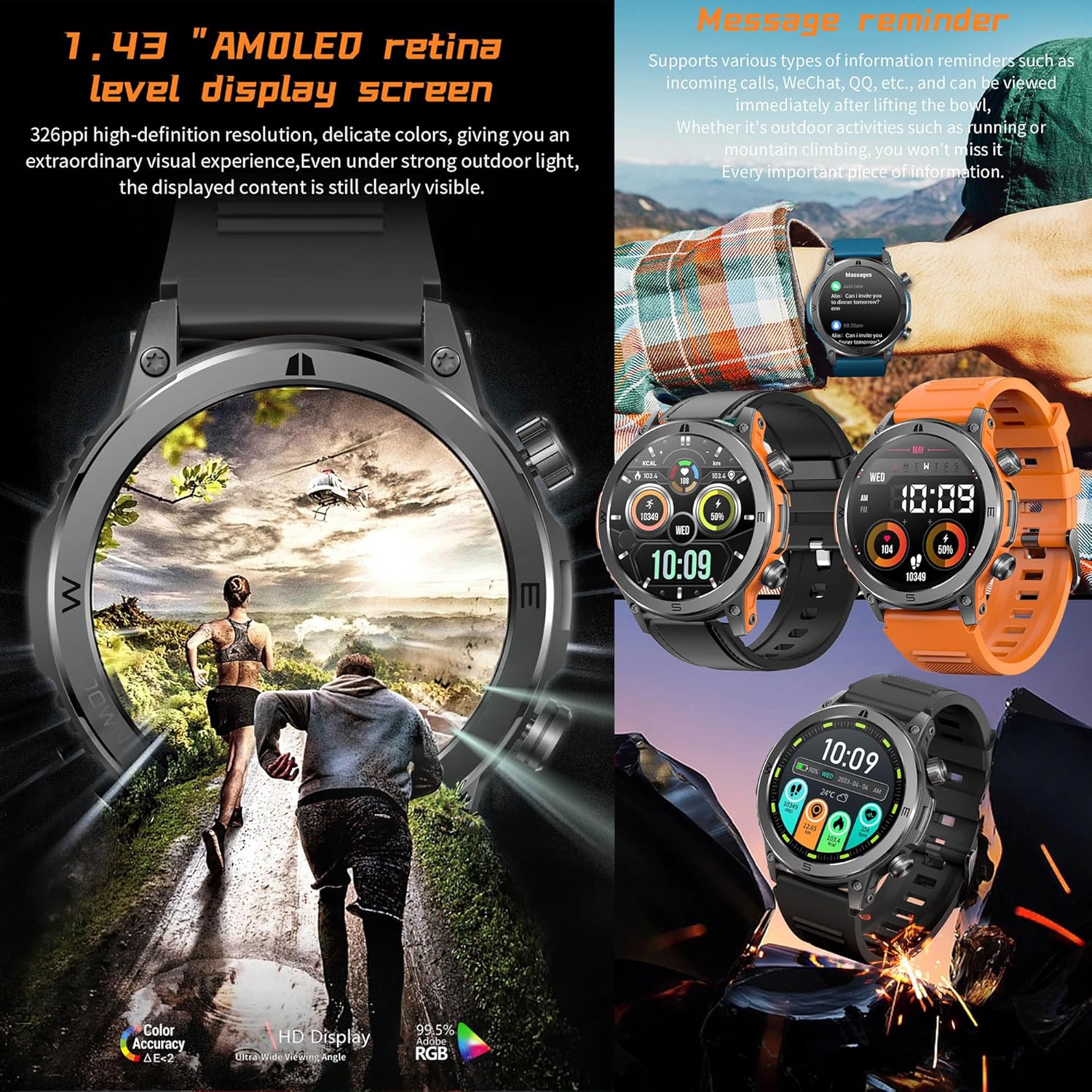
Figure 3: High-definition AMOLED display and message reminder feature.
4.2 Bluetooth Calls and Voice Assistant
With the built-in microphone and speaker, you can make and receive calls directly from your watch when connected via Bluetooth to your smartphone. The watch also supports voice assistant functionality.
- Making Calls: Access the dial pad or contact list on the watch to initiate a call.
- Receiving Calls: When a call comes in, you can answer or reject it directly from the watch screen.
- Voice Assistant: Activate the voice assistant feature (e.g., Siri, Google Assistant) through the watch interface to control your phone hands-free.

Figure 4: Bluetooth call functionality and extended battery life.
4.3 Message Reminders
Receive notifications for incoming calls, SMS, and messages from various apps (e.g., WeChat, QQ) directly on your smartwatch. Ensure notification permissions are enabled in the "FitCloudPro" app and your phone's settings.
4.4 Music Control
Control music playback on your smartphone directly from your watch. After connecting to the app, you can play/pause, skip tracks (next/previous), and adjust volume without taking out your phone.

Figure 5: Music control and other daily assistant features.
4.5 Watch Faces
Customize your smartwatch's appearance with a variety of pre-installed watch faces or download more through the "FitCloudPro" app. You can also set your own photos as watch faces.
4.6 Daily Assistant Features
The smartwatch includes several convenient daily tools:
- Alarm Clock: Set multiple alarms with vibration or sound reminders.
- Stopwatch/Timer: Use for timing activities or countdowns.
- Weather Forecast: Once connected to the app, the watch can display 5-day weather forecasts for your local city.
- Do Not Disturb Mode: Silence notifications during specific times.
- Calculator: Perform basic calculations directly on your wrist.
- Sedentary Reminder: Get alerts to move after periods of inactivity.
- Drink Water Reminder: Set reminders to stay hydrated.
5. Health Monitoring
The ZPIMY Smartwatch is equipped with advanced sensors to help you monitor key health metrics. For accurate readings, ensure the watch is worn snugly on your wrist.
Figure 6: Heart rate and blood oxygen monitoring features.
5.1 Heart Rate Monitoring
The watch provides 24-hour continuous heart rate monitoring. View your real-time heart rate on the watch or detailed historical data in the "FitCloudPro" app. This helps you understand your heart health and optimize your workouts.
5.2 Blood Oxygen (SpO2) Monitoring
Monitor your blood oxygen saturation levels. This feature helps you assess your body's oxygen absorption and can be useful for avoiding excessive exercise.
5.3 Sleep Monitoring
The smartwatch automatically tracks your sleep patterns, including deep sleep, light sleep, and awake time. Review your sleep score and analysis in the app for professional advice on improving sleep quality.
5.4 Menstrual Cycle Tracking (for female users)
For female users, the watch offers personalized menstrual cycle management, including reminders for menstruation, pregnancy preparation, and pregnancy tracking.
5.5 Breathing Training
Engage in guided breathing exercises to improve lung function and promote relaxation.
6. Activity Tracking
The smartwatch is your ideal companion for an active lifestyle, accurately tracking your movements and sports data.

Figure 7: Smartwatch with multi-sport mode tracking.
6.1 Sports Modes
With 123 built-in sports modes, including running, cycling, football, and more, you can accurately track your performance for almost any activity. During workouts, the watch precisely records calories burned, distance covered, steps taken, and exercise duration.

Figure 8: Over 100 sports modes available on the smartwatch.
6.2 GPS Tracking
When connected to the "FitCloudPro" app, the smartwatch can record your GPS movement tracking via your smartphone. This allows you to view your route and share your workout data with friends.
7. Maintenance
7.1 Water Resistance (5ATM / IP67)
The smartwatch is 5ATM waterproof, meaning it can withstand pressures equivalent to a depth of 50 meters. This makes it suitable for swimming and daily use like hand washing or rain exposure. However, it is not recommended for hot showers, saunas, or diving, as steam and hot water can compromise the seals.
The IP67 rating indicates it is dust-tight and can withstand immersion in 1 meter of water for 30 minutes. While robust, avoid prolonged exposure to water, especially saltwater, and dry the watch thoroughly after contact with water.
7.2 Cleaning
Regularly clean your smartwatch and strap to prevent skin irritation and maintain its appearance. Use a soft, lint-free cloth. If necessary, slightly dampen the cloth with water. Do not use harsh chemicals or abrasive materials.
7.3 Battery Care
The watch features a 260mAh battery. A full charge takes approximately 60 minutes. With Bluetooth call functionality enabled, the battery can last up to 7 days. Standby time is up to 12 days. To prolong battery life:
- Avoid extreme temperatures.
- Charge the watch before the battery is completely depleted.
- Reduce screen brightness and turn off unnecessary notifications if not needed.
8. Troubleshooting
If you encounter issues with your smartwatch, please refer to the following common solutions:
8.1 Connection Issues (Bluetooth)
- Ensure Bluetooth is On: Check that Bluetooth is enabled on both your smartphone and the smartwatch.
- Restart Devices: Try restarting both your smartphone and the smartwatch.
- Forget Device: In your phone's Bluetooth settings, "forget" or "unpair" the smartwatch, then try pairing again through the "FitCloudPro" app.
- App Permissions: Ensure the "FitCloudPro" app has all necessary permissions (location, Bluetooth, etc.) enabled in your phone's settings.
- Distance: Keep the smartwatch within Bluetooth range of your phone (typically 10 meters).
8.2 Inaccurate Health Data
- Proper Fit: Ensure the watch is worn snugly on your wrist, not too tight or too loose.
- Clean Sensors: Clean the optical sensors on the back of the watch regularly with a soft cloth.
- Stillness: For accurate readings (especially SpO2), remain still during measurement.
8.3 Notifications Not Appearing
- App Notifications: Verify that app notifications are enabled within the "FitCloudPro" app.
- Phone Settings: Check your phone's system notification settings to ensure the "FitCloudPro" app has permission to display notifications.
- Do Not Disturb: Ensure "Do Not Disturb" mode is not active on either your phone or the smartwatch.
8.4 Watch Not Turning On
- Charge Battery: Connect the watch to its charger and ensure it is charging. The battery might be completely drained.
- Check Charger: Ensure the charging cable and adapter are working correctly.
8.5 Factory Reset
If problems persist, you may need to perform a factory reset. This will erase all data on the watch and restore it to its original settings. Look for the "Factory Reset" or "Reset" option in the smartwatch's settings menu or within the "FitCloudPro" app.
9. Product Specifications
Figure 9: Detailed product dimensions and technical specifications.
| Feature | Specification |
|---|---|
| Brand | ZPIMY |
| Model Number | Orange |
| Color | Orange |
| Display | 1.43 inches AMOLED, 466 x 466 resolution |
| Operating System | AsteroidOS (Customized) |
| Connectivity | Bluetooth 5.1 |
| Battery Capacity | 260 mAh Lithium Polymer |
| Charging Time | Approx. 60 minutes |
| Battery Life (Typical Use) | Up to 7 days (with Bluetooth calls) |
| Standby Time | Up to 12 days |
| Water Resistance | 5ATM (equivalent to 50m depth), IP67 |
| Compatible Devices | Android 6.0+ / iOS 10.0+ |
| Sensors | Heart Rate, Blood Oxygen (SpO2) |
| Special Features | Bluetooth Calls, Voice Assistant, 123 Sports Modes, Message Reminders, Music Control, Sleep Tracking, Menstrual Cycle Tracking, Breathing Training, Weather Forecast, Alarm, Stopwatch, Calculator |
| Case Material | Zinc alloy + plastic |
| Memory Storage | 128MB (RAM+ROM) |
10. Warranty and Support
10.1 Manufacturer's Warranty
This ZPIMY Smartwatch comes with a 2-year manufacturer's warranty from the date of purchase. This warranty covers defects in materials and workmanship under normal use. It does not cover damage caused by misuse, accidents, unauthorized modifications, or normal wear and tear.
Please retain your proof of purchase for warranty claims.
10.2 Customer Support
For any questions, technical assistance, or warranty claims, please contact ZPIMY customer support through the retailer where you purchased the product or refer to the contact information provided in the original product packaging.
For the most up-to-date support information, please visit the official ZPIMY website (if available) or contact your local distributor.


