1. Introduction
Thank you for choosing the Ohniyou 52-inch Low Profile Ceiling Fan. This modern flush mount ceiling fan is designed for both indoor and outdoor use, offering advanced features such as remote and APP control, dimmable LED lighting with adjustable color temperature, a silent DC motor, and reversible airflow for year-round comfort. This manual provides detailed instructions for installation, operation, maintenance, and troubleshooting to ensure optimal performance and longevity of your fan.
2. Safety Information
Please read all instructions carefully before beginning installation. Failure to follow these instructions could result in electric shock, fire, or personal injury. Always consult a qualified electrician if you are unsure about any part of the installation process.
- Ensure the power is turned off at the circuit breaker before installation or maintenance.
- All wiring must be in accordance with national and local electrical codes.
- The mounting structure must be capable of supporting the fan's weight (approximately 14.52 pounds).
- Do not bend the blade holders during installation or cleaning.
- Keep children away from the fan during operation.
3. Package Contents
Verify that all components are present before beginning installation:
- Ceiling Fan Unit (with integrated light kit)
- Remote Control
- Mounting Bracket
- Fan Blades (5x)
- Hardware Pack (screws, wire nuts, etc.)
- User Manual
4. Setup and Installation
Installation of the Ohniyou ceiling fan is designed to be straightforward. It is recommended to have a second person assist during the mounting process.
4.1 Pre-Installation Steps
- Turn off power at the main circuit breaker.
- Identify the electrical box and ensure it is securely mounted and rated for ceiling fan support.
- Unpack all components and lay them out.
4.2 Mounting the Fan
- Attach the mounting bracket to the electrical box using the provided screws. Ensure the lip of the bracket faces down.
- Hang the fan motor assembly onto the hook provided on the mounting bracket to free your hands for wiring.
4.3 Wiring Connections
Connect the fan's wires to the household wiring. The fan typically has three wires: Ground, Neutral, and Live. If your existing wiring has a separate live wire for the light and fan, connect both to the fan's single live wire.
- Connect the green/bare copper wire (Ground) from the fan to the household ground wire.
- Connect the white wire (Neutral) from the fan to the household neutral wire.
- Connect the black wire (Live) from the fan to the household live wire(s).
4.4 Final Assembly
- Carefully tuck all wires into the electrical box.
- Secure the fan motor assembly to the mounting bracket with the designated screws.
- Attach the fan blades to the motor housing according to the instructions.
- Install the light cover.
Video: Official Ohniyou 52-Inch Modern Ceiling Fan Installation Tutorial. This video provides a visual guide to the installation process.

Image: The Ohniyou 52-inch Low Profile Ceiling Fan, showcasing its modern design with five black blades and an integrated LED light.
5. Operating Instructions
Your Ohniyou ceiling fan can be controlled via the included remote control or a dedicated smartphone application.
5.1 Remote Control Functions
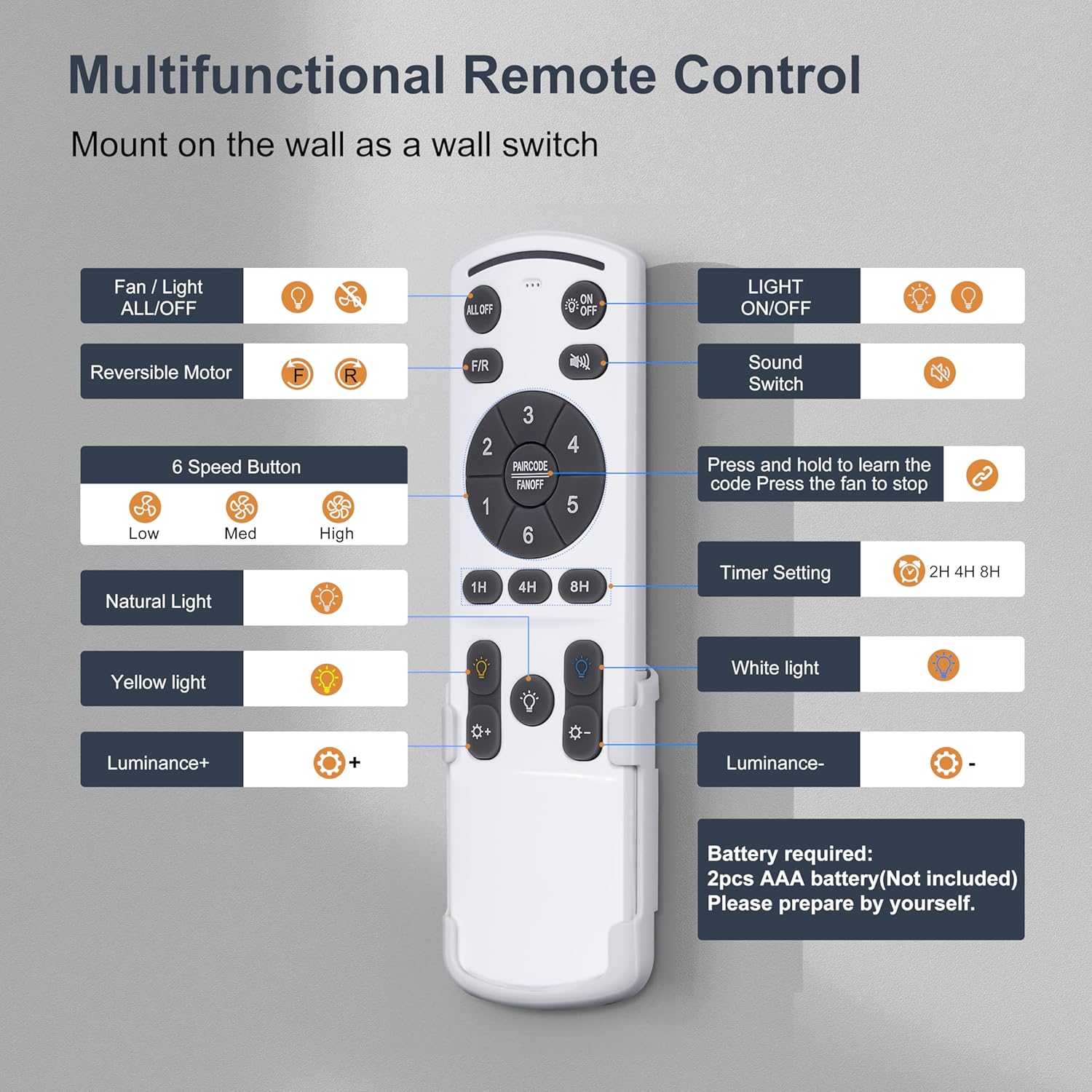
Image: Detailed view of the multifunctional remote control for the Ohniyou ceiling fan, highlighting various buttons for fan speed, light control, and timing.
- Fan/Light ALL ON/OFF: Turns both fan and light on/off.
- LIGHT ON/OFF: Controls the light independently.
- Reversible Motor (F/R): Toggles between summer (downward airflow) and winter (upward airflow) modes.
- 6 Speed Button (1-6): Adjusts fan speed from low (1-2, comfortable wind) to high (5-6, cool wind).
- Sound Switch: Toggles audible feedback from the fan.
- Natural Light / Yellow Light / White Light: Cycles through 3 CCT options (3000K Warm, 4500K Natural, 6000K Cold).
- Luminance +/-: Adjusts light brightness from 10% to 100%.
- Timer Setting (1H, 4H, 8H): Sets the fan to turn off automatically after 1, 4, or 8 hours.
- Pair Code: Press and hold to learn the code and pair the remote with the fan.
Note: The remote requires 2 AAA batteries (not included).
Video: Where is the remote control? This short video demonstrates the remote control's presence and basic handling.
5.2 APP Control
The Ohniyou ceiling fan can be controlled via a smartphone application. Scan the QR code in the manual or on the product packaging to download the app.

Image: Instructions for APP control, including a QR code for download and pairing notes. The app allows control of light color temperature, brightness, wind speed, wind direction, night light mode, and timing.
- APP Download: Visit http://www.jasonghost.com/fanlamppro/index-en.html or scan the QR code provided in the product packaging.
- APP Pairing: Turn on your phone's Bluetooth. For initial pairing, turn the ceiling fan power on and off 5 times quickly. The fan should beep to confirm successful pairing.
- Functions: The app allows control over light color temperature and brightness, fan speed and direction, night light mode, and timer settings.
5.3 Dimmable Light and Color Temperature
The integrated LED light offers three color temperature options and adjustable brightness:
- 6000K Cold Light: Bright, cool white light.
- 4500K Natural Light: Balanced, neutral white light.
- 3000K Warm Light: Soft, warm yellow light.
Brightness can be adjusted from 10% to 100% using the remote or app. Note: Lighting memory does not work with a wall switch; settings are retained when using the remote or app.
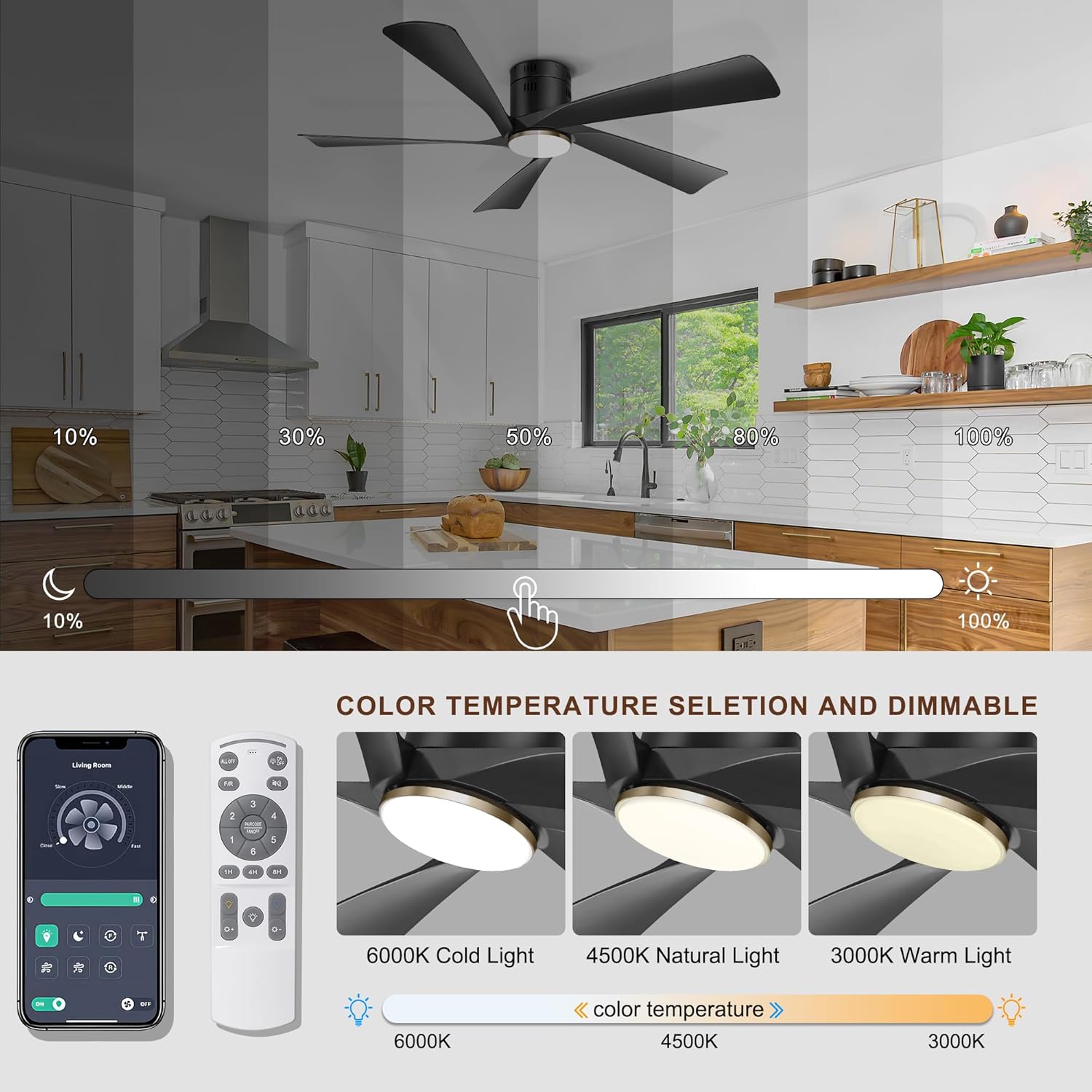
Image: Visual representation of the dimmable light feature and the three available color temperature options (6000K, 4500K, 3000K).
5.4 Reversible Airflow
The fan features a reversible DC motor for year-round comfort:
- Summer Mode (Downward Airflow): Blades rotate counter-clockwise, pushing cool air down to create a refreshing breeze.
- Winter Mode (Upward Airflow): Blades rotate clockwise, drawing cool air up and circulating warm air trapped near the ceiling.

Image: Diagram illustrating the summer (downward airflow) and winter (upward airflow) modes of the reversible ceiling fan.
5.5 Quiet Operation
The fan's DC motor operates quietly, typically below 30dB, ensuring a peaceful environment. This makes it suitable for bedrooms and other quiet spaces.

Image: Graphic illustrating the low noise level of the Ohniyou ceiling fan (30dB) compared to other common sounds.
6. Maintenance
Regular maintenance ensures the longevity and optimal performance of your ceiling fan.
- Cleaning: Use a soft, damp cloth to clean the fan blades and motor housing. Do not use abrasive cleaners or solvents.
- Blade Inspection: Periodically check that all blade screws are tight. Loose blades can cause wobbling and noise.
- Light Cover: Clean the light cover as needed to maintain optimal light output.
Always ensure the power is off at the circuit breaker before performing any cleaning or maintenance.
7. Troubleshooting
If you encounter issues with your Ohniyou ceiling fan, refer to the following common problems and solutions:
| Problem | Possible Cause | Solution |
|---|---|---|
| Fan does not operate | No power; Loose wiring; Remote/APP not paired. | Check circuit breaker. Ensure all wiring connections are secure. Re-pair remote/APP (see Section 5). |
| Light does not work | No power to light; Loose connection; LED failure. | Check power. Verify light wiring. Contact customer support if LED is faulty. |
| Fan wobbles | Loose blades; Unbalanced blades; Loose mounting. | Ensure all blade screws are tight. Check mounting bracket for secure installation. |
| Noisy operation | Loose screws; Motor issue; Obstruction. | Check all screws. Ensure no wires are rubbing. If noise persists, contact customer support. |
| Remote/APP not responding | Batteries dead; Not paired; Interference. | Replace remote batteries. Re-pair remote/APP. Ensure no strong interference sources nearby. |
| Light memory not working with wall switch | This is a design characteristic. | Use the remote or APP to control light settings for memory function. |
8. Specifications
| Feature | Detail |
|---|---|
| Brand | Ohniyou |
| Model Name | GLX063 |
| Color | Black |
| Product Dimensions | 52"D x 18"W x 52"H |
| Power Source | AC/DC |
| Wattage | 50 watts |
| Voltage | 230 Volts |
| Number of Blades | 5 |
| Blade Material | Plastic |
| Motor Type | DC Motor |
| Noise Level | Below 30dB |
| Light Type | LED (Dimmable, 3 CCT) |
| Control Method | App, Remote |
| Installation Method | Flush Mount |
| Indoor/Outdoor Usage | Outdoor, Indoor |
| Recommended Room Size Coverage | 12 ft ~ 14 ft |
9. Warranty and Support
Ohniyou provides a limited warranty for this product. For specific warranty details and duration, please refer to the warranty card included with your purchase or contact Ohniyou customer support directly.
For technical assistance, troubleshooting, or warranty claims, please contact Ohniyou customer service through the contact information provided on the product packaging or the official Ohniyou website.


