
1. Product Overview
The Dreo 4L Smart Humidifier HM311S is designed to enhance indoor air quality by maintaining optimal humidity levels. Featuring smart controls, a large 4-liter water tank, and quiet ultrasonic operation, it is suitable for various room types including bedrooms, nurseries, and offices. This humidifier also includes an essential oil diffuser and an ambient night light for added comfort and functionality.
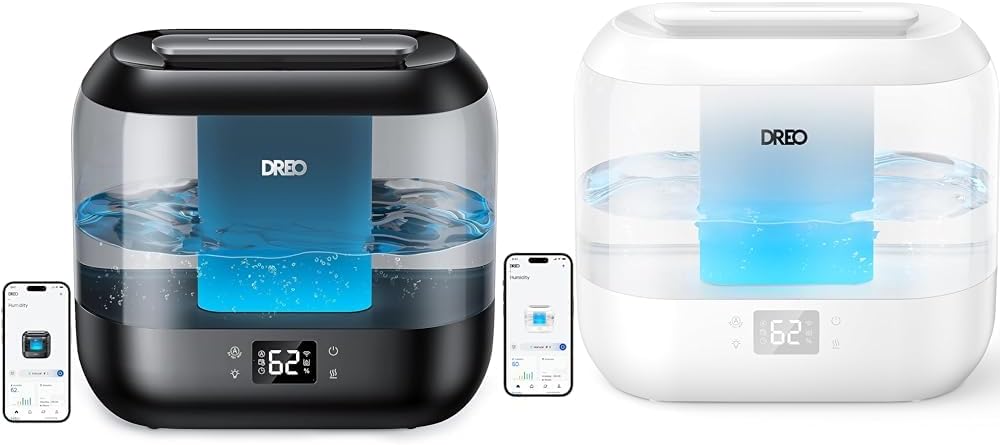
Figure 1: Dreo 4L Smart Humidifier (Black and White models shown with mobile app interface).
2. Setup and Installation
2.1 Initial Preparation
- Remove the humidifier from its packaging.
- Carefully remove any protective labels or plastic wraps from the base and internal components.
- Rinse all removable parts with water before first use.

Figure 2: Black model of the Dreo 4L Smart Humidifier, highlighting the digital display and app connectivity.
2.2 Filling the Water Tank
- Remove the top cover of the humidifier.
- Lift the water tank using its integrated handle.
- Fill the tank with purified or distilled water. Ensure the water level does not exceed the MAX line indicated on the tank.
- Place the filled water tank back onto the base and secure the top cover.
- Place the humidifier on a flat, level surface, at least 30 cm (12 inches) away from walls or major obstacles.

Figure 3: Humidifier in operation, demonstrating mist output and precise humidity control via the mobile application.
2.3 Connecting to the Dreo App and Voice Assistants
- Download the Dreo app from the App Store or Google Play.
- Launch the app and follow the in-app instructions to create an account and connect your humidifier to Wi-Fi.
- The humidifier supports voice control via Alexa and Google Assistant. Follow the app's instructions to link your device.

Figure 4: Mobile app interface displaying smart scheduling features for the humidifier, compatible with Google and Alexa.
3. Operating Instructions
3.1 Control Panel Overview
The humidifier features a touch-sensitive control panel on its front. The digital display shows current humidity levels, mist level indicators, and Wi-Fi status.
- Power Button: Turns the humidifier on/off. Long press for 10 seconds to restore factory settings.
- Manual Mode Button: Switches between Low, Medium, and High mist levels.
- Sleep Mode Button: Activates low mist and turns off ambient light and beep sounds.
- Auto Mode Button: Increases target humidity by 5% (range 30% to 90%). Mist level adjusts automatically. Press Sleep Mode and Auto Mode buttons simultaneously to exit Auto Mode.
- Timer Button: Selects a timer from 0-12 hours. Long press for 5 seconds to enter Wi-Fi settings.
- Humidity Indicator Light: Turns the indicator light on/off.
3.2 Humidity Control and Mist Output
- The humidifier's advanced algorithm and Auto Mode precisely sense and maintain desired humidity levels.
- Dreo's Dual-intake design produces a supersized mist, providing faster relief from dry air.
- The 30° tiltable nozzle allows you to direct the mist output as needed.
3.3 Essential Oil Diffuser
- Locate the aroma pad slot on the back of the humidifier.
- Pull out the small tray and add a few drops of your preferred essential oil to the sponge pad.
- Reinsert the tray. The mist will diffuse the aroma into the room.
- ATTENTION: Do not add essential oil directly into the water tank to avoid damage to the tank.
3.4 Night Light Function
- The humidifier features an ambient light that can be turned on or off via the control panel or the Dreo app.
- The light's brightness can be adjusted.
- In Sleep Mode, the ambient light will automatically turn off.
4. Maintenance
4.1 Routine Cleaning
- Unplug the humidifier before cleaning or refilling.
- Detach the water tank and drain any remaining water.
- Remove the demineralization cartridge (if used) and rinse with water.
- Rinse the tank with warm water.
- Remove the mist tube and rinse it with warm water.
- Gently clean the base with a soft cloth or the included cleaning brush.
- Attach the mist tube back to the base.
5. Troubleshooting
5.1 Common Issues and Solutions
- Humidifier Leaking:
- Ensure protective foam is removed.
- Check for particles or hair blocking the water valve.
- Verify the humidifier is placed on a flat surface.
- Confirm the water valve is flat and not leaking when refilling.
- Check if tank leakage is due to prolonged use of essential oils.
- White Powder Residue: It is recommended to add purified or distilled water to prevent white powder residue from forming.
6. Specifications
| Brand | Dreo |
| Model Name | Dreo 4L |
| Operation Mode | Ultrasonic |
| Special Feature | Quiet, Timer |
| Room Type | Bedroom, Nursery, Office |
| Included Components | Timer, Remote Control/App |
| Color | Black |
7. Warranty and Support
Dreo offers comprehensive customer support for its products:
- Faster response
- Lifetime customer support
- Hassle-free returns
- Professional product guidance
- Satisfying after-sales experience
For support, you can reach out to Dreo:
- Phone: (888) 290-1688 (Mon-Fri, 9:00 AM - 5:00 PM PST/PDT)
- Email: support@dreo.com
- Website: www.dreo.com
You may also extend your warranty by 30 months by visiting dreo.com/warranty and following the instructions.


