
Jansite 4k dash cam-T96
Jansite 4K WiFi Dash Cam with Rear Camera User Manual
Model: 4k dash cam-T96
1. Introduction
Thank you for choosing the Jansite 4K WiFi Dash Cam with Rear Camera. This device is designed to provide high-resolution video recording for your vehicle, enhancing driving safety and providing evidence in case of incidents. Featuring a 12-inch IPS touchscreen, 4K front recording, 1080P rear recording, 5G WiFi connectivity, and advanced night vision, this manual will guide you through the setup, operation, and maintenance of your new dash cam system.
2. Product Overview
2.1. Package Contents
- 1 x Jansite 4K Dash Cam (Mirror unit)
- 1 x Waterproof Rear Camera
- 1 x Car Power Cable
- 1 x Rear Camera Extension Cable (10 meters)
- 1 x User Manual
- 1 x 64GB Class 10 SD Card
2.2. Key Features
- 4K High Resolution Recording: Captures clear video details with an 8-million-pixel sensor and true 4K output for the front camera.
- 12-inch IPS Touchscreen: Provides a wide field of view and intuitive control.
- 5G WiFi Functionality: Allows wireless live preview, video download, and sharing via a mobile application.
- WDR (Wide Dynamic Range) Night Vision: Enhances clarity in low-light conditions, capturing details like license plates.
- IP69 Waterproof Rear Camera: Durable and resistant to rain and dust.
- Adjustable Reversing Line: Aids in safe parking and reversing.
- G-Sensor: Automatically locks video footage upon detecting sudden impacts or collisions.
- Loop Recording: Overwrites the oldest unlocked footage when the memory card is full, ensuring continuous recording.
- 24-Hour Parking Monitor: Requires a hardwire kit (sold separately, ASIN: B0C8CXTZG5) for continuous surveillance when parked.
- Type-C Power Interface: Offers stable power supply, faster charging, and improved durability.

Figure 2.1: Overview of the Jansite 4K WiFi Dash Cam system, showing the main mirror unit, rear camera, and included 64GB SD card, along with a smartphone displaying the app interface.

Figure 2.2: Illustration highlighting the 4K image quality, simultaneous front and rear recording, high-performance sensors, WiFi, and WDR features of the dash cam.
3. Setup Instructions
3.1. Installing the Front Dash Cam
- Mounting: Securely attach the dash cam mirror unit over your vehicle's existing rearview mirror using the provided straps. Ensure it is firmly in place and does not obstruct your view.
- Power Connection: Connect the car power cable to the Type-C port on the dash cam. Route the cable neatly along the windshield edge and dashboard to your vehicle's 12V power outlet (cigarette lighter socket).
- Insert SD Card: Insert the included 64GB Class 10 SD card into the designated slot on the dash cam. Ensure it is inserted correctly until it clicks into place.
3.2. Installing the Rear Camera
- Mounting Location: Choose a suitable location for the rear camera, typically above the license plate or inside the rear window. Ensure it has a clear view of the road behind.
- Secure Attachment: Use the provided adhesive or screws to securely mount the rear camera.
- Cable Routing: Connect the rear camera extension cable to the rear camera and route it through the vehicle's interior to the main dash cam unit. Connect the other end of the extension cable to the AV input port on the dash cam.
- Reverse Light Connection (Optional): For automatic display of parking guidelines when reversing, connect the red wire from the rear camera cable to your vehicle's reverse light positive wire. Professional installation is recommended for this step.

Figure 3.1: Comparison illustrating the benefits of the Type-C power interface (Stability Up, Convenience Up, Durability Up) over traditional Mini USB, and the inclusion of a 64GB memory card.
4. Operating Instructions
4.1. Basic Operation
- Power On/Off: The device will automatically power on and begin recording when the vehicle's ignition is turned on. It will power off automatically when the ignition is turned off. You can also manually power it on/off using the power button.
- Touchscreen Control: Navigate through menus and settings by swiping and tapping on the 12-inch IPS touchscreen.
- Switching Views: Swipe left or right on the screen to switch between front camera view, rear camera view, or split-screen display.
- Adjusting Brightness: Swipe up or down on the left side of the screen to adjust screen brightness.
- Adjusting Camera Angle: Swipe up or down on the right side of the screen to adjust the camera's vertical viewing angle.
4.2. Advanced Features
4.2.1. WiFi Connectivity and App Usage
- Download App: Search for the official Jansite dash cam app on the App Store (iOS) or Google Play Store (Android).
- Connect to WiFi: On the dash cam, enable the WiFi function through the settings menu. On your smartphone, connect to the dash cam's WiFi network (SSID and password will be displayed on the dash cam screen).
- App Functions: Once connected, you can use the app to:
- View live footage from both cameras.
- Browse and play back recorded videos.
- Download video files directly to your phone.
- Adjust dash cam settings.
- Share videos to social media platforms.

Figure 4.1: Demonstrates the dash cam's WiFi function, allowing users to wirelessly check, download, edit, and share video footage directly from their smartphone using the dedicated app.
4.2.2. WDR (Wide Dynamic Range) Night Vision
The WDR technology automatically adjusts exposure to provide balanced images in varying light conditions, significantly improving clarity and detail capture during nighttime driving or in tunnels. This ensures that critical information like license plates remains visible.
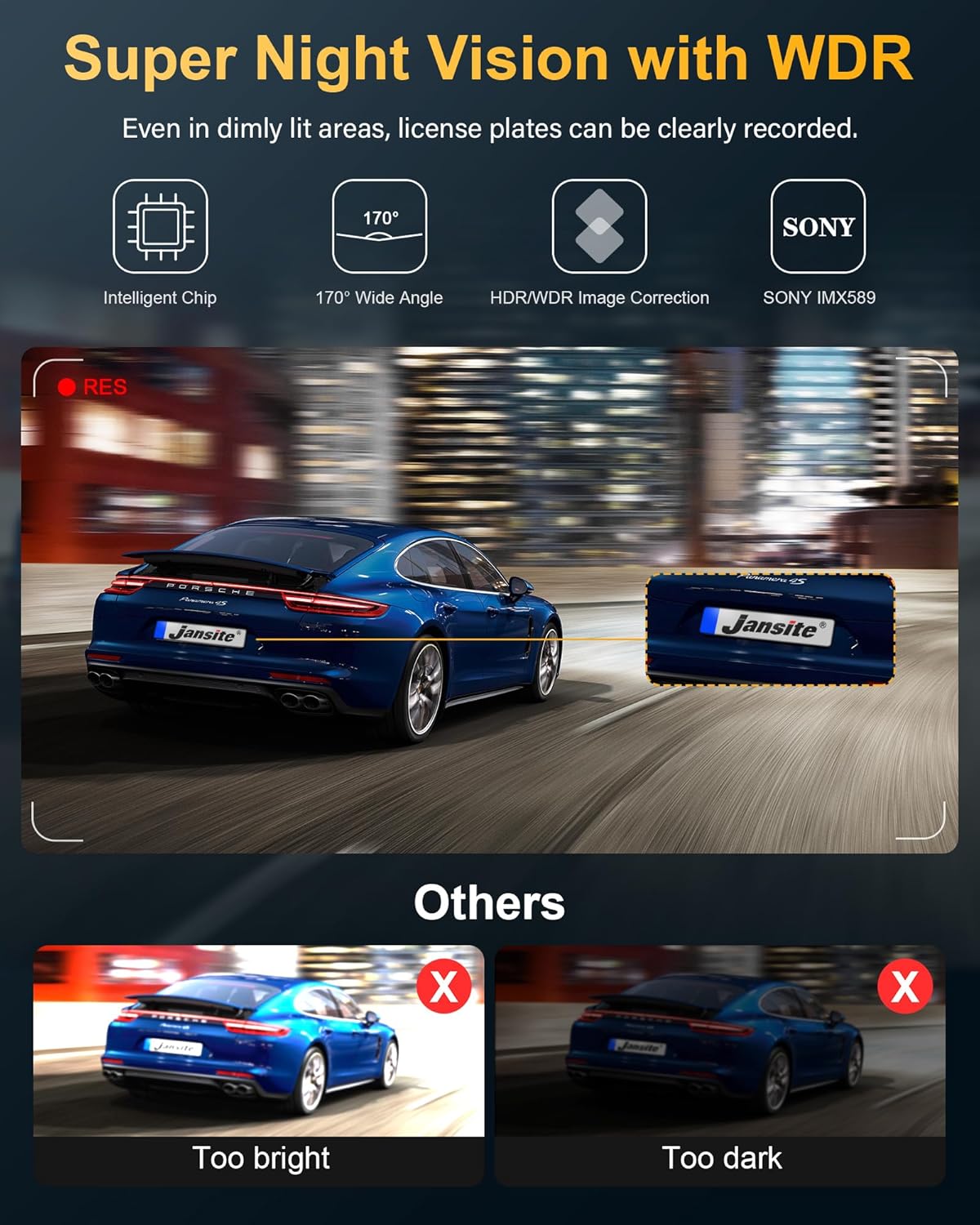
Figure 4.2: Illustrates the effectiveness of Super Night Vision with WDR, showing clear license plate capture in dim light compared to images that are either too bright or too dark without WDR.
4.2.3. Rear Camera Mirror Image Switching and IP69 Waterproofing
The rear camera supports mirror image switching, allowing you to adjust the display to your preference. Its IP69 waterproof rating ensures reliable performance in various weather conditions, protecting it from water and dust ingress.

Figure 4.3: Shows the rear camera's ability to switch between normal and mirror images, and highlights its IP69 waterproof and dust-proof capabilities.
4.2.4. Parking Monitor, G-Sensor, and Loop Recording
- Parking Monitor: When enabled (with optional hardwire kit), the dash cam will automatically record if it detects a collision or impact while your vehicle is parked.
- G-Sensor: In the event of a sudden shake or collision, the G-sensor will automatically lock the current video footage to prevent it from being overwritten by loop recording.
- Loop Recording: Ensures continuous recording by overwriting the oldest unlocked files when the SD card reaches its capacity. Locked files (from G-sensor events) are protected.
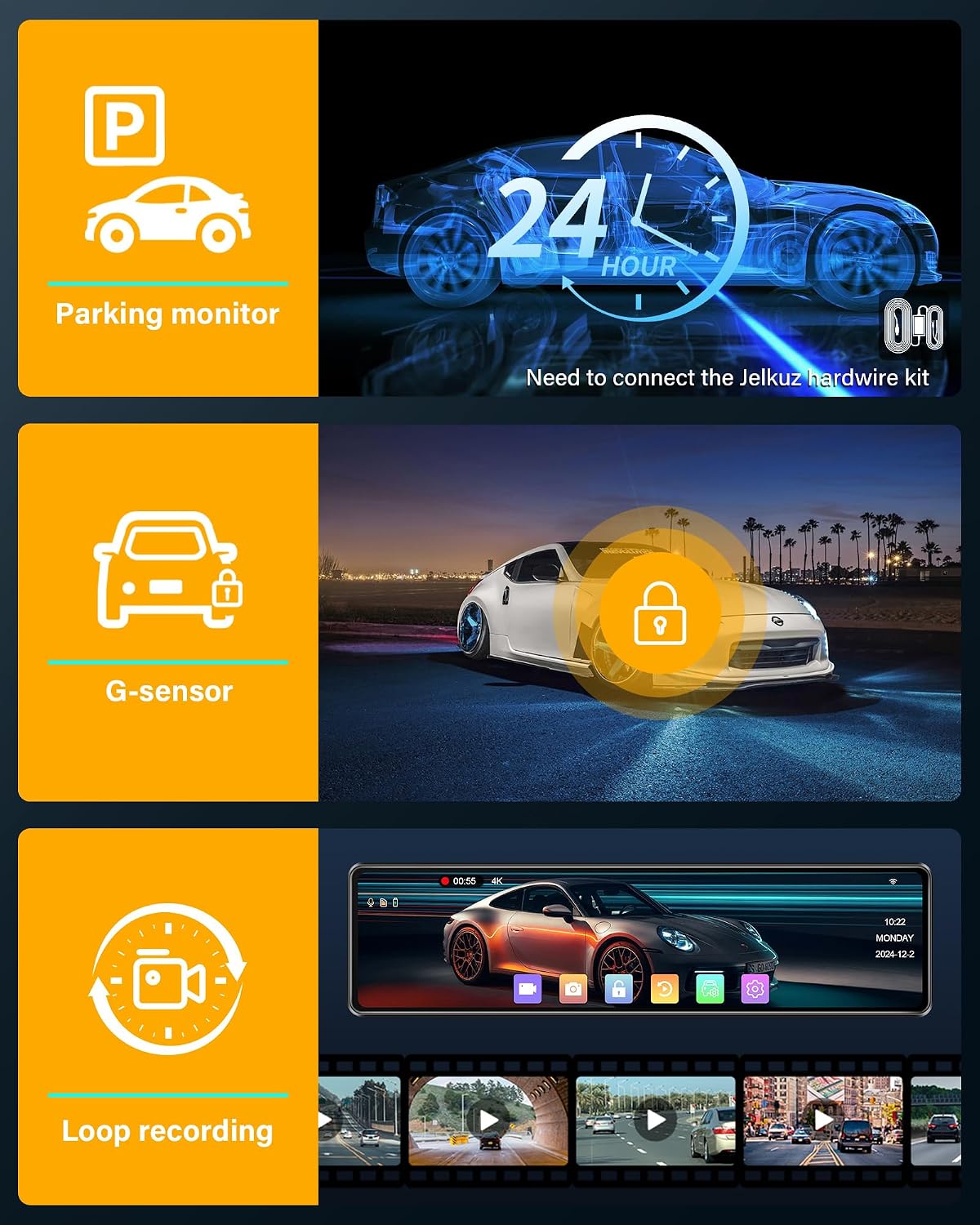
Figure 4.4: Depicts the Parking Monitor feature (requiring a hardwire kit), the G-sensor for impact detection, and the continuous Loop Recording function.
5. Maintenance
- SD Card Management:
- Format the SD card regularly (e.g., once a month) through the dash cam's settings to ensure optimal performance and prevent data corruption.
- Use only high-quality Class 10 or higher speed SD cards designed for dash cam use, as they are resistant to high temperatures.
- Cleaning:
- Gently wipe the camera lenses with a soft, lint-free cloth to ensure clear video recording.
- Clean the touchscreen with a microfiber cloth. Avoid using harsh chemicals.
- Firmware Updates: Check the manufacturer's website periodically for any available firmware updates to ensure your device has the latest features and bug fixes.
6. Troubleshooting
| Problem | Possible Cause / Solution |
|---|---|
| Dash cam does not power on. |
|
| Video footage is blurry or unclear. |
|
| SD card error or recording stops. |
|
| WiFi connection issues. |
|
| Rear camera not displaying or poor image quality at night. |
|
7. Specifications
| Feature | Detail |
|---|---|
| Brand | Jansite |
| Model Number | 4k dash cam-T96 |
| Screen Size | 12 Inches IPS Touchscreen |
| Front Camera Resolution | 4K (2160p) |
| Rear Camera Resolution | 1080P |
| Front Camera Angle | 170° Wide Angle |
| Rear Camera Angle | 140° Wide Angle |
| Connectivity | USB, 5G WiFi |
| Special Features | 4K High Resolution, 12" Touchscreen, WiFi Function, Adjustable Reversing Line, IP69 Waterproof Rear Camera, 10m Camera Cable, Free 64G SD Card, WDR Night Vision, G-Sensor, Loop Recording, 24-Hour Parking Monitor (with optional hardwire kit) |
| Compatible Devices | Vehicles (Truck, Car, Minivan) |
| Battery Composition | Lithium-polymer (included) |
| Mounting Type | Rearview Mirror Mount |
8. Warranty and Support
Jansite is committed to product quality and customer satisfaction. We offer a 24-month warranty and dedicated customer service for this product.
For any inquiries, technical support, or if you require accessories or instructions in other languages, please contact our after-sales support team via email:
Email: Jenny@jansite.cn
Please provide your product model number (4k dash cam-T96) and ASIN (B0CNR3N7Y1) when contacting support for faster assistance.
Related documents4k dash cam-T96


Ask a question about this manual
Ask about setup, troubleshooting, compatibility, parts, safety, or missing instructions. Manuals+ will review the question and use this page’s manual context to help answer it.