
1. Introduction
Thank you for purchasing the TNICER T5Plus Headset. This headset is designed to be used with the TNICER T5Plus motorcycle intercom system, providing clear audio communication and entertainment while riding. It includes both an arm microphone and a cord microphone to suit various helmet types and user preferences. Please read this manual thoroughly before installation and use to ensure proper operation and safety.
2. Safety Information
- Always prioritize road safety. Do not operate the intercom or headset in a way that distracts you from riding.
- Ensure the headset is securely installed in your helmet to prevent detachment during operation.
- Avoid prolonged exposure to loud sounds, which can cause hearing damage. Adjust volume to a safe level.
- Do not attempt to disassemble or modify the headset. This may void the warranty and cause damage.
- Keep the device away from water and extreme temperatures.
3. Package Contents
Please check the package for the following items:
- T5Plus Headset Speakers (L/R)
- Arm Microphone
- Cord Microphone
- Velcro Pads for Speakers
- Velcro Pad for Microphone
- USB Type-C Cable (for charging the intercom unit, not included with headset)
- User Manual (this document)
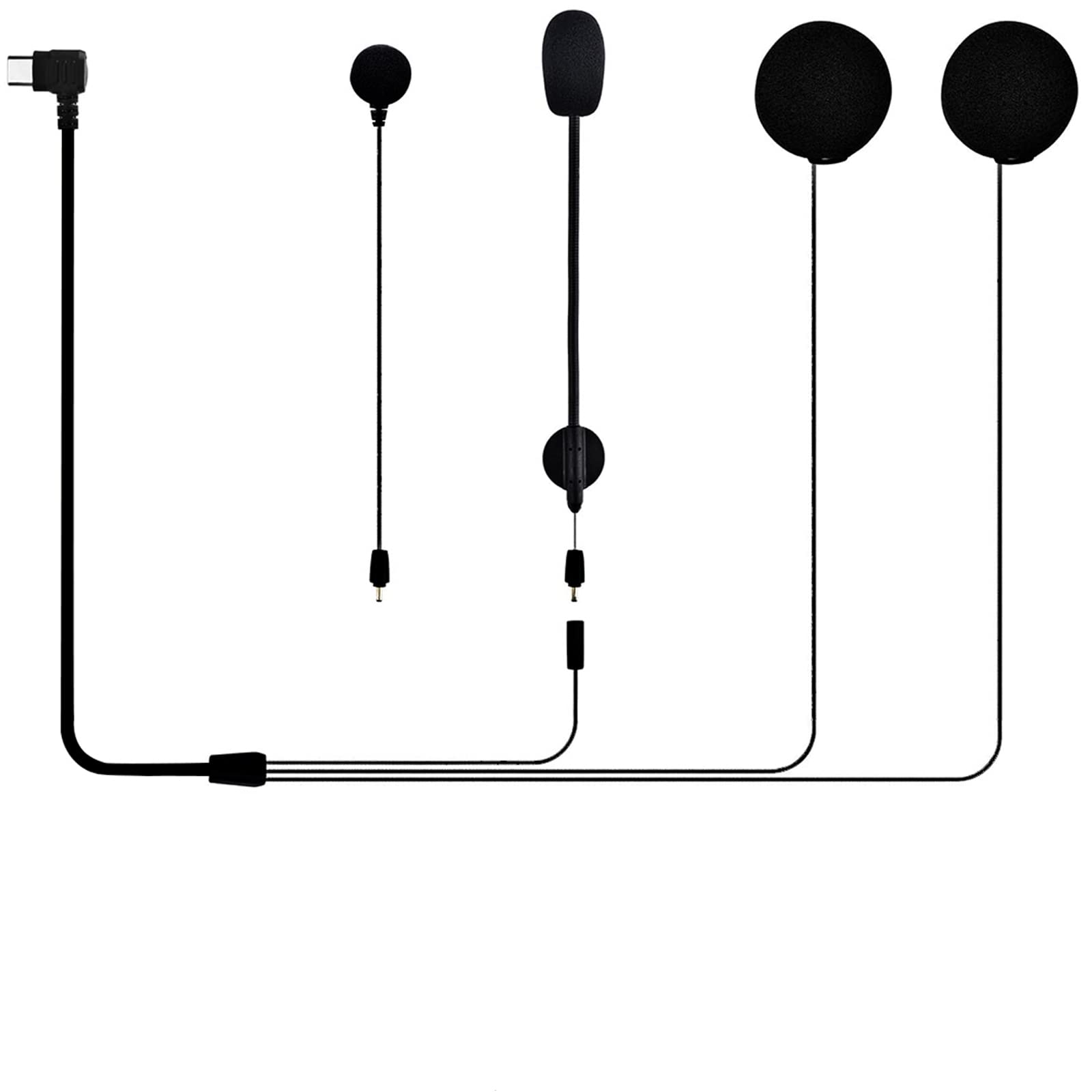
Image 1: Contents of the TNICER T5Plus Headset package. This image displays the two speaker units, the flexible arm microphone, and the wired cord microphone, along with various mounting accessories like Velcro pads.
4. Product Overview
The TNICER T5Plus Headset is designed for seamless integration with your T5Plus intercom unit. It features high-quality speakers for clear audio and two microphone options for different helmet styles.
4.1. Components
- Speakers: Two slim speakers designed to fit comfortably inside helmet ear pockets.
- Arm Microphone: A flexible boom microphone suitable for open-face or modular helmets.
- Cord Microphone: A wired microphone with a small profile, ideal for full-face helmets where the microphone can be placed near the mouth.
- Connector: A Type-C connector for connecting to the T5Plus intercom unit.
5. Setup and Installation
Follow these steps to install the headset components into your motorcycle helmet.
5.1. Speaker Installation
- Identify the ear pockets inside your helmet.
- Attach the Velcro pads to the back of each speaker.
- Peel off the protective film from the Velcro pads and firmly press the speakers into the helmet's ear pockets. Ensure they are positioned comfortably over your ears.
- Route the speaker wires neatly under the helmet's padding towards the left side where the intercom unit will be mounted.
5.2. Microphone Installation
Choose either the arm microphone or the cord microphone based on your helmet type.
5.2.1. Arm Microphone (for Open-Face/Modular Helmets)
- Attach a Velcro pad to the base of the arm microphone.
- Mount the arm microphone inside the helmet, ensuring the microphone tip is positioned close to your mouth when the helmet is worn.
- Route the microphone cable along the helmet's edge to the left side.
5.2.2. Cord Microphone (for Full-Face Helmets)
- Attach a Velcro pad to the back of the cord microphone.
- Mount the cord microphone inside the chin bar of your full-face helmet, positioning it directly in front of your mouth.
- Route the microphone cable neatly along the helmet's interior to the left side.
5.3. Connecting to the T5Plus Intercom Unit
- Ensure your T5Plus intercom unit (sold separately) is securely mounted to the side of your helmet.
- Locate the Type-C port on your T5Plus intercom unit.
- Connect the Type-C connector from the headset (which combines speaker and microphone wires) firmly into the intercom unit's Type-C port.
- Verify all cables are tucked away and do not interfere with helmet operation or comfort.
6. Operating Instructions
This headset functions as an audio input/output device for your TNICER T5Plus intercom unit. Refer to your T5Plus intercom unit's manual for detailed instructions on power, pairing, volume control, and specific feature usage.
6.1. Basic Functionality (via T5Plus Intercom Unit)
- Power On/Off: Controlled by the T5Plus intercom unit.
- Volume Adjustment: Controlled by the T5Plus intercom unit's buttons.
- Intercom Communication: Initiated and managed through the T5Plus intercom unit.
- Music Playback: Audio from a paired smartphone (via T5Plus unit) will be routed to the headset speakers.
- Phone Calls: Incoming and outgoing calls (via T5Plus unit) will use the headset's microphone and speakers.
7. Maintenance
- Cleaning: Use a soft, dry cloth to wipe the speakers and microphones. Do not use harsh chemicals or abrasive cleaners.
- Storage: When not in use, store the headset in a cool, dry place, away from direct sunlight and extreme temperatures.
- Cable Care: Avoid sharp bends or excessive pulling on the cables to prevent damage.
8. Troubleshooting
| Problem | Possible Cause | Solution |
|---|---|---|
| No sound from speakers. | Headset not properly connected to intercom unit. Volume too low. Intercom unit not powered on. | Ensure the Type-C connector is fully inserted into the T5Plus intercom unit. Increase volume on the T5Plus intercom unit. Power on the T5Plus intercom unit. |
| Microphone not picking up voice. | Microphone not connected. Microphone positioned incorrectly. Incorrect microphone selected (if applicable on intercom unit). | Ensure the headset's Type-C connector is fully inserted. Adjust microphone position closer to your mouth. Refer to your T5Plus intercom manual for microphone selection settings. |
| Sound quality is poor. | Speakers not positioned correctly. External interference. | Adjust speaker position in ear pockets for optimal sound. Move away from sources of strong electromagnetic interference. |
If you encounter issues not listed here, please refer to the TNICER T5Plus intercom unit's manual or contact customer support.
9. Specifications
- Model: T5Plus Headset
- Compatibility: TNICER T5Plus Motorcycle Intercom System
- Microphone Type: Arm Microphone, Cord Microphone
- Connector Type: USB Type-C
- ASIN: B0CNPR813F
10. Warranty and Support
TNICER products are designed for quality and reliability. For warranty information, please refer to the documentation included with your TNICER T5Plus intercom unit or visit the official TNICER website. For technical support or inquiries, please contact TNICER customer service through their official channels or the retailer where you purchased the product.
Official TNICER Store: Visit TNICER Store on Amazon.co.jp


