1. Introduction
This document provides essential instructions for the operation and maintenance of your new Generic replacement infrared remote control. This remote is designed to be compatible with a range of Akai AKTV series and LES series televisions. Please note that as a replacement unit, some advanced functions present on your original remote may not be fully supported. Refer to the compatibility list to ensure your television model is supported.

Image 1: Front view of the Generic replacement remote control. This image displays the full layout of buttons, including power, number pad, navigation, volume, channel, and media controls.
2. Setup: Battery Installation
The remote control requires two AAA batteries (not included) for operation. Follow these steps to install the batteries correctly:
- Locate the battery compartment cover on the back of the remote control.
- Press down on the tab and slide the cover downwards to open the compartment.
- Insert two AAA batteries, ensuring the positive (+) and negative (-) terminals align with the markings inside the compartment. Incorrect installation can prevent the remote from functioning.
- Slide the battery compartment cover back into place until it clicks securely.
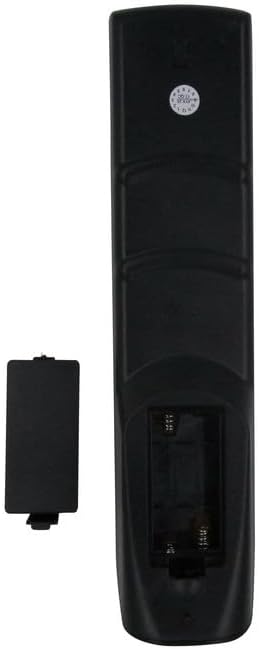
Image 2: Back view of the remote control with the battery compartment open, showing the slots for two AAA batteries.
Important: Always replace both batteries at the same time. Do not mix old and new batteries, or different types of batteries.
3. Operating the Remote Control
This remote control operates using infrared (IR) technology. Point the remote directly at your television's IR receiver for optimal performance. Ensure there are no obstructions between the remote and the TV.
Key Functions Overview:
| Button | Function |
|---|---|
| Power (Red) | Turns the television on or off. |
| Number Pad (0-9) | Directly selects TV channels. |
| CH +/- | Changes the television channel up or down sequentially. |
| VOL +/- | Adjusts the television volume up or down. |
| MUTE | Mutes or unmutes the television audio. |
| SOURCE / INPUT | Cycles through available input sources (e.g., HDMI 1, AV, USB). |
| MENU | Opens the television's main menu. |
| Navigation (Up/Down/Left/Right) | Navigates through menu options. |
| ENTER / OK | Confirms selections in menus. |
| EXIT | Exits the current menu or on-screen display. |
| DISPLAY / INFO | Displays current channel information or program details. |
| Colored Buttons (Red, Green, Yellow, Blue) | Perform specific functions within certain TV menus or applications, as indicated on-screen. |
Note: The functionality of certain buttons may vary slightly depending on your specific Akai TV model and its firmware.
4. Compatibility Information
This replacement remote control is designed to be compatible with the following Akai television models. Please verify your TV model number against this list:
- AKTV190
- AKTV3210
- AK24CTV
- AK40HK
- AKTV3218H
- AKTV246-DT
- AKTV2412T
- LES-32D99M
- LES-40D99M
- LES-43D99M
- AKTV257LED
- And other similar Akai Smart 4K UHD LCD LED HDTV TV models as specified by the seller.
If your specific model is not listed, or if you encounter issues, please contact the seller for assistance before assuming incompatibility.
5. Troubleshooting
If your remote control is not functioning as expected, please try the following troubleshooting steps:
- Check Batteries: Ensure batteries are inserted correctly with the correct polarity (+/-). Replace old batteries with new AAA batteries.
- Line of Sight: Make sure there are no objects blocking the path between the remote control and the TV's infrared receiver.
- Remote Range: Operate the remote within a reasonable distance (typically up to 7 meters or 23 feet) from the television.
- Test Remote: You can test if the remote is emitting an IR signal by pointing it at a smartphone camera. Press any button; if you see a light flashing on the remote's emitter through the camera, the remote is likely working.
- TV Power Cycle: Turn off your television, unplug it from the power outlet for a few minutes, then plug it back in and turn it on. This can sometimes resolve minor communication issues.
- Specific Functions: Remember that as a replacement remote, not all functions of your original TV remote may be replicated. If a specific button does not work, it might be due to this compatibility limitation.
If these steps do not resolve the issue, please contact the seller for further assistance.
6. Specifications
- Product Type: Replacement Infrared Remote Control
- Brand: Generic
- Compatible Devices: Akai Televisions (AKTV series, LES series)
- Power Source: 2 x AAA Batteries (not included)
- Color: Black
- Special Feature: Ergonomic design
- Max Number of Supported Devices: 1 (Television)
7. Maintenance
To ensure the longevity and proper functioning of your remote control, follow these maintenance guidelines:
- Cleaning: Wipe the remote control with a soft, dry cloth. For stubborn dirt, lightly dampen the cloth with water or a mild cleaning solution, then wipe dry immediately. Avoid harsh chemicals or abrasive cleaners.
- Battery Care: Remove batteries if the remote control will not be used for an extended period (e.g., one month or more) to prevent battery leakage, which can damage the device.
- Storage: Store the remote in a cool, dry place, away from direct sunlight, extreme temperatures, and high humidity.
- Avoid Drops: Protect the remote from physical impact, as drops can damage internal components.
8. Warranty and Support
As a generic replacement product, specific warranty details may vary. Please refer to the purchase terms and conditions provided by the seller, SZHKHXD, at the time of your purchase.
For any questions, technical support, or issues not covered in this manual, please contact the seller directly through the platform where the purchase was made. Provide your order number and a detailed description of the issue for prompt assistance.


