
DownyPaws DPWFP6
Contents
DownyPaws Wireless Cat Water Fountain User Manual
Model: DPWFP6
Introduction
Welcome to the user manual for your DownyPaws Wireless Cat Water Fountain. This innovative pet water dispenser is designed to provide fresh, clean water for your cat with the convenience of a cordless, battery-operated system. Its features promote hydration and ease of maintenance, ensuring a healthy and happy environment for your pet.

Image: The DownyPaws Wireless Cat Water Fountain, showcasing its sleek design and continuous water flow.
Product Features
- Wireless Convenience: Battery operated for versatile placement, allowing you to hydrate your cat anywhere without cord limitations.
- Superb Battery Capacity: Equipped with a built-in 4,000mAh rechargeable battery, providing up to 30 days of operation on a single charge (based on 1 cat household in Motion-activated Mode). Features a fast-charging chip and removable battery for easy recharging.
- Dual Water Modes: Offers both Timer Mode (water dispenses every 15 minutes for 20 seconds) and Motion Sensor Mode (activates when a cat approaches within 5 feet/1.5 meters and a 120-degree angle).
- Safe & Easy Clean: Constructed with BPA-Free Plastic and a Premium Stainless Steel Water Dish. The stainless steel tray is dishwasher-safe for high-temperature sterilization, and the unit is designed for easy disassembly and cleaning.
- Silent & Smart Water Pump: Operates at a whisper-quiet 30 decibels, ensuring a tranquil environment. Includes water level protection, automatically stopping the pump when water is low to prevent damage.
- 5-Level Filtration System: Continuously provides fresh and healthy water through activated carbon (removes taste/odor), ion exchange resin (softens water), medical stone (removes heavy metals/releases trace elements), non-woven fabric (filters hair/impurities), and a high-density sponge (removes fine particles).
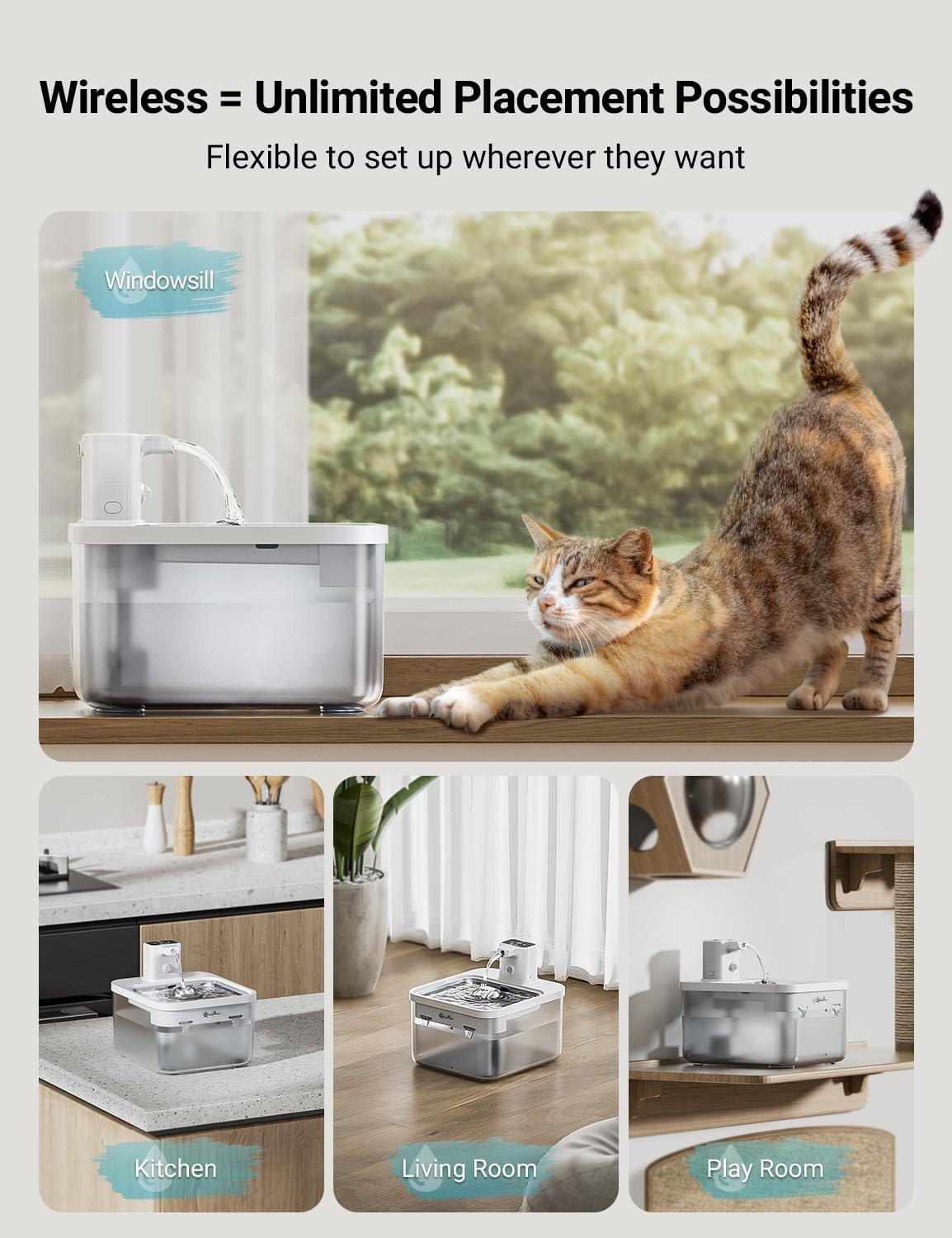
Image: The wireless cat water fountain placed in different locations like a windowsill, kitchen, living room, and play room, highlighting its versatile placement.
Package Contents
Please ensure all components are present and undamaged before proceeding with assembly.
- Main Fountain Unit (Water Tank, Base)
- Stainless Steel Water Tray
- Pump Unit with Spout
- Rechargeable Battery Pack
- Filter Cartridge (1 included)
- USB-C Charging Cable
- User Manual

Image: An exploded view of the fountain, showing the main water tank, stainless steel tray, and pump unit separated for easy understanding of components.
Setup Instructions
Follow these steps for the initial setup of your DownyPaws Wireless Cat Water Fountain:
- Unpack and Clean: Carefully remove all components from the packaging. Rinse the water tank, stainless steel tray, and pump unit thoroughly with clean water. Do not immerse the battery pack or the main pump unit (the part with electronics) in water for cleaning.
- Install Filter: Locate the filter cartridge. Insert it into its designated slot within the pump unit, ensuring it is seated correctly and securely.
- Assemble Pump Unit: Attach the spout to the top of the pump unit.
- Place Battery Pack: Ensure the battery pack is charged. Insert the battery pack into the compartment on the side of the pump unit. Confirm it clicks into place for a secure connection.
- Assemble Fountain: Place the assembled pump unit onto the water tank, ensuring the water outlet aligns correctly with the opening in the tank. Then, place the stainless steel water tray on top of the main unit.
- Fill with Water: Fill the water tank with clean, fresh water. Ensure the water level reaches the MAX fill line indicated on the tank. Avoid overfilling.
- Power On: Press the power button located on the pump unit to turn on the fountain. The indicator lights will illuminate, and the fountain will begin operation in its default mode.
Image: The fountain's components laid out, illustrating the simplicity of assembly and cleaning.
Operating Modes
The DownyPaws Wireless Cat Water Fountain offers two distinct operating modes to optimize water dispensing and battery life:
Motion-Activated Mode
In this mode, the fountain dispenses water only when your cat approaches. The built-in motion sensor detects movement within approximately 5 feet (1.5 meters) and a 120-degree angle, activating the water flow. This mimics a natural faucet-like experience, which can greatly stimulate your pet's interest in drinking.
To activate: Press the mode button on the pump unit until the motion sensor indicator light is illuminated.

Image: A cat approaching the fountain, demonstrating the motion-activated water flow.
Timer Mode
In Timer Mode, the fountain operates on a timed schedule. Water will be released for 20 seconds every 15 minutes, providing consistent access to fresh water throughout the day without requiring motion detection.
To activate: Press the mode button on the pump unit until the timer indicator light is illuminated.

Image: The cat water fountain operating in Timer Mode, showing the large water capacity.
Maintenance
Regular maintenance is crucial for the longevity and hygiene of your DownyPaws Wireless Cat Water Fountain. Follow these guidelines to ensure your pet always has access to clean, fresh water.
Daily Checks
- Water Level: Check the water level daily. Refill as needed to ensure the pump is always fully submerged. The transparent water tank allows for easy visual monitoring.
- Water Quality: Observe the water for any visible debris, cloudiness, or unusual odors.
Weekly Cleaning
For optimal performance and hygiene, a thorough cleaning of the fountain is recommended weekly.
- Disassemble: Turn off the fountain and carefully disassemble all components: remove the stainless steel tray, pump unit, and water tank.
- Clean Components: Wash the stainless steel tray and water tank with mild soap and warm water. The stainless steel tray is dishwasher-safe for high-temperature sterilization.
- Clean Pump Unit: Gently clean the pump unit and spout. Important: Do not immerse the battery pack or the electronic parts of the pump unit in water. The spout should be rinsed only.
- Rinse or Replace Filter: Rinse the filter cartridge under running water to remove trapped debris. Replace the filter every 2-4 weeks, or more frequently if you have multiple pets or if the water quality appears poor. (Replacement filters can be purchased by searching for ASIN: B0CJDQSD89).
- Reassemble: Reassemble all components after cleaning and refilling the water tank with fresh, clean water.

Image: The fountain disassembled, illustrating the ease of cleaning its individual components.
Battery Charging
The fountain's 4,000mAh rechargeable battery provides extended operation. A red indicator light on the pump unit will alert you when the battery is low and requires charging.
- Remove Battery Pack: The battery pack is designed to be easily removable for convenient charging without needing to move the entire fountain.
- Connect Charger: Connect the provided USB-C charging cable to the battery pack and a suitable USB power adapter (not included).
- Charging Time: A full charge typically takes approximately 4.5 hours.
- Reinstall: Once fully charged, carefully reinstall the battery pack into its compartment within the pump unit, ensuring a firm connection.

Image: The removable battery pack connected to a USB-C charging cable, demonstrating the ease of recharging.
Troubleshooting
If you encounter any issues with your DownyPaws Wireless Cat Water Fountain, please refer to the table below for common problems and their solutions.
| Problem | Possible Cause | Solution |
|---|---|---|
| Fountain not dispensing water | Low water level | Refill the water tank to the MAX fill line. |
| Battery is low or depleted | Recharge the battery pack fully. | |
| Pump or filter is clogged with debris | Disassemble and thoroughly clean the pump unit and filter. Replace the filter if necessary. | |
| Fountain is noisy | Low water level | Ensure the water level is sufficient to fully submerse the pump. |
| Debris in pump impeller | Clean the pump impeller and its housing. | |
| Water appears dirty or has odor | Filter needs replacement | Replace the filter cartridge. |
| Fountain needs thorough cleaning | Perform a complete cleaning of all fountain components as per the Maintenance section. | |
| Motion sensor not working | Obstruction in sensor path | Ensure no objects are blocking the motion sensor on the pump unit. |
| Incorrect mode selected | Switch the fountain to Motion-Activated Mode. |
Specifications
Detailed technical specifications for the DownyPaws Wireless Cat Water Fountain:
| Feature | Detail |
|---|---|
| Model Number | DPWFP6 |
| Capacity | 2.5 Liters (84 oz) |
| Product Dimensions (L x W x H) | 21 cm x 19 cm x 14 cm (approx. 8.3 in x 7.5 in x 5.5 in) |
| Item Weight | 1.12 kg (approx. 2.47 lbs) |
| Material | Acrylonitrile Butadiene Styrene (ABS), Stainless Steel |
| Power Source | Battery Powered |
| Battery Type | Lithium-Ion (4,000mAh) |
| Noise Level | 30 decibels (whisper-quiet) |
| Special Features | Food Grade Material, Motion Detector, Nonslip, Timer, Whisker Friendly |
| Country of Origin | China |

Image: A diagram illustrating the dimensions of the DownyPaws Wireless Cat Water Fountain.

Image: A graphic demonstrating the low noise level of the fountain (30dB) compared to a refrigerator hum (60dB) and a whisper (40dB).
Warranty and Support
For detailed warranty information, product support, or to address any concerns not covered in this manual, please refer to the official DownyPaws website or contact the seller directly through your purchase platform.
- Manufacturer: DownyPaws
- Place of Business: DownyPaws
- Replacement Filters: For genuine replacement filters, please search for ASIN: B0CJDQSD89.
Documents and downloads
Ask a question about this manual
Ask about setup, troubleshooting, compatibility, parts, safety, or missing instructions. Manuals+ will review the question and use this page’s manual context to help answer it.