
Peakeep MHP6010
Peakeep Digital Alarm Clock Instruction Manual
Model: MHP6010 | Brand: Peakeep
Introduction
Thank you for choosing the Peakeep Digital Alarm Clock. This manual provides comprehensive instructions for setting up, operating, and maintaining your new clock. Designed for clarity and convenience, this clock features a large LED display, adjustable brightness, multiple alarm volume options, and a reliable battery backup system.
Key Features
- Dual Power Supply: Operates via USB-C cord (included) with 4 AA batteries (not included) for backup, ensuring settings are retained during power outages.
- Mirror Face & Large LED Numbers: The 6.8-inch long and 3.1-inch high mirror screen displays large, easy-to-read LED numbers, also serving as a convenient makeup mirror.
- Adjustable Brightness: Six dimmer levels (L01-L05 and OFF) allow customization for optimal visibility in any lighting condition, protecting eyesight.
- Adjustable Alarm Volume: Five alarm volume levels cater to different needs, from light sleepers to heavy sleepers, with a gentle increase in volume.
- Snooze Function: A 9-minute snooze function provides extra rest.
- Time Formats: Supports 12-hour and 24-hour time display.
- Daylight Saving Time (DST): Easy toggle for DST adjustment.

Front view of the Peakeep Digital Alarm Clock, showcasing its mirror-finish display and large, easy-to-read LED digits.

The clock's mirror-finish surface can also function as a convenient makeup mirror, visible behind the large time display.

The clock offers 6 levels of adjustable brightness (L01 to L05, plus OFF) for the LED display, allowing users to customize visibility for day or night.

The alarm clock features 5 adjustable volume levels, designed to be loud enough for heavy sleepers while also offering quieter settings for comfort.
This official product video provides a visual guide to the Peakeep LED Mirror Surface Alarm Clock, showcasing its mirror display, large numbers, and various adjustable settings.
Setup Guide
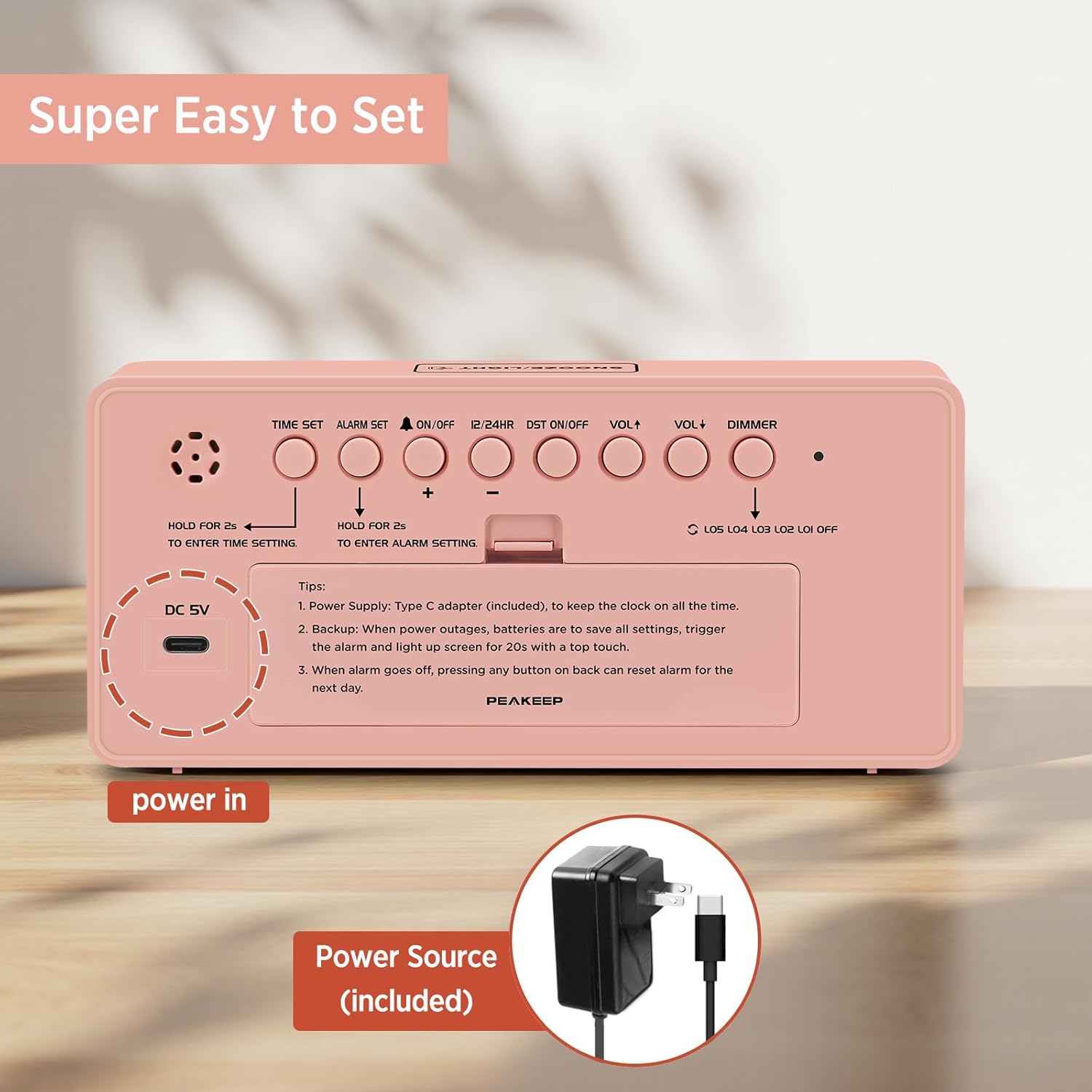
- Power Connection: Connect the included USB Type-C cord to the DC 5V port on the back of the clock and plug the other end into a compatible USB power adapter (not included) or USB port. The display will light up.
- Battery Backup (Optional but Recommended): Open the battery compartment on the back of the clock and insert 4 AA batteries (not included). This ensures that time and alarm settings are saved during a power outage. The display will light up for 20 seconds with a simple touch on top during power outages.
The clock is powered via an included USB Type-C cord. It also supports 4 AA batteries for backup during power outages.

Diagram illustrating the dimensions of the alarm clock and its dual power supply options: USB-C cord (included) and 4 AA batteries (not included) for backup.
Operating Instructions
All control buttons are located on the back panel of the clock.

Rear view of the alarm clock, highlighting the control buttons for time setting, alarm setting, volume, dimmer, and other functions, designed for easy operation.
Setting the Time
- Press and hold the TIME SET button for 2 seconds to enter time setting mode. The hour digits will flash.
- Use the + or - buttons to adjust the hour.
- Press TIME SET again to confirm the hour and move to minute setting. The minute digits will flash.
- Use the + or - buttons to adjust the minutes.
- Press TIME SET once more to confirm and exit time setting mode.
Setting the Alarm
- Press and hold the ALARM SET button for 2 seconds to enter alarm setting mode. The alarm hour digits will flash.
- Use the + or - buttons to adjust the alarm hour.
- Press ALARM SET again to confirm the alarm hour and move to alarm minute setting. The alarm minute digits will flash.
- Use the + or - buttons to adjust the alarm minutes.
- Press ALARM SET once more to confirm and exit alarm setting mode.
- To turn the alarm ON/OFF, short press the ON/OFF button. A bell icon will appear on the display when the alarm is active.
Snooze Function
When the alarm sounds, press the large SNOOZE/LIGHT button on top of the clock to activate the 9-minute snooze function. The alarm will temporarily stop and sound again after 9 minutes. To turn off the alarm completely for the day, press any button on the back panel.
12/24 Hour Format
Short press the 12/24HR button to switch between 12-hour (with AM/PM indicator) and 24-hour time formats.
Daylight Saving Time (DST)
Short press the DST ON/OFF button to activate or deactivate Daylight Saving Time. The DST indicator will appear on the display when active.
Volume Adjustment
Short press the VOL+ or VOL- buttons to adjust the alarm volume. There are 5 levels (U01 to U05).
Brightness Dimmer
Short press the DIMMER button to cycle through the 6 brightness levels (L05, L04, L03, L02, L01, and OFF). Select the level that best suits your environment.
Maintenance
- Cleaning: Wipe the clock surface with a soft, dry cloth. Avoid using abrasive cleaners or solvents.
- Battery Replacement: If using battery backup, replace all 4 AA batteries when the display no longer lights up during power outages or settings are not retained. Ensure correct polarity.
- Storage: If storing the clock for an extended period, remove the batteries to prevent leakage.
Troubleshooting
- Display is blank: Ensure the USB-C power cord is securely connected to both the clock and a working power source. If using battery backup, check if batteries are inserted correctly and have sufficient charge.
- Alarm does not sound: Verify that the alarm is turned ON (bell icon visible). Check the alarm volume level (U01-U05).
- Time/Alarm settings are lost after power outage: Ensure 4 AA batteries are installed for the backup function.
- Display is too bright/dim: Adjust the brightness using the DIMMER button on the back.
Specifications
| Feature | Detail |
|---|---|
| Brand | Peakeep |
| Model Number | MHP6010 |
| Color | Pink |
| Display Type | LED |
| Product Dimensions | 7"W x 3.3"H |
| Power Source | Corded Electric (USB Type C) |
| Battery Backup | 4 AA batteries required (not included) |
| Material | Plastic |
| Item Weight | 6.1 ounces |
Warranty and Support
For warranty information or technical support, please refer to the product packaging or contact Peakeep customer service directly. Contact details are typically provided on the product box or the manufacturer's official website.
Related documentsMHP6010


Ask a question about this manual
Ask about setup, troubleshooting, compatibility, parts, safety, or missing instructions. Manuals+ will review the question and use this page’s manual context to help answer it.