
Introduction
The HiBy Digital M300 is an ultraportable Digital Audio Player designed for modern smart device users. It combines superior performance with a user-friendly Android 13-based system, offering a versatile platform for music, videos, and applications. Featuring a vibrant 4-inch IPS display, a powerful Snapdragon 665 Octa-core processor, and a high-fidelity CS43131 DAC, the M300 delivers an immersive audio experience with extended battery life and robust build quality.
Package Contents
Upon opening your HiBy Digital M300 package, please ensure all the following items are present:
- HiBy Digital M300 Digital Audio Player
- USB-C Charging Cable
- User Manual (this document)
- Screen Protector (pre-applied or included separately)
- Protective Case (may be included depending on region/bundle)
Device Overview
Familiarize yourself with the physical components and controls of your HiBy Digital M300.

Figure 1: Front View. The main display shows the Android interface with various app icons including HiByMusic, Calendar, Clock, and Settings. The top bar indicates time and battery status.
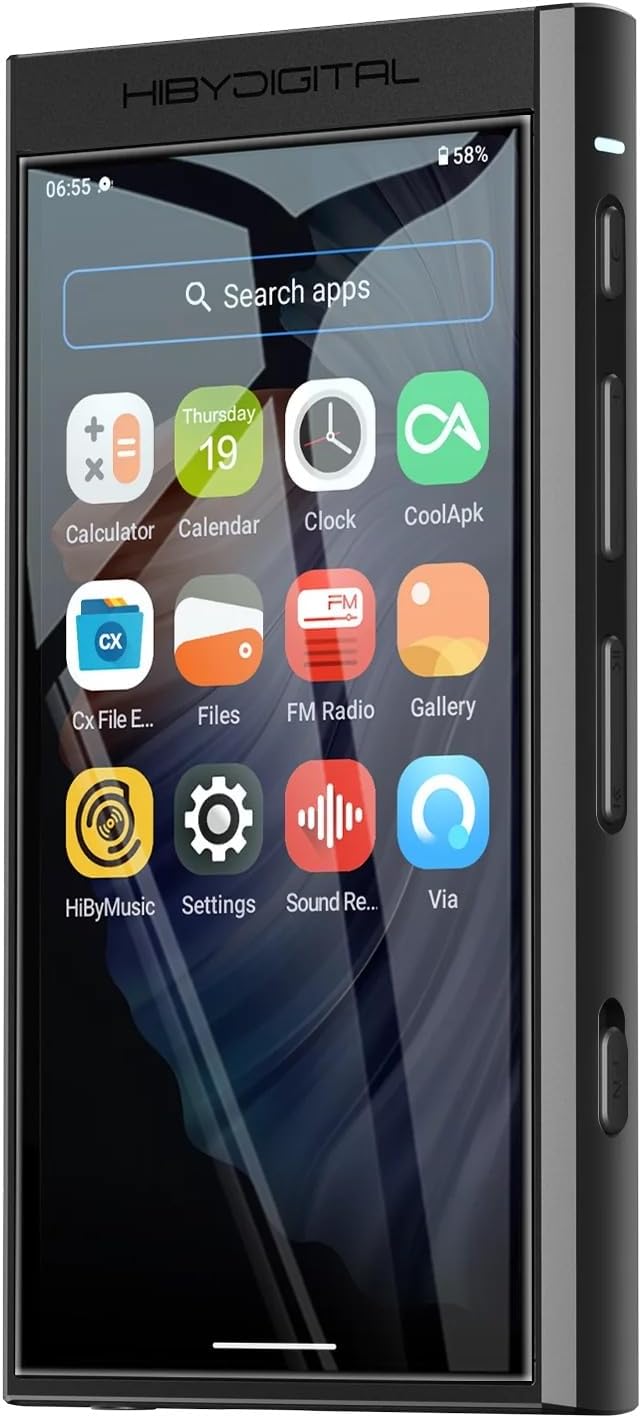
Figure 2: Side View (Right). This view illustrates the physical buttons on the right side of the device: Power button, Volume Up/Down buttons, and dedicated media control buttons (Previous, Play/Pause, Next). An indicator light is visible near the top.

Figure 3: Back View. The rear panel features the HiBy Digital logo and certifications for Hi-Res Audio and Hi-Res Audio Wireless, indicating its high-fidelity capabilities.

Figure 4: Bottom View. The bottom edge of the device includes the 3.5mm headphone output, a USB-C port for charging and data transfer, and the built-in loudspeaker grille.
Physical Controls and Ports:
- Power Button: Located on the right side, used to power on/off the device and wake/sleep the screen.
- Volume Buttons: Located on the right side, control the audio output volume.
- Media Control Buttons: Located on the right side, for previous track, play/pause, and next track.
- 3.5mm Headphone Jack: Located on the bottom, for connecting wired headphones.
- USB-C Port: Located on the bottom, for charging and data transfer.
- Microphone: Dual microphones located on the top for audio recording.
- Loudspeaker: Integrated speaker located on the bottom for audio playback without headphones.
- MicroSD Card Slot: Located on the left side, for expanding storage capacity.
Setup
- Initial Charge: Before first use, fully charge your HiBy M300 using the provided USB-C cable and a compatible power adapter (not included). The indicator light will show charging status.
- Power On: Press and hold the Power button on the right side until the HiBy Digital logo appears on the screen.
- Screen Protector: If a temporary screen protector is applied, carefully peel it off once the device is powered on and you've confirmed the screen is functioning correctly.
- Initial Configuration: Follow the on-screen prompts to select your preferred language, set up Wi-Fi connection, and configure basic Android settings.
- Insert MicroSD Card (Optional): If you wish to expand storage, gently insert a MicroSD card into the dedicated slot on the left side until it clicks into place.
Operating Instructions
Music Playback
The HiBy M300 comes with the HiBy Music app pre-installed, optimized for high-resolution audio playback.
- Importing Music: Transfer music files to the device's internal storage or MicroSD card via USB-C connection to a computer, or by downloading directly through streaming apps.
- Using HiBy Music App: Open the HiBy Music app. It will automatically scan for audio files. You can browse by title, artist, album, or folder.
- High-Resolution Audio: The device supports various high-resolution formats, including DSD256, leveraging its CS43131 DAC for superior sound quality.
- Equalizer and Sound Settings: The HiBy Music app offers a detailed equalizer and other sound tuning options to customize your listening experience.

Figure 5: Music Playback. The screen shows the HiBy Music app playing a track, displaying album art, track progress, and audio quality details (e.g., 48.0KHz, 24bits, 1703Kbps).
App Usage and Android 13
Running on Android 13, the M300 provides a familiar smartphone-like experience.
- Google Play Store: Access the Google Play Store to download and install a wide range of applications, including streaming services, games, and utility apps.
- Multitasking: The Snapdragon 665 processor and 3GB RAM allow for smooth multitasking between applications.
- File Management: Use the pre-installed file explorer app to manage files on internal storage and MicroSD card.
Connectivity
- Wi-Fi: Connect to Wi-Fi networks for internet access, app downloads, and streaming.
- Bluetooth: Pair with Bluetooth headphones or speakers for wireless audio. The device supports high-resolution Bluetooth codecs for optimal sound quality.
- USB: Connect to a computer for data transfer or use the M300 as a USB DAC.
- HiByLink: Utilize the HiByLink feature to control the M300 remotely from your smartphone.
Built-in Speaker and Microphone
- Loudspeaker: The integrated loudspeaker allows for casual listening without headphones.
- Microphone: The dual microphones enable voice recording directly on the device.
Maintenance
Proper care will ensure the longevity of your HiBy Digital M300.
- Cleaning: Use a soft, dry, lint-free cloth to clean the device. For stubborn smudges on the screen, a slightly damp microfiber cloth can be used. Avoid abrasive cleaners or solvents.
- Storage: Store the device in a cool, dry place away from direct sunlight and extreme temperatures.
- Battery Care: To prolong battery life, avoid fully discharging the device frequently. If storing for extended periods, charge the battery to around 50-60%.
- Protection: Consider using a protective case and screen protector to guard against scratches and accidental drops.
Troubleshooting
If you encounter issues with your HiBy Digital M300, refer to the following common problems and solutions:
| Problem | Possible Solution |
|---|---|
| Device does not power on. | Ensure the device is fully charged. Try pressing and holding the Power button for 10-15 seconds for a forced restart. |
| Poor sound quality or no audio. | Check headphone connection. Ensure volume is not muted or too low. Verify audio file integrity. Check equalizer settings in the HiBy Music app. |
| Bluetooth connectivity issues. | Ensure Bluetooth is enabled on both devices. Unpair and re-pair the devices. Move closer to the paired device to reduce interference. |
| Apps crashing or freezing. | Close background apps. Clear app cache (Settings > Apps > [App Name] > Storage > Clear Cache). Restart the device. Ensure apps are updated. |
| Battery drains quickly. | Reduce screen brightness. Disable Wi-Fi/Bluetooth when not in use. Close unused background apps. Check for rogue apps consuming excessive power. |
| Device not recognized by computer. | Ensure the USB-C cable is securely connected. Try a different USB port or cable. On the device, select "File Transfer" mode when connected. |
Specifications
Key technical specifications for the HiBy Digital M300:
- Model Name: HiBy Digital M300
- Brand: HiBy
- Operating System: Android 13
- Processor: Snapdragon 665 Octa-core
- DAC: Cirrus Logic CS43131
- RAM: 3GB
- Internal Storage: 32GB
- Expandable Storage: Micro SD (Media Type: Micro SD)
- Screen Size: 4 Inches
- Screen Resolution: 1280x640 IPS (178-degree wide view angle, 24-bit 16.7 million colors)
- Connectivity: HiByLink, Bluetooth, Wi-Fi, USB, 3.5mm headphone out
- Special Features: Touch Screen, Hi-Res Audio, Equalizer, Built-in Speaker, Dual Microphones
- Battery: 2000mAh Lithium Ion (Approx. 29 hours uptime, 15 days standby)
- Item Weight: 4.8 ounces
- Package Dimensions: 5.63 x 3.54 x 1.69 inches
Warranty and Support
For detailed warranty information and technical support, please refer to the official HiBy website or contact their customer service directly. Keep your proof of purchase for warranty claims.
Manufacturer: HiBy
Official Website: www.hiby.com (Please note: This is a placeholder URL, refer to your product packaging or official documentation for the exact support website.)