
1. Introduction
The GOLDCHAMP GC-5800G is a professional-grade ammonia gas detector designed for accurate and reliable monitoring of ammonia (NH3) concentrations. Equipped with an advanced electrochemical sensor, it provides fast response and high precision. This device also measures temperature (℃/℉ switchable) and humidity, making it a versatile tool for various environments such as farms, poultry houses, pig and livestock facilities, homes, and industrial settings.
This manual provides essential information for the safe and effective use of your GC-5800G Ammonia Gas Detector. Please read it thoroughly before operation and retain it for future reference.

Figure 1: Front view of the GOLDCHAMP GC-5800G Ammonia Gas Detector.
2. Product Features
- Ammonia Gas Detection: Professional electrochemical sensor for 0-100 ppm NH3 measurement with 0.1 ppm resolution.
- Environmental Monitoring: Measures temperature from -10°C to 50°C (°C/°F switchable) and humidity up to 95% RH.
- Dual Alarm System: Configurable high and low alarm thresholds (AL1 and AL2) with distinct visual (indicator light) and audible (buzzer) alerts.
- Versatile Mounting: Integrated tripod mount and rear bracket for hands-free operation (tripod not included).
- Clear Display: Color LCD screen for easy readability of all measurements.
- Power Management: Rechargeable battery for extended use, low battery indicator, and automatic/manual shutdown options.
- Durable Sensor: Electrochemical sensor designed for a service life exceeding typical 1-year sensors.

Figure 2: Overview of the detector's multifunctional capabilities.
3. Package Contents
Upon opening the package, please verify that all items listed below are present and in good condition:
- 1 x GOLDCHAMP GC-5800G Ammonia Gas Detector
- 1 x USB Charging Cable
- 1 x Instruction Manual
- 1 x Carrying Pouch (may vary by package)

Figure 3: Contents included in the product package.
4. Component Identification
Familiarize yourself with the various parts and controls of your GC-5800G detector:
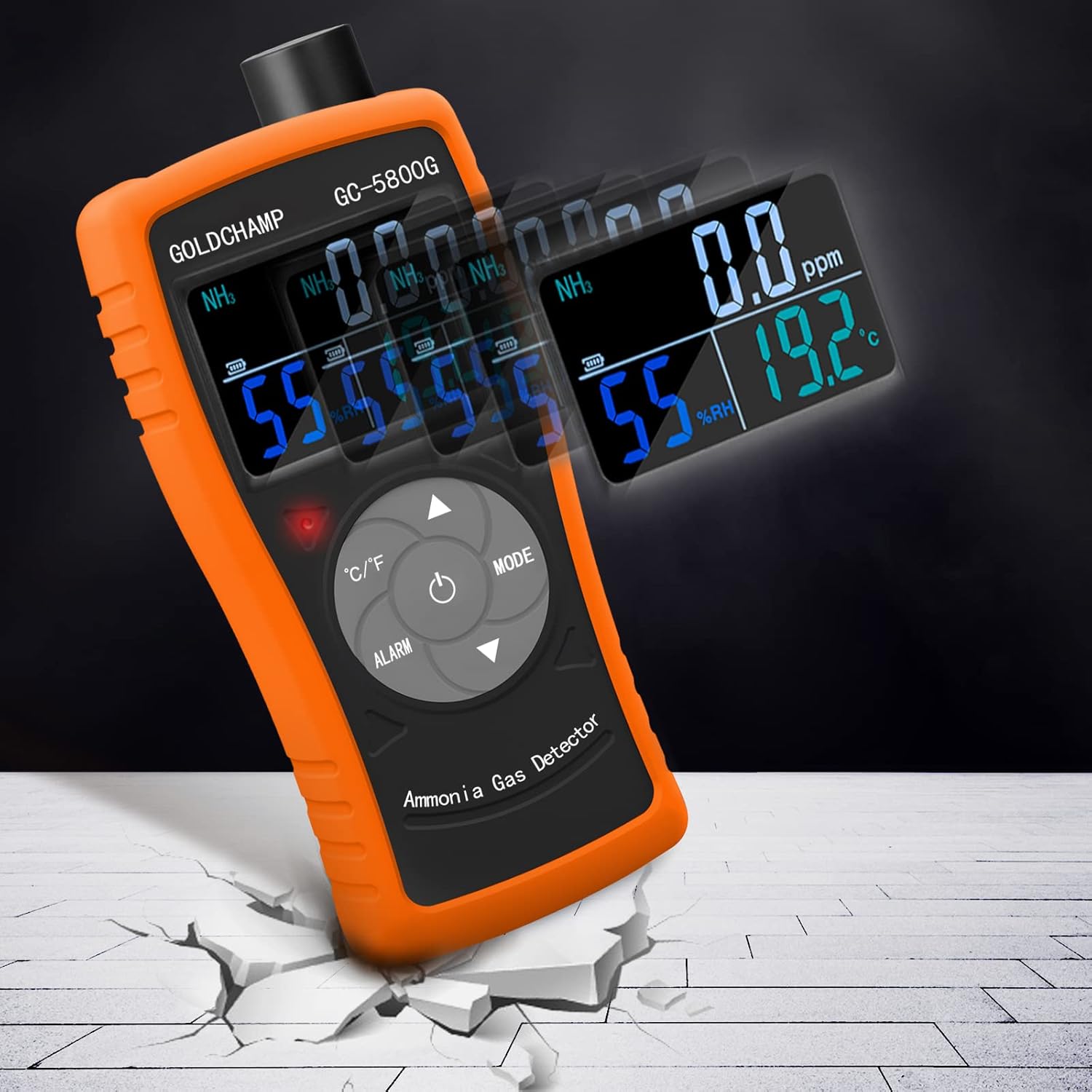
Figure 4: Front panel button and display identification.
- Color LCD Screen: Displays NH3 concentration, temperature, humidity, and alarm settings.
- Alarm Indicator Light: Flashes during alarm events.
- °C/°F Switchable Button: Toggles temperature unit between Celsius and Fahrenheit.
- Alarm Setting Button: Enters alarm setting mode.
- Increment Button (Up Arrow): Increases values in setting mode.
- MODE Button: Cycles through display modes or settings.
- Power On/Off Button: Turns the device on or off.
- Decrement Button (Down Arrow): Decreases values in setting mode.

Figure 5: Top and rear view identifying the probe sensor, charging port, and charging indicator.
- Probe Sensor: Detects ammonia gas. Note: The protective cover must be removed before measuring.
- Charging Port (DC 5V): Connect the included USB data cable for charging.
- Charging Indicator: Green light indicates charging, red light indicates fully charged.
- Bracket: For hands-free placement or tripod mounting.
5. Setup
- Unpacking: Carefully remove the detector and all accessories from the packaging.
- Initial Charge: Before first use, fully charge the device using the provided USB cable. Connect the cable to the charging port (DC 5V) and a suitable USB power adapter (not included). The charging indicator will be green during charging and turn red when fully charged.
- Remove Sensor Cap: Before taking any measurements, gently remove the protective cap from the probe sensor at the top of the device.
- Power On: Press and hold the Power On/Off button (central button) for a few seconds until the LCD screen illuminates.

Figure 6: Detail of the charging indicator.

Figure 7: Removing the protective cap from the sensor before use.
6. Operation
- Power On/Off: Press and hold the central Power On/Off button to turn the device on or off.
- Temperature Unit Conversion: Press the °C/°F button to switch the temperature display between Celsius (°C) and Fahrenheit (°F).
- Reading Measurements: Once powered on, the device will automatically begin detecting ammonia concentration (ppm), relative humidity (%RH), and temperature. These values are displayed on the color LCD screen.

Figure 8: The color LCD display provides clear readings.
Video 1: Demonstrates basic operation, including power on/off, temperature unit conversion, and alarm setting adjustments.
7. Alarm Settings
The GC-5800G features a dual alarm system with two configurable thresholds: AL1 (first alarm) and AL2 (second alarm).
- Enter Setting Mode: Press the ALARM button to enter the alarm setting state. The display will show "AL1" and the current AL1 threshold.
- Adjust AL1: Use the Increment (Up Arrow) and Decrement (Down Arrow) buttons to adjust the AL1 value. A short press changes the value by 0.1 ppm; a long press changes it by 1 ppm.
- Adjust AL2: Press the ALARM button again to switch to the AL2 setting mode. The display will show "AL2" and the current AL2 threshold. Adjust the AL2 value using the Increment and Decrement buttons.
- Exit Setting Mode: Press the ALARM button a third time, or wait for a few seconds, to exit the alarm setting mode and return to normal measurement.

Figure 9: The display showing the alarm setting interface.
Alarm Behavior:
- When ammonia concentration reaches AL1: The indicator light flashes slowly, and the buzzer sounds slowly.
- When ammonia concentration reaches AL2: The indicator light flashes quickly, and the buzzer sounds quickly.
8. Auto Power Off (APO)
The device has an Auto Power Off (APO) function to conserve battery life. You can enable or disable this feature:
- Enter MODE: Press the MODE button. The display will show "APO ON" or "APO OFF".
- Toggle APO: Use the Increment (Up Arrow) or Decrement (Down Arrow) buttons to switch between "APO ON" (auto power off enabled) and "APO OFF" (auto power off disabled).
- Exit MODE: Press the MODE button again, or wait for a few seconds, to exit the setting and return to normal measurement.
9. Specifications
| Feature | Specification |
|---|---|
| Brand | GOLDCHAMP |
| Model Number | EU-GC-5800G-US |
| Gas Detected | Ammonia (NH3) |
| Detection Range | 0-100 ppm |
| Resolution | 0.1 ppm |
| Measurement Accuracy | +/-2% |
| Sensor Type | Electrochemical |
| Operating Temperature | -10°C to 50°C (14°F to 122°F) |
| Operating Humidity | 0-95% RH (Non-condensing) |
| Alarm Type | Audible and Visual (Dual Alarm) |
| Power Source | Rechargeable Battery |
| Product Dimensions | 3"D x 3"W x 2"H (Approx. 7.6 x 7.6 x 5.1 cm) |
| Item Weight | 9.6 ounces (Approx. 272 grams) |
10. Maintenance
- Cleaning: Wipe the device with a soft, dry cloth. Do not use abrasive cleaners or solvents.
- Sensor Care: Keep the sensor area clean and free from obstructions. Always replace the protective cap when the device is not in use to prevent damage or contamination.
- Storage: Store the detector in a cool, dry place away from direct sunlight and extreme temperatures.
- Charging: Recharge the battery regularly, especially if the device will be stored for an extended period, to maintain battery health.
- Calibration: While the electrochemical sensor has a long lifespan, periodic professional calibration may be required to ensure continued accuracy, especially in critical applications. Consult GOLDCHAMP support for calibration services.
11. Troubleshooting
If you encounter issues with your GC-5800G detector, refer to the following common problems and solutions:
| Problem | Possible Cause | Solution |
|---|---|---|
| Device does not power on | Low battery; device not fully charged. | Charge the device fully using the provided USB cable. |
| Inaccurate readings | Sensor cap not removed; sensor contaminated; device not calibrated. | Ensure sensor cap is removed. Clean the sensor area. Consider professional calibration if issues persist. |
| Alarm not sounding | Alarm thresholds set too high; audible alarm disabled (if applicable). | Check and adjust AL1 and AL2 settings. Ensure volume is not muted (if applicable). |
| Auto Power Off (APO) not working | APO function is disabled. | Enable APO through the MODE button settings. |
If the problem persists after attempting these solutions, please contact GOLDCHAMP customer support.
12. Warranty and Support
The GOLDCHAMP GC-5800G Ammonia Gas Detector comes with a standard manufacturer's warranty. For specific warranty terms and conditions, please refer to the documentation included with your purchase or visit the official GOLDCHAMP website.
For technical support, troubleshooting assistance, or any questions regarding your product, please contact GOLDCHAMP customer service. You can often find contact information on the product packaging, the official GOLDCHAMP store on Amazon, or their website.
Thank you for choosing GOLDCHAMP.