
DEWENWILS B0CNP6GZNZ
Contents
DEWENWILS 6-Outlet Power Strip with Individual Switches (Model B0CNP6GZNZ) User Manual
Model: B0CNP6GZNZ | Brand: DEWENWILS
1. Introduction
This manual provides detailed instructions for the safe and efficient use of your DEWENWILS 6-Outlet Power Strip with Individual Switches. This device is designed to provide multiple power outlets with enhanced safety features, including individual control for each socket and surge protection. Please read this manual thoroughly before use and retain it for future reference.

Image 1.1: Overview of the DEWENWILS 6-Outlet Power Strip. This image displays the power strip from a top-down perspective, showing the six power outlets, seven red individual switches, the main power cable, and the DEWENWILS logo.
2. Important Safety Instructions
To reduce the risk of electric shock, fire, or injury, always follow these basic safety precautions:
- Do not exceed the maximum power rating of 3680W (16A at 230V). Overloading the power strip can cause overheating and fire.
- This power strip is designed for indoor use only. Do not expose it to moisture, rain, or liquids.
- Do not disassemble or modify the power strip. Refer all servicing to qualified personnel.
- Ensure the power strip is plugged into a properly grounded outlet.
- Keep children away from the power strip. The product includes child safety features, but supervision is always recommended.
- Avoid running the power cord under carpets or in areas where it can be tripped over or damaged.
- Unplug the power strip from the wall outlet when not in use or before cleaning.
- Do not connect multiple power strips together.

Image 2.1: Visual representation of the power strip's safety features. Icons depict child safety lock, overload protection, overvoltage protection, lightning protection, and short-circuit protection, emphasizing the robust safety design.
3. Product Features
The DEWENWILS 6-Outlet Power Strip is equipped with several features for convenience and safety:
- 6 AC Outlets: Provides power for up to six devices simultaneously.
- 7 Individual Bipolar Switches: Each of the six outlets has its own on/off switch, allowing you to control power to individual devices. An additional master switch controls the entire strip. This design enhances safety and reduces standby power consumption.
- LED Indicators: Each individual switch and the master switch feature an LED indicator to clearly show the power status of the respective outlet or the entire strip.
- Wide Spacing & 90° Angled Plugs: Designed with ample space between outlets and 90-degree angled plugs to accommodate larger adapters without blocking adjacent sockets.
- 5-Meter Power Cord: A generous 5-meter (approximately 16.4 feet) power cord provides flexibility in placement.
- Wall-Mountable Design: Features three mounting holes for secure installation on a wall or under a desk, saving space.
- Comprehensive Safety Protection: Includes protection against overload, overvoltage, lightning strikes, and short circuits. Child safety shutters are integrated into each outlet.
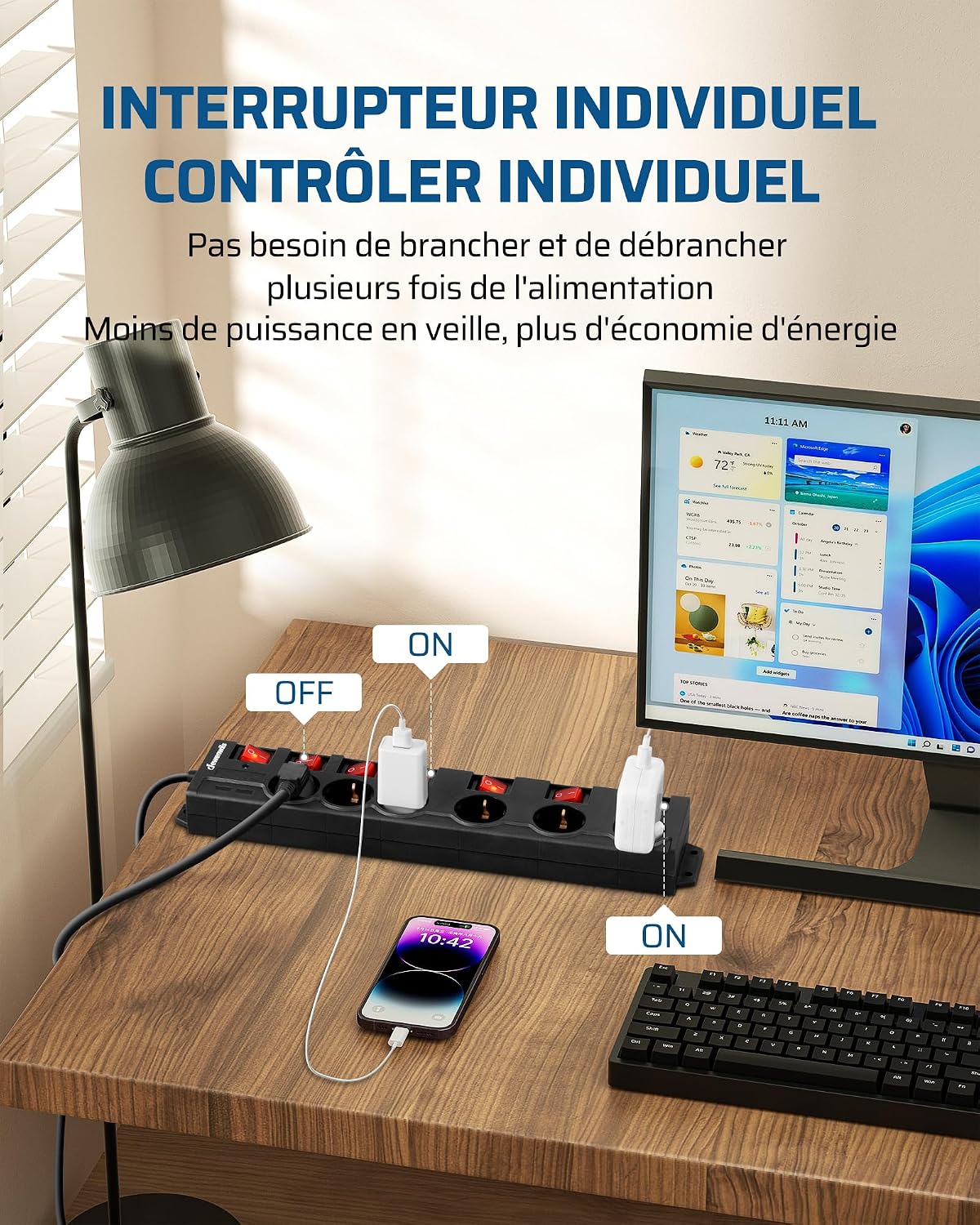
Image 3.1: Illustration of individual switch control. This image shows devices plugged into the power strip, with some individual switches turned "ON" and others "OFF," demonstrating how to control power to specific devices independently.

Image 3.2: Diagram explaining the bipolar switch mechanism. This graphic illustrates how bipolar switches simultaneously disconnect both live (L) and neutral (N) wires, providing a higher level of safety for connected appliances.

Image 3.3: The power strip in use, highlighting key specifications. This image shows the power strip connected to various devices, with overlays indicating 230VAC 50Hz input voltage, 3680W/16A max power, 7 bipolar switches, 7 switch LED indicators, 6 AC outlets, and 1 main LED indicator.

Image 3.4: Details of the power strip's cable and plug design. This image illustrates the flexible and pliable nature of the power cable and the 90-degree angled plugs, which prevent interference with adjacent sockets. Note: The cable length for this specific product variant is 5 meters.
4. Setup Instructions
- Unpacking: Carefully remove the power strip from its packaging. Inspect the unit for any signs of damage. Do not use if damaged.
- Placement: Choose a dry, indoor location away from heat sources, water, and direct sunlight. Ensure the 5-meter power cord can reach the wall outlet without being stretched or obstructed.
- Wall Mounting (Optional):
- Identify a suitable surface (wall or underside of a desk) for mounting.
- Use the three mounting holes on the back of the power strip as a template to mark screw positions.
- Drill pilot holes if necessary and secure the power strip using appropriate screws (not included). Ensure the mounting is firm and stable.
- Connecting to Power: Plug the power strip's main plug into a standard, grounded 230V AC wall outlet.

Image 4.1: The power strip mounted under a desk. This image demonstrates the wall-mounting capability, showing the power strip securely attached to the underside of a desk, helping to save space and organize cables.
5. Operating Instructions
- Powering On the Strip: After plugging the power strip into a wall outlet, press the master ON/OFF switch to supply power to the entire strip. The main LED indicator will illuminate.
- Connecting Devices: Plug your electronic devices into the AC outlets on the power strip.
- Individual Outlet Control: For each device you wish to power, press the corresponding individual ON/OFF switch. The LED indicator for that specific switch will illuminate when the outlet is active (ON).
- Powering Off Devices: To turn off a specific device, press its individual ON/OFF switch. The LED indicator for that switch will turn off. To power off all devices, press the master ON/OFF switch.
- Overload Protection: In case of an overload, the power strip's circuit breaker will trip, cutting power to all connected devices. To reset, unplug some devices, then press the reset button (if available, typically located near the main power cord entry) or cycle the master switch.
6. Care and Maintenance
- Cleaning: Disconnect the power strip from the wall outlet before cleaning. Use a soft, dry cloth to wipe the surface. Do not use liquid cleaners or aerosols.
- Inspection: Periodically inspect the power cord and the power strip for any signs of damage, such as frayed wires, cracks, or loose connections. If damage is found, discontinue use immediately and contact customer support.
- Storage: When not in use for extended periods, store the power strip in a cool, dry place, away from direct sunlight and moisture.
7. Troubleshooting
| Problem | Possible Cause | Solution |
|---|---|---|
| No power to any outlet. |
|
|
| No power to a specific outlet. |
|
|
| Power strip feels hot. |
|
|
8. Technical Specifications
| Feature | Specification |
|---|---|
| Brand | DEWENWILS |
| Model | B0CNP6GZNZ |
| Color | Black |
| Number of AC Outlets | 6 |
| Number of Individual Switches | 7 (6 for outlets, 1 master) |
| Voltage | 230 Volts AC |
| Maximum Power Rating | 3680W / 16A |
| Cable Length | 5 Meters |
| Special Features | Individual ON/OFF switches, Surge Protection, Overload Protection, Lightning Protection, Short-circuit Protection, Child Safety, Wall-Mountable |
| Plug Type | Type F (Schuko) |
| Item Weight | 1.05 Kilograms |
9. Warranty and Support
DEWENWILS products are manufactured to high-quality standards. For specific warranty information, please refer to the warranty card included with your purchase or visit the official DEWENWILS website. If you encounter any issues or have questions regarding your power strip, please contact DEWENWILS customer support for assistance.
Contact information can typically be found on the product packaging or the official DEWENWILS website.
Ask a question about this manual
Ask about setup, troubleshooting, compatibility, parts, safety, or missing instructions. Manuals+ will review the question and use this page’s manual context to help answer it.