
Introduction
Thank you for choosing the ECONTROLLY RC-712M replacement remote control. This remote is designed to be fully compatible with specific Onkyo AV Receiver models, including TX-SA606X and TXSA606X. It operates using infrared technology and requires no programming, offering a straightforward and easy-to-use solution for controlling your audio-video system.

Figure 1: Front view of the ECONTROLLY RC-712M Remote Control. This image displays the full layout of buttons, including power, input selectors, volume, channel controls, navigation, and numeric keypad.
Setup
Battery Installation
The RC-712M remote control requires two (2) AA ALKALINE batteries for operation. Please note that batteries are not included with the remote control.
- Locate the battery compartment on the back of the remote control.
- Slide the battery compartment cover downwards or in the direction indicated by an arrow to open it.
- Insert two AA ALKALINE batteries, ensuring the positive (+) and negative (-) terminals align correctly with the markings inside the compartment.
- Slide the battery compartment cover back into place until it clicks securely.
Important: Do not use rechargeable batteries. Only AA ALKALINE batteries are recommended for optimal performance and to prevent potential damage to the remote control.
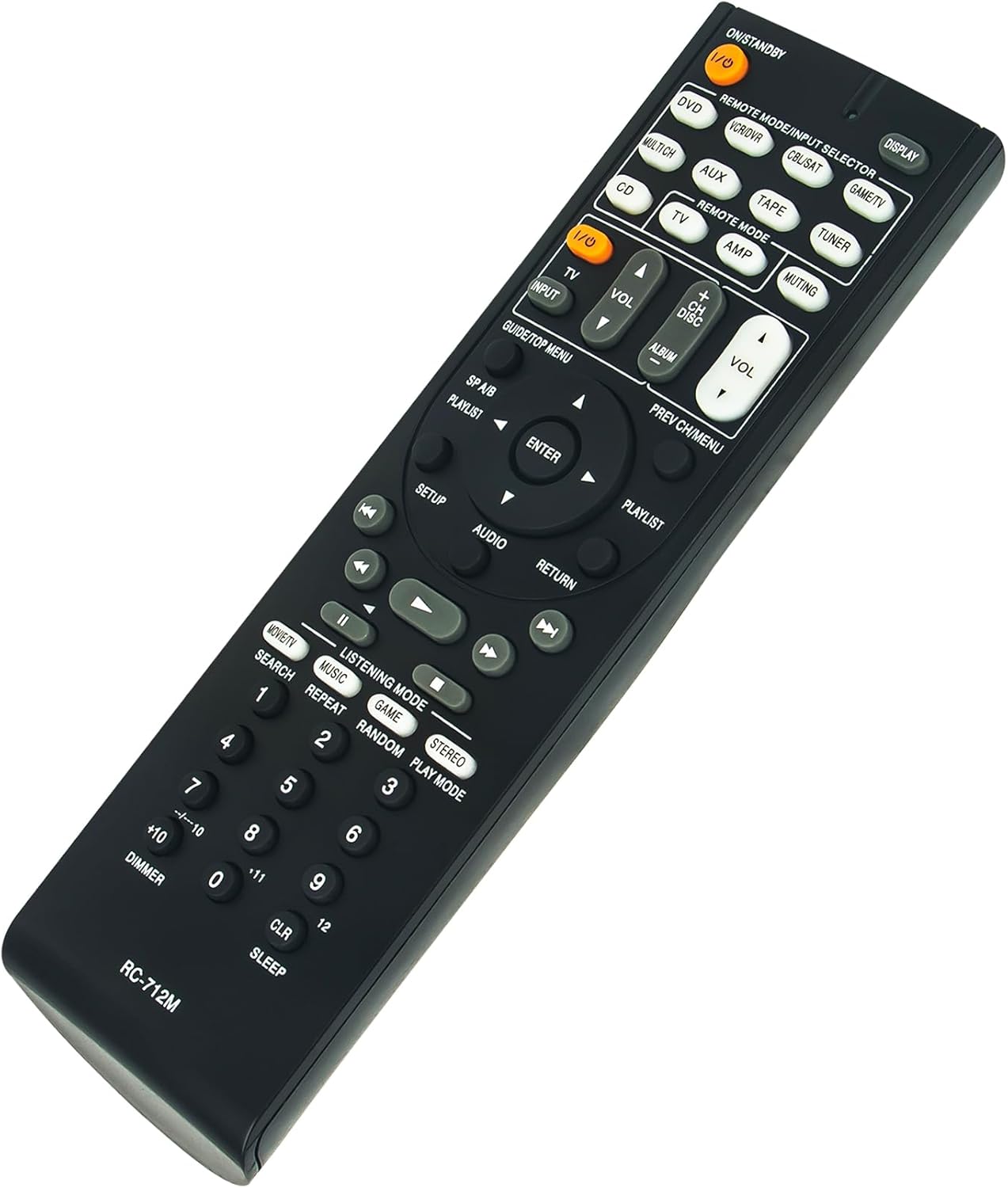
Figure 2: Angled view of the RC-712M remote control, highlighting its ergonomic design and the location of the battery compartment on the underside.
Operating Instructions
The ECONTROLLY RC-712M remote control is pre-programmed and ready to use with compatible Onkyo AV Receiver models TX-SA606X and TXSA606X. No additional programming or setup is required after battery installation.
Basic Functions
- ON/STANDBY: Powers the AV receiver on or off.
- Input Selectors (DVD, VCR/DVR, CBL/SAT, GAME/TV, MULTICH, AUX, TAPE, TUNER, CD): Selects the desired input source for your AV receiver.
- VOLUME (+/-): Adjusts the master volume level.
- MUTING: Mutes or unmutes the audio output.
- Navigation Buttons (Up, Down, Left, Right, ENTER): Used for menu navigation and selection.
- SETUP: Accesses the receiver's setup menu.
- AUDIO: Cycles through audio modes or settings.
- RETURN: Returns to the previous menu or screen.
- Playback Controls (Play, Pause, Stop, Rewind, Fast Forward, Skip): Controls media playback for connected devices.
- LISTENING MODE (MOVIE/TV, MUSIC, GAME, STEREO): Selects various audio listening modes.
- Numeric Keypad (0-9, +10, --/---10): Direct input for channel numbers or other numerical selections.
Point the remote control directly at the infrared sensor on your Onkyo AV receiver. Ensure there are no obstructions between the remote and the receiver.
Maintenance
Cleaning
To clean the remote control, gently wipe its surface with a soft, dry cloth. For stubborn dirt, slightly dampen the cloth with water or a mild, non-abrasive cleaner. Avoid using harsh chemicals, solvents, or abrasive materials, as these can damage the remote's finish or internal components.
Battery Care
- Replace batteries when the remote's response becomes sluggish or inconsistent.
- Always replace both batteries at the same time with new AA ALKALINE batteries.
- Remove batteries if the remote control will not be used for an extended period to prevent leakage and potential damage.
- Dispose of used batteries according to local regulations.
Troubleshooting
If you experience issues with your ECONTROLLY RC-712M remote control, please refer to the following common solutions:
- Remote Not Responding:
- Check if the batteries are inserted correctly with the correct polarity (+/-).
- Replace the batteries with fresh AA ALKALINE batteries.
- Ensure there are no obstructions between the remote control and the AV receiver's infrared sensor.
- Verify that you are within the effective operating range of the remote control (typically up to 20 feet/6 meters).
- Specific Buttons Not Working:
- Clean the remote control surface, especially around the problematic buttons, to remove any dirt or debris that might be interfering with button presses.
- If only certain functions are not working, ensure your AV receiver is set to the correct input source for that function (e.g., DVD input for DVD playback controls).
- Remote Control Range is Short:
- Replace the batteries with new ones, as weak batteries can reduce the remote's effective range.
- Ensure the remote's infrared emitter (at the front tip) and the receiver's sensor are clean and unobstructed.

Figure 3: Another angled view of the RC-712M remote control, showing its full length and button arrangement from a different perspective.
Specifications
| Model: | RC-712M |
| Brand: | ECONTROLLY |
| Compatibility: | Onkyo AV Receivers TX-SA606X, TXSA606X |
| Power Source: | 2 x AA ALKALINE Batteries (not included) |
| Special Feature: | Pre-programmed, no setup required |
| Color: | Black |
| Product Dimensions: | 3.94 x 1.57 x 0.59 inches (approximately) |
| Item Weight: | 1.76 ounces (approximately) |
| Max Supported Devices: | 1 (One AV Receiver) |
Warranty Information
Specific warranty details for the ECONTROLLY RC-712M remote control may vary. Please refer to the purchase documentation or contact your retailer for information regarding warranty coverage and terms. Generally, replacement remote controls are covered by a limited warranty against manufacturing defects.
Customer Support
If you have any questions, require further assistance, or encounter issues not covered in this manual, please do not hesitate to contact the seller or ECONTROLLY customer support.
For the quickest resolution, please have your product model (RC-712M) and purchase details ready when contacting support.