
Introduction
This user manual provides comprehensive instructions for the ECONTROLLY RAV334 WT92700 replacement remote control. This remote is designed to be compatible with various Yamaha AV Receiver models, offering a straightforward, pre-programmed solution for controlling your audio-visual system. Please read this manual carefully to ensure proper setup and operation.
Product Overview
The ECONTROLLY RAV334 WT92700 is an infrared replacement remote control. It requires no programming and is ready to use with compatible Yamaha AV Receivers once batteries are installed.
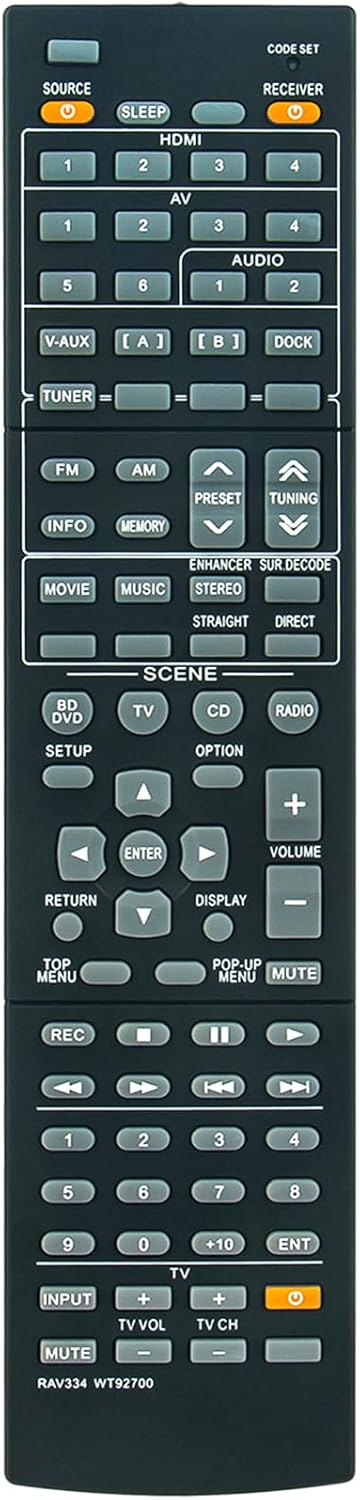
Figure 1: Front view of the RAV334 WT92700 Remote Control. This image displays the layout of all control buttons, including power, input selectors, volume, navigation, and scene controls.
Setup
1. Battery Installation
The remote control requires two (2) AAA ALKALINE batteries for operation. Rechargeable batteries are not recommended.
- Locate the battery compartment cover on the back of the remote control.
- Slide the cover downwards or press the latch to open it.
- Insert two AAA ALKALINE batteries, ensuring the positive (+) and negative (-) terminals match the diagrams inside the compartment.
- Replace the battery compartment cover, sliding it back into place until it clicks securely.

Figure 2: Angled view of the RAV334 WT92700 Remote Control. This perspective shows the side profile and the slight curvature for comfortable handling.
2. Compatibility
This remote control is pre-programmed and compatible with the following Yamaha AV Receiver models:
- RX-V567
- YHT-893
- HTR-4063
- HTR-5063
- RX-V467
- YHT-693
- HTR-5063BL
- RX-V567BL
- HTR-4063BL
- RX-V467BL
No additional programming is required for these models. Simply install batteries and begin use.
Operating Instructions
Point the remote control directly at the infrared sensor on your Yamaha AV Receiver. Ensure there are no obstructions between the remote and the receiver.
Key Functions:
- SOURCE: Selects the input source (e.g., HDMI, AV, V-AUX).
- RECEIVER / SLEEP: Powers the receiver On/Off or activates sleep timer.
- HDMI 1-4 / AV 1-4: Direct selection for HDMI or AV input channels.
- VOLUME +/-: Adjusts the master volume level.
- MUTE: Mutes or unmutes the audio output.
- TUNER (FM/AM): Selects FM or AM radio bands.
- PRESET / TUNING: Navigates radio presets or tunes frequencies.
- SCENE (MOVIE, MUSIC, etc.): Activates pre-set sound modes for different content types.
- NAVIGATION (Up, Down, Left, Right, ENTER): Used for menu navigation and selection.
- SETUP / RETURN / DISPLAY: Accesses system settings, goes back in menus, or changes display information.
- REC / PLAYBACK CONTROLS: (e.g., Play, Pause, Stop, Fast Forward, Rewind) Controls connected playback devices.
- INPUT (TV VOL/CH): Controls TV volume and channel if the remote is programmed for TV control (not primary function for this replacement remote).
Maintenance
Battery Replacement:
If the remote control's range decreases or it becomes unresponsive, replace the batteries with new AAA ALKALINE batteries. Always replace both batteries at the same time.
Cleaning:
Wipe the remote control with a soft, dry cloth. Do not use liquid cleaners or abrasive materials, as these can damage the remote's surface or internal components.
Troubleshooting
- Remote not responding:
- Ensure batteries are inserted correctly with correct polarity.
- Replace old batteries with new AAA ALKALINE batteries.
- Check for any obstructions between the remote and the AV receiver's infrared sensor.
- Ensure you are within the effective operating range (up to 33 feet).
- Specific buttons not working:
- Verify that the remote is compatible with your specific Yamaha AV Receiver model.
- Some buttons might be specific to certain functions or connected devices not present in your setup.
- Interference:
- Bright light sources (e.g., direct sunlight, fluorescent lights) can interfere with infrared signals. Try operating the remote in a different lighting condition.
Specifications
| Model Name | RAV334 WT92700 |
| Brand | ECONTROLLY |
| Connectivity Technology | Infrared |
| Maximum Range | 33 Feet (approx. 10 meters) |
| Power Source | 2 x AAA ALKALINE Batteries (not included) |
| Color | Black |
| Item Weight | 50 Grams |
| Dimensions (L x W x H) | 8.54" x 2" x 0.56" (21.7cm x 5.1cm x 1.4cm) |
Warranty and Support
Warranty Information:
This ECONTROLLY remote control comes with a 12-month warranty from the date of purchase, covering manufacturing defects. Please retain your proof of purchase for warranty claims.
Customer Support:
For any questions, technical assistance, or warranty inquiries, please contact ECONTROLLY customer support through the retailer where the product was purchased. Please have your model number (RAV334 WT92700) and purchase details ready.
