
1. Introduction
This manual provides instructions for the use and maintenance of your RemotesReplaced replacement remote control, specifically designed for the CHANGHONG LCD32G7NA9 television model. This remote control offers identical functionality to the original remote, ensuring seamless operation of your television.

Figure 1: Front view of the RemotesReplaced replacement remote control.
2. Product Features
- Direct replacement for the original CHANGHONG LCD32G7NA9 remote control.
- No setup codes required; ready to use upon battery insertion.
- Provides all original functions and controls for your television.
- Durable button control design for reliable operation.
- Utilizes infrared (IR) technology for communication with the television.
3. Setup: Battery Installation
The remote control requires two (2) AAA batteries for operation. Follow these steps to install the batteries:
- Locate the battery compartment cover on the back of the remote control.
- Slide the cover downwards or press the latch (if present) to open the compartment.
- Insert two AAA batteries, ensuring the positive (+) and negative (-) terminals align correctly with the markings inside the compartment.
- Close the battery compartment cover by sliding it back into place until it clicks securely.

Figure 2: Bottom view of the remote control with battery compartment.
Once batteries are installed, the remote control is ready for immediate use with your CHANGHONG LCD32G7NA9 television.
4. Operating Instructions
This remote control is designed to replicate the functions of your original CHANGHONG LCD32G7NA9 remote. Point the remote directly at the infrared receiver on your television for optimal performance.

Figure 3: Close-up of remote control buttons.
Common Button Functions:
- POWER: Turns the television on or off.
- MUTE: Mutes or unmutes the television sound.
- VOL +/-: Adjusts the volume up or down.
- CH +/- (or P +/-): Changes the television channel up or down.
- Number Buttons (0-9): Directly select channels.
- MENU: Accesses the television's main menu.
- Navigation (Arrow) Buttons & OK: Navigate through menus and confirm selections.
- SOURCE/INPUT: Selects the input source (HDMI, AV, etc.).
- Other buttons correspond to their labeled functions on the remote and your television's original remote.

Figure 4: Top view showing the infrared emitter.
5. Maintenance
Battery Replacement:
Replace batteries when the remote control becomes unresponsive or its range decreases. Always replace both batteries simultaneously with new AAA batteries. Do not mix old and new batteries, or different types of batteries.
Cleaning:
To clean the remote control, wipe it with a soft, dry cloth. Do not use abrasive cleaners, solvents, or wet cloths, as these can damage the remote's surface or internal components.
6. Troubleshooting
| Problem | Possible Cause | Solution |
|---|---|---|
| Remote control is unresponsive. | Batteries are dead or incorrectly inserted. | Replace batteries with new AAA batteries, ensuring correct polarity. |
| Remote control has limited range or intermittent response. | Low batteries; Obstruction between remote and TV; IR emitter is dirty. | Replace batteries. Ensure clear line of sight to the TV's IR receiver. Clean the IR emitter on the remote. |
| Specific buttons do not work. | Button malfunction; TV not responding to specific commands. | Ensure the remote is pointed directly at the TV. If problem persists, contact customer support. |
7. Specifications
| Feature | Detail |
|---|---|
| Compatibility | CHANGHONG LCD32G7NA9 Television |
| Power Source | 2 x AAA Batteries (not included) |
| Connectivity Technology | Infrared (IR) |
| Controller Type | Button Control |
| Item Weight | Approximately 120 grams |
| Manufacturer | Linkwebb |
| Country of Origin | China |
8. Important Information
Safety Information:
This product is intended for use with adult supervision. Keep batteries out of reach of children. Do not expose the remote control to extreme temperatures, direct sunlight, or moisture.

Figure 5: Safety warning regarding adult supervision.
Recycling and Disposal:
Please dispose of batteries and the remote control responsibly according to local regulations. Do not dispose of electronic waste in general household waste.
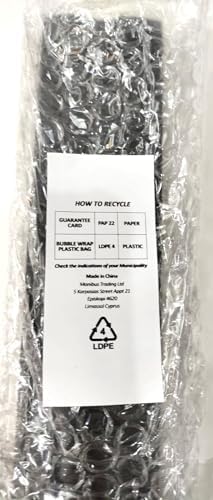
Figure 6: Recycling information for packaging.
9. Warranty and Support
For warranty information or technical support, please refer to the specific terms provided by the seller, Remotes Replaced, at the time of purchase. You can typically find contact information on your purchase receipt or the seller's official website.
For general inquiries, you may visit the RemotesReplaced brand page on Amazon.