
1. Product Overview
The TCL ION X T430W is a versatile smartphone designed for reliable performance and clear visuals. It features a 6-inch HD+ display, a 13MP main camera, and runs on Android 12. This manual provides essential information for setting up, operating, maintaining, and troubleshooting your device.
Key features include:
- Display: 6-inch HD+ widescreen display with an 18:9 aspect ratio and 1440x720 pixel resolution.
- Camera: 13MP rear camera with Light Trace and Stop Motion features, and a 5MP front camera for video calls.
- Processor: MediaTek octa-core processor for seamless performance.
- Operating System: Android 12, offering intuitive gestures and smart features.
- Security: Face Unlock for fast and secure device access.
- Storage: 32GB internal storage, expandable up to 512GB via MicroSD card.
- Battery: 3000mAh battery for extended use.
- Connectivity: Reliable 4G LTE connectivity.
This device is a renewed product. Renewed products are fully functional and may come with generic or original accessories and packaging. Cosmetic condition may vary, but functionality is guaranteed.
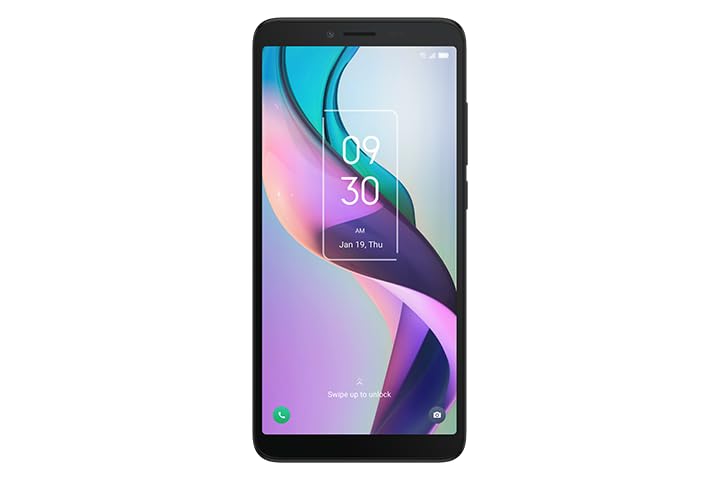
Image: Back view of the TCL ION X T430W smartphone, highlighting the camera and textured design.
2. Setup Guide
2.1. Unpacking and Initial Inspection
Carefully remove all components from the packaging. Verify that the following items are present:
- TCL ION X T430W Smartphone
- USB Cable
Inspect the device for any visible damage. If any components are missing or damaged, contact your retailer or support.
2.2. Inserting the SIM Card and MicroSD Card
- Locate the SIM card tray on the side of your device.
- Insert the SIM ejector tool (if provided, or a small paperclip) into the small hole on the tray to open it.
- Place your Nano-SIM card into the designated slot on the tray with the gold contacts facing down.
- If using a MicroSD card for expanded storage (up to 512GB), place it into the MicroSD slot on the same tray.
- Carefully push the tray back into the device until it clicks into place.
2.3. Charging the Battery
Before first use, fully charge the device battery.
- Connect the USB cable to the charging port on your phone.
- Connect the other end of the USB cable to a compatible power adapter (not included) and plug it into a power outlet.
- The charging indicator will appear on the screen. The 3000mAh battery typically takes a few hours to fully charge.
2.4. Powering On and Initial Configuration
- Press and hold the Power button (usually on the right side of the device) until the TCL logo appears.
- Follow the on-screen prompts to select your language, connect to a Wi-Fi network, and set up your Google account.
- During setup, you will have the option to configure security features like Face Unlock.
3. Operating Instructions
3.1. Basic Navigation
The TCL ION X T430W runs on Android 12, utilizing intuitive gestures for navigation:
- Home: Swipe up from the bottom of the screen to go to the home screen.
- Back: Swipe from the left or right edge of the screen.
- Recent Apps: Swipe up from the bottom and hold to view recently used applications.
- Notifications: Swipe down from the top of the screen to access notifications and quick settings.
3.2. Camera Usage
Your device is equipped with a 13MP rear camera and a 5MP front camera.
- Open the Camera application from your home screen or app drawer.
- Tap the shutter button to take a photo.
- Switch between front and rear cameras using the camera switch icon.
- Explore features like Light Trace and Stop Motion in the camera settings or modes.
3.3. Google Lens Integration
The built-in Google Lens allows you to interact with the world around you.
- Open the Google Lens app or access it through the camera app.
- Point your camera at text or objects to scan QR codes, copy text, identify plants and animals, or schedule events.
3.4. Face Unlock
Face Unlock provides a convenient and secure way to access your device.
- Go to Settings > Security > Face Unlock.
- Follow the on-screen instructions to register your face. Ensure good lighting during registration.
- Once registered, simply look at your phone's front camera to unlock it.
4. Maintenance
4.1. Software Updates
Regularly check for and install software updates to ensure optimal performance and security.
- Go to Settings > System > System update.
- Follow the prompts to check for and install any available updates.
4.2. Cleaning Your Device
To clean your phone, use a soft, lint-free cloth. Avoid using harsh chemicals or abrasive materials.
- Gently wipe the screen and back panel.
- For stubborn smudges, slightly dampen the cloth with water.
- Do not allow moisture to enter openings.
4.3. Storage Management
Manage your device's 32GB internal storage and MicroSD card to maintain performance.
- Go to Settings > Storage to view storage usage.
- Delete unnecessary files, apps, or move them to the MicroSD card.
5. Troubleshooting
This section addresses common issues you might encounter with your TCL ION X T430W.
5.1. Device Not Powering On
- Ensure the battery is charged. Connect the device to a charger for at least 15 minutes before attempting to power on.
- Press and hold the Power button for 10-15 seconds to force a restart.
5.2. Apps Crashing or Device Lagging
- Close background applications.
- Clear the cache of problematic apps (Settings > Apps > [App Name] > Storage & cache > Clear cache).
- Ensure you have sufficient storage space.
- Restart the device.
5.3. Network Connectivity Issues
- Check if Airplane Mode is off.
- Restart your device.
- Verify your SIM card is correctly inserted and active.
- Reset network settings (Settings > System > Reset options > Reset Wi-Fi, mobile & Bluetooth).
5.4. Face Unlock Not Working
- Ensure your face is well-lit and directly facing the front camera.
- Clean the front camera lens.
- Re-register your face in the security settings.
6. Specifications
Detailed technical specifications for the TCL ION X T430W.
| Feature | Specification |
|---|---|
| Model Name | ION X (T430W) |
| Brand | TCL |
| Operating System | Android 12 |
| CPU Model | MediaTek Helio P60T |
| Screen Size | 6 Inches |
| Resolution | 1440 x 720 |
| RAM Memory Installed Size | 3 GB |
| Memory Storage Capacity | 32 GB (expandable up to 512GB via MicroSD) |
| Battery Capacity | 3000 Milliamp Hours |
| Special Features | Face Unlock |
| Wireless Communication Technologies | Cellular (4G LTE) |
| Connectivity Technologies | USB |
| Item Weight | 8.8 ounces |
| Color | Black |
| What's in the box | USB Cable |
7. Warranty and Support
This TCL ION X T430W is a renewed product. Renewed products typically come with a specific return policy and warranty from the seller or platform.
7.1. Return Policy
This product is covered by a 90-day refund/replacement return policy. For details on initiating a return or replacement, please refer to the purchase platform's return policy or contact the seller directly.
7.2. Technical Support
For technical assistance or further inquiries regarding your device, please contact the seller, Techrific Deals, through the platform where the purchase was made. You may also refer to the official TCL support website for general product information and resources.