1. Introduction
Welcome to the NMY N100 Drone User Manual. This guide provides essential information to help you safely and effectively operate your NMY N100 drone. The NMY N100 is a lightweight, foldable drone equipped with a 4K camera, electronic image stabilization (EIS), and advanced flight features such as GPS positioning and multiple intelligent flight modes. Please read this manual thoroughly before your first flight to ensure optimal performance and safety.
2. Package Contents
Verify that all items are present in your package. If any components are missing or damaged, please contact NMY customer support.

Image: Complete NMY N100 Drone package contents, including the drone, remote controller, batteries, propellers, charging cables, and user manual.
- NMY N100 Drone (x1)
- Remote Controller (x1)
- Intelligent Flight Batteries (x2)
- Spare Propellers (multiple sets)
- USB Charging Cable (x1)
- Screwdriver (x1)
- User Manual (x1)
- SD Card and Card Reader (x1 set)
3. Safety Guidelines
Adhering to these safety guidelines is crucial for safe and responsible drone operation. Failure to do so may result in injury, property damage, or legal consequences.
- Pre-Flight Check: Always inspect the drone, propellers, and batteries for any damage before each flight.
- Weather Conditions: Do not fly in strong winds, rain, snow, or fog.
- Line of Sight: Always maintain visual line of sight with your drone during flight.
- Restricted Areas: Avoid flying near airports, military bases, power lines, or other restricted airspace.
- Privacy: Respect the privacy of others when recording photos or videos.
- Battery Safety: Use only original NMY batteries and chargers. Do not overcharge or puncture batteries.
- Weight: The NMY N100 weighs under 249g, which may exempt it from certain registration requirements in some regions. Always check local regulations.

Image: The NMY N100 drone held in a hand, illustrating its compact size and weight under 249g, which typically means no FAA registration is required.
4. Setup Guide
4.1 Charging Batteries
Fully charge both the drone's flight batteries and the remote controller's battery before first use.
- Connect the USB charging cable to the battery and a suitable USB power adapter (not included).
- The battery indicator lights will show charging status. All lights will be solid when fully charged.
- Charging time is approximately 2-3 hours per battery.

Image: The NMY N100 drone alongside its two intelligent flight batteries, highlighting the extended flight time of up to 40 minutes provided by both batteries.
4.2 Installing Flight Batteries
- Ensure the drone is powered off.
- Insert the charged flight battery into the battery compartment on the rear of the drone until it clicks into place.
- Ensure the battery is securely fastened to prevent dislodgement during flight.
4.3 Propeller Installation
The propellers are marked A and B. Match them to the corresponding motor arms.
- Identify the 'A' and 'B' markings on the propellers and motor arms.
- Place the propeller onto the motor shaft.
- Twist the propeller clockwise (for A) or counter-clockwise (for B) to secure it. Ensure it is firmly attached.
4.4 Remote Controller Setup
- Unfold the phone holder on the remote controller.
- Place your smartphone into the holder.
- Connect the remote controller to your smartphone using the provided USB cable.
- Power on the remote controller by pressing and holding the power button.

Image: A user's hands operating the NMY N100 drone's remote controller with a smartphone mounted, displaying the live camera feed and user-friendly controls.
4.5 App Installation and Connection
- Scan the QR code in the quick start guide or search for the "NMY Drone" app in your device's app store.
- Install the app on your smartphone.
- Ensure your phone's Wi-Fi is enabled.
- Power on the drone and the remote controller.
- Open the NMY Drone app and follow the on-screen instructions to connect to the drone's Wi-Fi network.
4.6 SD Card Installation
The NMY N100 supports SD cards for direct storage of 4K footage.
- Locate the SD card slot on the drone, typically near the camera or on the side of the drone body.
- Insert the provided 32GB Micro SD card into the slot with the gold contacts facing down/in, until it clicks into place.
- To remove, gently push the card in until it springs out.

Image: Close-up view of the NMY N100 drone's SD card slot, demonstrating support for Micro SD cards for fast data storage and reading, accompanied by a USB card reader.
5. Operating Instructions
5.1 Pre-Flight Checklist
- Drone batteries fully charged and installed.
- Remote controller battery fully charged.
- Propellers correctly installed and secure.
- SD card inserted (if recording).
- App connected and displaying live feed.
- GPS signal acquired (indicated by solid GPS icon in app).
- Fly in an open area, away from obstacles, people, and restricted zones.
5.2 Take-off and Landing
- Motor Start: Push both joysticks down and outwards simultaneously to start the motors.
- One-Key Take-off: Press the One-Key Take-off button on the remote controller or in the app. The drone will automatically ascend to a safe height.
- Manual Take-off: Slowly push the left joystick (throttle) upwards to ascend.
- Landing: Press the One-Key Landing button, and the drone will descend and land automatically. Alternatively, slowly pull the left joystick (throttle) downwards to land manually.
5.3 Intelligent Flight Modes
The NMY N100 offers several intelligent flight modes for enhanced creativity and ease of use:
- Follow Mode: The drone will automatically follow the subject (e.g., you) detected by the app. Ensure clear line of sight.
- Circling Mode: The drone will orbit a designated point or subject, maintaining a set radius and altitude.
- Waypoint Mode: Plan a flight path by tapping points on the map within the app. The drone will fly along the predefined route.
5.4 Camera Operation
The NMY N100 features a 4K camera with Electronic Image Stabilization (EIS) and a 120° adjustable angle.
- Photo/Video Capture: Use the dedicated buttons on the remote controller or the app interface to take photos or start/stop video recording.
- Camera Angle Adjustment: Use the gimbal dial on the remote controller to adjust the camera's vertical angle (120° range).
- EIS: The Electronic Image Stabilization system helps to reduce blur and shake in your footage, providing clearer and steadier shots.

Image: The NMY N100 drone in flight over a scenic landscape, illustrating its capability for crystal-clear 4K video recording with Electronic Image Stabilization (EIS).

Image: A visual comparison demonstrating the effectiveness of Electronic Image Stabilization (EIS) in drone footage, showing a stable image with EIS ON versus a blurry image with EIS OFF.
5.5 GPS Features and Return-to-Home (RTH)
The integrated GPS system provides precise positioning and enables advanced safety features.
- GPS Positioning: Ensures stable hovering and accurate flight paths.
- Smart Return-to-Home (RTH): The drone will automatically return to its take-off point under the following conditions:
- One-Key RTH: Activated by pressing the RTH button on the remote controller or in the app.
- Low Battery RTH: The drone will automatically initiate RTH when the battery level is critically low.
- Signal Loss RTH: If the connection between the drone and remote controller is lost, the drone will automatically return to the take-off point.

Image: The NMY N100 drone demonstrating its automatic return feature, showing a flight path back to the GPS-recorded home point, useful for low battery or signal loss scenarios.
6. Maintenance
6.1 Cleaning
- Use a soft, dry cloth to wipe down the drone body and propellers after each flight.
- Gently clean the camera lens with a microfiber cloth to ensure clear footage.
- Avoid using liquid cleaners or solvents that could damage electronic components.
6.2 Storage
- Store the drone and its accessories in a cool, dry place, away from direct sunlight and extreme temperatures.
- Remove batteries from the drone and remote controller if storing for extended periods.
- Utilize the provided carrying case for safe transport and storage.
6.3 Battery Care
- Do not fully discharge batteries. Charge them to approximately 50-60% for long-term storage.
- Avoid exposing batteries to extreme heat or cold.
- If a battery appears swollen, damaged, or leaks, discontinue use immediately and dispose of it properly.
7. Troubleshooting
| Problem | Possible Cause | Solution |
|---|---|---|
| Drone does not power on. | Battery not charged or not installed correctly. | Ensure batteries are fully charged and securely inserted. |
| No live video feed in app. | Wi-Fi not connected or app issue. | Reconnect to the drone's Wi-Fi network. Restart the app and drone. |
| Drone drifts during flight. | Improper calibration or strong wind. | Perform compass and gyroscope calibration. Avoid flying in windy conditions. |
| Remote controller not connecting. | Low battery or pairing issue. | Charge controller. Re-pair the controller with the drone according to manual instructions. |
| Camera not recording to SD card. | SD card full, corrupted, or not inserted correctly. | Check SD card insertion. Format or replace SD card. Ensure recording button is pressed. |
8. Specifications
| Feature | Detail |
|---|---|
| Model | N100 |
| Brand | NMY |
| Camera | 4K with EIS (Electronic Image Stabilization), 120° adjustable |
| Flight Time | Up to 40 minutes (with 2 batteries) |
| Motor Type | Brushless Motor |
| Weight | Under 249g |
| Special Features | Integrated GPS, One Button Return, Rechargeable Batteries, Multiple Flight Modes (Follow, Circling, Waypoint) |
| Product Dimensions | 20 x 15 x 5 cm |
| Batteries | 2 Lithium Ion batteries (included) |
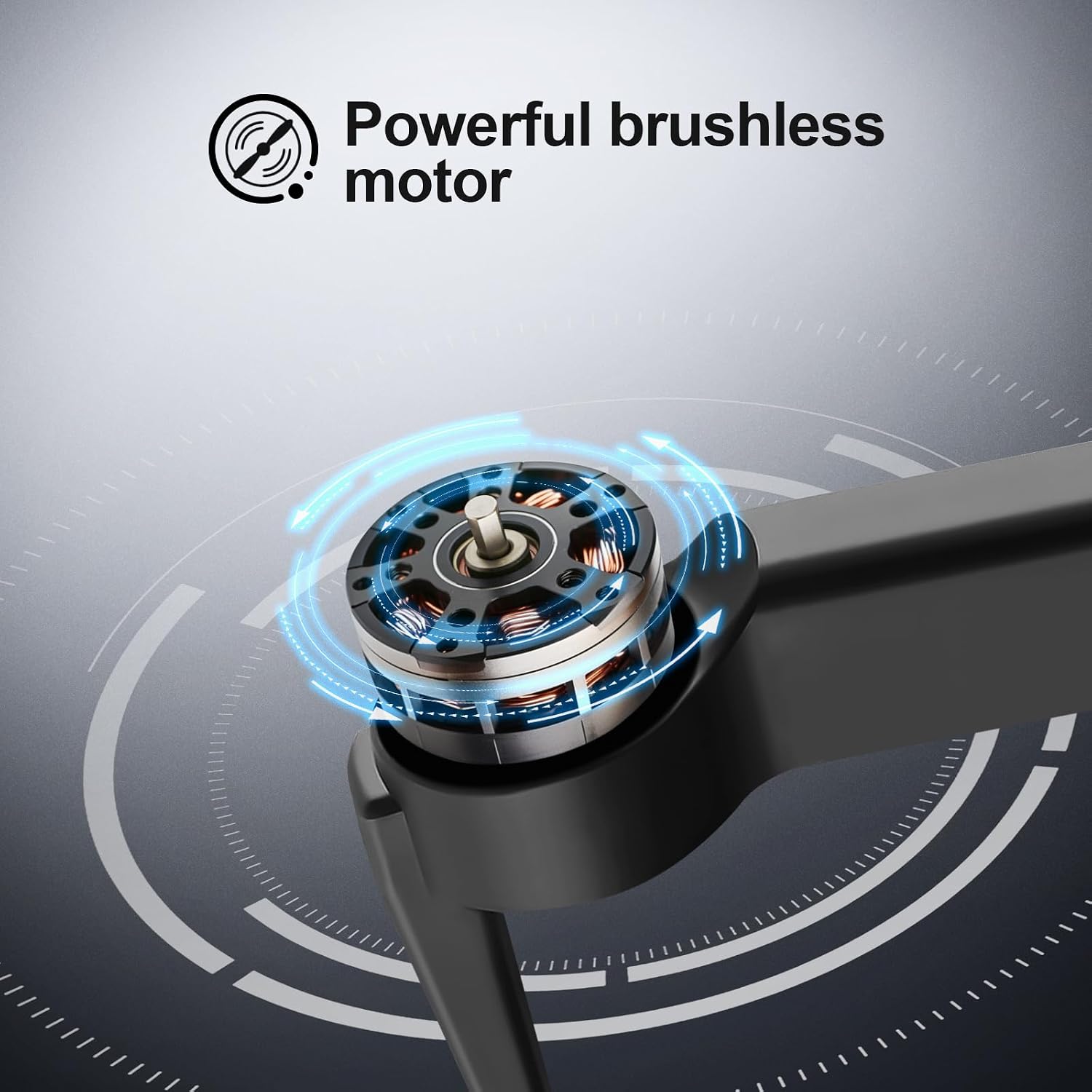
Image: A detailed view of the NMY N100 drone's powerful brushless motor, indicating high efficiency and durability for stable flight.
9. Warranty and Support
NMY is committed to providing professional after-sales support to ensure your satisfaction. We aim to guide you from novice to expert in drone operation.
- Customer Satisfaction: If you are not satisfied with your purchase, NMY offers a no-questions-asked return policy. Please refer to your purchase platform for specific return window details.
- Technical Support: For any operational questions, troubleshooting assistance, or technical issues, please contact NMY customer service. Contact information can typically be found on the product packaging or the official NMY website.