
Introduction
This manual provides comprehensive instructions for the safe and efficient operation, maintenance, and troubleshooting of your Frigidaire Professional 30-inch Single Electric Wall Oven with True Convection and Air Fry (Model PCWS3080AF). Please read this manual thoroughly before using your appliance and retain it for future reference. Proper use and care will ensure optimal performance and longevity of your oven.

Image: The Frigidaire Professional 30-inch Single Electric Wall Oven seamlessly integrated into a modern kitchen setting.
Safety Information
Your safety and the safety of others are very important. Always read and obey all safety messages in this manual and on your appliance. Failure to follow these instructions may result in fire, electric shock, property damage, personal injury, or death.
- Electrical Requirements: Ensure the oven is properly grounded and connected to the correct voltage (240 Volts) and wattage (4000 watts) as specified.
- Installation: This appliance must be installed by a qualified technician in accordance with all local codes and ordinances.
- Child Safety: Do not allow children to play with the oven. Never leave children unattended near the appliance when it is in use.
- Hot Surfaces: The oven and its components can become very hot. Use oven mitts when handling hot items.
- Flammable Materials: Keep flammable materials away from the oven.
Setup and Installation
The Frigidaire Professional Wall Oven is designed for wall-mount installation. Proper installation is crucial for safe and efficient operation. Refer to the separate installation guide provided with your appliance for detailed instructions.
Pre-Installation Checks:
- Verify that the cabinet opening dimensions match the oven's requirements.
- Ensure electrical supply meets the specifications (240V, 4000W).
- Unpack all components and inspect for any shipping damage.
Rack Installation:
The oven comes with multiple racks. These racks can be placed in various positions to accommodate different cooking needs. Ensure racks are securely seated before placing items on them.

Image: The spacious interior of the oven showing multiple adjustable racks for versatile cooking.
Operating Instructions
Your Frigidaire Professional Wall Oven features intuitive controls for various cooking modes and precise temperature management.
Control Panel Overview:
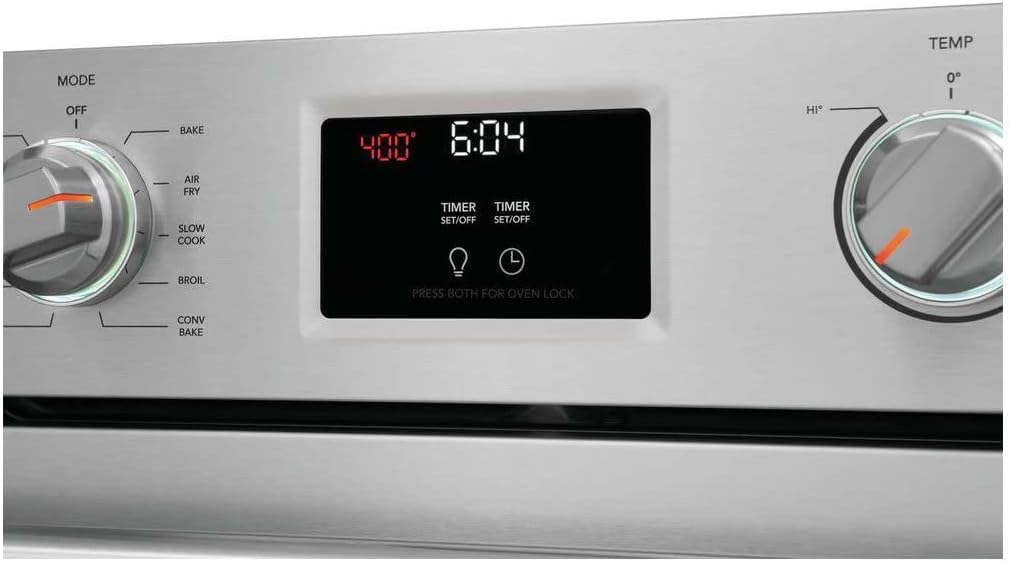
Image: A detailed view of the oven's control panel, featuring two rotary dials for mode and temperature, and a central digital touchscreen display for timer and settings.
- Left Dial (Oven Mode): Selects the cooking function (Off, Clean, Broil, Conv Roast, Conv Bake, Bake, Air Fry, Slow Cook, No Preheat).
- Right Dial (Oven Temp): Sets the desired temperature for the selected mode.
- Digital Touchscreen Display: Shows current time, oven temperature, and allows setting multiple timers. It also indicates preheat status and oven light control.
Setting the Oven:
- Select Oven Mode: Turn the left dial to your desired cooking mode (e.g., Bake, Air Fry, Conv Roast).
- Set Temperature: Turn the right dial to the desired temperature. The oven will begin to preheat. The digital display will show the current temperature and indicate when preheating is complete.
- Using the Timer: Tap the 'TIMER' button on the touchscreen to set a cooking timer. You can set multiple timers if needed.
- Oven Light: Tap the light bulb icon on the touchscreen to turn the interior oven light on or off.
- Oven Lock: Press and hold both 'TIMER' buttons simultaneously for oven lock activation/deactivation.
Special Features:
- True Convection: Utilizes a powerful fan and a third heating element to circulate hot air evenly, ensuring consistent cooking and faster results. Ideal for roasting and baking multiple dishes.
- Air Fry: This mode allows you to achieve crispy, delicious results with little to no oil. Follow recipes specifically designed for air frying in an oven.
- No Preheat: For certain dishes, this mode allows you to skip the preheating step, saving time and energy. Consult your recipe or food packaging for guidance.
- Slow Cook: Designed for low-temperature, long-duration cooking, perfect for tenderizing meats and stews.
Maintenance and Cleaning
Regular maintenance and cleaning will keep your Frigidaire Professional Wall Oven performing at its best and looking new.
Self-Cleaning Cycle:
The oven features a self-cleaning cycle that uses high temperatures to burn off food soils, leaving a small amount of ash that can be wiped away. Refer to the 'Clean' setting on the oven mode dial.
- Remove all oven racks and accessories before starting a self-clean cycle.
- Wipe up any loose spills or debris from the oven bottom.
- Follow the instructions on the digital display to initiate and complete the cycle.
- Ensure adequate ventilation during the self-clean cycle.
General Cleaning:
- Exterior: Clean stainless steel surfaces with a soft cloth and a stainless steel cleaner. Avoid abrasive cleaners.
- Oven Door: Use mild soap and water for the glass and interior door surfaces.
- Control Panel: Wipe with a damp cloth. Do not spray cleaners directly onto the panel.
Troubleshooting
If you experience issues with your oven, consult the following common troubleshooting tips before contacting service.
| Problem | Possible Cause | Solution |
|---|---|---|
| Oven not heating | Power supply issue, incorrect mode/temperature setting, door not closed properly. | Check circuit breaker. Ensure oven mode and temperature are set correctly. Close oven door completely. |
| Uneven cooking | Improper rack position, overcrowded oven, dirty oven. | Adjust rack position. Avoid overcrowding. Clean oven interior. Utilize convection mode for better circulation. |
| Oven light not working | Light bulb burned out, power issue. | Replace bulb (ensure oven is cool and power is off). Check power supply. |
| Self-clean cycle not starting | Oven door not latched, racks not removed. | Ensure door is fully closed and latched. Remove all racks and accessories. |
Specifications
Detailed technical specifications for the Frigidaire Professional 30-inch Single Electric Wall Oven (Model PCWS3080AF).

Image: A diagram illustrating the key dimensions of the Frigidaire Professional 30-inch Single Electric Wall Oven.
| Feature | Detail |
|---|---|
| Brand Name | Frigidaire |
| Model Info | 330529269 |
| Item Weight | 170 pounds |
| Product Dimensions | 25.19 x 29.88 x 28 inches |
| Item Model Number | PCWS3080AF |
| Capacity | 5.3 Cubic Feet |
| Installation Type | Wall Mount |
| Oven Cooking Mode | Convection |
| Color | Stainless Steel |
| Voltage | 240 Volts |
| Wattage | 4000 watts |
| Fuel Type | Electric |
| Defrost | Auto Defrost |
| Door Hinges | Front |
| Material Type | Stainless Steel |
| Included Components | Range (Note: This typically refers to the oven unit itself in a wall oven context) |
| Date First Available | October 12, 2022 |
| Heating Method | Convection |
| Finish Type | Stainless Steel |
Warranty Information
Frigidaire provides a limited warranty for this appliance. The specific terms and duration of the warranty may vary by region and purchase date. Please refer to the warranty card included with your product or visit the official Frigidaire website for detailed warranty information. Keep your proof of purchase for warranty claims.
Customer Support
For technical assistance, service scheduling, or to order replacement parts, please contact Frigidaire Customer Support. Have your model number (PCWS3080AF) and serial number ready when you call.
You can find contact information on the Frigidaire website or in the documentation included with your appliance.


