
Agrieyes AG-T28-EU
Agrieyes Halo Wireless Trailer Lights Instruction Manual
Model: AG-T28-EU
Introduction
This manual provides detailed instructions for the safe and efficient use of your Agrieyes Halo Wireless Trailer Lights. These lights are designed for towing applications, offering both magnetic and screw mounting options, and are suitable for trucks, boats, and RVs. Please read this manual thoroughly before installation and operation.
Setup and Installation
Mounting Options
Your Agrieyes wireless trailer lights offer two versatile installation methods: magnetic and screw-on.
- Magnetic Installation: The lights feature a rubber-coated magnetic base to prevent scratches on your vehicle's surface. Simply attach the lights to a suitable metallic surface on your trailer.
- Screw Installation: For a more permanent attachment, use the provided washers and screws. Avoid removing the integrated magnet for optimal performance, even when using screw mounting.
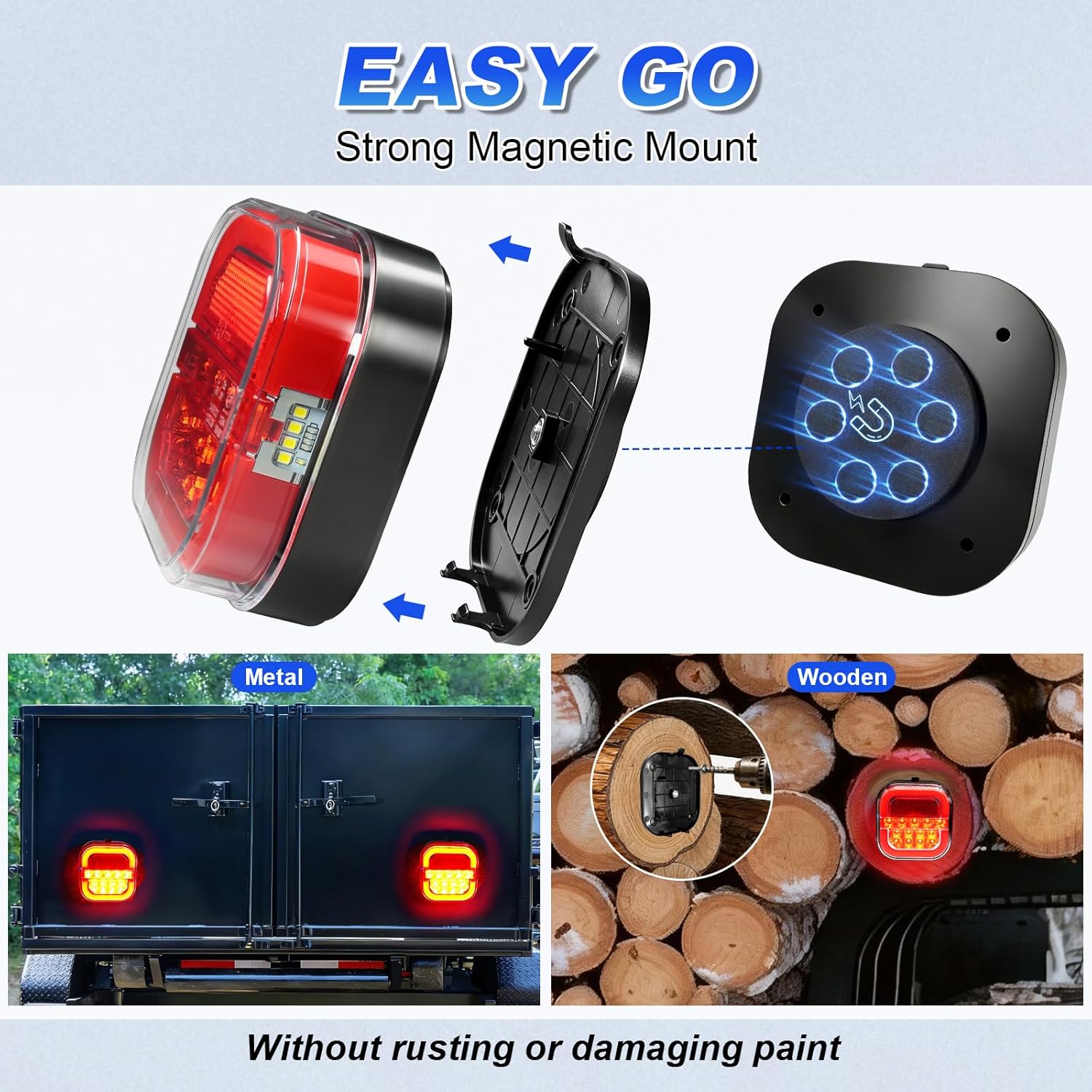
Image: Illustration of magnetic and screw mounting options for the trailer lights. The magnetic base is shown attaching to a metal surface, and a screw-on method is also depicted.
Transmitter Connection
The system includes a transmitter with a standard 7-pin round to 4-pin flat connector. This is compatible with most truck rear sockets. If your vehicle has a different socket type, a plug converter will be required (not included).

Image: Close-up view of the wireless transmitter, highlighting its 7-pin round and 4-pin flat connectors for vehicle compatibility.
Quick Installation Steps
- Start your truck or towing vehicle.
- Plug the transmitter into the vehicle's trailer light socket.
- Attach the magnetic lights to the desired position on your trailer.
- Verify that the lights are paired and functioning correctly.

Image: A visual guide demonstrating the four quick steps for installing the wireless trailer lights, from plugging in the transmitter to attaching the lights.
Setup Video
Video: Official Agrieyes video demonstrating the setup and functionality of the AG-T28 Wireless Trailer Lights.
Operating Instructions
Signal Stability and Range
The wireless tow lights are equipped with a built-in antenna and operate on a 2.4GHz transmission frequency, ensuring a stable signal. They offer a transmission range exceeding 100 feet (30.5 meters), making them suitable for longer vehicles and trailers.

Image: Diagram illustrating the superior 100-foot signal stability of Agrieyes lights compared to other brands.
Light Functions and Visibility
These magnetic vehicle lights are DOT-compliant and include tail, brake, turn, and license plate lights. Additionally, integrated reflectors enhance visibility when the vehicle is parked, reducing the risk of collisions. The lights utilize new ceramic base LEDs for lower power consumption and higher brightness.

Image: Visual representation of the different light functions (tail, turn, brake) and the ceramic base LED technology for enhanced brightness.
General Operation Video
Video: An official Agrieyes video showcasing the general operation and features of the Halo Wireless Trailer Lights.
Maintenance
Charging
The trailer lights are rechargeable via a USB-C charging port. A full charge takes approximately 2.5 hours and provides 8-27 hours of usage, depending on the mode of operation. Ensure the lights are fully charged before extended use.

Image: Detail of the USB-C charging port and battery indicator lights on the trailer light unit.
Cleaning and Storage
Clean the lights with a soft, damp cloth. Avoid abrasive cleaners or solvents. When not in use, store the lights in a dry place, preferably in their original packaging or a protective case, to prevent damage.
Safety Cable
For added security, especially during long trips or on rough terrain, utilize the included safety cable to tether the lights to your trailer. This prevents accidental detachment.

Image: Detail showing the safety cable attached to the trailer light for extra security.
Troubleshooting
Lights Not Functioning
- Check Battery: Ensure the lights are fully charged.
- Transmitter Connection: Verify the transmitter is securely plugged into the vehicle's socket.
- Vehicle Circuit Compatibility: A small percentage of vehicles may have circuit variations that affect compatibility. If issues persist after checking battery and connection, contact customer support.
- Pairing: If the lights are not responding, try re-pairing them with the transmitter. Refer to the "Setup and Installation" section for pairing instructions.
Weak Signal or Intermittent Operation
- Obstructions: Ensure there are no large metal objects or other significant obstructions between the transmitter and the lights that could interfere with the 2.4GHz signal.
- Range: Confirm that the trailer is within the 100-foot operating range of the transmitter.
- Interference: Other wireless devices operating on the 2.4GHz frequency might cause interference. Try to minimize such devices in the immediate vicinity.
Specifications
| Feature | Detail |
|---|---|
| Brand | Agrieyes |
| Model Number | AG-T28-EU |
| Color | Bright Red |
| Light Source Type | LED |
| Voltage | 12 Volts |
| Wattage | 5 watts |
| Item Weight | 16 ounces |
| Item Dimensions | 4 x 2 x 4 inches |
| Special Features | Dustproof, Impact Resistant, Lightweight, Shockproof, Waterproof |
| Compatible Vehicle Types | Boat, Bus, Car, Golf Cart, RV, Snowmobile, Tractor, Truck, UTV |
| Lens Material | Polycarbonate |
| Connectivity | 2.4GHz Wireless Transmission |
| Charging Port | USB-C |
| Charging Time | Approx. 2.5 hours |
| Usage Time | 8-27 hours (depending on mode) |

Image: Overview of the product package contents and dimensions of the trailer lights.
Warranty Information
Agrieyes offers a two-year warranty on the Halo Wireless Trailer Lights. If you encounter any problems with your product during this period, please contact our customer support team. We are committed to resolving any issues within 24 hours.
Customer Support
For any questions, concerns, or technical assistance regarding your Agrieyes Halo Wireless Trailer Lights, please contact Agrieyes Direct customer support.
Contact Information: Please refer to the contact details provided with your product packaging or visit the official Agrieyes website for the most up-to-date support information.
Related documentsAG-T28-EU

Ask a question about this manual
Ask about setup, troubleshooting, compatibility, parts, safety, or missing instructions. Manuals+ will review the question and use this page’s manual context to help answer it.