
Introduction
The Mackie MobileMix is an 8-channel USB-powerable audio mixer designed for use with smartphones, tablets, and DSLR cameras. It facilitates capturing high-quality audio for streaming and recording on the go. Key features include two mic/instrument preamps, Bluetooth connectivity with Mix Minus, stereo line inputs, EQ, and built-in effects.
This manual provides essential information for setting up, operating, and maintaining your MobileMix mixer.
Product Overview

Figure 1: Top-down view of the Mackie MobileMix 8-Channel USB-Powerable Mixer, showcasing its compact design and control layout.
The MobileMix is a compact and portable mixer, weighing approximately 2.9 pounds with dimensions of 9.2 x 4.9 x 7.3 inches. It offers a comprehensive set of controls and connectivity options for various audio applications.

Figure 2: Detailed diagram of the MobileMix, highlighting key components such as Mic/Instrument Inputs, Stereo Inputs, Bluetooth Input/Output, Smartphone/DSLR Input/Output, Dual Mix Outputs, USB Power Connector, Battery Storage, Channel EQ, Reverb FX, and Phone/Tablet Slot.
Setup
Powering the MobileMix
The MobileMix can be powered via USB. For portable use, a rechargeable USB battery pack (sold separately) can be connected and stored within the unit's dedicated compartment.

Figure 3: Illustration of connecting a rechargeable USB battery pack to the MobileMix, which can be stored in its dedicated compartment for extended portable use.
Connecting Inputs
The MobileMix offers diverse input options:
- Microphones/Instruments: Connect microphones or instruments to the two dedicated mic/instrument preamps. These inputs feature Hi-Z, Low Cut, and 48V Phantom Power for condenser microphones.
- Stereo Line Inputs: Use the stereo line inputs for connecting devices like keyboards, media players, or other audio sources.
- Bluetooth: Pair your smartphone or tablet via Bluetooth to stream audio or integrate phone calls into your mix. The Mix Minus feature helps prevent echo during calls.

Figure 4: A close-up view of the Mackie mic/instrument preamps, showing connected XLR and 1/4-inch cables, highlighting the versatile input options.

Figure 5: The Bluetooth button on the MobileMix, indicating active Bluetooth connection for wireless audio streaming and call integration.
Connecting Outputs
The MobileMix provides multiple output options:
- Smartphone/DSLR Output: Connect up to two smartphones and/or cameras simultaneously for recording or streaming to multiple platforms. This supports both vertical and landscape video orientations.
- Speakers: Connect your main speakers to the appropriate outputs.
- Headphones: The mixer includes two 1/4-inch headphone outputs with separate volume controls, plus one 1/8-inch output for monitoring.

Figure 6: The MobileMix connected to a smartphone and a DSLR camera, illustrating its capability as an ideal streaming mixer for multi-platform content creation.
Operating the MobileMix
Mixing and Effects
The MobileMix allows you to mix up to 8 channels, including microphones, instruments, and audio from connected devices. Each channel features EQ controls for tone shaping. The built-in effects engine provides various reverb options (Plate, Hall, Reverb+Delay) to enhance your sound.
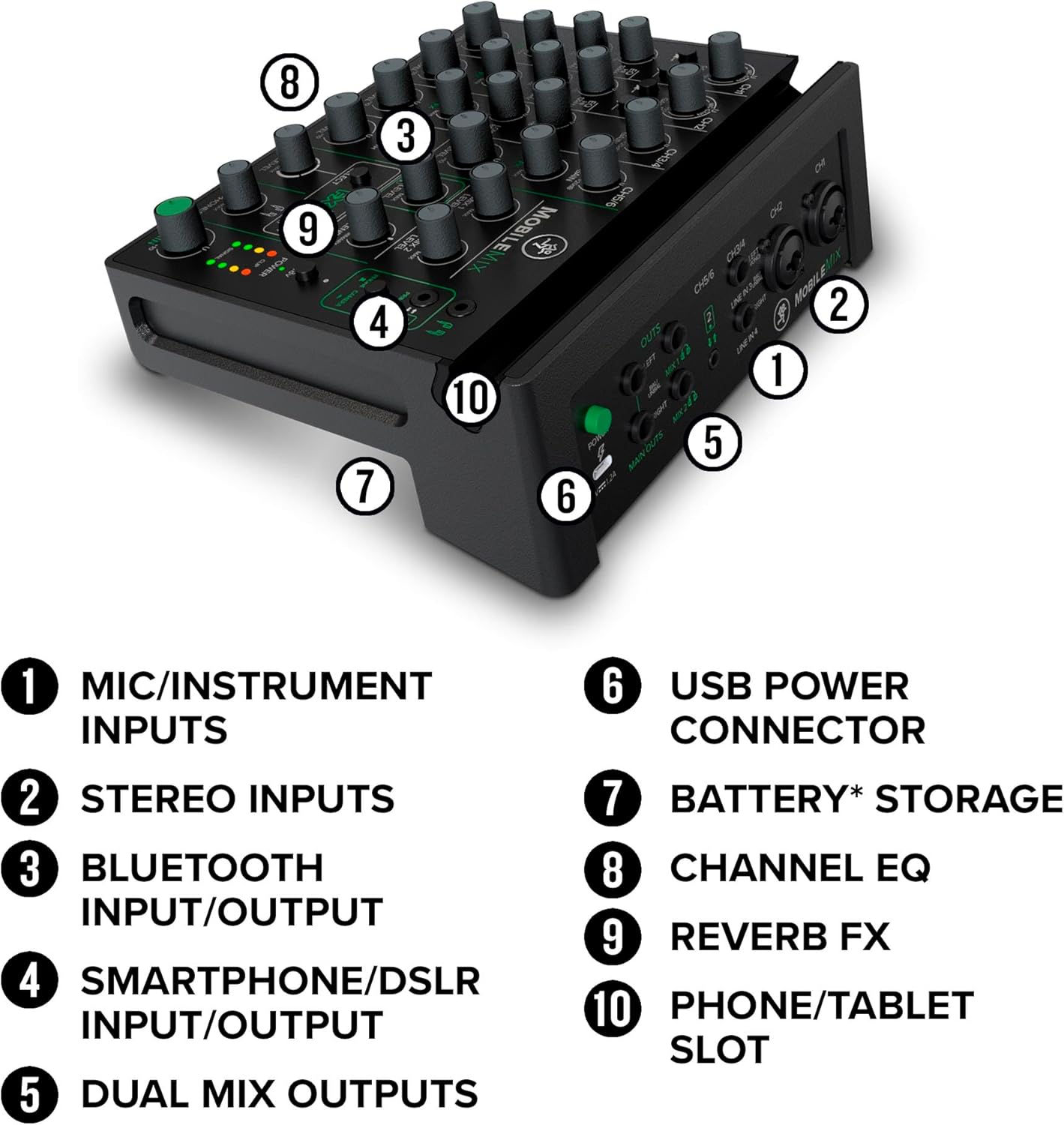
Figure 7: A detailed view of the Channel EQ and 3 unique Reverb Effects on the MobileMix, demonstrating powerful sound shaping capabilities.
Recording and Streaming
The MobileMix is designed to send your mixed audio to connected smartphones and cameras, enabling high-quality recording and live streaming. It integrates seamlessly with mobile devices for content creation.
Official Product Video Overview
Video 1: An official overview of the Mackie MobileMix, detailing its features, connectivity, and use cases for mobile streaming and recording.
Maintenance
To ensure the longevity and optimal performance of your Mackie MobileMix, follow these maintenance guidelines:
- Cleaning: Use a soft, dry cloth to clean the exterior of the mixer. Avoid abrasive cleaners or solvents that could damage the finish or controls.
- Storage: Store the mixer in a cool, dry place away from direct sunlight, extreme temperatures, and excessive dust.
- Cable Management: Always handle cables carefully. Avoid bending or crimping cables, and disconnect them by pulling the plug, not the cable itself.
- Power: Disconnect the power adapter when the mixer is not in use for extended periods.
Troubleshooting
If you encounter issues with your MobileMix, refer to the following common troubleshooting steps:
- No Sound Output:
- Check all cable connections to ensure they are secure.
- Verify that all volume levels (channel, main mix, headphone) are turned up.
- Ensure the correct input sources are selected and active.
- Confirm that any connected speakers or headphones are powered on and functioning.
- Distorted Audio:
- Reduce the gain levels on input channels to prevent clipping (indicated by red CLIP LEDs).
- Lower the main mix level if the output is distorting.
- Check the audio source for distortion.
- Bluetooth Connection Issues:
- Ensure the Bluetooth function on the MobileMix is activated.
- Verify that your device's Bluetooth is on and attempting to pair with "MobileMix".
- Move your device closer to the mixer to improve signal strength.
- Try unpairing and re-pairing the device.
- Phantom Power Not Working:
- Ensure the 48V phantom power button is engaged for condenser microphones.
- Check that the microphone cable is an XLR type, as phantom power is typically delivered via XLR.
If problems persist, consult the Mackie support website or contact customer service.
Specifications
| Feature | Detail |
|---|---|
| Brand | Mackie |
| Model Number | 2056164-00 |
| Number of Channels | 8 |
| Connectivity Technology | 1/4", Bluetooth, XLR |
| Power Source | Corded Electric (USB-powerable) |
| Item Weight | 2.9 Pounds |
| Product Dimensions | 9.2"D x 4.9"W x 7.3"H |
| Color | Black |
Warranty and Support
For warranty information and technical support, please refer to the official Mackie website or contact their customer service department. Keep your purchase receipt as proof of purchase for warranty claims.