1. Introduction
This manual provides detailed instructions for the assembly, operation, and maintenance of your Bush Business Furniture Hustle 60W x 30D Computer Desk. Please read all instructions carefully before beginning assembly or use to ensure safe and proper setup.

Image 1.1: The Bush Business Furniture Hustle 60W x 30D Computer Desk in White.
The Hustle Computer Desk is designed to support your workspace needs, offering a durable and functional surface for both home and professional environments. Its robust construction and thoughtful features aim to enhance productivity and organization.
Video 1.1: Overview of the Bush Business Furniture Hustle Collection, showcasing its modularity and design.
2. Key Features
- Durable Work Surface: The 60-inch wide desk provides ample space for materials and equipment, supporting up to 200 pounds.
- Thermally Fused Laminate Finish: Protects against scratches, stains, and daily wear in busy environments.
- Built-in Wire Management: A grommet keeps cables organized and off the desktop.
- Sturdy Metal Legs: Equipped with adjustable levelers for stability on uneven floors.
- Modular Design: Includes brackets to connect multiple desks, allowing for easy expansion and custom layouts.
- Quality Standards: Designed and tested to meet or exceed ANSI/BIFMA quality standards.
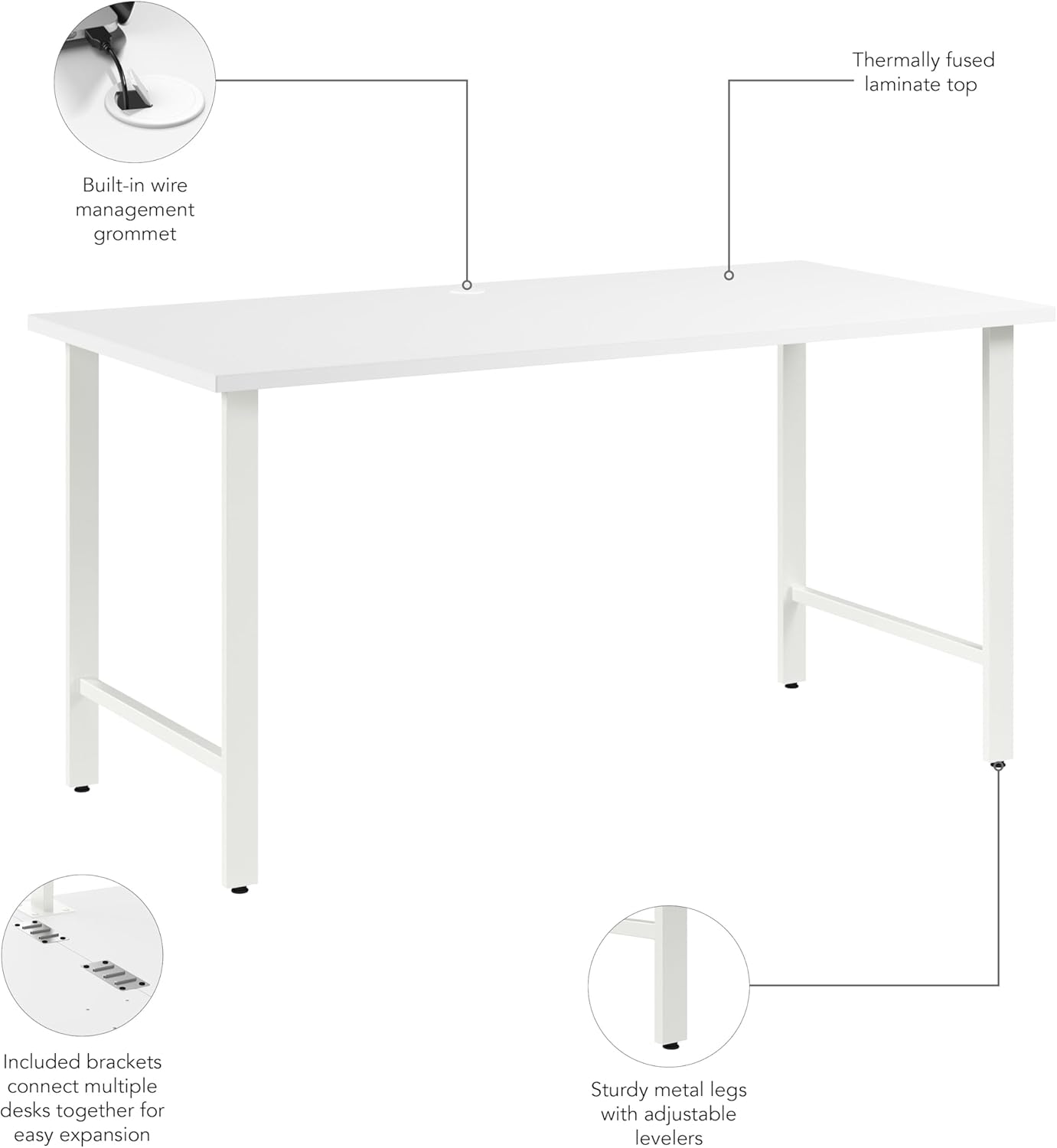
Image 2.1: Key features of the Hustle Desk, including wire management, laminate finish, and modular brackets.

Image 2.2: Detail of the wire management grommet for organized cabling.

Image 2.3: Adjustable levelers on the desk legs ensure stability.
3. Package Contents
Before beginning assembly, verify that all components are present and undamaged. Refer to the packing list included with your product for a complete inventory. Typically, the package includes:
- Desk Top Panel
- Metal Leg Frames (4)
- Crossbars (2)
- Adjustable Levelers (4)
- Wire Management Grommet Cover
- Modular Connection Brackets (if applicable for multi-desk setup)
- Assembly Hardware (screws, bolts, washers, etc.)
- Assembly Tools (Allen wrench, etc. - Note: Additional tools may be required, not all assembly tools are included.)
If any parts are missing or damaged, please contact Bush Furniture customer support immediately.
4. Setup and Assembly Instructions
Assembly is required for this product. It is recommended to have two people for assembly. Clear a spacious area and lay out all components on a soft, clean surface to prevent scratches.
4.1 Tools Required (Not all included):
- Phillips Head Screwdriver
- Hammer (optional, for dowels)
- Allen Wrench (usually included)
4.2 Assembly Steps:
- Attach Adjustable Levelers: Screw the adjustable levelers into the bottom of each metal leg frame. Ensure they are securely fastened but allow for future height adjustments.
- Assemble Leg Frames: Connect the two metal leg frames using the crossbars. Use the provided hardware (bolts and washers) and tighten with the Allen wrench. Do not overtighten initially.
- Attach Leg Assemblies to Desktop: Carefully place the desktop upside down on your protected surface. Align the assembled leg frames with the pre-drilled holes on the underside of the desktop. Secure them using the appropriate screws.
- Install Wire Management Grommet: Insert the wire management grommet into the designated hole on the desktop. Ensure it sits flush.
- Modular Connection (Optional): If connecting multiple desks, use the provided modular connection brackets to join the desks securely. Follow the specific instructions for bracket placement.
- Final Tightening and Leveling: Once all components are assembled, carefully turn the desk upright. Tighten all screws and bolts. Adjust the levelers on the bottom of the legs to ensure the desk is stable and does not wobble.

Image 4.1: View of the desk's underside, illustrating leg frame attachment.

Image 4.2: Example of modular connection brackets for expanding your workspace.
5. Operating Instructions
The Bush Business Furniture Hustle Computer Desk is designed for straightforward use. Once assembled, it provides a stable and organized workspace.
5.1 Cable Management:
Utilize the built-in wire management grommet to route power cords, display cables, and other peripheral wires. This helps keep your desktop clear and reduces clutter, contributing to a more organized and safer work area.
5.2 Weight Capacity:
The desk surface has a maximum weight capacity of 200 pounds (approximately 90.7 kg). Distribute weight evenly across the surface. Avoid placing excessively heavy items on one concentrated area.
5.3 Adjusting Levelers:
If the desk feels unstable or wobbly, gently lift one corner and rotate the adjustable leveler at the bottom of the corresponding leg. Adjust each leveler as needed until the desk is firm and level on your floor surface.
6. Maintenance
Proper care and maintenance will extend the life and appearance of your desk.
- Cleaning: Wipe the desk surface and metal legs with a damp cloth. For stubborn marks, a mild soap solution can be used, followed by wiping with a clean, dry cloth. Avoid abrasive cleaners or harsh chemicals, as these can damage the laminate finish.
- Spills: Clean up spills immediately to prevent staining or damage to the laminate.
- Heat and Moisture: Avoid placing hot items directly on the surface. Use coasters or protective pads. Protect the desk from excessive moisture.
- Hardware Check: Periodically check all screws and bolts to ensure they remain tight. Retighten if necessary to maintain structural integrity.
7. Troubleshooting
| Problem | Possible Cause | Solution |
|---|---|---|
| Desk is wobbly or unstable. | Uneven floor surface; loose hardware. | Adjust the levelers on the bottom of the legs. Ensure all assembly screws and bolts are tightened. |
| Parts do not fit together during assembly. | Incorrect orientation of parts; wrong hardware used. | Review the assembly instructions carefully. Ensure parts are oriented correctly. Verify you are using the correct hardware for each step. Do not force parts. |
| Scratches or damage to the surface. | Sharp objects; abrasive cleaning. | Use protective pads for sharp objects. Avoid abrasive cleaners. Minor scratches may be concealed with furniture repair kits (not included). |
If you encounter issues not listed here or require further assistance, please contact Bush Furniture customer support.
8. Specifications
| Feature | Detail |
|---|---|
| Model Number | HUD160WH |
| Brand | Bush Furniture |
| Dimensions (D x W x H) | 29.37"D x 59.44"W x 30.07"H (74.6 cm D x 151.0 cm W x 76.4 cm H) |
| Item Weight | 60 Pounds (27.2 kg) |
| Color | White |
| Top Material Type | Engineered Wood with Thermally Fused Laminate Finish |
| Base Material | Metal |
| Maximum Weight Recommendation | 200 Pounds (90.7 kg) |
| Assembly Required | Yes |
| Included Components | Cable Management Tray (Grommet) |

Image 8.1: Detailed dimensions of the Hustle Computer Desk.
9. Warranty and Support
9.1 Manufacturer's Warranty:
This Bush Business Furniture Hustle Computer Desk is backed by the Bush Business Furniture 10 Year Manufacturer's Warranty. This warranty covers defects in materials and workmanship under normal use. Please refer to the warranty documentation included with your product or visit the official Bush Furniture website for full terms and conditions.
9.2 Customer Support:
For assistance with assembly, missing parts, or any other product-related inquiries, please contact Bush Furniture customer support. Contact information can typically be found on the packaging, in the included warranty card, or on the official Bush Furniture website.
Please retain your proof of purchase for warranty claims.


