
1. Introduction
This user manual provides comprehensive instructions for the safe and efficient use, assembly, maintenance, and troubleshooting of your Samsung Jet 65 Pet VS15A60BGR5 cordless stick vacuum cleaner. Please read this manual thoroughly before operating the appliance and retain it for future reference.
2. Safety Information
Always follow basic safety precautions when using electrical appliances to reduce the risk of fire, electric shock, or injury. This appliance is for household use only.
- Do not use the vacuum cleaner outdoors or on wet surfaces.
- Do not allow children to operate the vacuum cleaner. Supervise children when the appliance is in use.
- Do not pick up flammable or combustible materials, hot ashes, or sharp objects.
- Ensure the filter is correctly installed before use.
- Use only manufacturer-recommended attachments.
- Disconnect the power adapter before cleaning or performing maintenance.
3. Package Contents
Verify that all components are present in the package:
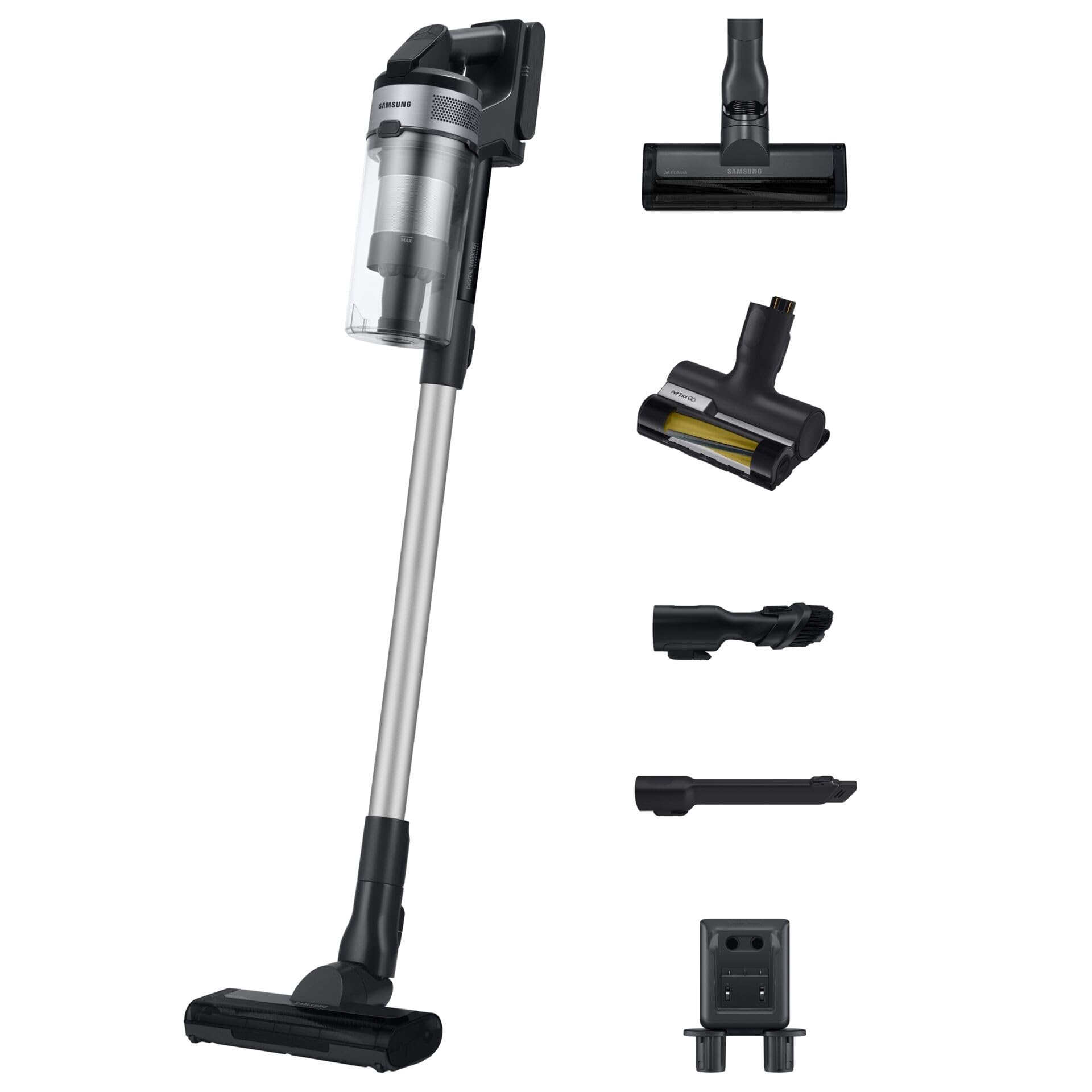
- Main Body (Handheld Vacuum)
- Extension Pipe
- Soft Action Brush (for hard floors)
- Pet Tool (Mini-motorized brush for pet hair)
- 2-in-1 Combination Tool
- Crevice Tool
- Charging Station (Wall-mount or freestanding)
- Power Adapter
- Washable Micro-Filter
- User Manual

4. Setup
4.1 Assembly
- Attach the Extension Pipe: Insert the extension pipe into the main body until it clicks securely into place.
- Attach the Cleaning Head: Connect your desired cleaning head (e.g., Soft Action Brush or Pet Tool) to the end of the extension pipe until it clicks.
- Install the Dustbin and Filters: Ensure the dustbin and all filters (metallic filter, micro-filter) are correctly assembled and inserted into the main body.
4.2 Charging the Battery
The vacuum cleaner uses a detachable Li-Ion battery. Before first use, fully charge the battery.
- Mount the Charging Station: Choose a suitable location to mount the wall-mount charging station or place the freestanding charging station.
- Connect Power: Plug the power adapter into the charging station and then into a wall outlet.
- Place the Vacuum: Place the vacuum cleaner onto the charging station. The battery indicator lights will illuminate to show charging status. A full charge takes approximately 3 hours and 30 minutes.
5. Operating Instructions
5.1 Powering On/Off and Suction Modes
- Power On: Press the power button on the main body to start the vacuum cleaner.
- Adjust Suction: Use the '+' and '-' buttons to cycle through the available suction modes: Min, Mid, and Max.
- Power Off: Press the power button again to turn off the vacuum cleaner.
5.2 Using Attachments
- Soft Action Brush: Ideal for hard floors, capturing fine dust and larger debris.
- Pet Tool: Specifically designed with a mini-motorized brush to effectively remove pet hair from upholstery and carpets.
- 2-in-1 Combination Tool: Features a brush and a wide nozzle for versatile cleaning of various surfaces, including furniture and car interiors.
- Crevice Tool: Perfect for reaching tight spaces, corners, and edges.
5.3 Cleaning Surfaces
- Hard Floors: Use the Soft Action Brush on Min or Mid mode for daily cleaning.
- Carpets and Rugs: Use the Pet Tool or Soft Action Brush on Mid or Max mode for deeper cleaning.
- Upholstery and Pet Hair: Attach the Pet Tool directly to the main body or extension pipe for targeted cleaning.
6. Maintenance
Regular maintenance ensures optimal performance and extends the lifespan of your vacuum cleaner.
6.1 Emptying the Dustbin
- Press the unlock button to detach the dustbin from the main body.
- Twist the cover to open, remove the metallic filter, and empty the dustbin contents into a waste bin.
6.2 Cleaning Filters
The micro-filter and metallic filter are washable. It is recommended to clean the dustbin and filters once a month.
- Remove the washable micro-filter by holding the inner handles.
- Clean the dustbin and its cover with water and a small brush, then let them dry completely.
- Rinse the micro-filter under running water.
- Ensure all parts are completely dry before reassembling.
6.3 Cleaning the Turbo Action Brush
The Turbo Action Brush can accumulate hair and debris. Clean it regularly.
- Press the unlock button to remove the brush from the cleaning head.
- Clean the brush with a damp cloth or a dry cloth to remove tangled hair and debris.
- Ensure the brush is completely dry before replacing it.
7. Troubleshooting
If you encounter issues with your vacuum cleaner, refer to the following common problems and solutions:
- Vacuum not turning on: Check if the battery is charged and properly inserted. Ensure the power button is pressed firmly.
- Reduced suction power: Empty the dustbin, clean all filters, and check the brush for any blockages or tangled hair.
- Brush not rotating: Ensure the brush is free from obstructions. Check if the cleaning head is properly attached.
- Short battery life: Ensure the battery is fully charged. Battery performance may decrease over time with prolonged use.
If the problem persists, contact Samsung customer support.
8. Specifications
| Feature | Specification |
|---|---|
| Model Name | VS15A60BGR5/WD |
| Brand | Samsung |
| Type | Cordless Stick Vacuum Cleaner |
| Motor Power | 410 Watts (0.2011 horsepower) |
| Suction Power (Max Mode) | 150 AW |
| Filtration System | Multi-cyclonic, Multi-layer (99.999% filtration) |
| Battery Type | Li-Ion (21.6 V) |
| Run Time (Min Mode) | Up to 40 minutes |
| Charging Time | 3 hours 30 minutes |
| Dustbin Capacity | 0.8 Liters |
| Noise Level | 86 dBA |
| Weight | 2.3 Kilograms |
| Special Features | Pet Tool, Cyclonic, Washable Filter |
| Recommended Surface | Hard Floor, Carpet |
9. Warranty and Support
Your Samsung Jet 65 Pet VS15A60BGR5 vacuum cleaner is covered by a manufacturer's warranty. For detailed warranty information, please refer to the warranty card included in your package or visit the official Samsung website. For technical support, spare parts, or service inquiries, please contact Samsung customer service in your region.