
1. Introduction
This manual provides detailed instructions for the installation, operation, and maintenance of your Dasaita HA5473 10.2-inch QLED Touchscreen Car Radio. Designed specifically for Toyota Camry models from 2015 to 2017, this unit integrates advanced features such as Wireless CarPlay, Android Auto, Android 13 OS, 4G LTE/5G WiFi, and GPS navigation. Please read this manual thoroughly before installation and use to ensure proper functionality and safety.
2. Product Overview
The Dasaita HA5473 car radio offers a significant upgrade to your vehicle's infotainment system. It features a 10.2-inch QLED display with 1280x720 resolution, providing clear visuals and responsive touch control. Powered by a Qualcomm Snapdragon 665 octa-core processor with 6GB RAM and 64GB ROM, it ensures smooth performance for multiple applications. The unit supports seamless integration with existing factory features, including steering wheel controls, backup camera, parking sensors, and OEM USB/AUX ports, while also displaying real-time vehicle data like door status and AC information.

Image: Qualcomm Snapdragon 665 Processor with 6GB RAM and 64GB ROM.
3. Package Contents
Verify that all items are present in the package before proceeding with installation:
- Dasaita HA5473 Head Unit (10.2-inch QLED Touchscreen)
- Power Cable
- AUX in & Cam in Cables
- Single USB Cable
- Dual USB Cable
- WiFi Antenna
- GPS Antenna
- Microphone
- Canbus Decoder
- USB Adapter
- User Manual

Image: All components included in the Dasaita HA5473 package.
4. Setup & Installation
The Dasaita HA5473 is designed for plug-and-play installation in Toyota Camry 2015-2017 models. It integrates with your factory system, retaining essential features. No wiring cuts are typically required.
4.1 Pre-Installation Checks
- Ensure your vehicle is a Toyota Camry model year 2015-2017.
- Verify that your original car radio matches the compatible models shown in the product images.
- Disconnect the vehicle's battery before starting installation.
4.2 Installation Steps
- Carefully remove the original car radio and trim panels.
- Connect the provided wiring harnesses to the vehicle's existing connectors. Ensure all connections are secure.
- Connect the GPS antenna, WiFi antenna, and microphone.
- Integrate the Canbus decoder as per the wiring diagram to retain steering wheel controls and vehicle data display.
- Connect the main power cable and any necessary USB/AUX cables.
- Mount the Dasaita HA5473 head unit into the dashboard opening.
- Reconnect the vehicle's battery.
- Power on the unit and perform initial setup.

Image: Dasaita HA5473 unit seamlessly installed in a Toyota Camry dashboard.

Image: Wiring diagram for connecting the Dasaita HA5473 car radio.
Video: Installation guide for the Dasaita Android 13 Radio in a 2015-2017 Toyota Camry.
5. Operating Instructions
5.1 Basic Functions
The unit features a user-friendly interface with quick access to essential functions:
- Radio: Access FM/AM radio stations.
- Music: Play audio files from various sources (USB, Bluetooth, streaming apps).
- Navigation: Utilize built-in GPS or third-party navigation apps like Google Maps.

Image: User-friendly interface with quick access to Navi, Music, and Radio functions.
5.2 Connectivity
The HA5473 offers multiple connectivity options:
- Wireless CarPlay & Android Auto: Connect your smartphone wirelessly via Bluetooth 5.0 for hands-free calls, music, and navigation.
- Bluetooth: Pair your phone for audio streaming and hands-free calling.
- 5G WiFi & 4G LTE: Stay connected with dual-band 5G WiFi or insert a SIM card for 4G LTE internet access and calling.

Image: Wireless CarPlay and Android Auto connectivity options.

Image: 4G Internet/Calling and 5G WiFi connectivity features.
5.3 Audio Settings
Customize your audio experience with the integrated TDA7850 amplifier and DTS sound effects:
- Equalizer (EQ): Adjust bass, treble, and other frequency bands to your preference.
- DTS Sound: Select from various modes (Rock, Pop, Jazz, Classic) for enhanced sound quality.
- Fader/Balance: Adjust sound distribution across the vehicle's speakers.

Image: DTS Sound settings and equalizer controls.
5.4 Steering Wheel Controls
The unit retains your factory steering wheel controls. You can also customize button functions through the 'Wheelkey Study' setting in the system menu.
5.5 Vehicle Information Display
The Dasaita HA5473 integrates with your vehicle's CAN-BUS system to display real-time information such as door status, air conditioning settings, and fuel consumption data.
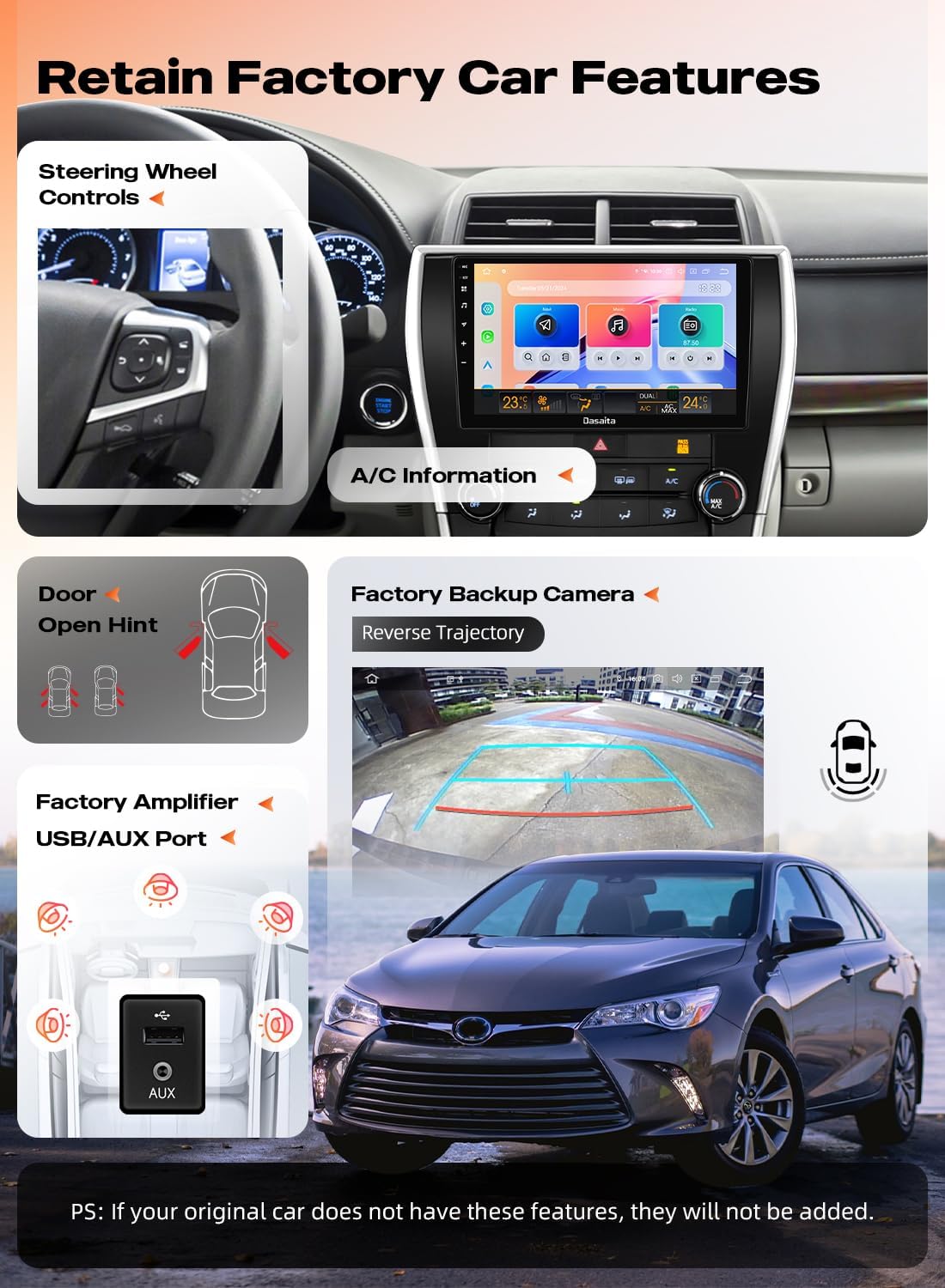
Image: Retained factory car features and vehicle data display.
6. Troubleshooting
6.1 Backup Camera Not Working
If your factory backup camera is not displaying an image, showing a yellow warning symbol, or experiencing signal issues, consider the following:
- Check RCA Connections: Ensure that the two yellow RCA video wires, specifically those not labeled for a front camera, are correctly connected. Sometimes, these need to be connected together or to the correct 'CAM IN' input.
- Verify Wiring Harness: Confirm that the camera input cable from the vehicle's wiring harness is properly connected to the head unit.
- Power Cycle: Disconnect the vehicle's battery for approximately 10 minutes, then reconnect it. This can sometimes resolve minor software glitches affecting camera detection.
- Consult Wiring Diagram: Refer to the provided wiring diagram for specific instructions on connecting the factory reverse camera. Some setups may require switching specific plugs (e.g., switch No. 4 to No. 4-1 white plug, and the yellow plug may need to be exchanged).
Video: Detailed steps to troubleshoot and fix backup camera issues with the Dasaita Toyota Camry Radio.
6.2 General Issues
For other operational issues, please refer to the comprehensive troubleshooting guide available on the Dasaita support website or contact customer support directly.
7. Specifications
| Feature | Detail |
|---|---|
| Model Number | HA5473 |
| Screen Size | 10.2 Inches |
| Screen Type | QLED Touchscreen (1280x720) |
| Operating System | Android 13 OS |
| Processor | Qualcomm Snapdragon 665 Octa-core |
| RAM | 6GB |
| ROM | 64GB |
| Connectivity | Bluetooth 5.0, USB, Wi-Fi (4G LTE/5G WiFi) |
| Special Features | Wireless Apple CarPlay, Android Auto, Lane Assist, Radar Warning, DTS Sound, TDA7850 Amplifier |
| Vehicle Service Type | Car (Toyota Camry 2015-2017) |
| Mounting Type | Dashboard Mount |
| Item Weight | 6.87 pounds |
| Package Dimensions | 17.17 x 12.36 x 7.87 inches |
8. Warranty & Support
Dasaita offers the following support and warranty for your product:
- Return Policy: 30-day refund or replacement.
- Warranty: 365-day warranty.
- Customer Service: 24/7 support available.
- Contact: For after-sales support, please email saitanavi@outlook.com.
Extended protection plans are also available for purchase:
- 2-Year Protection Plan
- 3-Year Protection Plan
- Complete Protect (monthly plan covering eligible purchases)


