
1. Introduction
This manual provides comprehensive instructions for the safe and effective operation of your POPDEER PD-J01 2500A Portable Jump Starter. This device is designed to jump start 12V vehicles with up to 8.0L gas or 6.0L diesel engines, and also functions as a portable power bank and an emergency LED light. Please read this manual thoroughly before use and retain it for future reference.

Image 1.1: POPDEER PD-J01 Jump Starter and accessories.
2. Safety Information
Always observe the following safety precautions to prevent injury or damage to the device or vehicle:
- Do not attempt to jump start a frozen battery.
- Ensure proper polarity connection (red clamp to positive, black clamp to negative) to avoid sparks and damage.
- Do not allow the red and black clamps to touch each other.
- Keep the device away from children.
- Do not expose the device to rain or immerse it in water.
- Operate the device in a well-ventilated area.
- If the device becomes excessively hot during use, discontinue operation immediately.
- Do not disassemble the unit. Refer servicing to qualified personnel.
- The device is designed to operate within a temperature range of -4°F to 140°F (-20°C to 60°C).

Image 2.1: The PD-J01 operates effectively across a wide temperature range.
3. Package Contents
Verify that all items are present in your package:
- 1 × POPDEER PD-J01 Car Battery Jump Starter
- 1 × Smart Jumper Cable
- 1 × Type-C Charging Cable
- 1 × User Manual (this document)
4. Product Features and Components
Familiarize yourself with the various parts of your POPDEER PD-J01 jump starter:

Image 4.1: Labeled components of the PD-J01 unit.
- Button: Power on/off, activate LED light.
- Display Screen: Shows battery percentage and operational status.
- USB Output Interface 1: For charging external devices.
- USB Output Interface 2: For charging external devices.
- Charging Input Interface (Type-C): For charging the jump starter unit.
- LED Flashlight: Provides illumination with multiple modes.
- DC Output: Port for smart jumper cables.
5. Charging the Device
Before initial use, fully charge the POPDEER PD-J01. It is recommended to keep the device charged above 50% for optimal performance.
- Connect the provided Type-C charging cable to the Charging Input Interface (5) on the jump starter.
- Connect the other end of the Type-C cable to a suitable USB power adapter (not included).
- The display screen will show the charging progress. The unit is fully charged when the display shows 100%.
6. Operating Instructions
6.1. Jump Starting a Vehicle
The PD-J01 is capable of jump starting 12V vehicles with engines up to 8.0L gas or 6.0L diesel.

Image 6.1: The PD-J01 is designed for emergency vehicle jump starts.

Image 6.2: The PD-J01 is suitable for multiple vehicle types.
Follow these steps to jump start your vehicle:
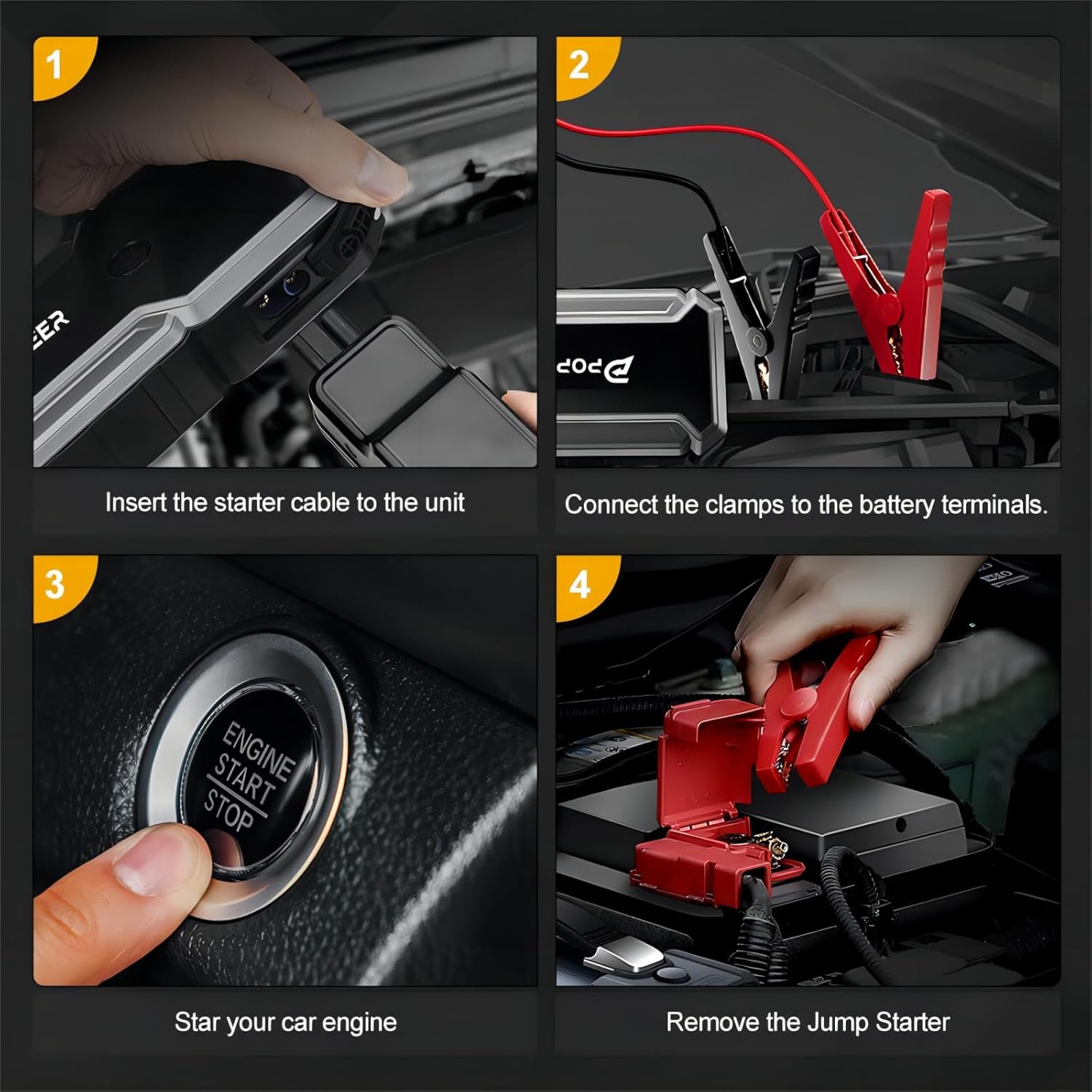
Image 6.3: Step-by-step guide for jump starting a vehicle.
- Insert the Smart Jumper Cable: Plug the blue end of the smart jumper cable into the DC Output (7) port on the jump starter. Ensure it is fully inserted.
- Connect to Battery Terminals: Attach the red clamp to the positive (+) terminal of the vehicle's battery and the black clamp to the negative (-) terminal. Ensure a secure connection. The smart cable will indicate readiness.
- Start Your Car Engine: Once the smart cable indicates a safe connection, start your vehicle's engine. If the engine does not start immediately, wait 30 seconds and try again. Do not attempt more than 3 consecutive starts.
- Remove the Jump Starter: Once the engine starts, immediately remove the smart jumper cable from the vehicle battery terminals, then unplug it from the jump starter unit.
6.2. Using as a Portable Power Bank
The PD-J01 features a 20000mAh capacity and dual USB output ports to charge your electronic devices.

Image 6.4: The PD-J01 can charge multiple devices simultaneously.
- Connect your device's USB charging cable to either USB Output Interface 1 (3) or USB Output Interface 2 (4) on the jump starter.
- The jump starter will automatically begin charging your device. The display screen will show the remaining battery percentage.
6.3. Using the LED Light
The built-in LED flashlight offers three modes for various emergency situations.

Image 6.5: The LED light offers multiple modes for emergency use.
- To turn on the light: Press and hold the Power Button (1) for 3 seconds. The light will turn on in Spotlight mode.
- To cycle modes: Briefly press the Power Button (1) to switch between Spotlight, Strobe, and SOS modes.
- To turn off the light: Press and hold the Power Button (1) for 3 seconds again.
7. Maintenance
- Storage: Store the jump starter in a cool, dry place away from direct sunlight and extreme temperatures.
- Charging: For optimal battery life, recharge the unit every 3-6 months, even if not in use.
- Cleaning: Wipe the unit with a dry, soft cloth. Do not use harsh chemicals or abrasive materials.
- Battery Care: Avoid fully discharging the battery frequently.
8. Troubleshooting
| Problem | Possible Cause | Solution |
|---|---|---|
| Unit does not turn on. | Battery is fully discharged. | Charge the unit using the Type-C cable. |
| Vehicle does not start. | Incorrect clamp connection. | Ensure clamps are securely connected to the correct battery terminals (red to +, black to -). |
| Vehicle does not start. | Vehicle battery is severely damaged or other mechanical issues. | Consult a professional mechanic. The jump starter cannot fix mechanical problems. |
| Smart cable indicator shows an error. | Reverse polarity, short circuit, or other safety issue. | Disconnect clamps, check connections, and re-attempt. Refer to smart cable instructions for specific error codes. |
| External device not charging. | Charging cable is faulty or not properly connected. | Try a different USB cable or ensure the cable is fully inserted into both the jump starter and the device. |
9. Specifications
| Feature | Specification |
|---|---|
| Model | PD-J01 |
| Peak Output Current | 2500 Amps |
| Battery Capacity | 20000mAh |
| Start Voltage | 12V |
| Engine Compatibility | Up to 8.0L Gas / 6.0L Diesel |
| Operating Temperature | -4°F to 140°F (-20°C to 60°C) |
| Product Dimensions | 5.1 x 9.3 x 3.1 inches |
| Item Weight | 1.96 pounds |
| LED Light Power | 5W |
10. Warranty and Support
Your POPDEER PD-J01 jump starter comes with comprehensive after-sales support. We offer an 18-month technical support period from the date of purchase.
For warranty claims, technical assistance, or any questions regarding your product, please contact our customer interaction team. We are committed to providing friendly assistance and addressing any concerns you may have.
Please refer to your purchase documentation or the official POPDEER website for specific contact details and the full warranty policy.


